


BMW partners with Intel to get autonomous cars on the road by 2021
BMW has already said it wants to get autonomous cars on the road by 2021, but the automaker doesn’t have all the technological know-how to make that a reality. To get there, BMW today announced a partnership with Intel and computer vision / sensing company Mobileye to build a platform that’ll help the company meet its goals. But what the three companies are working on won’t just benefit BWM — it sounds like the idea is to make an open industry platform that other car makers can use in an effort to make autonomous vehicles more widely available.
From a technology perspective, Intel and Mobileye are both bringing experience in machine learning and computer technology; Intel’s been working on autonomous driving tech for several years now. Ultimately, the companies all want to push driverless cars forward to the point where they reach the “eyes off” and “mind off” stage of the game, where passengers aren’t required to keep their hands on the wheel, eyes on the road or any of the other things we take as part of the current driving experience.
All three companies have agreed to “deliverables and milestones” to reach that 2021 goal, but they aren’t talking much about what those are just yet. In the short term, the partners will show off an autonomous test drive featuring a “highly automated driving” prototype. What exactly that means remains unclear, but it seems like we should see things come out of those partnership before too long — by 2017, BWM, Intel and Mobileye want to have full fleets of vehicles performing “extended” autonomous test drives.
Source: BMW (BusinessWire)
Police confirm DVD player found in Tesla Autopilot wreck
A day after we learned that the National Highway Traffic Safety Administration (NHTSA) is investigating a fatal crash involving Tesla’s Autopilot feature, more details have emerged. The Florida Highway Patrol confirmed to Reuters that a portable DVD player was found in the wreckage. The driver of the truck that was crossing the highway when it was struck by the Model S told the Associated Press that the driver was playing a Harry Potter movie at the time. He said he could he could hear it playing after the car hit a telephone pole further down the road.
BREAKING: After truck driver suspected Tesla driver in fatal crash was watching a video, police say DVD player found pic.twitter.com/qoZjd6jt62
— CNBC Now (@CNBCnow) July 1, 2016
When engaged, the Autopilot feature reminds drivers to keep their hands on the wheel and remain attentive, however many posted videos show that not everyone actually does that. From what we know about this particular crash, there are a number of elements at play. Slashgear points out that while Florida laws ban forbid TV screens visible to the driver while a car is in motion, the driver, identified as Joshua Brown, was from Ohio, which does not have a specific law against that.
Mobileye, the company behind some of the sensor tech involved in the Tesla, said in a statement to Electrek that “today’s collision avoidance technology, or Automatic Emergency Braking (AEB) is defined as rear-end collision avoidance, and is designed specifically for that. This incident involved a laterally crossing vehicle, which current-generation AEB systems are not designed to actuate upon.” It’s planning to add detection for that type of incident beginning in 2018, while Tesla again pointed out that the combination of the box truck’s design and color resulted in the automatic braking not firing.
Source: Reuters, Electrek, Slashgear, CNBC (AP)
ESPN2 will televise the ‘Street Fighter V’ finals from Evo 2016
Professional gaming continues its slow creep into the mainstream, landing airtime for another tournament on a prominent sports channel. ESPN2 will air the world championship matches for Street Fighter V live from the Mandalay Bay events center on July 17th at 10pm ET, but they’ll also broadcast it on WatchESPN for you cord-cutters.
The elite Street Fighter tournament is just one of several in the weekend-long Evolution Championship Series (Evo), which hosts top-level fighting game competitions. Eight other titles will be played including Mortal Kombat X, Ultimate Marvel vs. Capcom 3, Tekken 7 and Pokken Tournament. While it’s a little late to register yourself, you can still buy tickets here.
ESPN is really beefing up its esports coverage. They’ve aired events like BlizzCon and The International Dota2 Championships on ESPN3 and the Heroes of the Dorm final on ESPN2 for a couple years now, dragging pro-gaming off the internet and in front of cable subscribers. After launching a dedicated esports vertical in January broadcasting the Madden NFL 16 championships back in June, ESPN seems more and more invested in catering to the digital athletics crowd.
Source: ESPN2
Tansfer money securely with Circle Pay (review)
 Hamburger Menu
In today’s digital age, it has become common place for us to want to want to do everything from our mobile devices, including banking. Speaking for myself, I hardly ever carry cash anymore. If someone asks me for money I have recently been resorting to, “Why don’t I pay and you can pay me back?” or vice versa. The next dilemma is paying them back. I again look to my mobile device for answers. Circle Pay offers an easy way to send someone that reimbursement with a simple text or email.
Impression
A simple, free download from the Google Play store and you can launch the app. The only setup required is to register an email address for your account. Upon login, we find warm and inviting colors matched by that classic material design we all feel comfortable with. Taking a look at the home screen, we have a hamburger menu in the top left, an ellipse menu in the top right, our account balance in the center and below the balance, we see our recent activity. Finally, in the bottom right of the screen, we have a “+” button that allows us to initiate sending or requesting of money.

Hamburger Menu

Home Screen
When we try to dig a little deeper we find how simplistic Circle Pay really is. The whole basis of the app is quick, convenient money transfer. From the hamburger menu, you can quickly send money, request money, add money to your account (yes, Circle Pay has its own account balance) or Cash Out (put you balance back into your Bank). The only downside is the $300 per week limit for deposits which is understandable for a free service and can be increased if you are a frequent user. On the other hand, cash out, spend and receive is unlimited.
Great, sending and receiving money is easy but where does the money come from. Simple, Circle Pay allows you to link directly to your bank account or debit card for free and, if you so choose, you can convert your money to Bitcoin right from the app (after accepting all potential liabilities that come with Bitcoin of course).

Settings and Security

More Settings and Security
Along with discussions of money and technology comes the ever looming question of security. Circle Pay has you covered. By default, it requires two-factor authentication to sign in and to send or receive anything over $30 (this can be adjusted in the settings). The app also allows you to easily create a PIN number that must be typed in before you can access the app. Finally, there is an option to hide your account balance from the home screen if you are worried about prying eyes over your shoulder.
Looking ahead, the developers tell us that there will soon be support for the Euro as well.
We will soon open Circle Euro support to consumers in Spain as the first part of a broader European-wide rollout to come over the coming month. We are currently working with the regulators to finalize our approach, but are excited about the opportunity.
Conclusion
Circle Pay has succeeded in what it has set out to do, become an easy way for people to quickly share funds. They have not skipped out on security, functionality, or style. I would love to see the app grow into becoming more than just a money sharing app but an all purpose purchasing app. If you think Circle Pay might be just what you need in your life, click the link below and get started today.
Download Circle Pay from Google Play
Fitbit Blaze review

As the company’s first take on the traditional every day watch design, the Fitbit Blaze falls somewhere between a smartwatch and an activity tracker.
On paper the wearable matches up with the likes of Samsung’s Gear Fit family and the Withings Activite Pop. Running a proprietary OS, the Blaze technically offers less practicality and flexibility than an Android Wear watch or Apple Watch.
 The Fitbit Blaze doesn’t blaze any new territory and does pretty much the same stuff you’ll find in various Garmin models. Heck, it’s not unlike a number of other Fitbits when it comes to function. Pricing is listed about $200 but there are other bands and accessories which can be purchased, too.
What does all of this mean to the average user? How does the Fitbit Blaze work in the real world? In short, it’s a great little device that does more for wearers than they might expect. But, it comes with a small adjustment and acclimation period.
Design
Introduced in early 2016, the Blaze looks like a first-generation approach to smartwatches. It’s angular and the black and silver aesthetics are decidedly masculine. You might be forgiven for thinking it’s more of an enhanced techie watch than a fitness tracker. Should you want something a little less serious there’s also a plum/silver and blue/silver option. On the other end of the spectrum is an all-black unit.

The watch is considerably lighter than it looks and doesn’t feel as if it constricts movement in any way. The default band is a tad wider than we might have liked but it is generally comfortable to wear.
Features
The Fitbit Blaze tracks just about any fitness-related activity you might think of, including steps, flights of stairs climbed, heart rate, and sleep. It’s very similar to its sibling, the Fitbit Surge, but this one adds in the touch-friendly color display and side buttons while swapping out the standalone GPS.
 Should you want to track a bike ride or run you will need to have your phone nearby; the GPS comes from the handset and talks to the app/watch combination.
Out of the box, the watch gives users quick access to nearly all functions. Additionally, the watch can double as a timer or stopwatch. Wearers can go into the app on the smartphone to toggle other details and customize a few settings such as watch face and notifications. It’s also in the app where you can track how many glasses of water you’ve had or set up a meal plan to help lose weight.
Where to Buy
- Amazon
- B&H Photo Video
- Best Buy
- Target
Wearers will notice the watch can show incoming phone calls, calendar reminders, and message notifications from a variety of apps. Moreover, there’s also a music player with basic controls that handles songs from your phone.
The Blaze will detect and record “active exercises” when it notices you’re doing something more intense for a period of ten minutes or longer. Along those lines, the software makes it so that you’re just a few taps away from manually tracking a number of physical activities, too.
Battery
Touted at one week, we found the battery life on the Fitbit Blaze to be excellent. This was good, because the method of charging was wonky to say the least. To charge the battery you are required to remove the main square component from the watch and place it inside of a cradle. Moreover, the cradle locks down similar to a roller coaster harness. Yeah, it’s weird and somewhat awkward, but thankfully you’re only doing this once every six to seven days. We charged in a Monday night and went into Saturday before throwing it back on a charge at bedtime.

General Impressions
As someone who normally has an Android Wear-powered watch on, it took a day or so to get acclimated to a less “smart” unit. Conversely, it was great to have all of these health and fitness options so readily accessible. It’s nice to not have to go digging for an app or launching something if I want to track water intake or a particular exercise.
The display automatically turns itself off, which is a great way to preserve battery. A quick flick of the wrist or tap of the screen pulls up a watch face that shows time and usually some aspect of tracking. We wished there were more than four faces to choose from or some elements of customization. But, given this is a fitness and activity tracker, we understand it’s not all about the watch aspect.

While we do understand that the watch is designed to help track sleep, it’s somewhat odd to wear the Fitbit Blaze to bed. After a long day of doing whatever it is we do, sometimes the last thing we want is to have something wrapped on our wrist. For us, sleep monitoring isn’t the key reason to own this, so we’d recommend a different wearable for that use case. But, if you don’t mind the “confinement”, the Blaze is great at detecting heart rate and sleep.
There’s plenty of discussion about how accurate of a pedometer you’ll get in a watch, regardless of band. Wear any two products in a day and you’re bound to find different figures in the end. Along those lines, we’re not sure how accurate the Fitbit Blaze is as compared to other models; we didn’t wear it in conjunction with any other brand.
Staying with accuracy, we liked that the watch would help us with tracking different activities. But, let’s be honest here, there’s no way the Fitbit Blaze knows how good your form is when lifting weights or doing jumping jacks. The silent buzz prompts are a nice touch, but it’s mostly like having a coach blow a whistle for you. A coach who has his face in his phone and not paying attention to whether you’re doing things properly.

We really appreciate the way in which Fitbit held our hands in designing a meal plan or goal for losing weight. It’s a simple process of putting in a starting weight, desired goal, and determining how aggressive you want to be. The app can be used to forecast the date you should reach your goal, help track foods (barcode scanner for the win), and let you know whether you are on pace for the day. Our advice is to stick with it once you start. Doing it sporadically won’t help you in the end and you’ll not be able to mine your data very effectively.
Optional Accessories
Fitbit offers a number of accessories to choose from for its Blaze, including other elastomer bands, leather straps, and steel-link straps. Pricing ranges from $30 to $100, to $130, respectively with color options along the way.
Conclusion
It’s easy to find a fitness tracker in 2016. There are plenty of models to choose from, each with a variable reason to consider. Heck, Fitbit alone has more than a couple devices to choose from. You’re not going to go wrong if you pick something from Fitbit. You’ll just want to figure out which model speaks to your needs.
If you’re mostly interested in tracking basic stuff like steps taken or heart rate, there’s plenty of other, cheaper options. But, should you wish to step things up include distance, water intake, weight tracking, and meal plans, the Blaze is a terrific option.

The Fitbit Blaze occupies a space somewhere between a generic fitness tracker and a smart watch. It’s not going to have the overall flexibility and intelligence of an Android Wear or Apple Watch, but it’s excellent at what it does. We would have liked for a waterproof design, but understand that lines have to be drawn somewhere. The same goes for not having an internal GPS. Going this route might nickle and dime us into a price point that turns people away. With a recommended $200 price tag for the Fitbit Blaze, it’s definitely attractive enough to justify its cost.
The post Fitbit Blaze review appeared first on SmarterWatching.
Where to Buy
- Amazon
- B&H Photo Video
- Best Buy
- Target
[Review] Take the Aukey wireless outdoor speaker on your next adventure
If you’re looking for a rugged Bluetooth speaker the next time you go camping, then this Aukey speaker may be what you’re looking for. Let’s take a look.

First Impressions
Weighing in at just over half a pound, this rugged device is perfect for camping, hiking, road trips, etc. The speaker is labeled as water resistant, although I wasn’t able to find an exact specification. The speaker grills are made from anodized aluminum, while the casing is made from acrylonitrile butadiene styrene (ABS). To get technical, it’s a thermoplastic polymer with three monomers.
ABS rubber is amorphous in nature so it doesn’t have a true melting point. It’s also impact and mechanically tough even at lower temperatures, providing a safe range of use between -4˚ and 176˚ F. Even though the rubber is durable, it’s also silky smooth to the touch, so holding the speaker is a tactile delight. For reference, ABS is what Legos are made of.
Features
- Bluetooth version: 4.1
- Standard: A2DP, AVRCP, HFP, HSP
- Weight: 1.43 lbs (650.6 g)
- Dimensions: 8.23 x 3.27 x 2.87in (20.9 x 8.3 x 7.3cm)
- Play Time: 30hrs
- Charging Time: 6hrs
- Operating Range: up to 10m / 33ft
- Power Output: 2×5 W
- AUX: 3.5mm audio-in jack
- Power Input: DC 5V
- Battery Type: Rechargeable lithium-polymer battery (7.4V 2600mAh)
Usage
Even though this is a Bluetooth speaker, it still has an auxiliary port so you can plug in an aux cable directly into your phone. On the bottom, there is a 1/4’20 standard screw mount so you can screw it onto most camera tripods if you wish.

The speaker has dual 5W drivers which deliver a clear sound that is fairly balanced amongst bass, mids and highs. In addition, the speaker has a built in microphone to take audio calls.The sound output is loud so you don’t even have to turn it up much.
As a way to test the sound quality of audio devices, I like to play this song. It has a lot of bass and sub bass, and those drops are sick bro. Check it out:

On one end of the speaker you’ll find a place to attach a keychain attachment (not included) so you can hang the speaker from a tree branch, bike, a tent frame, etc.
The speaker battery seriously lasts for a long time. It’s 2600mAh, which may not seem like much, but it’s rated at 30hrs of battery life and that’s only if you use it frequently. I was able to use it for a week without needing to charge, but as it says in the manual, it does take six hours to charge.

Due to the bulk of the speaker you probably won’t find yourself casually throwing it into a purse or backpack, but it’s still portable enough to easily carry around in a suitcase or duffel bag.
Conclusion
After having reviewed several Aukey products, I can objectively say that they are a good company. This speaker, along with the Bluetooth headphones I reviewed, are both awesome products. It’s a great accessory for your smartphone, whether you have an iPhone or Android phone.
This speaker is affordable at $47.99 and you can pick it up on Amazon (Affiliate link).
1 of 8


LG G5 Review: modular marvel or bold blunder?
2016 has so far been a year of impressive flagship phones with perhaps the most unique of the bunch being the LG G5. LG was coming off a year of success with two wonderful flagships (the G4 and V10) receiving rave reviews. Many speculated that the G5 would be a fusion of the two devices – stealing the most innovative features of the V10 but in a smaller, easier to handle body.
What we got was something completely different. As early as January, we brought you news that the G5 was going to have a metal unibody that pulled apart at the bottom and featured a removable battery. No one has ever tried this combination before and our interest was piqued. More news leaked about a “magic slot” that would allow users to expand the phone’s functionality with modules. This was truly something new and unique to the market. We’ve seen some of this functionality in beta devices from Project Ara (now named just Ara), but never in a consumer device.
What we got was controversial. Is it metal unibody? Sure is, but it doesn’t remotely feel like it. Does it have a “magic slot”? Yep, but how much it expands the functionality of the phone is debatable.
The G5 matches up in terms of specs with every other flagship on the market, but phones are more than a sum of its parts. What matters is how those chips and that silicon perform and how engaging and easy to understand the software is. LG has had issues with these areas in the past, and they’ve held LG back from challenging Samsung for supremacy in the Android market in the United States. Can the fifth iteration of the G series finally make the leap from also-ran to front-runner?
Software
LG has always deployed one of the heaviest skins of any of the Android OEM’s currently producing flagship phones. This hasn’t changed for the LG G5. Actually, not much has changed from the LG G4’s software, to be honest. This year’s model does ship with the most recent version of Android 6.0.1 Marshmallow, but unless you were looking in the settings, you could be forgiven for not knowing that. There are little enhancements that Marshmallow brings present in the G5, but you’re going to get almost the exact same experience on last year’s G4.

The most notable change in LG’s software is removing the Application Drawer on the default launcher. I did receive an update during the review process that enabled a Home + App Drawer launcher, but for the first week or so, I was stuck without it since I wasn’t using a third-party home replacement like Nova Launcher.
Removing the Application Drawer is a bold move, and I honestly hated it. I have no idea what the purpose of such a move would be other than to be more like Apple. Throwing over 100 applications into folders and hoping I remember where I put them is not a fun experience. It doesn’t lend to finding an app quickly, which is very frustrating when you’re pressed for time.
I hope LG got this out of its system and never tries it again. If I wanted to put every application on my home screen, I could already do that. Forcing me to goes against what Android is all about: choice.
I miss the app drawer
1 of 3
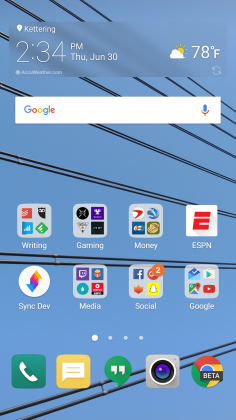

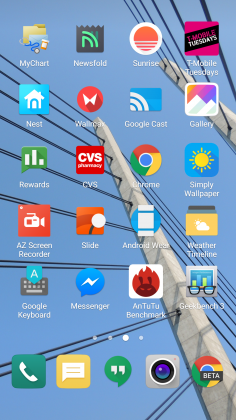
Luckily when I was living an App Drawer-less life, there wasn’t too much bloat to worry about. I am using an unlocked, unbranded version so there are no carrier-installed applications on the phone, but the suite of apps from LG wasn’t excessive. I had no use for apps like LG Friends manager, LG Health, Music, Quick Help, QuickMemo+, QuickRemote, SmartWorld, Tasks, but they were quickly hidden in a folder that I could forget about on a distant home screen.
Kudos to LG for not loading down the device with uninstallable crap from third parties. Android OEMs like to sign commercial deals where they add apps like Yellow Pages or Facebook to the phone to drive up profits, and I like that LG hasn’t sunk to that level.
Another huge win for LG is the quality of life improvements they made to the software. The ability to customize the navigation bar at the bottom of the phone is just smart. Not only can you choose on which side of the home button you want the back and recent apps buttons to be located, but you can add buttons for the QuickMemo+ app and one to drop the notification shade so you don’t have to reach the top of the phone. This is one of my favorite little features on any Android phone out there. LG has been including these options in its phones for a while now, and I hope it continues until Android makes them irrelevant.
You can see Marshmallow poking its head through occasionally. LG decided to keep the stock recent apps screen basically completely stock – clear apps button included. There’s also an always-on display that LG talked about a lot at its Mobile World Congress press conference that shows the time and some notifications. It’s a nice feature that I appreciate, but it’s nothing I think should influence your buying decision. This feature is becoming standard on most phones these days – the Samsung Galaxy S7, Moto X, OnePlus 3, and Nexus 6P all have various forms of this – and the inclusion of an LCD screen means that the G5 has to keep the entire screen on for this always-on display. It’s not ideal in its implementation, and I honestly don’t miss it when I’m not using the G5.
The puzzling choices LG made continue past using an LCD panel for an always-on display. The Settings app is a complete mess. The tabbed layout is confusing and frustrating. There is a reason that most phones use a longer list layout, and LG needs to get the memo that it’s a superior option. In fact, if it could use the stock Android settings menu and just add in the options it needs, do that. Google has made it pretty easy on OEM’s by including a great Settings app in AOSP, and yet, they keep screwing it up somehow.
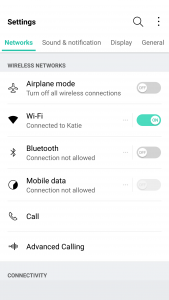
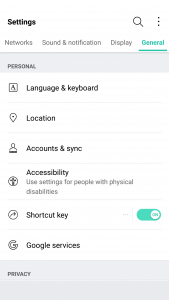
LG seems to put a lot of effort into its software to make it a true selling point. There are some great little features that no-one knows about like the phone composing a ringtone based on the number calling you. That’s not a feature that is going to make your life easier on a day-to-day basis, but it’s something innovative that people will love. It’s cute. I wish LG would focus on features like this instead of theming every inch of the OS with its own brand of color vomit. Stop messing with things that already work just to make them different.
Performance
The LG G5 has a Snapdragon 820 processor clocked at 2.15GHz with 4GB of RAM and an Adreno 530 GPU. This is the standard loadout for a flagship phone released in the first half of 2016, which includes the Samsung Galaxy S7, HTC 10, and LG G5.
As much as I complained about the software in the previous section, this set of hardware is easily able to power through it. LG had been notoriously bad about its home screens redrawing every time you hit the home button on the G4, but luckily I’ve never seen that happen in the several weeks I’ve spent with the G5.
There are no lags in long menus or the recent apps window and zero stutters when swiping through home screen pages. App loading times are on par with the Samsung Galaxy S7 Edge, with maybe the slightest advantage going to LG, but it’s nothing that you’ll notice unless you have the two phones sitting right next to each other.
Consecutive AnTuTu Benchmark runs
1 of 4
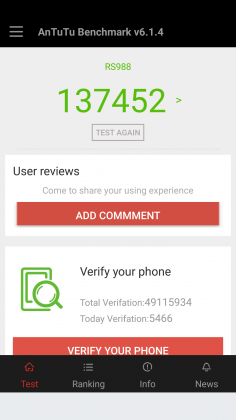

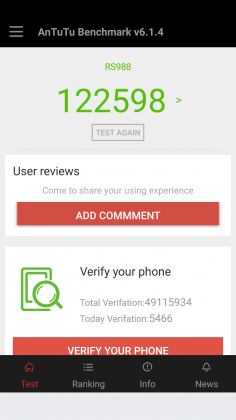

Since the G5 has a top of the line processor in it, expect it to power through extremely difficult tasks like 3D games and video editing. We’re living in 2016, and phones have gotten to the point where there is almost nothing you can throw at a flagship device that it can’t handle.
Benchmarks are always being blown up by the next generation of devices because of the giant leaps being made by companies like Qualcomm, and the G5 is no different. You can put it up against any device from last year and it’ll crush it. Will you see that performance gain in day-to-day use? The all depends on how you use your phone, but you shouldn’t be scared off from the G5 because you think something else can power through difficult tasks better. Everything is amazing these days.
Where you may run into some issues is with connecting to calls. I consistently had issues with phone calls taking forever to connect once I hit send. I am using T-Mobile in an excellent coverage area so there should be no issue. Tested next to other flagship devices, the LG G5 had significantly longer lag times between hitting the dial button and the phone beginning to ring. I don’t know where the issue is coming from. I think I can rule out T-Mobile because I tested it against other unlocked devices, but this just seems like a weird bug. Calls sound wonderful on both my end and the recipient once it actually connects, but I hope that LG is working on a fix for this because it was one of the most annoying issues that popped up while testing the G5.
The G5 does have one thing that most phones of today don’t, a removable battery. I consistently applaud OEM’s for including removable batteries in their devices due to the demands consumers are putting on their phones. The 2800mAh battery is smaller than last year’s flagship and it shows in the life, unfortunately.
Time and again I had trouble passing three hours of Screen on Time. I’m not one who pushes my devices to the limit so those three hours were filled mostly with listening to music with Google Play Music, reading Reddit, and the occasional glimpse at Facebook along with the normal calling and texting. To say I was disappointed would be a bit of an understatement.
To engineer a device as forward thinking as the modular G5 to have it only have it held back by terrible battery life is frustrating. I used to have to charge my phone multiple times a day in 2014, I don’t expect to do so in 2016. At least I can trade out the battery or use quick charging around lunch to get through the rest of the day.
Screen on Time
1 of 4

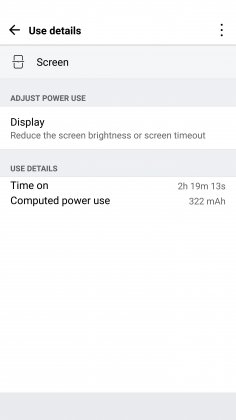


Quick Charging really does save this phone. The G5 actually has the latest in Quick Charge 3.0 which will let you charge up your device about 60% in 30 minutes. If you get an hour for lunch and keep your phone on the charger while eating, you should be good to go for the rest of the day. It’s just disappointing how much I had to utilize this feature. You’ll notice the battery drop especially quick during intensive tasks like heavy games. During setup (installing all my applications and setting them up the way I want) the battery dropped from 78% to 16%. That is a pretty ridiculous drop for the little over an hour it took to get the phone up and running.
Screen
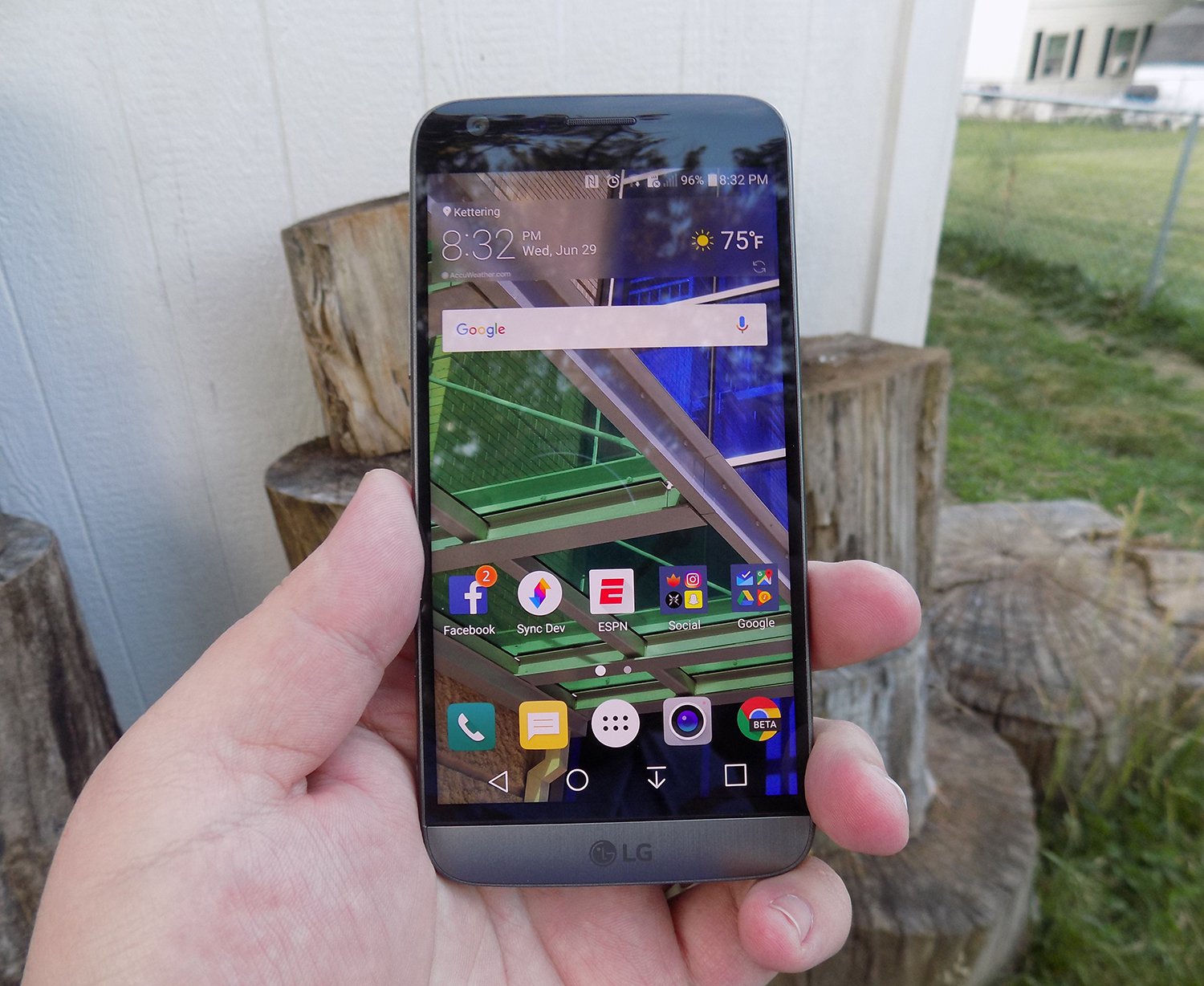
LG brings back another 2560 x 1440p display for the G5, which is now the standard for flagship phones in 2016. Whether you need all of those pixels is still being debated on message boards and in comments sections of reviews like this, but the truth of the matter is that we’re never going to go backward on resolution. It’s a selling point and people want the biggest and best, and higher numbers rule the day.
The fact of the matter is that the display on the G5 is nothing wonderful. Sure, it has a ton of pixels, but it does tend to skew blue and colors simply don’t pop like on Samsung devices. Samsung tends to over-saturate colors and has a superior contrast ratio due to using AMOLED displays, giving it a huge advantage.
The inclusion of an LCD display of the G5 is disappointing if I’m being honest. The always-on display begs for the battery friendly AMOLED display if nothing else. I think LG also overdid it with the auto-brightness again; this is an issue I’ve had with the G3, G4, and now the G5. It doesn’t matter how good the display looks if it’s never lit up high enough to actually see it clearly. Even at max brightness, the G5 cannot compete with other phones on the market.
While the display does have good viewing angles, we would like to see the ability to adjust the display levels and white balance through software. Unfortunately, it’s simply lacking from the phone. There’s also an issue of backlight bleed when the screen is dark that won’t bother you much, if at all, but is present.
Camera
The camera is much like the display, there are a lot of big numbers and plenty of fancy marketing lingo, but it doesn’t blow away its competitors like LG might have hoped. This year we got dual cameras: a wide-angle camera set to capture more of the world around you and a regular field-of-view camera meant to capture more true to life pictures.
The regular camera can shoot up to 16 MP, which is about standard for 2016, while the wide-angle camera sacrifices some megapixels (it tops out at 8MP) to gain the desired effect.

Both cameras are really good. They take comparable pictures to others on the market, but we’re getting to the point in mobile photography where almost everything is fine for what we end up using the pictures for, social media and sending picture messages. Is this my first choice for a camera on a phone? Nope, but it got the job done just fine.
1 of 2

Default Camera

Wide Angle Camera
The camera does tend to bring in lots of light. This is great for those low-light situations that tend to make up many pictures, but can have an adverse effect in well-lit pictures. Luckily, there is a robust manual mode that will let you decide exactly how bright you want the picture to be before you ever snap it.

Pictures provided by our own Josh Noriega. Check out his Flagship Phone Camera Shootout to see how the G5’s camera stacks up against the Samsung Galaxy S7 and HTC 10.
Hardware
The body of the G5 is made out of metal. It doesn’t look like it, and it certainly doesn’t feel like it. There was a controversy when the phone first came out that most reviewers were calling out LG for not actually producing a metal phone.
It was eventually confirmed that LG has covered the body of the phone with a coating to hide the antennas and thus giving a false impression of the phone being made out of plastic. Whatever the reason for, it still doesn’t change the fact that it just doesn’t feel great in the hand. The size is good, but it doesn’t feel like metal, which is really what you want if you’re buying a metal phone.

We’re seeing a bit of a resurgence of phones that feature the microSD card. Both the HTC 10 and the Samsung Galaxy S7 feature the card slot, and LG follows suit with an expandable storage slot of its own. You can expand your storage up to 256GB, and even though adoptable storage isn’t enabled out of the box, it’s only an easy command prompt away.
Part of the advantage of being a modular phone is the removable battery that LG placed in the G5. The 2800mAh battery is smaller than competitors and previous LG flagships, and it shows. As I discussed previously, battery life isn’t great, but you can buy an extra battery to easily swap out when you get low.
Also, since the G5 features Quick Charge 3.0, you can get back about 60% of your battery in a half hour if you happen to be close to a wall outlet and have your charger on you. It’s not a perfect solution to sub-par battery life, but if I believe most people will get through the day on a single charge and a top-off before bed.
Audio output is a bit of a mixed bag. The bottom firing speaker isn’t great. It doesn’t get the loudest and can distort at higher volumes. If you’re often listening to YouTube videos or music in crowded places, you’re probably annoying other people anyway. If you’re using it for speaker phone, it should get you by.
The audio output from the 3.5mm jack is another story. It easily stacks up with the Samsung Galaxy S7 for best output on the market. It’s loud and puts out a quality sound. Props to LG here.

The last thing I want to touch on here is LG’s removable bottom and “Friends”. Having the ability to add in functionality is a great idea. I’ve never been so excited after a product press conference as I was after watching LG’s show at Mobile World Congress 2016. But I’m extremely disappointed in the practical usage of the phone.
The bottom of the phone slides slot, but there’s still a gap at the bottom. Not only that but on my unit, it doesn’t even line up correctly. There is a sharp edge where the phone should be flush, not to mention that the sides where the metal band meets the body is decently sharp too. It won’t hurt, but it is annoying.

I don’t believe LG’s Friends initiative provide enough functionality to justify the design choices it had to make. Right now, it’s a closed system with no real third party modules you can buy and everything that you can buy can easily be duplicated on other phones with different accessories. There’s nothing exclusive about the LG G5, and that’s a shame.
Conclusion
I’ve brought up a lot of negatives about the LG G5 in this review. Maybe I tend to skew toward the negatives because every phone is amazing these days. What really sets them apart is what they can’t do.
The LG G5 can do pretty much what every other phone on the market can do right now. It’s extremely fast and fluid, it takes fine pictures, you can expand the storage with low-cost storage, and charge up the battery incredibly quick.
Where I think LG took a huge misstep were the compromises they had to make for their modular body. Due to this design, it can’t be water resistant like the Samsung Galaxy S7, it doesn’t feel excellent like the hand like the HTC 10 and it isn’t cost efficient (likely to R&D costs) like the OnePlus 3. The functionality it adds is little more than a gimmick, and it gave up major selling points to do it.
Our thanks to B&H Photo for making this review possible!
2017 Mercedes-Benz E300 review – Roadshow
Jul 2016
The Good The 2017 Mercedes-Benz E300 is top of the segment in terms of technology. The small, turbocharged is gutsy enough for the target market, and the car cuts a sophisticated profile.
The Bad All the fun technology comes with a steep price tag over $10,000.
The Bottom Line The E300 is a high-tech machine with plenty of luxury features. The smooth ride and willing, although not eager, chassis make it a comfortable and pleasant midsize sedan.
Looking at a list of midsize luxury sedan manufacturers is like holding roll call for the UN. You can get your high-class on with the Japanese, British, Americans, Koreans or Swedes, but today we’re talking German luxury. More specifically, Mercedes-Benz richness in the form of the 2017 E300.
The E-class, long a top seller in the segment, routinely sells more than the BMW 5-series, the Audi A6 and Cadillac CTS. In fact, the only luxury sedan that sold more units in 2014 and 2015 is the Lexus ES. Deutschland, Deutschland almost über alles.
For its 10th generation, the E-class offers a whole new look and a massive amount of technology, adding good looks to affluent comfort, resulting in a sumptuous ride indeed. This overhaul likely won’t hurt its sales position.
Nerd alert
Mercedes-Benz calls the E-class the most intelligent sedan in the world, and while I’m not one for superlatives, it certainly is well on its way to autonomy. The Drive Pilot adaptive cruise control and semi-autonomous steering system can follow cars up to 130 miles per hour. What if you’re out on a dark, desert highway with no lead cars in sight? The E300 can read the speed limit signs and adjust the speed accordingly. Don’t worry speed demons. You can turn this feature off.

Chris Paukert/Roadshow
While not not perfect, the system does a good job of keeping your foot off the pedals while commuting. During heavy traffic the steering pilot pulled either extremely right or left, and at higher speeds it gently moved from side to side, instead of keeping me directly centered. Still it made my rush-hour voyage from San Jose to Monterey down the unpleasantly busy Pacific Coast Highway less stressful than usual.
The E300 can even change lanes for you when in Drive Pilot. Just signal your intention and the E300 will swing around the slower car, traffic permitting. However, it’s better to keep this assist to the straightaways. A left-hand lane change during the middle of a long right-hand sweeper confused the E300, but on straight sections of the highway it centered itself in the new lane just fine.
Save that squirrel!
I also got to experience Mercedes-Benz’s new evasive steering assist, though as a passenger, not as a driver. While barreling through the California countryside my drive partner and I came upon two squirrels who had decided the road was their turf. A flick of the wheel to the left and the system kicked in, offering extra steering torque to get us around the defiant rodents. One may think it would be easy for an experienced driver to overcorrect the computer’s correction, but we ended up perfectly centered in our original lane.
My turn to feel the computerized nannies of the E-class came on the freeway, when sudden traffic had me on the brakes quite firmly. Even though I had it all under control, the brake assist came on to give me a little extra boost so I stopped at least a foot away from the lead car’s bumper, and not merely inches.
A
totally
redesigned
Mercedes-Benz
E-Class…
See full gallery


1 – 6 of 30
Next
Prev
Other new safety features include Pre-safe Sound, which sends out a short burst of aural interference if a collision is detected. This interference triggers a protective reflex in the human ear, mitigating hearing loss in an accident. Further, if a lateral collision is detected the side bolster rapidly inflates, forcing the occupant towards the midline of the car to reduce the load of impact.
Look out, Virtual Cockpit
Mercedes-Benz adds some sweet technological advances to the E300’s infotainment system for 2017. A 12.3-inch LCD is standard in the center dashboard, but to my delight my test model had an additional 12.3-inch screen as the instrument cluster. Similar to Audi’s Virtual Cockpit, the layout of the screen can be changed to include radio, fuel economy or navigation information as well as different gauge layouts.
Verizon will reward customers for referring new subscribers
Need a little extra pocket money? Is Verizon your cell phone carrier? You might be able to hit the company up for a little boost in your cash flow then, provided you bring a few new customers along with you.
Starting today, Verizon will begin rewarding its current customers for utilizing posts on social media networks like Facebook or Twitter to refer family and friends. You can earn up to $100 in Visa rewards cards this way, with $25 for 1 referral, $50 for two and $100 for three or more. Unfortunately it doesn’t keep stacking, but the new customers will also receive a $50 Visa rewards card after signing up as well.
If you’re interested in signing up for the program, you’ll need to head to the special Verizon page set up for referrals here and follow the prompts on the page to ensure you both get your moola. There’s one catch, though: The rewards cards won’t be sent to either party until the new account has been active for 45 days.
Source: Verizon
How to take photos of fireworks – CNET
Taking photos of fireworks is not as difficult as you might think. Rather than pointing your smartphone or dSLR toward the sky and hoping for the best, keep these tips in mind before setting off to watch the holiday light show.
Set up
Get into position early. For the best results, scope out the area beforehand and work out where the fireworks will be set off so you can have the best vantage point. It’s also handy to figure out how the wind is blowing so you can avoid the smoke which can affect the look of your photos.

Lexy Savvides/CNET
Equipment
The most important investment for firework photos is a tripod. For smartphones, here’s how you can attach a handset to a standard tripod. Otherwise, you can invest in a portable solution like the GorillaPod GripTight that’s compatible with almost every handset.
You need to keep your camera stable because the main trick to firework photography is keeping the shutter open for long enough to capture light.
Another tip for minimizing any blur caused by camera shake is using the self-timer option once your smartphone or camera is on a tripod. This is especially useful when using a smartphone as touching the screen to take a photo introduces a lot of movement.
Dreamstime stock photographer Betsy Hern also suggests to bring a flashlight, which works in two ways. “You can use the flashlight to help you see the camera’s menu in the dark, but also as additional light for your frame,” she says.
Smartphone
Once your smartphone is stable, there are a few options you will want to tweak before taking firework photos. The most important is to turn off the flash and make sure HDR mode is not active.
If your default camera app has a night mode or even a dedicated fireworks mode, enable it for better results. Set and lock your focus if possible using an AE/AF option and take some establishing shots to work out the exposure.

Some default camera apps like those on the Galaxy S7 and S7 Edge have a so-called “pro” mode that lets you fine-tune exposure details including ISO and shutter speed.
Andrew Hoyle/CNET
A smartphone that has manual exposure options in the default camera app will give the most control. Set your ISO to a low value such as 100 or 200, focus at infinity or on an object that’s roughly on the same plane as where the fireworks will be.
As your aperture is fixed on a mobile phone, the shutter speed will need to be a little faster than on a dSLR to avoid blowing out the image. Experiment with a one second exposure, and reduce or increase as needed to capture the light trails from fireworks.
Don’t have manual controls in your default camera app? Try downloading a third-party app like Manual Camera for iOS, Camera FV-5 for Android or CameraPro for Windows Phone for more flexibility.
Another option is to take a video of the light show and extract still images of the best scenes. It will only give you the equivalent of a 2-megapixel image for full HD, or 8 megapixels for 4K, but it is something to consider if you want both photos and videos of the show.
Other accessories you might want to add to your firework photography kit include clip-on lenses for your smartphone like the Olloclip or Zeiss Exolens.
If you can’t get close enough, resist the urge to use digital zoom. Instead, use a telephoto clip-on lens so you can crop into your images later.
Compact
There is not much to mention when shooting on a compact, unless your camera has manual exposure controls. If it does, read the dSLR section for the settings to use.
Otherwise, if you are stuck with a camera that has automatic or program modes only, try and find a scene mode that is dedicated to fireworks or use a night mode with the flash deactivated. If you have the option, use manual focus.

Lexy Savvides/CNET
You can also trick the camera into behaving like it has selectable shutter speeds by using program mode, turning off the flash and setting your ISO low. This will force the camera’s shutter to stay open for a longer period of time in order to gather more light. As long as the camera is stable, you should get a shake-free shot.
dSLR
Learn to get comfortable with manual mode on your dSLR. Set your lens to manual focus and don’t change it during the fireworks.
Your aperture should be around f/8 to f/11 while your ISO should be low at 100. The shutter speed needs to be at least a few seconds’ duration in order to capture the fireworks properly.
Experiment with 3 to 4 seconds to start with, increasing or decreasing the time depending on your results. To avoid camera shake from pressing the shutter button, use a remote shutter release or the self-timer option on your dSLR.

Lexy Savvides/CNET
Another option is bulb mode, which keeps the shutter open as long as you hold the shutter button. It’s best to use a remote release for bulb mode, otherwise you can introduce camera shake into your images.
During the fireworks show, try varying the shutter speed to obtain different effects. Remember that fireworks are a very bright light source, so anything longer than a few seconds may result in overexposure. Shooting in raw will help you recover detail in case your exposure is too long or short.
Consider shooting wide in order to capture more of the scene and then crop in later. Fireworks will be at all levels from high in the sky or close to the ground. You may need to recompose — but don’t refocus — during the show.

Lexy Savvides/CNET
Once you have nailed the technical component, think about composition. It’s not all about what’s happening in the sky; try and contextualize the fireworks by including some of the surrounds.
Also try playing around with orientation. Landscape shots can look great, but portrait orientation works well too so you can capture a longer trail of light.

Lexy Savvides/CNET
Post-processing
Don’t forget to take advantage of editing and processing your photos after the fireworks show is over. Consider boosting the contrast to make the background a deeper black; or increase the hue and saturation to make the fireworks pop, suggests Hern.
Also, you may want to combine several photos into one for a more dramatic effect. “Clone out any imperfections, crop them, and combine them on different layers so you can move them around,” says Hern. Then you can layer them over each other and make it look like it was all taken in one photo by changing the blending mode in a program like Photoshop.

Lexy Savvides/CNET
Remember that not every shot you take will be a keeper. Take plenty of photos, but also try to enjoy the show rather than watching it through your camera screen.
Editors’ note: This post was originally published June 25, 2014, and has been updated.
 AIVAnet