


Cane Wireless Cliki review – CNET
The Good Cliki’s app groups commands into helpful sets, making feature selection easier than with other smart buttons.
The Bad Cliki doesn’t have nearly enough flexibility to appeal to most users. It’s Android-exclusive, and it doesn’t work with IFTTT or other integration platforms.
The Bottom Line For Cliki’s price, you can buy a much better smart button. But when Cane Wireless adds IFTTT integration and iOS compatibility, its product might start to gain on the competition.
Visit manufacturer site for details.
Smart buttons are hard explain, partly because they look so different depending on who’s using them. You can control the music on your phone, toggle the smart lights in your house, order a pizza, and more — all with the press of a button. At it’s best, using smart buttons can feel magical.
But when it comes to reviewing any particular smart button, the process is strictly scientific: How flexible is it? How many functions can it perform? How many platforms does it work with? These are the simple building blocks that construct the user experience.
Cliki, a new smart button by Florida-based Cane Wireless, is Android-exclusive and can perform thirteen distinct functions. It sends commands to your phone — to take a picture or toggle tethering — and it does so reliably. The problem is, for a $39 product, Cliki should do so much more.
This smart button could live on your keychain…
See full gallery


1 – 5 of 9
Next
Prev
Cliki does a few things well. First off, you can attach Cliki to your keychain and use it as a fob. To me, that feels much more useful than the adhesive strips that other smart buttons have used. The Cliki app is also efficient. Rather than programming the button one command at a time, the commands are grouped into sets. That way, when you select the music icon, your button will automatically be able to play/pause your music with one press, and skip to the next song with a double press. Grouping commands in this way makes transitioning between button uses really easy.
Get Android N wallpapers on your phone right now
The third developer preview of Android N is now available, and buried inside the software are four new wallpapers.
Anticipation is high for Android N and in an uncharacteristic move, Google released a developer build of Android N into the wild much earlier than expected. We’ve been playing with the future version of Android to see what’s changing, what’s new, and what we can expect come launch day. You can read all about our findings from here. Preview 3 of Android N is the latest version of Google’s mobile operating system due this autumn.
Apart from introducing new wallpapers, this developer preview tweaks existing features, adds new ones, improves stability, and more. Google said it considers this build to be “beta” quality. Android N Developer Preview 3 can be installed on select Android devices. We’ve detailed how to get it running straightaway. Keep in mind Google plans to release two more previews in the coming months ahead of the final release later this year.
Google typically releases the first preview of the latest Android during its Google I/O developer conference held annually in May. But this year for the first time it made the first preview available in March as an over-the-air update for those enrolled in the Android Beta Program. If you don’t want to take chances by testing unfinished software on your device, you’ll be glad to know you can still get ahold those new Android N wallpapers.
We’ve included them in the gallery above. You’ll see classic aerial shots of coasts and water bodies.
Pepper the robot is opening up to Android
SoftBank’s Pepper robot is about to get a lot more developer-friendly. The Japanese firm announced today that it’ll be opening up Pepper’s tablet to Google’s mobile OS, in the hopes of spurring on its capabilities with new apps, Bloomberg reports. SoftBank CEO Masayoshi Son initially wanted to keep Pepper’s entire platform closed, and it took a loss on every $1,800 robot it sold to drive its cost down. Unfortunately, despite selling around 10,000 units, developers have been slow to bite.
SoftBank will still use its Naoqi operating system to control Pepper’s hardware — Android will only run on its chest-strapped tablet. The company isn’t saying what sort of business deal it’s struck, but Google typically takes a 30 percent cut from Android app revenues. We also don’t know how much the robot will be able to take advantage of Android’s features. The recently announced Google Assistant AI could actually be useful in a humanoid robot that can move on its own.
SoftBank is still trying to figure out a purpose for Pepper, hence the need for more developer interest. As an experiment, it staffed an entire phone store with several Pepper units earlier this year, but that was only temporary.

Source: Bloomberg
Android Apps and the Play Store are coming to Chrome OS this year
Google CEO Sundar Pichai was handed the reins of Android in early 2013, putting him in charge of both Chrome and the company’s mobile OS. Ever since then, rumors have swirled that Google would look to merge its two distinct operating systems into a unified whole. Those picked up steam this past fall, and indeed Google is finally unveiling some closer ties between Chrome OS and Android. But that doesn’t mean Chrome OS is going away. Quite the opposite, in fact: This year, Google’s browser-based operating system will become compatible with the million-plus Android apps available in the Google Play Store. The company accidentally revealed its plans yesterday, but a session this morning at Google I/O makes it official.
When the update rolls out later this year, Google will simultaneously tackle two of the biggest problems facing Chrome OS. “A lot of users wanted more apps and better offline capabilities,” says Google’s Kan Liu, a senior product director for Chrome. “We’ve been thinking about what is the right way to bring that to end users — and it turns out we have a great app ecosystem in the Play Store.” These apps will enable much more robust offline capabilities, something that could significantly transform how people work with Chromebooks.
“We’ve spent a lot of time and made good progress at enabling offline for Chromebooks based on the web,” Liu explains, “but the web wasn’t fundamentally designed for offline.” Even though our smartphones are online most of the time, the vast majority of apps are designed to work offline as well, in a way that web apps just can’t replicate. “When you design for Android, you have to think about offline,” Liu adds. Things like music, video, photos, games and documents all benefit from more-robust offline modes. Some worked offline before but not to the extent they will when the Play Store arrives. “We’ve been trying to get developers to prioritize it [for Chrome] because users are asking for it, but developers weren’t thinking about it,” Liu says.
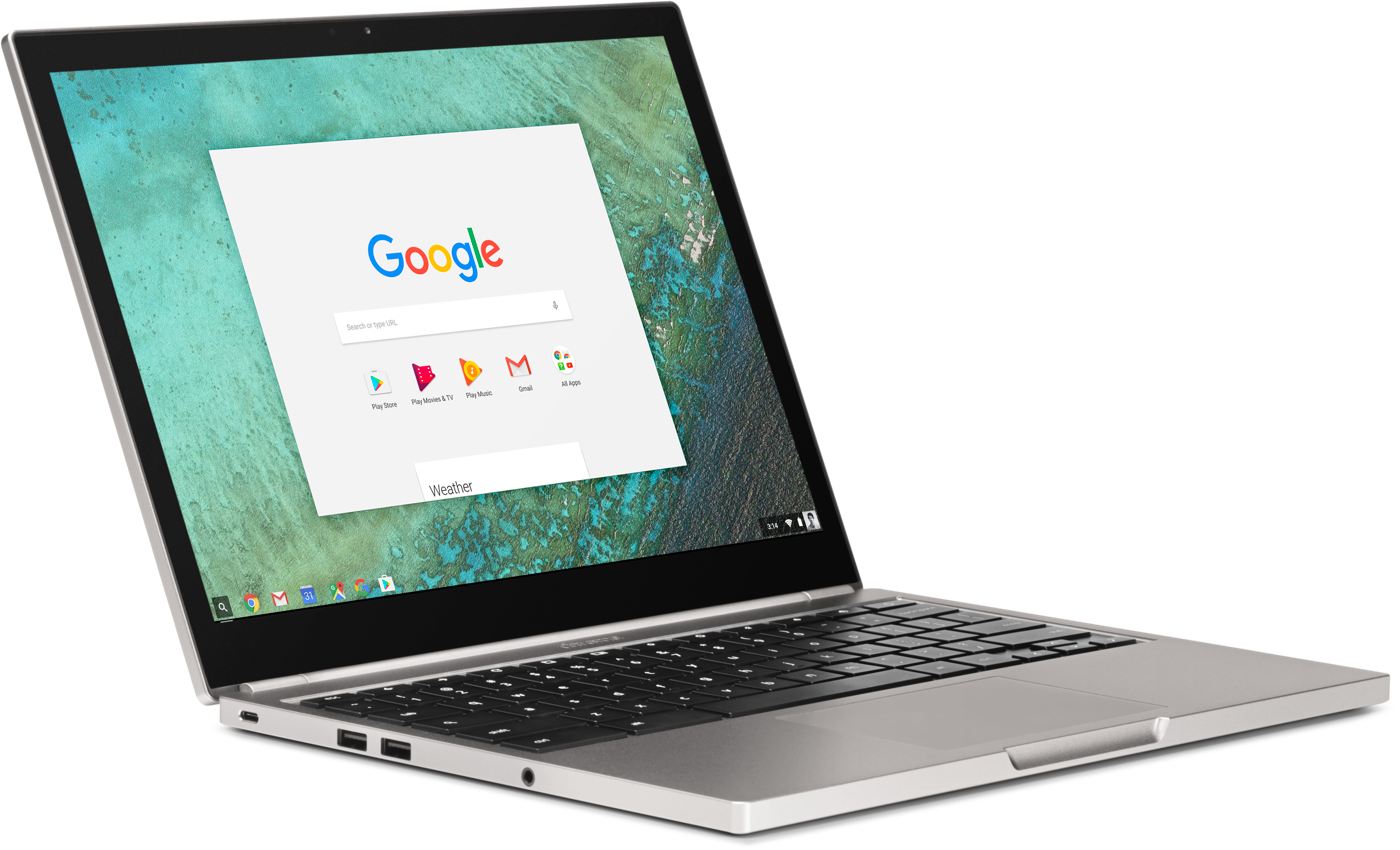
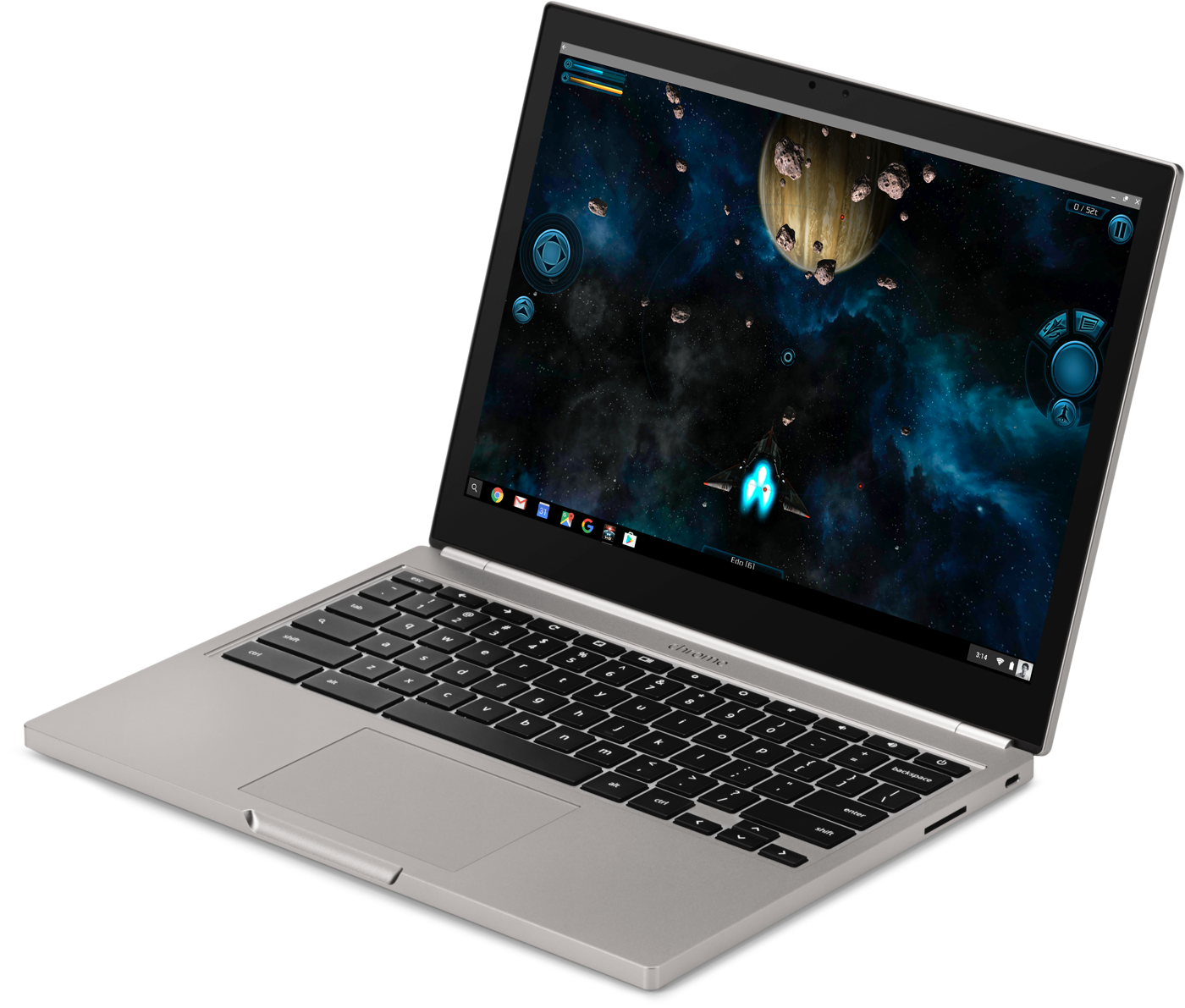
Google is doing as much as it can to make these feel like native desktop applications. It’s not quite there yet, but eventually you’ll be able to grab an Android app from the corner, stretch and resize it any way you like, with the content adjusting to fit that space. At the moment, though, you can only run them in their portrait “phone” or larger landscape “tablet” modes. Still, most of what I saw felt perfectly native: Notifications are filtered into the standard Chrome notification area, and the common design language across Google means most Android apps fit right in.
The obvious question is, why bother running Android apps on Chrome when you can just run them on native Android devices? But traditional notebooks still have a lot of productivity advantages over tablets. “The big difference between a tablet and a Chromebook is the trackpad, doing things with precision, it’s a lot easier to use a mouse editing a document,” Liu says. “And because it’s a Chromebook, we have a full desktop-class browser.” Split-screen multitasking in Android N will certainly help, but the multitasking experience still falls short of what a laptop can offer. That, combined with the stability of Chrome itself, will continue to give Chromebooks an advantage over tablets when it comes to sheer productivity.
As with most things Google, it’ll be a while yet before users get to enjoy the benefits of the Play Store on their Chromebooks. Google is announcing the initiative today so it can start getting developers to take its desktop OS into account when updating their apps. It’ll be available in the next developer channel release and will only work on a limited set of devices: last year’s Chromebook Pixel, the ASUS Chromebook Flip and a few others. A touchscreen will be a requirement at first — but that restriction will be lifted by the time the Play Store rolls out. That should happen before the end of the year.
If you’re a Chrome OS fan, it’s hard not to be excited about what Google is doing here — but it’s also worth remembering that the success of Google Play on Chrome will depend on developers. The big knock against Android tablets has been less about hardware and more about the quality of apps. Developers haven’t focused on building apps for larger screens with the same gusto that iOS developers have — Android tablets have always felt like an afterthought.
For that not to happen with Chrome OS, devs will need to think about building for the form factor. History says that won’t happen at the level you’d hope for. Still, my fingers are crossed that things will go differently this time. The growing number of Chromebook users means there’s a big new market for Play apps. Hopefully developers will embrace the form factor. More users are always a good thing, and more apps are definitely good for Chromebook fans.
For all the latest news and updates from Google I/O 2016, follow along here.
Google will sell its own Daydream VR headset
When Google developed its popular line of Nexus phones and tablets, it didn’t just give the reference designs to third parties and hope for the best: It built and sold its own hardware to showcase just what those designs could achieve. The company announced on Thursday that it will take the same tack with its newly unveiled Daydream VR hardware. That’s right, Google is going to build its own line of Daydream headsets and controllers to show third-party developers how it’s done.
Since the Daydream is an evolution of the Cardboard headset — albeit a heck of a lot easier to wear — it’s not going to have any onboard processing power, instead relying on the user’s phone. To that end, Google’s already in the process of certifying handsets from LG, Samsung, HTC, Xiaomi, Alcatel and others. And you can bet the Nexus line will be among them.
For all the latest news and updates from Google I/O 2016, follow along here.
Source: Google (Twitter)
Why Google can’t stop making messaging apps
Google has announced three new communication apps this week: Spaces, Allo and Duo. That’s in addition to the three it already has. To understand why it’s doing this, and why it’ll do it again, we only need to look to its past.
Twelve years ago, Google began its shift from being “just” the world’s most popular search engine to something much more: It released Gmail. Soon, the company was offering several options for communication. By 2009 Google users had a pretty robust set of tools at their disposal. Gmail for email, Talk for real-time text and voice chats, Voice for VoIP calling, and Android to facilitate everything else. Unfortunately, this simple delineation would quickly disappear as the company launched more and more services.
Google Wave was the first addition. Announced in mid-2009, it mashed together elements of bulletin boards, instant messaging and collaborative editing to pretty awesome effect. It grew a small but fervent community — I was a big fan — until Google halted development.

Then came Buzz. Launched in 2010, it was Google’s first attempt at a bona fide social network. It failed miserably, not least due to complaints about the way Google forced it upon users and some valid privacy concerns. Although neither Wave nor Buzz really competed with what the company was already offering, that would change when Google launched its next attempt at a social network, Google+.
In addition to standard social networking, Google+ also had two features that facilitated direct communication with individuals and groups: Hangouts and Huddles. Not to be mistaken with the current app, Hangouts at the time offered multiuser video chat for people in the same Circle. Huddle, on the other hand, was an instant messaging app for talking with other Google+ users.
Huddle would soon become Google+ Messenger, offering the same functionality as Google Talk, while Hangouts would expand to seriously encroach on Google Voice. Within a year, Google had added the ability to make “audio-only” calls by inviting users to join Hangouts over a regular phone line.
Google now had two apps for everything, coupled with the problem that many users — even on its Android platform — were still using SMS to communicate on the go. It began work to rectify this and unify its disparate platforms. In 2013 we got an all-new Hangouts, available cross-platform and on the web. It merged the functionality of Hangouts and Messenger, and it also replaced Talk within Gmail if you opted to upgrade. Voice was still out in the cold and SMS wasn’t integrated, but the company was moving in the right direction.
In late 2013, Google added SMS to Hangouts, and in Android 4.4 it replaced Messaging as the OS default for texting. By Oct. 2014 Google had integrated VoIP into Hangouts as well. It finally had one app for everything.
You could assert that Hangouts was a better app because of the confusing mess that preceded it. Google tried lots of things and put the best elements from all of its offerings into a single app.
That arguably should have been the end of the story, but it’s not. For whatever reason — probably because it figured out that a lot of Android users didn’t use Hangouts — Google released another app in Nov. 2014 called Messenger. This Messenger had nothing to do with Google+ but instead was a simple app focused on SMS and MMS. Hangouts could and can still handle your texts, but Messenger is now standard on Nexus phones and can be installed on any Android phone from the Play Store. This confusing muddle means that if you have, say, a new flagship Samsung phone, you’ll have two apps capable of handling your SMS (Samsung’s app and Hangouts), with the possibility of adding a third with Messenger.
Hangouts, for the most part, has been doing a fine job.
Still, SMS isn’t exactly a burning priority for most people, and Hangouts, for the most part, has been doing a fine job. I can’t say I use it that often — my conversations are mostly through Facebook Messenger and WhatsApp, because that’s where my friends are — but when I do, it’s a pleasant-enough experience. The same can be said for Google+: It’s actually a great social network now, aside from the fact that barely anyone uses it.
That’s the issue that Google faces today and the reason why these new apps exist. More people are using Facebook Messenger than Hangouts. More people are using WhatsApp than Hangouts. More people are using Snapchat than Hangouts. And everyone uses everything other than Google+.
So we now have three new apps from Google, each performing pretty different tasks. The first is Spaces. Think of it as Google+ redux redux redux. It takes the service’s fresh focus on communities and collections and puts it into an app that exists outside the social network. The end result is a mashup of Slack, Pinterest, Facebook Groups and Trello. It’s promising, but, as of writing, it’s very much a work in progress.
Next up is Allo, a reaction to Facebook Messenger and Microsoft’s efforts in the chatbot space. It uses machine learning to streamline conversations with auto replies and also offers a virtual assistant that’ll book restaurants for you, answer questions and do other chatbotty things. Just like Spaces exists outside Google+, Allo exists outside Hangouts. You don’t even need a Google account to sign up, just a phone number — much like how WhatsApp doesn’t require a Facebook account.
Finally we have Duo, which is by far the most focused of the three. It basically duplicates Hangouts’ original function: video calling. According to the PR, it makes mobile video calls “fast” and “simple,” and it’s only going to be available on Android and iOS. Both Duo and Allo also have the distinction of offering end-to-end encryption — although Allo doesn’t do so by default — the absence of which has been something privacy advocates have hated about Hangouts.
This summer, when Duo and Allo become available, Google users will be at another confusing impasse. Want to send a message to a friend? Pick from Hangouts, Allo or Messenger. Want to make a video call? Hangouts or Duo. Group chat? Hangouts, Allo or Spaces. It’s not user-friendly, and it’s not sustainable.
Sure, Facebook sustains two chat services (WhatsApp and its own Messenger) just fine, but it bought WhatsApp as a fully independent, hugely popular app and has barely changed a thing. Google doesn’t have that luxury. Instead, it’ll borrow another Facebook play: Test new features on a small audience and integrate. Over the past couple of years Facebook has released Slingshot, Rooms, Paper, Riff, Strobe, Shout, Selfied and Moments. I’m probably missing a few.
All of these apps were essentially built around a single feature: private chats, ephemeral messaging, a prettier news feed, selfies, etc. The vast majority won’t get traction on their own, but their features might prove useful enough to fold into the main Facebook and Messenger apps. And if one of them takes off, no problem, you’ve got another successful app.
This has to be Google’s strategy for Allo, Duo and Spaces. We don’t know what Google’s communication offerings will look like at the end of this year, let alone 2017. But chances are that Google will continue to float new ideas before eventually merging the best of them into a single, coherent application, as it did with Hangouts. And then it’ll start the process again. In the meantime, Google will spend money developing x number of duplicate apps, and users will have to deal with a confusing mess of applications on their home screens.
‘GunJack Next’ coming to Google’s Daydream VR platform
Google yesterday revealed a brand new VR platform for Android called “Daydream,” and now we know of at least one game for it. CCP, which developed Eve Online and Gunjack for the Oculus Rift, HTC Vive and Samsung Gear VR, will make a sequel tentatively named Gunjack Next exclusively for Daydream. The original title was a VR shooter set in the space world of Eve Online, where you defend your ship by blasting enemies from a gun turret, arcade-style.
Google’s Daydream is a software and hardware virtual reality platform for Android N that includes a Gear VR-like headset and handheld controller. The search giant is partnering with smartphone manufacturers including Samsung, Xiaomi and HTC, along with content providers like Netflix and HBO. It calls Daydream a “high-quality VR platform” and will certify partner handsets to make sure that’s so. The best way to do virtual reality on mobile at the moment is with Samsung’s Gear VR, which is powered by Oculus software.
CCP shouldn’t have much trouble creating a game for the Daydream Android platform, because it originally built Gunjack for the Gear VR, then later adapted it for the Rift and Vive. The company also released Eve Valkyrie, a dogfighting game set in the Eve Online universe, to the Oculus Rift and plans to release it on the HTC Vive and Sony Playstation VR headsets later this year.
Please don’t send me Smart Replies
Yesterday, Google announced Allo, a new AI-powered messaging app. One of its key features is Smart Reply, which makes use of Google’s machine learning tech to suggest responses if you don’t feel like typing for whatever reason. Similar to the Smart Reply feature in Inbox, it’s apparently clever enough to learn from your behavior, allowing it to make better and more relevant suggestions over time. While this seems like a neat feature at first, I ultimately wouldn’t want any of my friends to use it in a conversation with me. In fact, I’d feel pretty insulted.
See, I think having Smart Replies completely misses the point of a messaging app. I can understand canned responses like “Be right there!” or “I’ll be late!” if you’re in a car and only have a few seconds to reply before you have to get back to the business of driving. But if you aren’t behind the wheel and already have your full attention on the app — which should be the case anyway, because distracted driving is bad — then Smart Replies seems like an unnecessarily lazy way to have a conversation.
At yesterday’s keynote, for example, Google gave a demonstration on how you could respond with “Cute!” to a photo of a puppy or “Yum clams!” to a photo of clam linguine. Are you so devoid of creativity that you can’t think of “Yum clams!” by yourself? Is typing so much of a hassle that you can’t enter in “Cute!” before hitting send?

Further, I don’t care how intelligent these Smart Replies are: They can never capture the personality and character of a real human conversation. My colleague Mat Smith discovered this when he allowed Google’s autoreply to respond to his emails for a week. Instead of saying “Cute!” to that puppy picture, for example, I might’ve typed “Ugh, disgusting.” Not because I don’t actually like dogs (I do!) but because I have a tendency to be sarcastic. Having the option of Smart Replies encourages me to give a more straightforward response rather than coming up with something that’s perhaps more emblematic of my real personality. It’s dehumanizing.
But more than that, using Smart Replies instead of your own words and thoughts robs your friend of you. It means that you don’t value the friendship enough to fully engage in the conversation. You’d rather have a robot do all the talking for you instead of spending time and energy on them. That’s terrible.
I know, I know, Smart Replies are optional. You don’t have to use them. But if we’re any kind of friends at all, I sure as hell hope you don’t.
What the hell is Google Assistant?
Google Assistant is a conversational successor to Google Now. But it’s also a competitor to the chatbots we’re seeing from Microsoft and Facebook. And of course, it’s also being positioned to take on Amazon’s Alexa and its Echo speaker. Assistant in many ways looks like the future of Google, but at this point it’s also pretty confusing. Engadget’s Chris Velazco tries to figure sort out what it means in the video above.
For all the latest news and updates from Google I/O 2016, follow along here.
Google has big plans for Daydream VR but not much to show
Google revealed the Daydream VR platform at its I/O conference yesterday, and even though the company is definitely building a headset itself, there’s nothing for us to get our hands on just yet. Daydream is a complete VR ecosystem from Google, starting with software baked into Android N and ending in partnerships with Samsung, HTC, LG, Alcatel and other major brands. Google has drawn up reference designs for Daydream hardware, including a Wiimote-like controller with a clickable touchpad. Engadget’s Chris Velazco walks through the Daydream details in the above video.
For all the latest news and updates from Google I/O 2016, follow along here.
 AIVAnet