


Canadians deserve better than the Huawei GR5

Why would anyone buy this phone, exactly?
Canadians attuned to the idiosyncrasies of the mobile space are well accustomed to Android devices that, while close, don’t quite align with their international, or even U.S., counterparts.
One such product is the newly-released Huawei GR5, a mid-range Android device available starting this week from Rogers for $0 on a 2-year contract and $375 outright.
As far as free phones go, on paper the GR5 sounds like a satisfying prospect: big, bright 5.5-inch Full HD display; 3,000mAh battery; rear fingerprint scanner; metal body. But it’s when you dig into the core of the product that you begin to see where things went rotten. And rotten is certainly an apt adjective for this product.
On background

The Huawei GR5 is actually the Honor 5X renamed for the Canadian market. Honor, Huawei’s budget-friendly brand proliferating throughout the U.S. and Europe, was developed, as many brands are, to distance itself from any preconceptions associated with its parent company.
The “Huawei” brand, especially in the U.S., drudges up associations — unproven, to clarify — of collusion with the Chinese government and the surreptitious installation of spyware and malware. Since 2012, the company has been effectively banned from selling network equipment to U.S.-based carriers, and has no plans to pursue a large scale handset strategy under its own name.


In Canada, things are very different. Huawei does sell network equipment to our carriers, and its brand, growing in strength, is positively associated in almost every respect. It has built an enormous R&D centre in Ottawa, the nation’s capital, and every May, under the name Seeds for the Future, sends 20 Canadian university students on a two-week “cultural and work experience trip.”
Oh, and it also sells handsets.
No Hono(u)r

Huawei doesn’t sell its high-end P or Mate series products in Canada, at least not through carrier channels. In fact, outside the Nexus 6P, which is packaged as a Google product, the GR5 is the company’s most powerful device on store shelves. But it is not a good representative of the brand at all.
More: Read our full Honor 5X review
Not only is the GR5 a watered-down version of the Honor 5X, which a reduction in RAM (in some models) from 3GB to 2GB, it actually ships — in May, 2016 — with Android 5.1.1 Lollipop. Alone that isn’t cause for concern, but the GR5’s EMUI 3.1 is, for lack of a better word, ugly; what we’ve seen on the Huawei P9, which ships with Android 6.0 and EMUI 4.1, is much more encouraging.


I’m not just talking to the hardcore Android users when I say that shipping a device with year-old software is bad for everyone. It’s bad for the OEM, which has already overcome many of its most persistent software issues in newer versions; it’s bad for the carrier, which has to support this aging OS, and convince customers to buy it; and it’s especially bad for those customers, many of whom may balk at this poor Android experience and reconsider their next purchase.
From my time with EMUI 3.1, I found the interface clumsy and finicky, pocked with numerous spelling mistakes peppered throughout the confusing system of non-standard Android menus. While the lack of an app drawer is not alone worth complaining about, Huawei’s default launcher performs poorly, and the built-in apps are badly-designed. Worse, the notification shade modifies Android’s standard colour scheme, so apps like Google’s own Gmail render black text on a purple background.
A hardware dilemma

On the surface, the Huawei GR5 looks nice enough. Its metal body, while thin and too flexible, is handsomely finished, and the company did a respectable job matching the silver plastic insets that hide the antennas. Holding the phone, though, exposes a wispy lightness, the result of a company skimping on housing materials.
Inside, the Snapdragon 616 processor is only minutely different to the Snapdragon 615 that we found wanting in performance even a year ago; today, such a chip is outright slow. Most OEMs have moved on to the similarly-priced but more-capable Snapdragon 617, or even the 650, but since this is a variant of a phone released in October 2015, such things are to be expected.
Also of concern is the 2GB of RAM, a cost-saving measure that may not impact performance at first, but over time will take its toll.
I’ll defer to my colleague, Andrew Martonik, on the GR5’s 13MP + 5MP rear/front camera combination, who, in his review, found them competent if unremarkable:
The typical snapshot in average-or-better lighting turned out better than I could’ve expected, and for the other situations you can’t be too disappointed considering the price point. The front-facing camera was also surprisingly good on the Honor 5X, taking relatively sharp shots from the 5MP sensor even in indoor lighting.
The upside

There are better free phones at Rogers, like the LG G4, Moto X Play — and even the LG G3. If paying nothing upfront for a phone is the only goal, consider a phone from an OEM with a better track record of issuing updates, and less of a penchant for modifying the heck out of Android.
If the GR5 is the phone for you, you can overcome all of its issues, and you’re willing to buy it outright, I have good news: Newegg Canada sells the actual Honor 5X for $249.99 — and it’s much more likely to receive an upgrade to Marshmallow before the Rogers-sold variant.
Google announces the second class of Launchpad Accelerator startups
Google has announced the companies that will be a part of the second class of startups in its Launchpad Accelerator program. The 24 startups are based out of Brazil, India, Indonesia, and Mexico, and as part of the program each company will receive mentorship and resources to help successfully scale the mobile apps that they’re working on.

From the Google Developer blog:
Class 2 kicks off June 13. The startups will descend on Google HQ for an intensive 2 week bootcamp. Under the tutelage of Google product teams and mentors from the global Launchpad network, they will receive intensive, targeted mentoring, equity-free funding, and more benefits during the 6-month program.
These are the companies included in the second Launchpad Accelerator class:
- BankFacil
- Emprego Ligado
- AppProva
- GetNinjas
- Edools
- Love Mondays
- HijUp
- Talenta
- Jarvis Store
- Ruangguru
- IDNtimes
- Codapay
- Taskbob
- Programming Hub
- ShareChat
- RedCarpet
- PlaySimple Games
- MagicPin
- Aliada
- SaferTaxi
- Conekta
- Konfio
- Kichink
- Miroculus
The Launchpad Accelerator program, unlike other accelerators, is focused on providing mentoring to startups in developing countries, giving them the skills and seed funding necessary to finish building out their apps.
Disguise your Amazon Echo with a case or skin – CNET

Taylor Martin/CNET
Amazon’s original connected speaker, the Echo, has become the smart home accessory to have.
It has an ever growing list of third-party devices and services that it can interact with or control; it’s pretty reliable and relatively natural to talk to; and when paired with IFTTT or Yonomi, it often removes the need for a smart hub and makes the simple commands or controls that much easier.
That said, it only comes in one style — a matte-black finish which may not match the style of your home. Maybe you have stainless appliances in your kitchen or the large black speaker throws off the balance of your entertainment system. If so, you’re not out of luck. There is a quick and affordable way to truly customize the appearance of your Amazon Echo.
Amazon Echo skins
With smartphones, if you don’t like the stock appearance of your phone, you can purchase a skin for your device for under $20. The same goes for the Echo, but the selection of skins is still a bit paltry.
One seller offers a selection of eight different skin colors to choose from, each priced at $8.99 (£6.22 GBP or AU$12.21, converted): silver (pictured), red, carbon fiber black, carbon fiber white, denim, gold, slate and wood. Another seller offers R2-D2 or TARDIS skins.

Taylor Martin/CNET
I have to say, the silver, which looks has a faux-brushed stainless appearance, actually classes the Echo up quite a bit.
The installation of the skin is surprisingly very easy. Lining it up to be perfectly straight will take a few tries, but I had no trouble with fully applying the skin, removing it to adjust the alignment and reapplying. Frustrating as it may be, it didn’t seem to affect the adhesive in any way.
Without a doubt, the seams are the worst part of these skins. It’s virtually impossible to align them perfectly. But, assuming you install the three pieces properly, you will only see the seam on the volume ring. The others will be hidden from view.
Other options
For whatever reason, there are also a few cases available for the Echo. A case seems better suited for the Amazon Tap, as most people won’t be lugging their Echo around with them. But if you want a more premium appearance for your Echo, a thick leather travel case may be the way to go.
Or if you want something a bit more decorative, there is at least one enclosure for the Echo that closely resembles a candle holder and will blend your speaker into your white desk or kitchen.
Either way, the options for styling — or disguising — your Amazon Echo are only growing.
AT&T HTC One M8 and One M9 Marshmallow updates will begin rolling out on May 12

AT&T is finally going to begin pushing Marshmallow to both the HTC One M8 and HTC One M9 on May 12. This comes after some long delays in getting the update finalized, but either way it is great to see it will be hitting phones shortly. Mo Versi, the VP of Product Management at HTC, made the announcement on Twitter.
HTC One (M8 & M9) AT&T owners! Thank you for your patience. Marshmallow OS is approved, OTA to start tomorrow!!
— Mo Versi (@moversi) May 11, 2016
If you own either of these phones on AT&T, be sure to keep an eye out tomorrow for the update. Odds are it won’t hit every single phone tomorrow, so you may need to wait an extra day or two before you see the update on your phone. Be sure to let us know once you start receiving the notifications to update!
HTC One M9 Central
HTC One M9 Essentials
- Beginner’s guide to the M9
- Read our full review
- HTC One M9 specs
- HTC One series specs
- Get the latest M9 News
- Join the M9 discussion
- Shop for accessories
AT&T
HTC
Sprint
Verizon
Read ‘Winds of Winter’ right now – CNET
George R.R. Martin seems to both love and hate his fans. He probably hates that we’re always asking when “The Winds of Winter” will *actually* come out, but he must love that we’re so invested because he shares snippets of the book with us sometimes. (Or maybe he hates us and shares new chapters just to tease since he’s not yet done with the book…hmm.)
In any case, today, the ma(e)ster dropped a new chapter, which if you’ve been following along, you kind of figured was coming before the book release. Why’s that? Well, it turns out this chapter has been floating around for a bit; it was even read by GRRM at various conventions. Some people have even tried to help others out by recounting much of what was in the chapter.
But no more secondhand readings! Finally, book readers get to revel in Martin’s far-superior book world instead of stringing ourselves along like addicts by watching “Game of Thrones.” (Let’s not even get into how weird this season is for book-readers who’re still watching.)
Where noted, some chapters are available to read in the World of Ice & Fire app (it’s free with in-app purchases and available on Android and iOS), and there are also links to the chapters that are available to read, watch or listen to online.
 Enlarge Image
The official “for now” cover of the long-awaited novel.
Bantam Spectra
Theon
Released in December 2011, Theon Greyjoy’s chapter takes place during the chronology of “A Dance With Dragons.” (In the UK it’s also available in “Book 2: After the Feast”.) It has also been archived online and is available in the app.
Arianne
GRRM has released two Arianne Martell of Dorne chapters. The first chapter appeared in January 2012, and was supposedly destined for the fifth book, “A Dance With Dragons,” before being cut. It has been archived online and is available in the app.
Her second chapter is the newly released sample and can be read right now on Martin’s homepage.
Victarion
The Greyjoy’s chapter is not available in the app, but a portion of it was read by GRRM at a convention in March 2012. Here’s where you can listen to it. Also, a very nice Redditor once transcribed the excerpt.
Ser Barristan
First read at a convention in October 2013, it is also available as a preview chapter in “A Dance With Dragons” and in the app.
Tyrion
First read at Worldcon in August 2013, now available in the app.
Mercy
This Arya chapter was originally intended to be a part of “A Feast for Crows” and has shifted between books before being slotted for “Winds of Winter.” It has been archived online and is also available in the app.
Alayne
Sansa’s chapter was posted just over a year ago and is now available archived online and in the app.
There may very well be more rumored chapters floating around in the Interwebs (maybe a second Barristan chapter?!), but these are the released and confirmed chapters we know about right now.
And if you’re interested in even more reading material, here are the rest of the Song of Ice & Fire books.
YouTube’s new messaging feature will make sharing videos a breeze

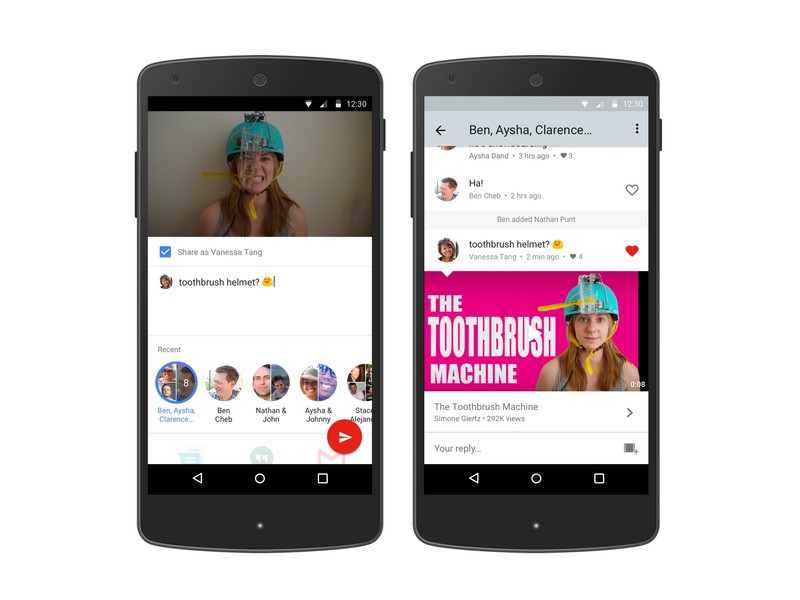
The process of sharing your favorite YouTube with friends will soon take place entirely inside of the YouTube app. That’s thanks to a new messaging feature the video giant is currently testing, through which users can share videos and chat about them without ever leaving the YouTube app.
From Wired:
Starting today, so-called native sharing will go live for a small percentage of YouTube users. They can then spread the feature to their friends by inviting them into conversation threads. Friends can chat about the shared video right inside YouTube’s mobile app. They can also reply with another video. The message threads reside within a new tab on YouTube’s mobile app so groups can dip in and out of conversations and catch up on what they missed or add new videos of their own.
While messaging may seem like an odd fit at first, it makes a lot of sense for YouTube. Dedicated chat threads within YouTube will eliminate the need to fiddle with copying links over to other apps. And, of course, there’s also the added benefit that users will spend much more time inside of the YouTube app itself.
3 apps for keeping track of your TV shows – CNET
In this golden age of television, it’s difficult to keep up with all of your shows, let alone discover new ones. There are so many TV channels and streaming services producing quality content that I have this constant feeling that I’m missing must-see TV.
When a friend tells me about a show I should be watching, I need an app to tell me how I can watch it. That is, whether it’s on a free cable channel or HBO (I’m a subscriber because winter is coming) or available on Netflix or Amazon Prime. And if not, then how much will it cost to purchase on iTunes or elsewhere.
Just as there are many outlets for great TV, there are many apps that endeavor to help you discover great TV (and movies). I had previously used the Can I Stream It? app but it hasn’t been updated in more than two years, so it’s time to find a new app for keeping up with TV.
I used the shows “The Americans” and “Silicon Valley” as tests. I started watching “The Americans” on FX when it first starting airing, but I fell behind and then FX took away season 1 from Xfinity On Demand. So, I want to catch up with “The Americans” while also picking up “Silicon Valley” from its beginning.

Matt Elliott/CNET
After kicking the tires on a number of video-discovery apps, I have narrowed the list to three. Let’s meet our three finalists before we get to my pick for the best of the bunch.
Fan TV
Fan TV has a feed you can browse to find new shows and also displays live TV listings if you tell it your TV provider, but neither of these features interest me. I just want to search for a show and find out where I can watch it. Fan TV lets you search for TV shows and movies and displays the price for the HD versions of shows and movies, which is what I’m after.
In settings, you can select which TV channels and streaming services you want it to search. It offers more than 50 channels and streaming services.

Screenshot by Matt Elliott/CNET
I had to hunt around a bit before I was able to drill down to season 1 of “The Americans.” Fan TV displays streaming and purchase information on its landing page for a TV series, but hides the season information behind the Watch Now option. And after you select a specific season, you then must to drill down to a specific episode to see the streaming and purchase options.
With Fan TV, you can create two lists — Watch List and I’m a fan — to keep track of your shows. You can also create new lists to track, say, horror movies worth watching.
Fan TV is free and available for Android and for iOS.
JustWatch
When you first launch JustWatch, it asks you to choose the streaming service providers that your use. What I like about its approach is the limited number it offers. If you use an obscure streaming service, you’ll be disappointed, but I like not having to go through dozens of TV channels and services that don’t interest me. I was quickly able to select Netflix, Amazon Video, HBO Now and iTunes and move on.
JustWatch also makes it easy to find streaming and purchase information, displaying it for both full seasons of shows and individual episodes. It shows the Best Price, SD and HD price. Since SD usually equates to best price, it could probably reduce these three pricing options to two, but they are easy enough to switch between.

Screenshot by Matt Elliott/CNET
JustWatch also has a WatchList to which you can add shows, which is standard fare. Unique to JustWatch is its Price Drops tab, that shows you movies and TV shows that have recently dropped their purchase price. It also has a Cinema tab that shows both Upcoming movies and those Now in theaters.
JustWatch is free and available for Android and for iOS.
Yidio
Yidio attempts to recommend shows based on your tastes. When you first launch the app, it asks you to pick at least of your three favorite shows. In order to do so, however, you will need to sign up for a free account via email or Facebook.
Yidio is better suited for a tablet than a phone because it assumes you want to watch shows on the device upon which you are searching. It filters its results based on the video apps you have installed on your device, which isn’t the best arrangement if you use your phone to find TV shows to watch on a TV.

Screenshot by Matt Elliott/CNET
Like Fan TV, Yidio forces you to drill down to individual episodes to view streaming and purchase information. And it doesn’t let you pick between SD and HD prices, always showing the lowest price for a show when what I want to see the HD price.
Yidio is free and available for Android and for iOS. It is also the only app of the three here to feature ads, detracting from its overall appeal.
And the winner is…
My go-to video-discovery app is JustWatch. It is the easiest to set up with its targeted list of streaming services. I also found the app’s design the easiest to navigate, and I like that it surfaces pricing information without making me dig down to individual episodes. It also has the cleanest layout of pricing information, making it easy to toggle between SD and HD prices. Lastly, I enjoy being able to peruse the movies that are currently in theaters and the titles that are coming soon.
The HTC 10 monthly security patch isn’t missing — it’s just hidden
Here’s how to find out whether your HTC 10 has the most up-to-date security patch.
One of the more welcome features of Android 6.0 Marshmallow was the transparency of the new monthly security patches. Starting with the Nexus 5X and Nexus 6P and rolling out with updates to other phones, the “About” section in the settings menu tells the date of the most recently received security patch. It’s sort of a badge of honor, really — and an important piece of transparency in the fight to keep our smartphones safe and secure.
HTC has been one of the better manufacturers when it comes to keeping its phones updated — especially when it comes to its carrier-free models. Computerworld’s JR Raphael ranked HTC No. 2 (behind Google) in his latest “Android update report card,” and while it focuses on major platform updates and not monthly security updates, the point stands — HTC has done pretty when when it comes to keeping current software on its phones.
That’s why it’s troubling, then, that HTC is hiding the monthly security patch level on the HTC 10. Especially when it’s so easy to glean. Here’s how you can do it.

When your phone shows the date of its most recent security patch in the settings menu, it’s pulling that data from the “build.prop.” It’s a file full of little text strings that tell the phone about itself. Model name, software versions, things like that. And in there is where you’ll find the security patch information.
 If you know how to pull files off a phone using a command line, it’s easy. Just pull build.prop and open it in a text editor. My HTC 10 was just updated, and it’s on the May security patch. So the line in the build.prop shows:
ro.build.version.security_patch=2016-05-01
If you don’t want to do that sort of spelunking, a simple system info app can track it down for you. It does the same thing — reads the build.prop — but puts it into something a little easier on the eyes. There are myriad system info apps out there. We’ve been using AIDA64 lately, and it clearly shows the security patch from May 1, 2016.
Why did HTC choose to not display the date of the most recent system patch? It doesn’t really matter. The data is there — you just need to know where to look. And that almost makes it worse. Transparency is important when it comes to this sort of thing. Google’s doing an excellent job of keeping us informed, every month, about what’s being fixed. Other manufacturers are doing the right thing and letting us know how recently they patched their phones.
HTC half-heartedly hiding that information is unnecessary and disappointing.
HTC 10
- HTC 10 review
- HTC 10 specs
- These are the HTC 10 colors
- Our first photo and video samples
- Meet the Ice View case
- Join our HTC 10 forums
HTC
Verizon
Best heavy duty cases for the Galaxy S7

Treat your phone a little less than kind? Get a heavy duty case!
Let’s face it, sometimes keeping your phone protected is the most important thing. After all, you carry it around everywhere so it’s bound to be put into some dangerous situations. If you are prone to dropping your phone on the ground, down the stairs, or even in the water, you may want to think about a heavy duty case.
Heavy duty cases are not typically meant as fashion statements. Their big, bulky, and sturdy design is made for one purpose and one purpose only. Keeping your phone as safe as possible.
- i-Blason Armorbox
- Obliq Naked Shield Series
- Otterbox Defender series
- Spigen slim armor
- Supcase Beetle Pro series
i-Blason Armorbox

This two-piece case will do its part to keep your phone as safe as possible.
The frame the phone sits in is made of hard polycarbonate — to protect it from scratches and bumps — and flexible TPU plastic which will protect your phone in case it falls on the ground. Plus, the headphone jack and charging port have plastic flaps that cover them up to prevent dust from getting in when they are not in use.
The great thing about the Armorbox is it has a separate screen protector that you can either use or not. It’s easy to take on or off whenever you want so you can use the screen protector only when you think you will need it.
See at Amazon
Obliq Naked Shield Series

While clear cases aren’t usually the first to come to mind when you think heavy duty, this offering from Obliq certainly changes that perception.
A crystal clear see-through one-piece shell — with both the shock absorbing power of TPU and the durability of hard polycarbonate — fits snugly on your phone without impeding any of the phone’s functionality. The edges of the case raise above the screen to offer protection when your phone is lying on a flat surface.
An added bonus of this case is the metal kickstand. Watching videos on landscape mode has never been so easy since the kickstand gives you the ability to still use both your hands.
If you want something that protects your phone really well and shows off the craftsmanship of the Galaxy S7, this could be a great case for you.
See at Amazon
Otterbox Defender series

Otterbox is known for making some of the most rugged cases around and their Defender series is the toughest of the bunch.
The Defender series is made up of four layers to offer your S7 the most protection: It has a screen protector to prevent your screen from being scratched up, a foam buffer to ensure your screen protector isn’t rubbing against the screen, an inner shell that protects the rest of the phone from damage, and a hard outer slipcover that seals up the ports to prevent dust and particulates from getting in. Plus, Otterbox puts all of their cases through rigorous testing, such as drop tests and tumble tests, to ensure their product is as rugged as possible.
Due to its design, expect the Defender series case to add a significant amount of weight and bulk to your S7.
See at Amazon
Spigen slim armor

Spigen’s slim armor case may not have a part that covers the front of the screen, but with the edges of the case protruding at least 2mm it doesn’t really need it. On top of that, the camera also has lots of protection from table scratches by the high edges of the case as well.
Spigen’s slim armor is drop-tested military grade. Now we know that sounds like some random label that a company would stick on it’s packaging just to sell phones, but in this case it actually means a lot. It literally means that it was tested by a third party and is approved for use in the military. This is the kind of case Rambo would have had if he had a cell phone.
The added feature of a metal kickstand is just icing on top of this delicious heavy duty cake.
See at Amazon
Supcase Unicorn Beetle

Supcase sounds like two frat boys started a phone case company, but we promise it’s no joke of a product.
The Beetle Pro series has everything you need in a heavy duty case. A hard, polycarbonate shell protects all sides and edges of the phone. There is a screen protector built into the case and dust covers protect your charging port and headphone jack.
The one difference from the other cases we have featured in this roundup is the removable clip that attaches to the back of the phone. Now wearing your phone on your waist isn’t everyone’s cup of tea; however, if you need to have easy access to your phone it’s a super useful feature.
It comes in a few different colors but, if you get the blue one, you can say you have the power of Blue Beetle so why get any other color?
See at Amazon
The end of the road
Heavy duty cases are a great way to protect your phone. Their thickness, weight, and sturdiness make them super secure in your hand and make you worry much less when you have those little accidents. If you think a heavy duty case is way over kill and want some different options don’t forget to check out our round up of the best clear cases for the Galaxy S7
Samsung Galaxy S7 and S7 edge
- Galaxy S7 review
- Galaxy S7 edge review
- Here are all four Galaxy S7 colors
- Should you upgrade to the Galaxy S7?
- Learn about the Galaxy S7’s SD card slot
- Join our Galaxy S7 forums
AT&T
Sprint
T-Mobile
Verizon
Verizon will let you try out the LG 360 CAM with an in-store demo
If you’re interested in the many possibilities opened up by 360-degree photography with the LG 360 CAM, but want to try it out in person before dropping a load of cash, Verizon has your back. The carrier has announced that customers can now head down to their nearest Verizon store to get a hands-on demonstration with LG’s nifty camera, which also just happens to be available to buy for a cool $200.

Of course, if you want to get a head start on things, you should also be sure to check out our review for an in-depth look at how the camera performs, along with some fantastic sample footage. On the other hand, if you’d rather skip all of that and just get your hands on one now, you can pick up the LG 360 CAM from Verizon’s online store at the link below.
See at Verizon
 AIVAnet