


LG Phoenix 2 Release Date, Price and Specs – CNET

AT&T
I’d love to say that AT&T’s new LG Phoenix 2 bursts with cutting-edge tech befitting its exciting name, but the reality is that we’re looking at a relatively entry-level smartphone for AT&T’s prepaid GoPhone brand.
Hey, at least it’s affordable!
Here’s what you get for $100:
- Android 6.0 Marshmallow software
- 5-inch screen
- 8-megapixel rear camera
- 5-megapixel front-facing camera
- 1.3GHz quad-core processor
- 2,125mAh battery
- 16GB internal storage, 1.5GB RAM
- MicroSD card support (up to 32GB)
- Color: Black
Wallet-watchers can pick up the prepaid phone online at AT&T’s website immediately, or wait for May 14 to pick it up at “select” retail stores.
The phone makes its way to AT&T retail shops starting June 10.
Tikteck Multi-Color Bluetooth LED review – CNET
The Good Tikteck’s colors are vivid and accurate, and the app’s ability to set lighting timers works well, even when your phone is out of Bluetooth range.
The Bad The bulb’s white-light tones aren’t as bright as advertised, and the music sync feature didn’t work at all. And don’t expect compatibility with Nest, Alexa, or any of the other third-parties that work with bulbs like Lifx or Hue.
The Bottom Line This is a pretty unexceptional smart bulb, but it delivers on most of its promises at a bargain bin price. For basic, app-enabled color control, it’s a decent pick.

Tikteck does a good job with colors that Hue struggles with, like green and cyan. None of the colors are very bright, though.
Ry Crist/CNET
Color-changing smart bulbs are often stupid expensive, but the $10 Tikteck LED is an exception. At a fraction of what you’d expect to spend on bulbs from Lifx or Philips Hue, Tikteck’s Bluetooth LED offers app-enabled color control, along with a scheduling feature that’ll program the bulb to turn on or change colors at a specific time.
Mind you, this is a simple, unexceptional smart bulb we’re talking about, with a generic-looking app that won’t work with Nest, IFTTT, Alexa, Apple HomeKit, or any other notable third party. If that’s the sort of smart-home integration you’re after, then you’re better off splurging on a better-connected bulb. That said, as far as basic, bargain-priced novelties go, Tikteck gets the job done better than you might expect. And hey, “Hue for cheapskates” isn’t the worst pitch I’ve ever heard.

Tikteck’s app is nothing special, and the badly translated English is confusing at times, but it still does a fine job with color control and scheduling.
Screenshots by Ry Crist/CNET
The Tikteck LED’s packaging pegs it at 600 lumens, but I clocked it at 424 lumens at its default white-light setting (about as much as you’d expect from a 40W incandescent), with a color temperature of roughly 3,500 K. You can dial the color temperature up to around 5,500 K or down to about 2,800 K, but the brightness dips either way. You can also dim the bulb cleanly down to zero right in the app.
The Tikteck app also gives you a color wheel. Tap one of its colors, and the bulb will follow suit. I don’t like that the app gives no indication of the currently selected shade, but it’s quick and responsive to use, and the bulb’s colors are vivid and more accurate than I’d honestly expected. They weren’t very bright, though, none of them registering above 100 lumens. That’s good enough for mood lighting, or maybe accent lighting at a party, but not much else.
Aside from the controls for brightness, color and color temperature, the app has a variable-speed color-cycling mode that works fine, a nightlight mode that simply dims the bulb way down, and a music syncing mode that I couldn’t get to work at all. You can also schedule lighting changes that will run even if your phone is out of Bluetooth range, or out of battery — a nice touch for anyone looking to use this thing as a wake-up light. And sure, Tikteck’s smarts are nowhere near as sophisticated as what you’ll get with Lifx or Philips Hue, but at $10 a pop, that really doesn’t matter too much. If color-changing lights have tempted you in the past, but the high prices have turned you off, then maybe this is the bulb you’ve been waiting for.
Bang and Olufsen speakers add Google Cast for wireless audio
Google Cast for audio is a standard feature on most new wireless speakers these days, and Bang & Olufsen is making sure its customers can use that tool as well. The company announced an update for the BeoPlay A6 and the larger (and much pricier) second-gen A9 that will add Google’s wireless connectivity. If you’ll recall, the option works like a Chromecast for TV: it pulls content directly from the service you’re using rather than using your phone or tablet’s connection. Back at CES, Google revealed that Cast would arrive on more speakers this year, and B&O is helping it keep that promise.
What’s more, B&O says all of its network wireless speakers in the future will also offer Google Cast. If you’re looking for other connectivity methods, the audio gear also plays nice with Apple AirPlay and Bluetooth. For owners of the A6 and A9, the new feature will arrive via an automatic update that’s rolling out starting today.
Pick up Sony’s 128GB microSD card for just $33 at Amazon
If you are looking to add some storage to your phone or tablet, you’ll want to check out this deal from Sony on microSD cards at Amazon. You can grab a 128GB card for just $33, its lowest price yet. Should this be too much storage or more than you wanted to spend, Sony is also offering discounts on its other cards as well.

You can snag a 64GB card for just $24, a 32GB card for $9 or 16GB for $8. Don’t wait too long before placing your order though, as we have no idea how long this deal will last. Which storage capacity will you be picking up? Let us know in the comments!
See at Amazon
5 reasons to install Google’s keyboard on your iPhone – CNET
 Enlarge Image
Jason Cipriani/CNET
Google has released a keyboard for iOS users that does more than simply offer a way to enter text. Naturally, search is built in, as are a few other options you won’t find in Apple’s stock keyboard.
After a some time using it, it’s clear Gboard is one of the best keyboards for iPhone and iPad users. Here are five reasons you should install it:
Built in search

Enlarge Image
Screenshot by Jason Cipriani/CNET
Gboard features a built-in search button, found just to the left of word predictions. Tap on it to open a search bar and enter your query. You can search for websites, businesses, contacts or weather. A series of cards are returned as a result, and with a tap you can automatically insert information into a text field.
With Gboard you can look something up without ever leaving a conversation and send the information. It’s pretty slick.
Predictive emojis

Enlarge Image
Screenshot by Jason Cipriani/CNET
With the stock iOS keyboard you can pick emojis by switching to a dedicated keyboard, then back to the standard keyboard. For example, type “key” and the key emoji will show up as an option to auto populate in the text field.
Conversely, you can tap on the smiley face next to the space bar and search through emojis instead of spending time scrolling through a list of emojis.
Glide typing
Sure, there are other keyboard options for iOS users that allow you to swipe or glide a finger across the keyboard to spell out a word instead of tapping each key, but Google’s glide feature is spot on. In a few minutes of trying it out, I hardly had to go back and correct the word I traced over. If you’ve used Google’s Android keyboard, you’ll feel right at home using it on your iOS device.
GIFs!

Enlarge Image
Screenshot by Jason Cipriani/CNET
Sometimes the only proper response is to send an animated image, or GIF. Gboard offers the ability to search for the perfect GIF without having to switch keyboards or bounce between apps. Tap on the emoji icon, then select GIF. Commonly searched categories and GIFs are shown, with the additional benefit of searching for a GIF.
Customization

Enlarge Image
Screenshot by Jason Cipriani/CNET
Gboard offers various customization options within its Settings. For example, you can enable location access so the keyboard can provide local weather and restaurants when searching. You can also enable contact search, making it easier to share contact info without leaving a conversation. Don’t want emojis to show up as text predictions? Turn it off. You can fine-tune Gboard to work just as you want.
Download Gboard for free from the App Store.
This article also appears in Spanish. Read: 5 razones para instalar el nuevo teclado de Google en tu iPhone.
Best rugged cases for the Galaxy S7 edge

Keep your S7 edge looking beautiful by protecting it with a tough case!
There are few worse feelings than the moment after you drop your phone, screen down. You gasp. Maybe you curse. You reach for it and hope you don’t see spiderwebs when you flip that screen upward. And with an all-glass phone like the Galaxy S7 edge, there are two sides you could be breaking.
There’s one really easy way to avoid this awful screen-shatter lottery — by protecting your new Galaxy S7 edge with a suitably rugged case. Here are a few of our top picks.
- Supcase Unicorn Beetle
- Spigen Rugged Armor
- i-Blason Prime
- E LV Armor Defender
- OtterBox Symmetry
Supcase Unicorn Beetle

The Unicorn Beetle for Galaxy S7 edge is a two-piece case designed to protect the front and back of your new phone. Its raised bezel means even if your phone drops face-first onto concrete, there is an extra layer of protection to stop the glass screen from impacting the hard ground directly. Even though the Bezel is raised, the case contours to the shape of the S7 edge so you can easily access the sides of your screen.
This case comes with a removable holster which can be rotated depending on how you want to wear the whole assembly. If features closable ports to access your charger and headphone jacks, covered side buttons, and openings for the microphones. And the backing of the phone is raised around the camera lens, protecting it from damage. The case is outlined with Impact resistant bumpers which fatten up the sides of the case to provide extra protection for corner-impacts. Even with the extra padding, this case still works well with wireless chargers.
The Unicorn Beetle for the Galaxy S7 edge provides extra protection for the parts of your phone most prone to dropping damage, without adding too much bulk to your S7 Edge’s slim form.
See at Amazon
Spigen Rugged Armor

Spigen’s Rugged Armor case for the Galaxy S7 edge is one of the thinnest cases you can get, while still being tough. The inside of the case is ridged with a unique pattern to help spread out the impact of drops over the whole phone’s body, making it less likely to damage your screen. The corners of the case are designed with tiny air cushions to further protect the phone’s most damage-prone points.
The case envelops the side buttons and leaves openings at the bottom for your charger, microphone and speaker. A carbon-fibre strip at the bottom of the phone is placed where your pinky finger would normally rest during texting, which makes it feel extra secure in your hands.
This case has been certified with Spigen’s Military Grade drop testing, which means the case has protected an S7 Edge during a battery of shock, quality, and drop tests (26 drops to be exact). This is the least beefy in our list of rugged phones, but was designed to offer good protection in the sleekest possible form factor.
See at Amazon
i-Blason Prime

If you want your phone case to feel rugged, the i-Blason Prime is a great option. Its reinforced corners, raised bezel, and hardshell construction meet the expectations of a heavy-duty phone case. The rigid outer inclosure of this case is backed up by a double-enforced, shock-absorbing inner sleeve of silicone. Additional corner cushioning has been added to the phone’s case which adds a bit of size, but also gives peace-of-mind in the event of corner-first drops.
The rear of the case has carbon-fiber panels, making the phone case easy to grip. You also can choose to holster the i-Blason to your belt or enjoy its kickstand feature if you want to rest the phone on a table while watching videos. Raised edges around the exposed ports at the bottom of your phone bring additional protection to another vulnerable area of the handset.
See at Amazon
E LV Armor Defender

E LV has a slim-form case with added protection features, right on the cusp of the standards for a rugged case. With a rigid outer lining and a flexible inner lining, the E LV case can help absorb some of the impact that comes with dropping your phone. Bottom cutouts are raised to give open access to your microphone, headphones jack, and charger. The corners of this case are built up to provide added protection against corner drops, and the buttons of the S7 edge are protected by the case’s hard edges.
What’s really unique about this case is its textured back. Reminiscent of the handlebars on your childhood bike, the back of this case is covered by fine, deep, ridges, which help provide great grip even if your hands are sweaty. Overall, this case is not as sturdy as beefier rivals on this list, however its textured back and built-out corners make it a less bulky option.
See at Amazon
OtterBox Symmetry

If the only name you trust in tough smartphone cases is OtterBox, the Symmetry is a great choice for a minimalist rugged case. Not as sturdy as the Defender line which is available for other phone models, the Symmetry maintains some important Otterbox features, but slims the case down so you can enjoy the thinness of your S7 edge.
The familiar dual-material body associated with Otterboxes is present in the symmetry with a rigid outer case and an impact-absorbing, soft inner case. With raised and beveled edges, you’ll still have access to your S7 edge’s most unique feature, while also being protected against drops and scrapes. Pushing your phone’s buttons through the Symmetry case can be a little tough, but that’s not a deal-breaker. It should be noted that the smooth back of the case makes it slippery in the hand and resting on surfaces, but if you insist on having an Otterbox case to protect your new phone, this is currently your best option.
See at Amazon
How ’bout you?
If none of these suit your fancy, check out picks for best Galaxy S7 edge cases overall! Have a rugged case you love that’s not on our list? Make sure to leave us a comment and tell us what kind of case it is and why you love it!
Samsung Galaxy S7 and S7 edge
- Galaxy S7 review
- Galaxy S7 edge review
- Here are all four Galaxy S7 colors
- Should you upgrade to the Galaxy S7?
- Learn about the Galaxy S7’s SD card slot
- Join our Galaxy S7 forums
AT&T
Sprint
T-Mobile
Verizon
NVIDIA may be gearing up to launch a new Shield tablet
If a new FCC filing is any indication, NVIDIA may have a new Shield tablet on the way. Though there’s little to go off of, the filing (via Liliputing) shows off a tablet with similar dimensions to NVIDIA’s current gaming tablet offering.

Measurements come in at 215mm by 120mm, which compares to the current Shield tablet’s 221mm by 126mm frame. And aside from the fact that the tablet sports a micro USB port and supports 802.11ac Wi-Fi, along with Bluetooth and Bluetooth LE, spec details are nonexistent.
In any case, the timing makes sense as it seems like the Shield tablet is due for a refresh. The original launched in 2014 before being recalled due to a battery issue. NVIDIA then relaunched the tablet as the NVIDIA Shield Tablet K1 in 2015 with similar specs.
Hopefully we’ll get a full look at what NVIDIA has up its sleeve relatively soon. In the meantime, what would you like to see out of a refreshed NVIDIA Shield tablet? Let us know in the comments!
Philips finally has an amazing app for its Hue bulbs

A long time coming, but so worth the wait.
Early adopters of the Philips Hue bulbs are used to messing around with third-party apps by now. Philips opening up its APIs at an early stage was a smart move, and the number of incredible apps to have come from that are well worth talking about. At the same time, one of the big reasons many users turned to third-party apps in the first place was due largely to how confusing and downright featureless the Philips Hue app was.
Recently Philips released Hue Gen 2, a replacement to the original Hue app. We’ve been using it for a few days now, and it is without a doubt the most complete app you can have for your smart bulbs today.

First things first — we have Material Design for the new Hue app, and it’s fantastic. There are a lot of flat card-like interfaces, a FAB in the bottom right or just about every screen, and the animations for this whole app are fantastic. Hue put a lot of work into the design, and the app feels so much nicer than the previous design.
Philips has done a fantastic job here.
The design is far from the big feature here, though. That honor goes to Hue’s decision to finally implement room organization for its lights. You can split bulbs up by room, and control entire rooms all at once without having to program different scenes for each room. It’s exactly as simple as it should be, without sacrificing individual bulb controls or the Philips scene system. All of the original Philips features still exist, but the organization has shifted to rooms before scenes, and the difference that makes is significant. It means you can quickly toggle entire rooms, and if you’re using multiple colors in a room you see that displayed right in the main menu.
Remote access features that were added to the original Hue app have become a great deal more functional in this second generation app as well. Auto-dimming lights as you leave the house, or remotely controlling your bulbs from the Hue app is significantly more reliable. There’s also a separate section of the app for setting up Friends of Hue, which includes things like Nest and Amazon Echo integration.

All around, this new app is a significantly more complete complete thought when compared to the previous experience. It looks nicer, runs smoother, and all of the features are nice and easy to access. Philips has done a fantastic job here, and Hue bulbs finally have a single app that covers all of the core features nicely. There are still great third-party apps out there for folks who have already found a comfortable alternative, but the core app is incredible for now and it’s about time.
Best cases for the Nextbit Robin

If it’s colored like a robin’s egg, you should probably protect it like one.
The Nextbit Robin isn’t flashy in the same way a metal or glass phone is, but it is pretty to look at with its square edges, unique colors and porportions and rather thin design. That being said, you drop that sucker on its corner and it’s bye bye birdie.
We’ve rounded up the best cases that you can buy today to keep your Robin safe and sound, so you can keep Tweeting.
- Nextbit Bruises
- Nextbit Bumps
- Nextbit Scratches
- Fosom DURA-T Ultra-slim Fit
- Orzly FlexiCase
- Orzly Fusion
Nextbit Bruises

The first of three Nextbit cases is called “Bruises” because it’s going to protect your Robin from falls and bumps and scratches and it’ll take any other lumps that might befall your phone.
The Bruises case is made of flexible plastic with soft rubber bumpers on each end, so that, if you do drop it on an edge, you don’t have a spider web for a screen. The front of the case is also raised so that you can safely lay your Robin face-down without worrying about damaging the screen.
It comes in Nextbit’s trademark “Midnight” color, which perfectly matches the Midnight Robin. (Or stands in contrast to the Mint Robin.)
See at Nextbit
See at Amazon
Nextbit Bumps

While the Bruises case covers all of the Robin except the screen, the Bumps case takes a more minimalist approach, leaving the entire front of the phone exposed and allowing thinner bezels on the top and bottom. Bumps won’t add any bulk to your Robin, but should protect it while adding a fashionable flair.
Bumps comes in four colors: Sunset, Midnight, Sky, and Fog. This case is made of perforated plastic, which gives it a neat sort-of-lattice look (the holes aren’t enormous or anything; it’s just a neat effect).
While Bumps will protect your phone from everyday wear and tear, it isn’t a rugged case and shouldn’t be treated as such. There are no corner bumpers, so while it is protected more than having nothing at all, you’ll want to be wary of dropping it from on high.
That being said, if you want to go with the most fashionable case for your Robin, this is it, folks.
See at Nextbit
See at Amazon
Nextbit Scratches

This is as minimal as it gets for Nextbit cases; Scratches is billed as the company’s ultra-thin number. It’s translucent, so the color you picked for your Robin will shine through without getting scuffed up and marred. It’s raised on the front to protect your screen if you decide to lay it face-down.
Ultra-thin means no real added bulk or weight, leaving your Robin feeling light as a feather. And this is also the least expensive case option from Nextbit, at $15.
This case is for you if you want something minimal that maintains the appearance of your Robin, while protecting it from light bumps and dings, scratches, and the odd low drop.
See at Nextbit
See at Amazon
Fosom DURA-T Ultra-slim Fit

Fosom’s case is made of soft TPU with a matte finish, so your Robin is protected from bumps and dings and even unsightly fingerprints.
As the name would suggest, the DURA-T is ultra-thin and won’t add any bulk or weight to your Robin; if you go with the clear one, you might just forget it’s there.
There are three color options to choose from: clear, hot pink, and black, so you can still add a relatively personal touch to your Mint or Midnight Robin. The hot pink option is translucent, so it will look pretty dark on the Midnight Robin. If you just want a case to be a case, the black DURA-T is opaque and a straightforward option for the function-focused folks.
If you can’t decide on a color, you might as well grab all three; they’re under $10 each.
See at Amazon
Orzly FlexiCase

For purists who like to choose their phone color and want it to shine through always, but still want to protect, the Orzly FlexiCase has your name on it.
It’s totally transparent and offers shock-absorbent protection in the form of soft silicone. It’s a slim fit that forms snugly to your Robin, so there’s no risk of slippage or that awkward loose feeling that ill-fitting cases can cause.
The front bezel is raised for your screen’s protection and all the necessary buttons are left uncovered. The matte finish also gives your phone a non-slip texture, which is always handy with a phone which may shatter if dropped on its edge.
Grab the FlexiCase if you want a minimal, grippy, transparent case that’ll feel great in your hand and allow the beauty of your Robin to spread its wings and fly (I can do this all day).
See at Amazon
Orzly Fusion

The Fusion features a transparent hard plastic back with a soft rubber rim, which maintains the original look of your Nextbit Robin, while protecting its exposed edges and corners.
The outer rubber rim comes in three colors: black, grey, and mint green, so you can personalize your case a little bit. The mint green is darker than the Mint Robin, though it may make for an interesting contrast. The clear back also lets you see all of the LED cloud notifications that are so important to this phone.
This is one of the most durable cases in our roundup and can take some harder hits than, say, the Nextbit Scratches, so if you’re roughin’ it, pair this with a decent screen protector and you’ll have all-around protection.
See at Amazon
What are you using?
Is there an awesome case that’s missing from your round-up? Sound off in the comments below and let us know why you think it’s the best!
Nextbit Robin
- Nextbit Robin review
- Nextbit Robin unboxing
- Nextbit Robin specs
- Join the Nextbit Robin forums
See at Amazon
AT&T announces the $100 LG Phoenix 2
AT&T is supposed to begin selling the LG Phoenix 2 on its website today for $99.99 without a contract under its GoPhone pre-paid brand. The phone will be sold at other retailers on Saturday, May 14 and at AT&T stores on June 10.
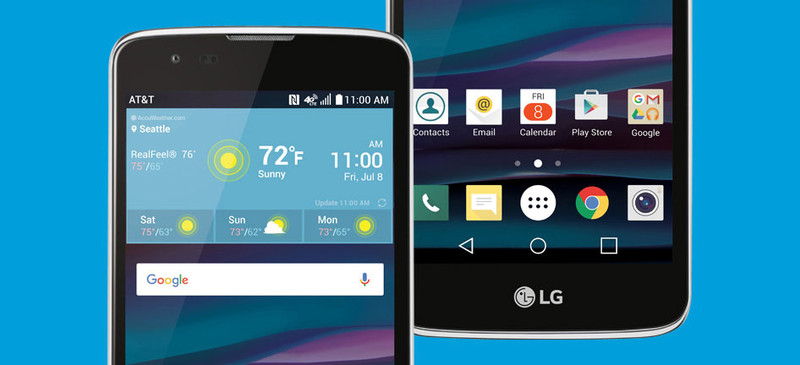
AT&T says the LG Phoenix 2 has a 5-inch display, with Android 6.0 Marshmallow pre-installed. The announcement says nothing about the phone’s processor, memory or storage but it does say it has an 8 megapixel rear camera, a 5 MP front-facing camera and a 2,125 mAh battery.
While the phone is supposed to go on sale today at AT&T’s site, as of this writing it has not appeared. We will update this post when the LG Phoenix 2 listing goes online.
 AIVAnet