


Pay what you want for the A to Z Microsoft Office Training Bundle
Microsoft Office is essential for well-rounded professionals to master. From Excel to PowerPoint, its programs provide you with the necessary tools to tackle the foundational operations of data-mastery spreadsheets, word processing, visual presentations and more.
With the immersive, 10-course A to Z Microsoft Office Training Bundle, you’ll master every aspect of Microsoft Office you can think of. You’ll learn Office essentials at your own pace, with hundreds of lectures and HD video presentations to guide you along the way.
Collectively, this group of courses is priced at £1101.83 ($1,590). But for a limited time on Pocket-lint Deals, you get to pick the price.
With the A to Z Microsoft Office Training Bundle, you’ll receive the following:
Microsoft Excel 2016 Basic Course
Advanced Excel 2016
Basic Microsoft Word 2016
Advanced Microsoft Word 2016
Learn Microsoft Outlook 2016 Course
Basic Microsoft PowerPoint 2016
Advanced Microsoft PowerPoint 2016
Advanced Microsoft Access 2016 Course
Basic Microsoft Access 2016 Training
Learn Microsoft OneNote 2016
Choose your own price and set your own pace with the A to Z Microsoft Office Training Bundle. For any price you choose, you’ll receive the Basic Microsoft Access 2016 Training and the Microsoft OneNote 2016 courses. Beat the average price and unlock all ten courses!
Get started today on Pocket-lint Deals.
Google’s iOS keyboard is the GIF and emoji app of my dreams
I just deleted the Giphy app from my iPhone. This is notable because I adore GIFs. I find a deep, slightly perverse, pleasure in sending texts full of those little moving pictures to my loved ones, and the Giphy app streamlined my image-hunting process tenfold. But now, it’s gone from my home screen, deleted forever because I found something that makes texting with GIFs even easier. I found Gboard.
Let’s not get melodramatic here: Gboard is simply Google’s new iOS keyboard. It’s not an app that will change your life or make your surly traditionalist uncle see the true value of technology, but it’s a welcome addition to my own texting routine. Gboard features Google search right in the keyboard, plus the ability to hunt for emoji by name. There’s also the Glide Typing swipeable keyboard and, of course, GIF search.
The embedded Google search function is ridiculously handy. It brings browser searching straight to the keyboard, eliminating the process of closing the texting app, opening a browser, copying a link, closing the browser and finally pasting the information into a message. Instead, tap the G icon in the upper left corner of the keyboard and search right there for anything on the web, including weather reports, addresses, flight information and nearby cat cafes (hey, we said anything). Search results pop up in a single row of clickable cards; tap one and its headline and URL automatically populate in your message. If you want to add the actual card, just tap the card, tap the message field, hit “Paste” and voila!
Once you’ve searched for something, you’re able to toggle among web, image and GIF results via three icons under the row of cards. To add an image or GIF, tap the card you want and it’s automatically ready to be pasted, either as a boring static picture or a gloriously mobile, extra-short narrative experience. (Have I mentioned how much I love GIFs?)
But, that’s not the only way Gboard can add GIFs to texts. A small smiley face to the left of the spacebar brings up the standard iOS selection of emoji, plus the option to toggle to GIF search. Hit the “GIF” icon under those yellow smiley faces and search for whatever moving picture you’d like, or browse suggested searches such as “high five,” “thumbs up,” “shrug” and “mic drop.”

Even emoji are searchable in Gboard in a pleasantly natural way. Most icons seem to respond to a variety of terms — for example, searching for “Halloween” brings up a jack-o-lantern. The search even works with some misspellings and inaccurate predicted text. Not using the swipeable keyboard, I searched for “Halloweeb” and still received the happy little pumpkin, while “jack” brought up the pumpkin and the Union Jack. Using the swipeable keyboard, I accidentally searched for “punishing” and received a row of fists — and a jack-o-lantern at the very end.
Emoji search is a wonderful addition to my texting life, since I find scrolling through rows of vaguely sorted icons to be time-consuming and frustrating. Plus, Gboard suggests emoji even when you’re composing a text-only message. For example, I started asking my boyfriend if he wanted to get a burrito for lunch and the first suggested “word” under the message was the burrito emoji. We also messaged each other about butts for a while, which is when I realized the peach emoji actually represents a booty, not a vagina. The more you know, indeed.
Overall, the Glide Typing function is suitably responsive (this isn’t the first swipeable keyboard for iOS, after all), though I have to make sure the nail on my thumb doesn’t interfere with my actual swiping.
Gboard makes a lot of sense. I wouldn’t be surprised if it became the standard for keyboards in the near future — it’s a welcome upgrade based on how people actually send text messages. And GIFs. We can’t forget the GIFs.
Scientists held a secret meeting to debate creating synthetic human genes
On Tuesday, about 150 scientists, lawyers and entrepreneurs gathered at Harvard Medical School to discuss a future project to improve techniques to synthesize human DNA from chemicals. But they held the meeting behind closed doors, with explicit instructions not to contact the media, getting the scientific community in a tizzy. At the top of their worry pile is that the project will end up innovating new ways to make synthetic human genes, which could lead to them being used to artificially create humans.
Scientists Drew Endy of Stanford and Laurie Zoloth of Northwestern University criticized the meeting for keeping the debate private. Developing newer, cheaper techniques to synthesize human gene pairs would benefit science, but aspiring to recreate the full genome synthetically may have unintended consequences and scare away public funding, they argue. And if the meeting was about synthetic human genes, there should be a public debate on the morality of creating or editing human genes.
But synthetically creating life is not what they intend, said Harvard Medical School genetics professor George Church, one of the organizers of the secret meeting’s project. Instead, the project aims to improve techniques to synthesize long strands of DNA, Church told the New York Times, which could be applied to various animals, plants and microbes.
If folks were worried, it’s likely because the initial invitation to the Harvard meeting stated that the project’s primary goal was to “synthesize a complete human genome in a cell line within a period of ten years.” But its title was changed to “HGP-Write: Testing Large Synthetic Genomes in Cells,” reflecting the project’s nature as a follow-up to the Human Genome Project, which completely mapped the full human genome by 2003. The originally-stated goal was a bit of aspirational sensationalism, said the organizers — a bit of moonshot hyperbole to boost enthusiasm in the scientific community.
Regardless, synthesizing base pairs of genes has only gotten cheaper, from $4 per pair in 2003 to $.03 today. Synthesizing all three billion pairs in the human genome would still cost $90 million now, but the per-pair cost is expected to continue dropping.
Source: The New York Times
Apple Confirms Music Deletion Glitch, Says Fix Incoming in Future iTunes Update
Apple today confirmed reports of an issue that causes music from personal collections to be deleted, telling The Loop it only affects a small number of users and that a fix is incoming in an iTunes update next week.
“In an extremely small number of cases users have reported that music files saved on their computer were removed without their permission,” Apple said. “We’re taking these reports seriously as we know how important music is to our customers and our teams are focused on identifying the cause. We have not been able to reproduce this issue, however, we’re releasing an update to iTunes early next week which includes additional safeguards. If a user experiences this issue they should contact AppleCare.”
Last week, debate raged over the supposed glitch after Vellum’s Jake Pinkstone wrote a blogpost complaining that Apple Music had deleted 122 GB of his personal music collection without his permission after he joined the service. The deletion occurred after Pinkstone had his music library scanned by Apple to make his collection available across his devices.
Confusion ensued after Pinkstone was told by an Apple Support Representative named Amber that Apple Music’s matching system was “functioning as intended.” When asked whether Apple Music was supposed to delete his personal music without his permission, Amber responded “yes.” Amber’s statement, however, was inaccurate according to Apple’s own support document.
While the causation of the bug is still unknown, as Apple has failed to reproduce the issue, the company’s statement suggests Apple has narrowed down the issue to iTunes rather than the Apple Music service. It’s unclear whether the fix will arrive with a minor or major iTunes update. However, one possibility is iTunes 12.4, which will include a minor redesign and arrive in the next couple of weeks, according to a MacRumors source.
Tags: iTunes, Apple Music
Discuss this article in our forums
TAG Heuer Connected Watch review – CNET
The Good The TAG Heuer Connected has striking, aggressive looks, it’s made from luxury materials and the fashionable name of its maker will appeal to those of you looking for the finer things in life.
The Bad It’s extremely expensive yet functionally offers nothing that you won’t find on Android Wear watches that cost a fraction of the price.
The Bottom Line The TAG Heuer Connected is the most fashionable way of adding smart functions to your wrist. But it’ll cost you a hell of a lot for privilege.
Visit manufacturer site for details.
So you want a smartwatch, but you don’t want a tech brand name like LG or Samsung clashing with your fancy suit? Cast your eyes, then, over the TAG Heuer Connected.
The Connected’s chunky, angular titanium body and thick rubber strap gives the watch a striking look I’m very keen on. It’s certainly more aggressive-looking than the sleek simplicity of the Apple Watch — in fact with a range of great-looking TAG Heuer watch faces to choose from (styled after the company’s analogue watches), you might not think it’s a smartwatch at all. It’s a big guy, though, so those of you with more dainty wrists will want to try before you buy.
 View full gallery
Andrew Hoyle/CNET
Running the same Android Wear software as the LG G Watch or Moto 360, it connects to your phone (either Android or iPhone) and shows incoming notifications, steps taken and a wide variety of other information from. There are about 8,000 apps that work with Android Wear watches now, but they all essentially function as a second screen for your phone.
You swipe through the notifications — shown as “cards” on the screen — using the round 1.5-inch touchscreen. It’s bright and responsive, and the 360×360-pixel resolution is sufficient for reading texts (although close up you can see individual pixels). I’d like to see a higher resolution, given the high price.

View full gallery
Andrew Hoyle/CNET
Which brings me on to my final point: the price. The watch costs a whopping £1,100 in the UK, $1,500 in the US and AU$2,000 in Australia. That’s a lot to pay for a watch that does the same as the Moto 360, which costs only £229 or $300 (it’s not yet available in Australia).
As a sweetener though, TAG Heuer has a scheme that allows you to trade in your Connected watch after two years, pay an extra £1,000, $1,500 or AU$2,000 and swap it for a mechanical watch, exclusively reserved for those of you who bought the Connected model. It’s difficult to say whether this is a good deal or not, but it does at least mean that you’ll have a watch to use long after the technology inside the Connected has become obsolete.
There’s nothing wrong with the Connected watch itself. It’s beautifully designed and those of you who want a fashionable name on your wrist, as well as a fancy new gadget, should at least go and take a look at one in a store. There’s just no escaping that massive price tag though. If you’re more excited about the smart features than the fancy name, save your money and go for any of the cheaper options.
HTC 10 vs Nexus 6P
Buy the Nexus 6P
Buy the HTC 10
In the current smartphone landscape, metal is the way to go for a device to be considered “premium,” and pretty much every flagship incorporates metal into their designs, be it in the form of metal frames and glass or plastic backings, or with full metal constructions. However, as the company would gladly remind you, HTC was the first to this party, starting with the One M7, and with continuing refinements and improvements to the overall package, what we get with their latest high-end offering is the greatest and most complete HTC smartphone yet.
- HTC 10 review
- Nexus 6P review
On the other hand, Google, along with various hardware manufacturers, initially had a difficult time defining what the Nexus program should be. After the budget-friendly Nexus 5, the Nexus 6 was Google’s first attempt at bringing a truly high-end smartphone to the market, but that unfortunately meant that the key factor of affordability went by the wayside. However, 2015 is when Google seems to have got it right, with consumers given two devices to choose from. For those with budgetary concerns, the Nexus 5X is the way to go, and with the metal-clad Nexus 6P, manufactured by Huawei, Google finally has on offer a truly compelling flagship that can stand tall against its competition.
HTC’s newest, and arguably greatest, offering goes up against the best Nexus device yet, as we take an in-depth look at the HTC 10 vs Nexus 6P!
Buy the Nexus 6P
Buy the HTC 10
Design
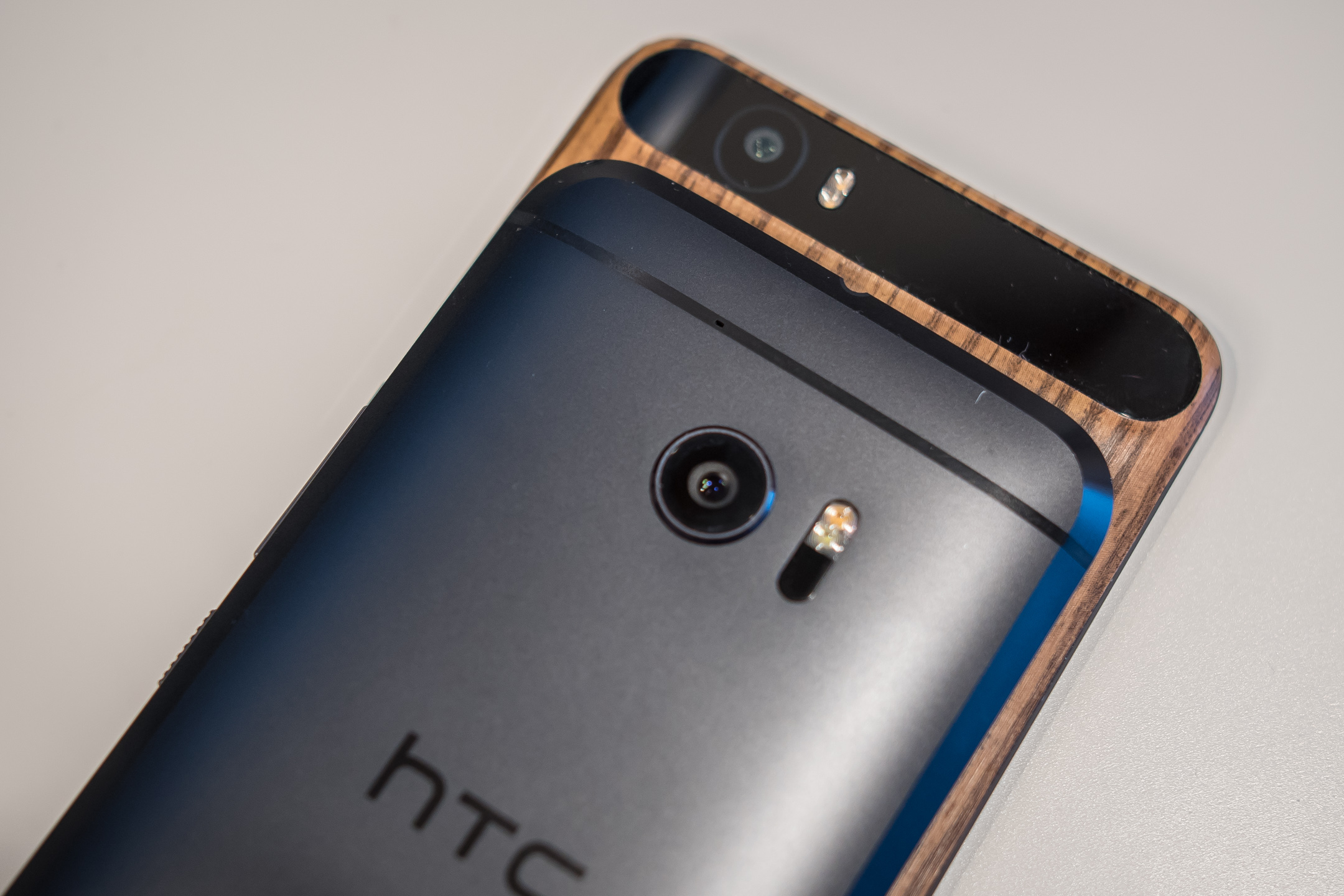
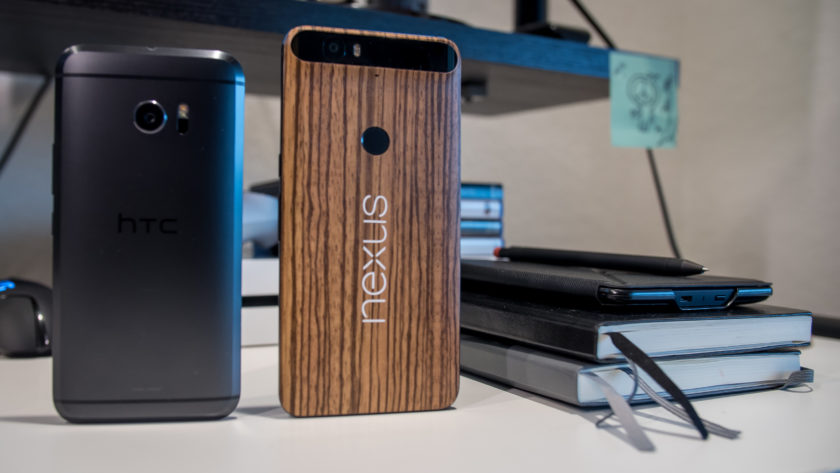
Before getting started, I have to mention that my personal Nexus 6P has been skinned to have a wooden look on the back, but for this comparison, we will take into consideration the device as it is out of the box. Metal is the name of the game with both smartphones, as they take metal to different places in their design.
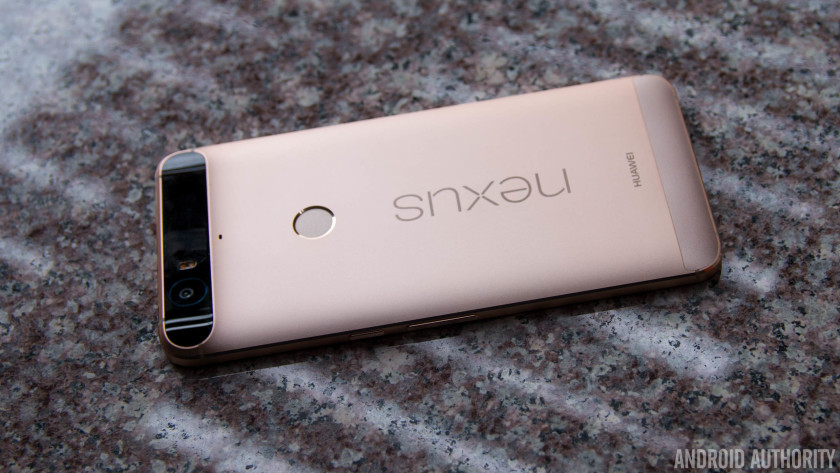
The Nexus 6P without a skin
The Nexus 6P employs a full metal unibody construction with a glass bump area at the top on the back that houses the camera setup, and this has certainly been a polarizing design element. Some consider it a fashionable choice, others consider it an ugly one. Ultimately, we do think that it looks quite good and is a nice touch that makes it stand out from the competition.
With a 5.7-inch display, the Nexus 6P is understandably taller, wider, and also heavier, than the HTC 10, but Huawei has done a great job with keeping the overall footprint compact enough to allow for manageable one-handed usability. The Nexus 6P is also symmetrical up front, with speakers above and below the display for a dual front-facing speaker setup, something that is unfortunately no longer available with the HTC flagship.
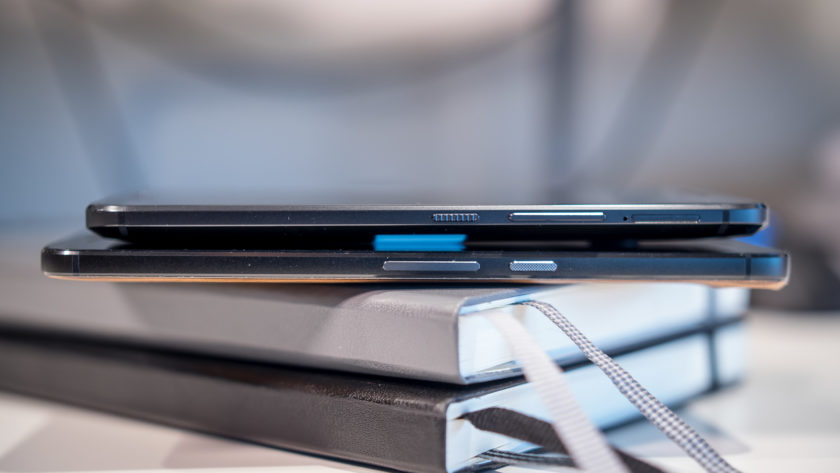
The HTC 10 brings some subtle changes to a design language that we’ve already loved with previous generations. While there is still a certain familiarity when looking at the back of the phone, HTC has added a bit of girth all the way around the edges. The chamfered edges allow for a silhouetted effect that is subtle but looks great, and does enough to differentiate the HTC 10 from its predecessors.
The HTC 10 is a little wider than it should be, but because of its smaller size overall, this device certainly offers the better handling experience when compared to the Nexus 6P. However, in both cases, the metal does make both smartphones quite slippery, which can take some getting used, and you are likely better off using a case that allows for more grip to keep this beautifully designed smartphones in pristine condition.
Display
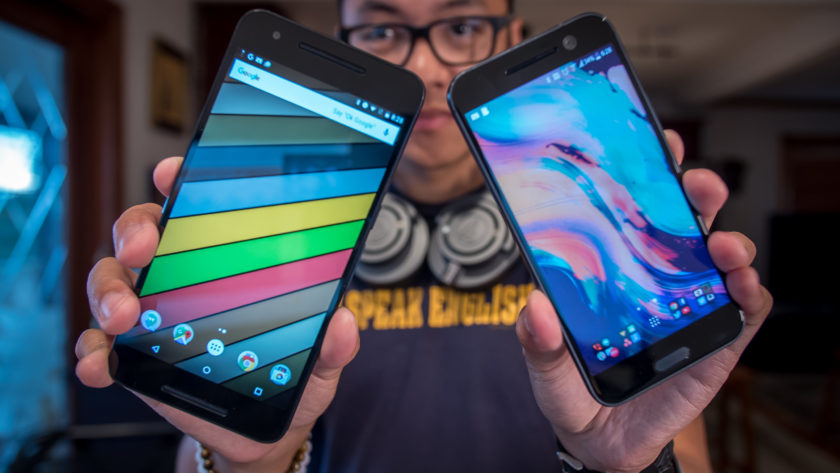
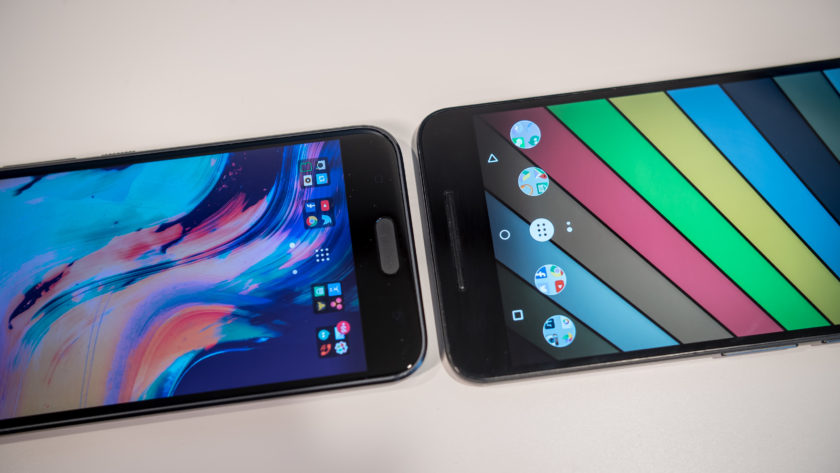
The HTC 10 comes with a 5.2-inch Super LCD 5 display with a Quad HD resolution, resulting in a pixel density of 565 ppi. This display adheres to the HTSC standard, and does so while providing impressive saturation and overall performance. HTC claims that the screen has low latency when it comes to your touch and what happens on the screen, and while this may not be something that is easily noticeable, it’s still a positive with regards to the performance of the phone.
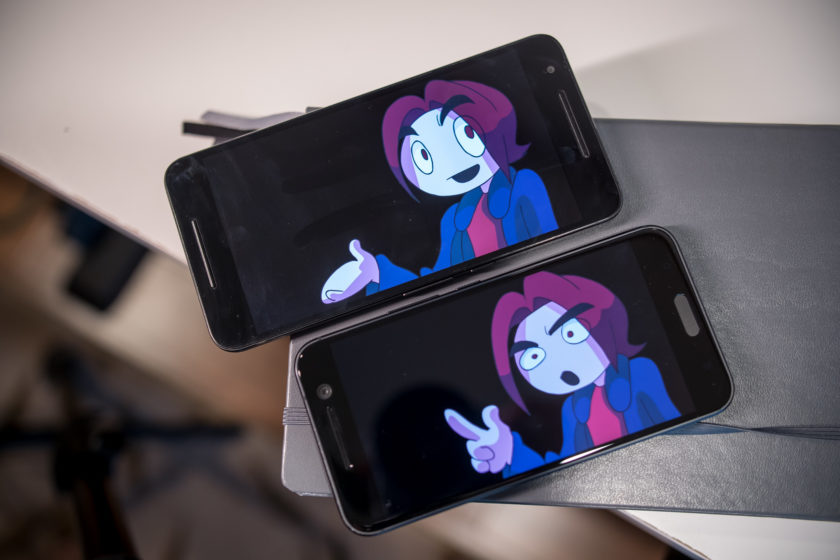
The Nexus 6P is not behind at all when it comes to the display, featuring a 5.7-inch AMOLED screen, also with a Quad HD resolution, resulting in a pixel density of 518 ppi. With an AMOLED display, you are going to get the expected deep, inky blacks and much higher saturation. However, in this comparison, there isn’t as much of a discrepancy between the two. Media consumption and gaming can be more enjoyable on the larger screen that is available with the Nexus 6P, but when it comes to the general viewing experience, both displays do an excellent job.
Performance
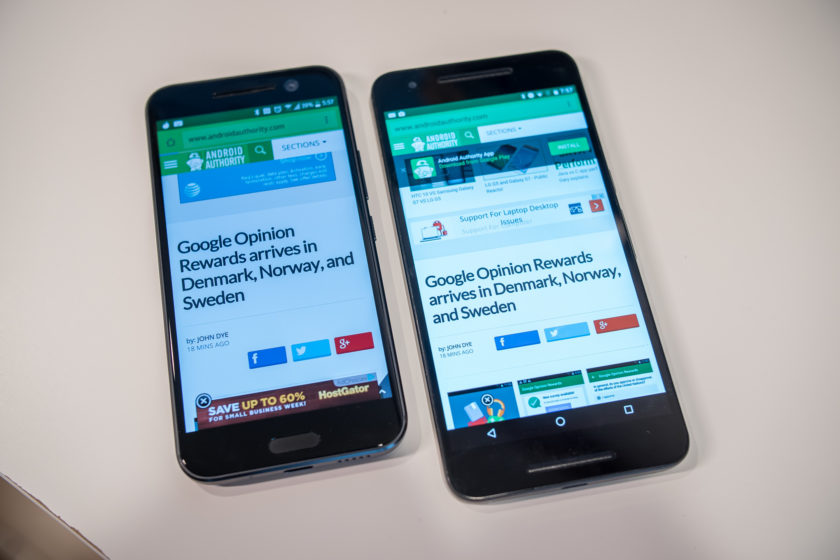
Performance is another area where you will not see a lot of difference between the two smartphones, given that the Nexus 6P was launched in the latter half of 2015, but the HTC 10 does see the benefits of being a newer release. The Nexus 6P comes with an octa-core Qualcomm Snapdragon 810 processor, clocked at 2 GHz, and backed by the Adreno 430 GPU and 3 GB of RAM, while the HTC 10 is powered by the quad-core Qualcomm Snapdragon 820 processor, clocked at 2.15 GHz, and backed by the Adreno 530 GPU and 4 GB of RAM.
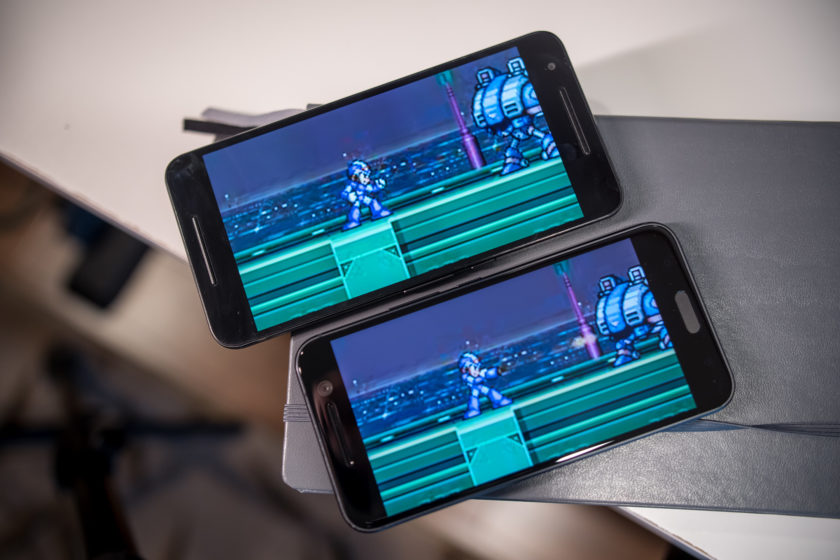
The HTC 10 is obviously going to be faster, but there isn’t that much of a difference when it comes to real world performance, with the additional gig of RAM that the HTC flagship packs being the only real differentiator. That’s not to say that the Nexus 6P will get overwhelmed easily even if you have a number of apps running in the background simultaneously, but for those of you who are spec hungry, 4 GB of RAM is what you will need. The overall performance is fantastic with both smartphones, helped along by the streamlined software experiences that is available with these smartphones, but more so in the case of the Nexus 6P, that is running stock Android.
Hardware
As is the case with any current generation flagship smartphone, both devices come with fingerprint scanners, but with different implementations. In the case of the Nexus 6P, the scanner is found on the back, placed ideally to be within easy reach of an index finger, and can be used to quickly wake and unlock the phone in one go. The fingerprint scanner of the HTC 10 is found up front, embedded into the capacitive home key, and is as fast and accurate as the sensor of the Nexus 6P.
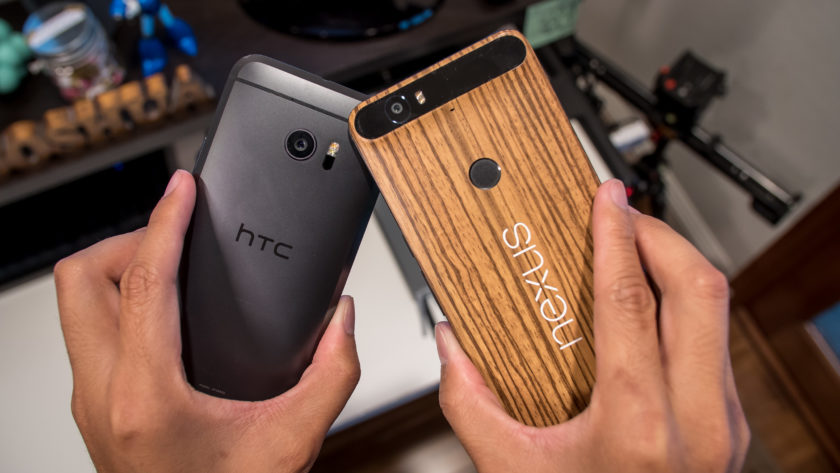
32 GB and 64 GB are the built-in storage options available with the HTC 10, and you do get expandable storage via microSD card for up to an additional 200 GB. On other hand, the Nexus 6P also adds a 128 GB version, but with no expandable storage available, users are dependent on getting one of the larger storage options, and paying the associated premium, to cover their needs. Both devices come with a standard suite of connectivity options, but with the larger focus on audio, the HTC 10 also adds Air Play support.
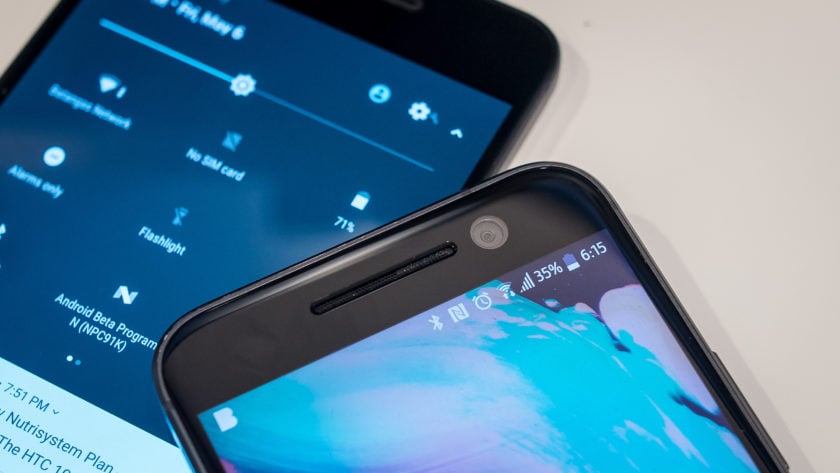
Speaking of audio, the Nexus 6P comes with a feature that was originally one of the biggest selling points of previous HTC flagships, but is no longer available with the HTC 10 – dual front-facing speakers. With the HTC 10, you now get one speaker above the display, that is coupled with a woofer at the bottom. This does mean that the lows and mids are better, but it certainly doesn’t get as loud as the dual front-facing setup of the Nexus 6P.
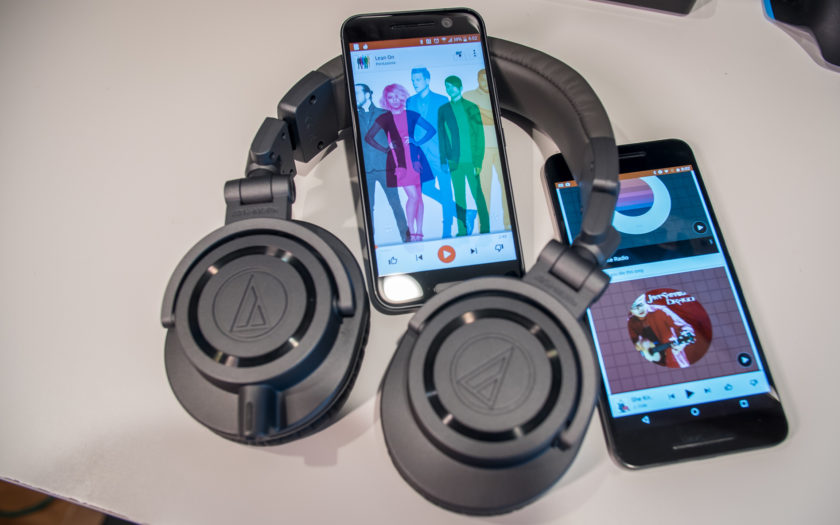
However, it’s when you plug headphones in to the HTC 10 that BoomSound earns its name. BoomSound here is Dolby enhancements, along with audio profiles that can be created by answering a few questions, or by actually going through different frequencies, using more advanced tutorials. Once everything is set up, audio sounds amazing with the HTC 10. A 24-bit DAC provides even clearer audio and a wider sound stage with good headphones, and an amp allows for the loudness that other smartphones can’t really provide, which includes the Nexus 6P.
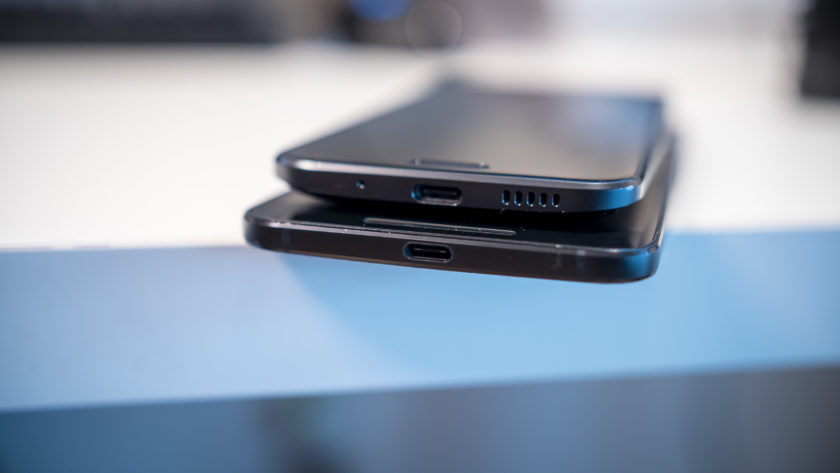
The larger 3,450 mAh battery of the Nexus 6P allows for more longevity when compared to the 3,000 mAh unit of the HTC 10, with the former providing up to two full days of use, especially if you stretch it out using the Doze feature that is built into Android 6.0 Marshmallow. With the HTC 10, the battery life can be pushed to about a day and a half, and getting a full day of use with more than average usage isn’t going to be an issue with either smartphone. Both smartphones come with USB Type-C ports, USB 2.0 in the case of the Nexus 6P, and USB 3.1 with the HTC 10, as well as fast charging capabilities.
Camera
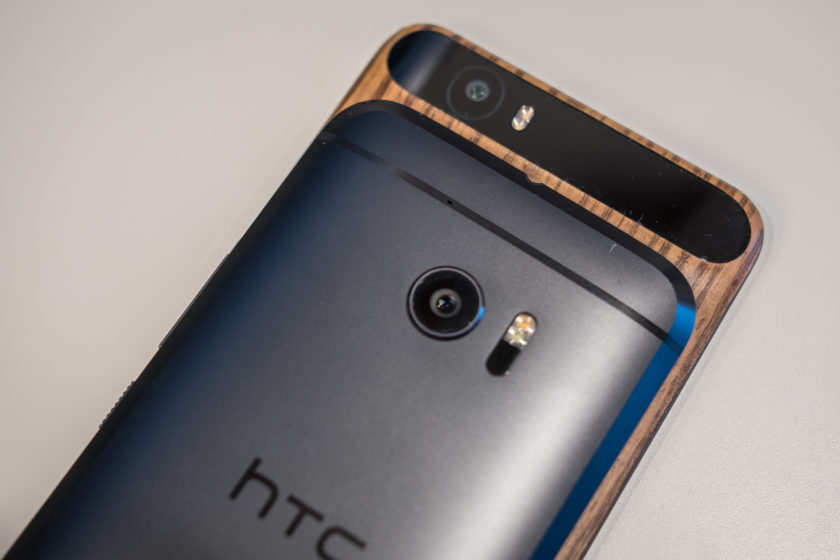
The Nexus 6P comes with a 12 MP rear camera with a 1.55µm pixel size, and a f/2.0 aperture, OIS, and laser auto focus system. The spec sheet of the HTC 10 is mostly identical, save for the f/1.8 aperture.
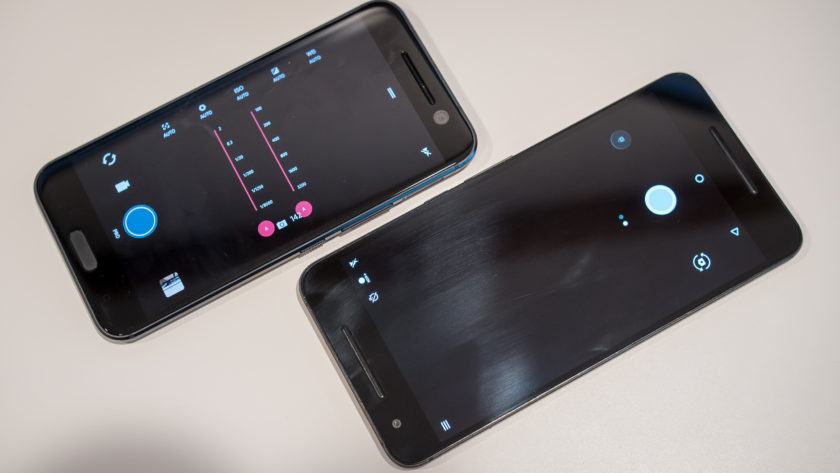
Simplicity is the main focus when it comes to the respective camera applications, with HTC further streamlining the camera app to make it easier to use. Of course, it doesn’t get any simpler than the Google camera app available with the Nexus 6P, which doesn’t come with a lot of modes, but also lacks a Pro mode, which is something that is available with the HTC 10, allowing for granular control over various settings.
HTC 10 camera samples

Optical image stabilization is also available with the front-facing camera of the HTC 10, which is a first for any smartphone. This means that you will get better looking selfies in lower-light conditions, but the availability of OIS also allows for better video capture when using the front-facing camera. It doesn’t make a particularly significant difference, but it is something that is noticeable when comparing video captures side by side, and is a subtle and small change that HTC does deserve recognition for.
Nexus 6P camera samples

The HTC 10 did receive a few software updates to improve the performance of the camera, and we will go in-depth with these changes in an upcoming feature focus. With both of these cameras being quite similar, it is a toss up between them in terms of image quality. You will see a brighter exposure in the shots taken with the Nexus 6P, with the HTC 10 dialing it back with the updates. In low-light conditions is where you will see a noticeable difference, with the HTC 10 opting for a warmer color temperature. However, with both cameras, you do sometimes end of up with grainy and noisy photos in poor lighting conditions.
The HTC 10 also has its advantage when it comes to sound, with the ability to record hi-res audio regardless of whether you are using the front or back camera. However, this does mean that processing the videos requires some tinkering, as we found that the .mkv files that the HTC 10 creates have to be tinkered with before they are recognized by most video editing software.
Software
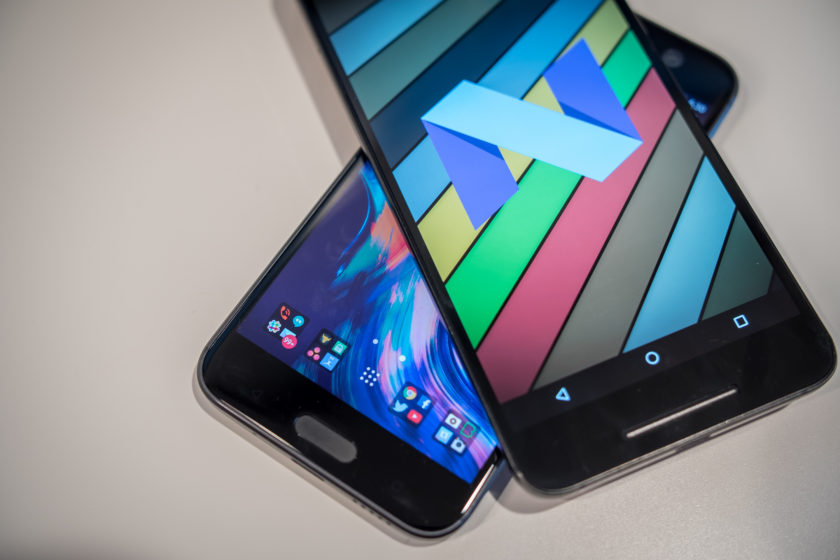
On the software side of things, both smartphones are running Android 6.0 Marshmallow. HTC Sense isn’t drastically different from stock Android, especially when compared to the Samsung and LG smartphones out there. In this case, some differences are seen, since I am using the Android N beta version on the Nexus 6P, which is one of the advantages of the Nexus line.
Any Android purist will know exactly what to expect from stock Android, with the new features including Doze and Google Now on Tap, which allows for easy Google searches regardless of where you are in the phone. A lot of users enjoy stock Android because of how simple it keeps things, with functionality being the priority. HTC Sense doesn’t add a whole lot to the formula either, which is one of the best parts about it.
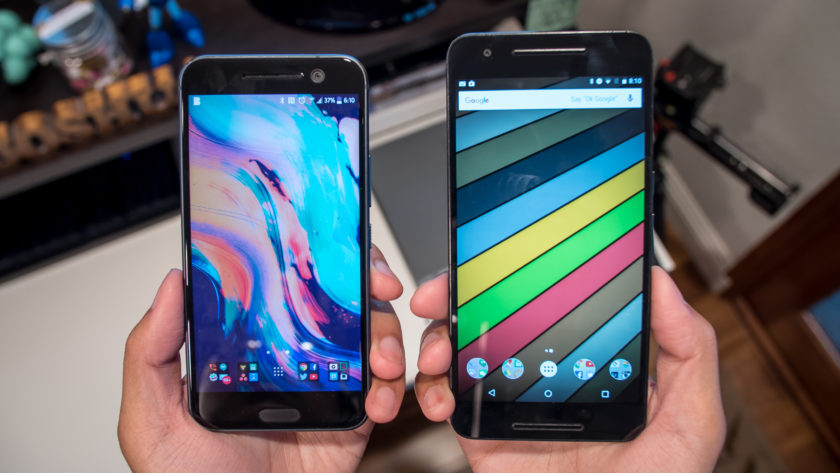
Sense is far more utilitarian when compared to TouchWiz or the LG UX, and aside from BlinkFeed, everything is quite familiar. There aren’t many extra features, and there are no longer any app redundancies either. For example, if you have Google Photos, you don’t get the HTC Gallery, and if you use the HTC Messages app, you are not going to have Google Messenger. HTC Sense uses a dark theme of sorts which is easier on the eyes, but there is a Themes engine available if you are looking to change the look. Overall, function is definitely king no matter which of these versions of Android you use. So, while we do love stock Android, you won’t find yourself looking to replace HTC Sense out of the box with a third-party launcher.
Specs comparison
| Display | 5.2-inch Super LCD5 display Quad HD resolution, 565 ppi |
5.7-inch AMOLED display Quad HD resolution, 518 ppi |
| Processor | 2.15 GHz quad-core Qualcomm Snapdragon 820 Adreno 530 GPU |
2 GHz octa-core Qualcomm Snapdragon 810 Adreno 430 GPU |
| RAM | 4 GB | 3 GB |
| Storage | 32/64 GB expandable via microSD up to 200 GB |
32/64/128 GB not exapndable |
| Camera | 12 MP rear camera, f/1.8 aperture, 1.55µm pixel size, OIS, laser autofocus 5 MP front-facing camera, f/1.8 aperture, OIS |
12 MP rear camera, f/2.0 aperture, 1.55µm pixel size, OIS, laser autofocus 8 MP front-facing camera |
| Connectivity | Wi-Fi 802.11 a/b/g/n/ac Bluetooth 4.2 GPS + GLONASS NFC USB 3.1, Type-C 1.0 connector |
Wi-Fi 802.11 a/b/g/n/ac Bluetooth 4.2 GPS + GLONASS NFC USB 2.0, Type-C 1.0 connector |
| Battery | 3,000 mAh non removable |
3,450 mAh non removable |
| Software | Android 6.0.1 Marshmallow HTC Sense UI |
Android 6.0.1 Marshmallow |
| Dimensions | 145.9 x 71.9 x 9 mm 161 grams |
159.3 x 77.8 x 7.3 mm 178 grams |
Gallery
Pricing and final thoughts
The HTC 10 is available for the premium monthly installment rate with the various network carriers, but can also be picked up unlocked, priced at $699. On the other hand, the Nexus 6P is currently available for the far more affordable $399, which is a great prospect, given that you are able to get a solid high-end flagship for a lower price, while providing a lot of the same features.
So there you have it for this closer look at the HTC 10 vs Nexus 6P! These two smartphones actually have quite a bit in common, and if you are in the market for a metal clad device, it doesn’t get better than these two. The Nexus 6P is a steal at its current price point however, but the HTC 10 has a couple of compelling features that make it stand out, with the main one being the audio experience it provides. The HTC 10 camera has also seen some improvements following a few software updates, and these changes are something we will explore further in an upcoming feature focus.
Buy the Nexus 6P
Buy the HTC 10
Atari has ‘Missile Command’ and ‘Centipede’ movies in the works
Atari just won’t give up the dream of bringing its iconic gaming properties to the big screen. Back in 2010 we heard the company was shopping a Missile Command movie around Hollywood. It even set up the project with Fox in 2011 — but that appears to have gone nowhere. Now, Deadline is reporting that Atari is partnering with Emmet/Furla/Oasis films for Missile Command and Centipede films. The idea might seem crazy, but let’s not forget that we recently lived through a big budget adaptation of Battleship.
Paradoxically, an existing brand, even one that hasn’t been culturally relevant for decades, is far more tempting to Hollywood studios than something original. Never mind that it’ll be pretty tough to form a coherent narrative out of something like Centipede, a game that involve shooting endless waves of bugs.
I wouldn’t fret too much about these projects, though. Given how much trouble Atari has had with getting Missile Command made, there’s a good chance neither of these adaptations will ever see the light of day.
Source: Deadline Hollywood
The best unlocked Android phones for Canada

If you want to buy contract free in Canada, we’ve got you covered.
Not everyone wants to be locked into a carrier contract, especially if you’re the type of buyer who changes their phone more frequently than once every couple of years. There’s a lot of positives to paying for a phone up front and leaving yourself much more flexibility when it comes to your cellular plan.
What you can buy unlocked, and what’s worth buying unlocked, varies from market to market. Here we’ll be rounding up some of your best options if you’re up in Canada. This list will continually be updated as newer, more awesome phones become available.
So let’s get to it.
Nexus 6P

Pros
- Great build quality
- Excellent camera
- Pure Google software
Cons
- It’s pretty big
- Lacks wireless charging
- A little bit slippery to hold
One of the best unlocked Android phones is also one of the most expensive. But with a top-notch spec sheet and plenty of power, the Nexus 6P is well worth the money. The good news is that you can pick up the Nexus 6P from various carriers for a heavily reduced cost on a 2-year contract, and thanks to deals with the carriers, the phone still comes unlocked.
Upon opening, you’ll find a sleek, if slightly oversized, metal frame, a great 5.7-inch display, lots of battery life, and an excellent fingerprint sensor. Huawei did the building, but it’s Google, with its always-latest Android software, that really sells the experience here.
Check out our full Nexus 6P review
See at Amazon See at Google
Nexus 5X

Pros
- Strong camera
- Great fingerprint sensor
- Clean software experience
- Quick updates
Cons
- Occasionally sluggish performance
- Weak speaker
- Uninspired hardware
.
While it hasn’t aged particularly well, the Nexus 5X, like its popular predecessor, is a good choice for Canadians looking for a small handset with the best software experience on Android.
Hampered somewhat by a mediocre 1080p display and plenty of software slowdown, the Nexus 5X does benefit from the same 12.3MP rear camera sensor as the more expensive Nexus 6P, and its rear fingerprint reader is just as fast.
Read our Nexus 5X review
See at Amazon See at Google
OnePlus X

Pros
- Looks fantastic
- Simple, good looking software
- Full HD 1080p display
Cons
- Weak camera
- Lacking some important radio bands
- Below average battery life
It may not be at the top of many peoples’ lists, but the OnePlus X (or OnePlux as I always write it) is stylish, affordable and oh-so-easy to hold in one hand. The metal-and-glass finish is attractive, if fingerprint-prone, and the Snapdragon 801 chip is not quite as spritely as it once was, but OnePlus has optimized the heck out of its Oxygen OS software, which bears more than a passing resemblance to the stock Android we tend to love.
At $329 CAD, the OnePlus X more than meets its value, especially if you’re looking for a small handset with big potential.
See more in our OnePlus X review
See at OnePlus
ZTE Axon

Pros
- Great build quality
- Excellent audio performance
- Interesting dual-camera setup
Cons
- Uninspired software additions
- Aging hardware
- Design may not appeal to everyone
A surprising addition to the list, the ZTE Axon is one of the nicer devices we’ve seen from the Chinese OEM. With an emphasis on style over substance, the hardware lacks punch around the edges — the Snapdragon 801 chip isn’t as new as it used to be — but the all-metal body and excellent speakers make this $400 well worth the price.
See at Newegg
Moto E (2015)

Pros
- Great price to performance ratio
- Easily customizable with colourful bands
- No-frills Android software
Cons
- Low-resolution screen isn’t particularly bright
- Software updates not a sure thing
- Weak camera
The second-generation Moto E is one of those inexpensive devices you can safely buy for a kid or accident-prone family member and not worry about its long-term outcome. With a one hand-friendly enclosure made from rugged plastic, it is a great starter phone, and is fast and fluid enough for anyone looking for a cheap no-frills Android experience.
See more in our Moto E review
See at Staples
OnePlus 2

Pros
- Great price to performance ratio
- OxygenOS has great update track record
- Nice build quality
Cons
- Disappointing camera
- Some software gimmicks
- Poor speaker output
The OnePlus 2 is a known quantity at this point: great performance and a so-so design coupled with an intriguing, if flawed, take on Android with OxygenOS. But there is something encouraging about a small Chinese OEM providing meaningful features built atop stock Android, many of which are quite useful. Elsewhere, a whip-fast fingerprint sensor and interesting take on the iPhone’s hardware mute button make the device more compelling.
At $449 CAD, the OnePlus 2 is about as cheap a device as you’re going to get for its spec sheet, but the disappointing camera may push some people towards more expensive options like the Nexus 6P.
See more in our OnePlus 2 review
See at OnePlus
HTC 10

Pros
- Beautiful QHD display and excellent build quality
- Nice effort to de-bloat Sense
- Lovely sound and camera
Cons
- Expensive
- Some software gimmicks
- Battery issues
The HTC 10 is, at $999 CAD, expensive when purchased unlocked, but you get one of the best Android phones currently available. Featuring a stunning all-metal chassis, the device improves in every way over its predecessor, especially in the camera. Elsewhere, smaller changes, like a custom DAC that puts it heads and tails above its Android competitors in the sound output department, will appeal to audiophiles.
See more in our HTC 10 review
See at HTC
3 Android weather apps to use instead of Dark Sky – CNET
 Enlarge Image
Jason Cipriani/CNET
Dark Sky is arguably the best weather app on iOS, and now it’s available on Android. Exciting, right? Not for some. The app’s subscription model is upsetting some users; just read through the one-star reviews on the Play store and you’ll quickly see users are upset about the $2.99 yearly subscription fee.
If you’re one of those who left an angry review, all is not lost. The developers of Dark Sky have long made the same data source used in the iOS app available to developers. In turn, Android developers have integrated the service with various weather apps. Granted, the experience isn’t going to be identical to the Dark Sky app, but that’s not necessarily a bad thing.
Below are just a few of the apps that use Dark Sky’s Forecast.io API to provide weather forecasts.
Weather Timeline

Enlarge Image
Screenshot by Jason Cipriani/CNET
Weather Timeline is one of the more visually appealing apps that use Forecast’s data. The interface strings together a series of cards, each one including various information such as current weather, upcoming precipitation, and an hour-by-hour breakdown.
The hyperlocal push alerts triggered by rain or snow that have made Dark Sky so intriguing? Weather Timeline has those too. An Android Wear app and watch face are also included.
Download Weather Timeline from the Play store.
Arcus Weather

Enlarge Image
Screenshot by Jason Cipriani/CNET
Arcus Weather looks and behaves somewhat similar to the official Dark Sky app. You can view a radar map, current conditions, an hourly forecast or the next week’s daily forecast. Using a series of graphs, Arcus Weather plots out what you can expect for precipitation and temperature, with the added option of receiving alerts when precipitation is near.
The core functionality of the app is free, but you’ll have to be OK living with ads and the inability to set the refresh frequency. An in-app purchase of $2.73, £1.90, or AU$3.76 unlocks all features and removes ads.
Download Arcus Weather from the Play Store.
Forecaster

Enlarge Image
Screenshot by Jason Cipriani/CNET
Forecaster is a bare-bones weather app, lacking push alerts or any sort of fancy radar display. Taking a minimal approach to its design, Forecaster displays the next week’s forecast with color-coded lines indicating what to expect.
The minimal approach to the app also means it’s completely free, but you have the option to donate to the developer or enable ads within the app to help pay for access to the Forecast.io servers.
Download Forecaster from the Play store.
Bonus suggestion
Forecast.io is more than just the name of the data service, it’s a true website that looks and acts nearly identical to Dark Sky. You can use Chrome to visit Forecast.io and view the same information Dark Sky users have, in a similar layout. You can even create a shortcut on to the site on your home scree for easier access.
Granted, you’re going to give up push alerts for rain or snow, but it’s almost like using the app. Almost.
Best accessories for your Galaxy S7 or Galaxy S7 edge

From car mounts, to screen protectors, to wireless chargers, here are the best accessories for the Galaxy S7 and S7 edge.
Every year without fail, more accessories come out for the latest Samsung devices, and this year is no different. There are cases, car mounts, and new and sparkly things you can use with your new phone . Here’s a roundup of some of the best add-ons for your new Galaxy S7 or S7 edge.
- Samsung Gear VR
- iOttie Easy One Touch XL car mount holder
- Samsung Gear S2
- Samsung S-View Clear Flip Cover for S7 edge
- Samsung Galaxy S7 Wireless Charging Battery Pack Cover
- Samsung Fast Charge Battery Pack
- Samsung LED View Cover for S7 edge
- Samsung Fast Charging Qi Stand
- UAG Samsung Galaxy S7 Edge feather light composite ICE military drop-tested phone case
Samsung Gear VR

Samsung has teamed up with Oculus to bring the world of virtual reality to Galaxy owners with the Gear VR.
If you like to be on top of the latest technogy, then this virtual reality headset is a must-have.
Pair your Galaxy S7 or S7 edge with the Gear VR and enjoy the media on your phone or from your favorite streaming service as if you were in it.
See at Samsung
iOttie Easy One Touch XL car mount holder

With those hands-free laws about phone use while driving, it’s worthwhile getting a car mount for your new Galaxy S7 or S7 edge.
iOttie’s Easy One Touch XL features a simple lock and release system that holds your device firmly in place while allowing you to release it with an easy one-finger push. Its powerful suction cup can attach to a dashboard, windshield, or any other surface that is flat and smooth. Additionally, it can turn a full 360 degrees, so that you can change your phone’s orientation from portrait to landscape and back again quickly and easily.
Another great thing about this car mount is that if you need to re-locate it, you can return the suction cup to mint-condition by rinsing it in warm water and letting it air dry.
See at Amazon
Samsung Gear S2

The Samsung Gear S2 is a smartwatch that works especially well with the Galaxy S7 or S7 edge. It lets you view text alerts, calendar alerts, and much more right from your wrist.
Choose between the elegant classic flavor, or the futuristic regular edition. With its genuine leather band and fancy watch faces, the Classic edition looks like a high-end watch. On the other hand, the regular edition looks like a watch of the future, all sleek and clean-lined. Both flavors have the same functions, so choosing between them is a matter of aesthetic appeal.
Samsung Gear S2
Samsung Gear S2 Classic
Samsung S-View Cover

The innovative S-View Cover case gives you access to the most-used features of your phone right through the front cover.
Using the Samsung ID chip, the case relays information to the front cover from your phone’s screen. This lets you to cool things like answer calls without having to flip the front cover open. All of the important notifications, like text message and calendar alerts are just a swipe away, too. You can even access the camera from the front cover.
Finally, this case installs with a snap and protects the vulnerable corners of your device with hard plastic bumpers.
See at ShopAndroid
Galaxy S7 Wireless Charging Battery Pack

If you frequently find that your GS7 runs out of juice too early in the day, you’ll benefit from this battery case from Samsung.
While it does add some bulk to the phone, it doesn’t add as much as other battery cases thanks to Qi wireless charging — all of the phones ports and jacks remain unobstructed.
The case will get your phone up to about 50% charge in 2 hours, which isn’t as fast as plugging it into an outlet but you still have the ability to use the phone just as you would normally while it’s charging up this way.
See at Amazon
Samsung Fast Charge Battery Pack

With its 5700mAh capacity, this battery pack is ideal for charging your Galaxy S7 or S7 edge quickly on the go.
It comes in gold and silver and is capable of charging your phone to 50% in half an hour — that’s pretty fast.
And because it has a standard USB port on it, you can connect any length of cable you want, as well as charge any other phone — not just a Galaxy S7.
See at ShopAndroid
Galaxy S7 edge LED View Cover

Are you looking for a cool case for your Galaxy S7 edge? Then look no further than this neat case from Samsung.
You don’t have to flip open the cover in order to check your phone’s status. LED lights on the cover give you information about missed calls, incoming calls, and even the music that’s currently playing on your device. Furthermore, you can see text notifications and find out the status of your battery, too.
Another useful feature of this case is that inside the cover is a pocket where you can store up to three credit cards and some cash.
See at ShopAndroid
Samsung Fast Charging Qi Stand

Over time, micro-USB cables can wear out from consistent use. Give them a rest by wirelessly charging your Galaxy S7 or S7 edge on a wireless charging stand.
With this stand, charging your Galaxy S7 or S7 edge is as simple as placing it on the stand. That’s it. No more fumbling around trying to connect your charger to your phone in the middle of the night. No more messing around with wires (except the one supplying power to the charging stand, of course). Neat, huh?
Now the Galaxy S7 and S7 edge can use any wireless charger, but Samsung’s Qi charging stand offers even faster charging speeds. This Fast Charge wireless charger will fill up the phone about 40% faster than a standard wireless charger — that’s a big deal.
See at Amazon
UAG ICE S7 Edge Case

If you want a case that can take a beating while maintaining the GS7 edge’s sleek profile, UAG’s composite ICE case is a great choice.
As its name implies, this case is very light, but extremely durable. It features an armored shell combined with a soft internal sleeve to protect your expensive phone from impacts. In addition to this, the case is quite grippy, which is helpful given the fact that the S7 edge’s curves make it prone to slipping out of your hands.
For even more recommendations on great cases, check out our best clear cases article over here.
See at Amazon
Samsung Galaxy S7 and S7 edge
- Galaxy S7 review
- Galaxy S7 edge review
- Here are all four Galaxy S7 colors
- Should you upgrade to the Galaxy S7?
- Learn about the Galaxy S7’s SD card slot
- Join our Galaxy S7 forums
AT&T
Sprint
T-Mobile
Verizon
 AIVAnet