


Button, begone — LG unveils next-gen fingerprint sensor under glass
You nearly can’t (or at least, probably shouldn’t) buy a high-end phone today that doesn’t have a fingerprint sensor. And LG has just unveiled the next generation of the security feature, getting rid of the button and moving things under the phone’s glass.
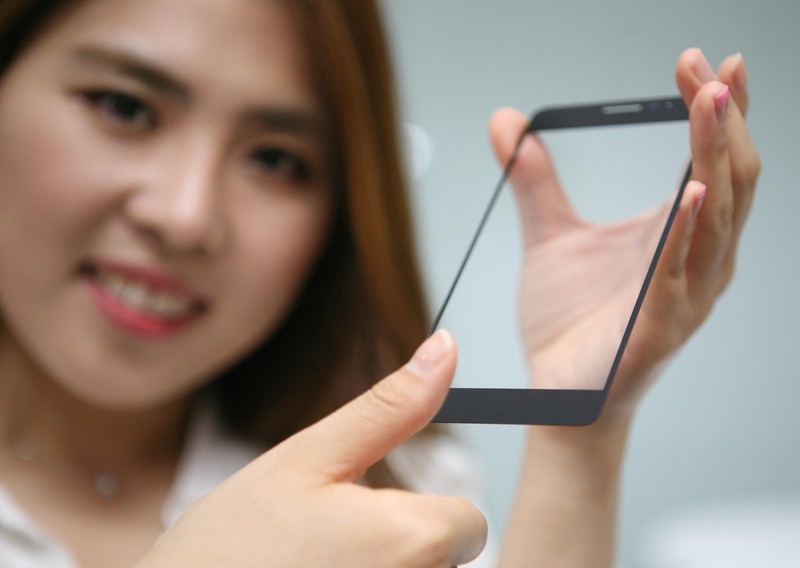
The development comes out of LG’s Innotek branch, and incorporates the same secure fingerprint authentication without the need for a separate sensor — just place your finger on a designated portion of the glass, and the phone with authenticate. It all comes together by shaving out a small 0.3 mm thick portion of the underside of the glass and placing the sensor underneath, letting it do its job without being exposed directly to the finger.
Not only does this give manufacturers more options when it comes to placement of fingerprint sensors, it also makes it easier to have a waterproof phone with fewer openings. The fingerprint sensor itself isn’t exposed to damage, either. Naturally LG isn’t saying just when this advancement will make it out into consumer-facing phones, but we have to expect it’ll be out in the world rather soon.
Press release:
LG Innotek unveils innovative fingerprint sensor module without button
Seoul, Korea, May 2, 2016 – LG Innotek (CEO Jongseok Park) today announced an under glass fingerprint sensor module. It means you just placed your finger on the cover glass of the phone and then it identifies your fingerprint.
This module gives the freedom of the smartphone design and even enhances the user-friendly function, for example, waterproof or protection from any damage.
Previous ‘button type’ modules required you to press a finger on a raised square or circular button for your fingerprint to be read exactly, so the sensor was usually mounted on the front, rear or side buttons of a smartphone.
LG Innotek cut a shallow furrow of 0.01inches (0.3mm) thick on the lower backside of the cover glass and installed the fingerprint sensor inside of it with using their supreme precision and combination technology.
With this module, the sensor is not exposed to the outside of the device, so manufacturer can produce a sleek designed smartphone. Fingerprint recognition area also can be indicated by various patterns up to design of complete product.
High-strength cover glass protects the sensor and prevents it from coming in direct contact with water or damage from scratches.
At the same time, the new module secured the fingerprint recognition accuracy compared to the button type. The new module has a false acceptance rate (FAR) of 0.002%. The FAR is the probability that the system falsely recognizes someone else’s biometric information as that of the user.
LG Innotek developed a proprietary adhesive to be used to attach the sensor to the glass, securing the commercialization scale of the durability including high impact absorption.
The adherend side of the sensor and glass is only 0.0098inches (0.25mm) thick, but it endures impact of 4.6 oz (130grams) of the steel ball dropped from 7.9inch (20cm).
LG Innotek expects that demand for fingerprint recognition technology will dramatically increase due to the expansion of the mobile payment market, has a plan to secure the new customer.
Market research firm, IHS, reports approximately 499 million fingerprint sensors have been sold globally in 2015 and expects that number will increase to 1600 million units in 2020.
Changhwan Kim, Head of the company’s R&D Center said, “We are concentrating on all our resources to the development of the differentiated technology based on the creation of customer values.” “We will continue to provide convenient, safe, and pleasant user experiences by launching innovative product.”
SpaceX: our Falcon rockets are more powerful than we thought
If you thought SpaceX was already making a fuss over the capabilities of both its existing Falcon 9 rocket and the upcoming Falcon Heavy, you haven’t seen anything yet. The company has posted updated specs showing that both vehicles are more powerful than previously thought. A Falcon 9 is now known to be capable of hauling 50,265lbs to low Earth orbit, up from just shy of 29,000 pounds. The Falcon Heavy, meanwhile, will carry 119,930lbs instead of the previously promised 116,845lbs. Elon Musk chalks up the improved figures to more thorough testing — SpaceX hasn’t upgraded the hardware, at least not yet.
However, the private space firm is also raising expectations across the board. Musk plans to increase the Falcon 9’s rated liftoff thrust to 1.71 million (up from 1.3 million), and the Falcon Heavy will now put out 5.1 million pounds on liftoff instead of the earlier 4.5 million. That’s twice the thrust of any other rocket in service, the exec claims.
This is all good news for a company that wants to get to Mars in a hurry, but the proof will be in the pudding. After all, SpaceX has pushed back the Falcon Heavy’s first launch multiple times (now due for sometime in November). Although development appears to be winding down for that rocket, you’ll only know for sure what it and the uprated Falcon 9 are truly capable of when they leave the launchpad.
Falcon Heavy thrust will be 5.1M lbf at liftoff — twice any rocket currently flying. It’s a beast…
— Elon Musk (@elonmusk) May 1, 2016
Source: SpaceX, Elon Musk (Twitter 1), (2), (3)
Graphene e-paper is brighter and bendier
Who said that e-paper was old stuff? Certainly not China — the country’s Guangzhou OED Technologies has created what it says is the world’s first graphene-based e-paper. The extremely strong yet light material promises very thin screens that are both brighter and more flexible. You could get e-readers that are easier to read on a sunny day, for instance, or activity trackers that can put up with more abuse. It should even be less expensive, as graphene’s carbon is much easier to find than the exotic indium metal you see in conventional e-paper.
The main question is simply availability. The company expects to start production of graphene e-paper in a year, and it’s not clear just who’s lined up. You shouldn’t count on Amazon making a graphene Kindle, unfortunately. If the technology takes off, though, it could give e-paper some relevance in an era when it’s being crowded out by LCD- and OLED-based devices.
Via: DNA India
Source: Xinhua
Best car mounts for the Galaxy S7 and Galaxy S7 edge

Holding your phone while driving is a horrible idea. Get a car mount for your S7!
In many cases, it’s illegal for you to hold your cell phone to your ear while you’re driving, so a car mount is a great alternative. This way, you can throw up a Google Map before you embark and you’ll be able to following your path like you would on any GPS device.
Get yourself a Bluetooth headset (or, better yet, a car with built-in Bluetooth) and you’ll be able to answer calls, since pushing a button on your phone will be no different than pushing the buttons on your console.
If you’ve got the Galaxy S7 or S7 edge, then we’ve got the car mount roundup you’ve been looking for.
- Spigen Air Vent Magnetic Car Mount
- EnergyPal HC84K Car Mount
- Omaker 3-in-1 Universal Car Mount
- iOttie Easy One Touch Car Mount
- Zilu CM001 Universal Car Mount
- Spigen Style Ring
Spigen Air Vent Magnetic Car Mount

Gone are the days of gooey adhesives that muck up the inside of your pristine automobile. Magnets are where it’s at. No, the magnets won’t mess up your phone; you’ll just have easy on and off mounting, which is what we all want, isn’t it?
This Spigen mount has two sizes of slits to fit almost any car air vent and you can pop your S7 or S7 edge on in any orientation. All you do is stick the metal plate to the back of your phone’s case and boom, your phone’s magnetic and good to go any time. You can even take the mount with you and use it as a kickstand for when you’re watching videos on your phone.
Note: you should stick the metal plates to a case and not the back of the phone itself. If you need some help finding cheap cases, we’ve got another round-up with your name on it.
It should also be noted that having the metal plate on the back of your Galaxy S7 or S7 edge’s case will hinder wireless charging, so you’ll have to take it out of the case for that.
See at Amazon
EnergyPal HC84K Car Mount

This particular mount serves a dual purpose: it holds your phone and doubles as a car charger. The end of the mount plugs into your cigarette lighter and looks like most USB car chargers, but an articulating arm extends upward from the unit into a three-sided phone holder. It softly cradles your phone, leaving the bottom open so you can run your charging cable down to the USB ports.
This unit comes equipped with over-charge protection, so you won’t fry your phone if your car decides to short circuit on you. The gooseneck-style end can be rotated to any orientation, so you can view maps in landscape format if you fancy.
The only downside of this particular mount will be where your lighter plug is placed. If it’s kind of hard to get to, then this particular mount may not work out for you, since the neck is only about 5 inches long.
See at Amazon
Omaker 3-in-1 Universal Car Mount

This is perhaps the most versatile mount in our roundup, since it can be clipped to your air vents, mounted on your dashboard, or mounted on your windshield (if that’s legal where you are), with three different attachments.
It’s got a longer arm for your windshield, the classic suction cup base for the dash, and clips for your vents and you can rotate it 360 degrees. It cradles your phone on three sides with a soft grip that won’t damage your Galaxy S7 if you’re a sans-case type of person. A great feature is the one-touch press to release your S7 or S7 edge, so you’re not fiddling with it when you’re jumping out of your car in a rush.
See at Amazon
iOttie Easy One Touch Car Mount

This is one of those mounts with a sticky gel pad that you stick to your dashboard, so if you’re worried about damage, you may want to sit this one out. However, the nice part about it being a gel pad is its ability to stick to uneven and textured surfaces, making this mount ideal for even the most oddly designed vehicle interior.
You’ve got a telescopic arm that extends two inches and bends 180 degrees, to give you versatility in terms of where you stick your mount. It comes with a one-year replacement warranty, so if anything goes wrong, you just contact iOttie and they send you a new one.
If the gel pad on the back gets all dusty and gross and won’t stick anymore, you can just rinse it under warm water, let it dry, and it’ll be good as new.
See at Amazon
Zilu CM001 Universal Car Mount

The Zilu CM001 is a reinforced rubber and harder plastic mount that has a ball that lets you mount your Galaxy S7 or S7 edge in truly any orientation. This is probably the most inconspicuous mount in our round-up, with an arm that cradles each side of your phone, leaving the top and bottom open. So long as you’ve got it snugged up, there’s no worry of your GS7 or S7 edge slipping or sliding out while you’re driving.
This is a suction cup mount, so you’ll want to have it on a flat surface. One flip of the little switch and it comes right off, not greasy residue. Those of you with textured dashboards may want to reconsider.
See at Amazon
Spigen Style Ring

If you want to go as minimal as possible, then the Spigen Style Ring is the only way to go. It’s an adhesive piece, no bigger than an inch, that stick to the back of your phone, with an articulating ring that doubles as a kickstand (bonus!).
Then, there’s another piece, about the same size, that adheres to your dashboard or your console and you just hang the ring on it. That’s it. It takes up about as much space as the volume knob on your radio. If you’re taking some wild turns, it may jostle your phone out of place, but it’s otherwise quite secure, despite how it looks.
Make sure you stick it to your dash during warmer months, since the adhesive won’t really take in the dead of winter.
See at Amazon
Important to consider
Double-check the ol’ law where you are and make sure that it’s not illegal to mount anything on your windshield.
You’ll also want to consider the absorbency of your dashboard, since some adhesives may leave stains.
What’s your favorite?
Which car mount are you presently using for your Galaxy S7 or Galaxy S7 edge? Sound off in the comments below!
Samsung Galaxy S7 and S7 edge
- Galaxy S7 review
- Galaxy S7 edge review
- Here are all four Galaxy S7 colors
- Should you upgrade to the Galaxy S7?
- Learn about the Galaxy S7’s SD card slot
- Join our Galaxy S7 forums
AT&T
Sprint
T-Mobile
Verizon
Amazon Fire tablet’s price cut by $10 to just $39.99 for limited time
Amazon is currently selling its 7-inch Fire tablet for just $39.99, a $10 discount from its normal $49.99 price tag. Most of Amazon’s other tablets have discounts as well.

That price is for the base version of the tablet with 8GB of storage, but the recently launched version with 16GB of storage has also been discounted by $10, from $69.99 down to $59.99. The Amazon Fire HD 6 tablet’s price has been cut as well for a limited time by $30, with the 8GB version selling for $69.99 and the 16GB model selling for $89.99.
The Amazon Fire Kids Edition currently has a discount of $20, down to $79.99 and the Fire HD 6 Kids Edition’s price has been cut by $50, from $169.99 to $119.99. The 10.1-inch Fire HD 10 tablet’s price has been discounted by $50, from $229.99 down to $179.99. Finally, the 8.9-inch Fire HDX 8.9, with 64GB of storage, has a price cut of $80, from $479.99 down to $399.99.
Why you should try the 7-inch Amazon Fire tablet
See at Amazon
Best third-party wristbands for the LG Watch Urbane

You’ve already got sleek and sexy covered with your LG Watch Urbane. Now, accessorize.
We’ve reached a point where we can accessorize our accessories. The LG Watch Urbane is where fashion meets functionality in a big way, so why not continue to amp up the fashion with different bands?
You don’t have to stick to just LG’s bands. If you want to truly personalize your Watch Urbane, then you need to look at some third party options.
We’ve assembled a quick roundup of the best third party LG Watch Urbane straps out there. Strap in!
- MODE Band
- GadgetWraps silicone wristband
- Ritche mesh stainless steel wristband
- Barton
- Yesoo stainless steel wristband
- RaySun genuine leather brown wristband
MODE Band
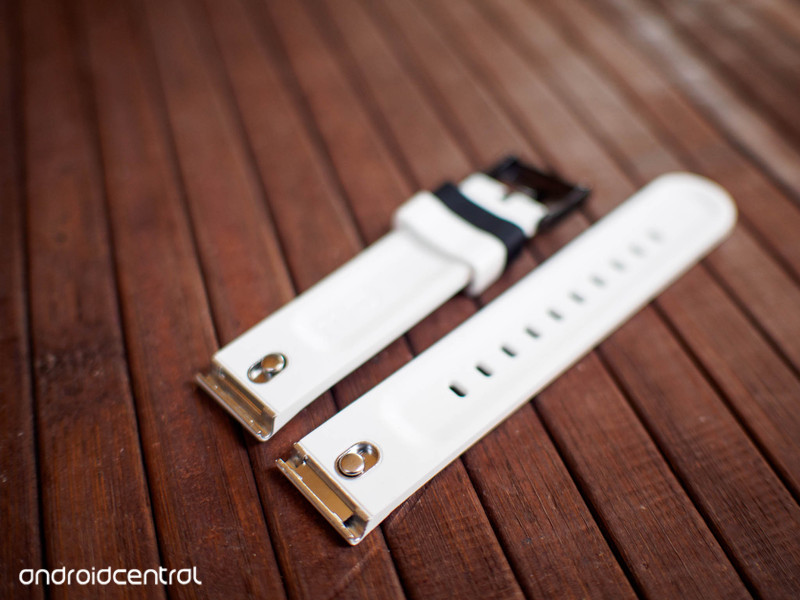
The days of annoying pins and cumbersome tiny tools are over! Google has released its MODE bands (currently only manufactured by Hadley Roma BND) and they might just be the most interchangeable watch bands of all time. At least for Android Wear. There’s a neat video on the MODE site that shows you exactly how these bands connect to your LG Watch Urbane, and we have to say, it’s pretty sweet.
Basically, all you do it remove the original pin that presently in your Urbane, then you add the MODE pin, slide your MODE band over the pin, and lock it shut, kind of like a carabiner. That’s it.
So, once you have 10 different bands (when cheaper ones become available; Hadley Roma’s models start around $50), you’ll be able to make a change on the fly with ease. Just remember that when you go to order yours you need the 22 millimeter band.
See at Google
GadgetWraps silicone wristband
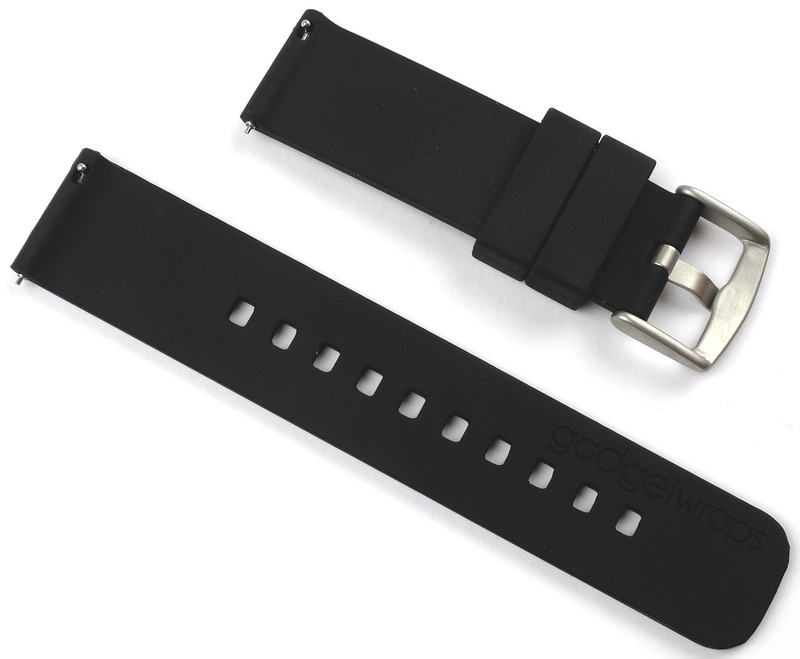
Let’s get things started with the most versatile of the wristbands we’ll discuss: the GadgetWraps silicone wristband. These bands are great for those who put comfort and durability above all else, but still want to maintain the dapper design of the LG Watch Urbane.
GadgetWraps are available in eight colors to match your style and with a price tag starting around $20, they won’t break the bank.
There’s also beauty in the GadgetWraps installation process, since they feature quick-release pins, which means no tool necessary.
Some of the bright colors might not really match the sophistication of the LG Watch Urbane, but, like I said, they’re there to match your style.
See at Amazon
Ritche mesh stainless steel wristband

The problem with many “cheap” mesh wristbands is that they can be incredibly inflexible to the point of not even forming to the contour of your wrist. You just end up with a weird square around your wrist.
No problem with the Ritche mesh band, which is super flexible and surprisingly comfortable. You do need a watch band too, but that’s provided and it means a little more security when you do attach it to the watch unit itself.
You’d probably want to pair this with the silver Urbane, though it may add some funky flair to the gold watch, again, depending on your style.
See at Amazon
Barton Quick Release
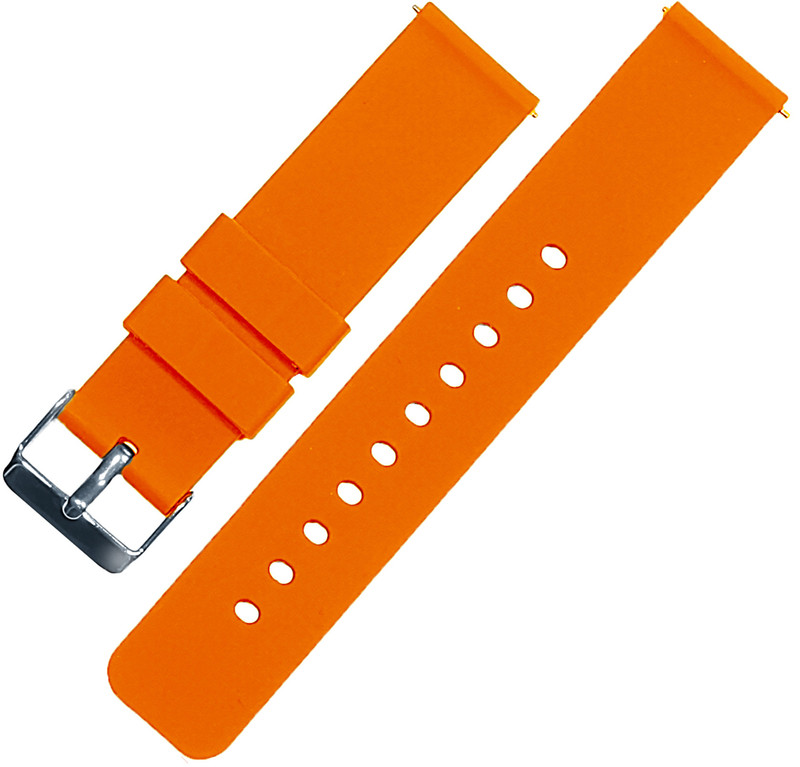
Add a big splash of color to your LG Watch Urbane, with Barton’s line of quick-release watch bands. They’re made of soft silicone, so they’re comfortable and won’t tarnish the way leather or metal bands will.
You can choose from nine colors, ranging from a very punchy bright orange to a more muted charcoal. Starting around $15, you can grab a few and switch them out daily, thanks to the quick-release – no need for annoying tools and tedious installation!
Barton also claims that their bands will fit 95 percent of wearers and that, if you happen to be in the 5 percent their bands does not fit, they’ll gladly refund your purchase.
See at Amazon
Yesoo stainless steel wristband

Getting back to a more traditional steel band, Yesoo offers a flashy band with a quick-release butterfly buckle, making this easy to put on and take off, with none of the painful pinching that can come with some other types of buckles.
The Yesoo band comes with the necessary installation tools and shouldn’t present too much of a hassle in that department, since it’s just like any other metal wristband. You can remove links if it’s initially too big and you’re on your way to shiny urbanity.
See at Amazon
RaySun genuine leather brown wristband

Let’s look at some brown leather, the way leather was meant to be (or so I’ve heard). This offer from RaySun is has an anti-slip texture and it’s waterproof, so it won’t dry and crack like leather generally does.
With the many buckle holes, this strap is designed to fit even the slimmest wrists, which makes it an ideal option for slighter folks. Like all the other bands we’ve discussed that are traditionally installed, RaySun provides all the necessary tools to get this breathable band on your LG Watch Urbane and out where everyone can ogle it.
See at Amazon
The Urbane Professional
Do you have a watch strap that you absolutely love that’s not on our list? Make sure to leave a comment and tell us which band you have and why you think your strap is the best one ever made!
Judge orders woman to unlock iPhone with her fingerprint
It’s still not perfectly clear whether or not law enforcement can force you to unlock your phone with your fingerprint, but an LA court isn’t waiting to find out: for the first time in a federal case, a judge has ordered a person to unlock her smartphone using her digits. The FBI obtained a warrant requiring that identity theft suspect Paytsar Bkhchadzhyan unlock her iPhone through Touch ID just 45 minutes after her arrest. While it’s not certain what the FBI was looking for, Bkhchadzhyan eventually pleaded no contest to the charge.
The authority to do this appears to be based around a blend of legal decisions. The Supreme Court has ruled that police can search your phone if they have a warrant, and that they can order you to produce fingerprints without a judge’s approval. However, it’s not certain that you can combine the two.
As the LA Times explains, there’s a dispute as to whether or not using your fingerprint to unlock your phone is a violation of the Constitution’s 5th Amendment, which protects against self-incrimination. While a fingerprint isn’t the same as testifying, unlocking your phone could be treated that way. Even with precedent from a 2014 Virginia case (which determined that fingerprints are okay, but passcodes aren’t) working in the feds’ favor, there’s no guarantee that police can order fingerprint access going forward.
Via: Christopher Soghoian (Twitter), The Verge
Source: LA Times
Phone call study concludes we can only have five best friends
The Sisterhood of Traveling Pants can only have one more BFF, according to a study by a group of British researchers. They include anthropologist Robin Dunbar, who pinpointed a correlation between a primates’ brain sizes and the sizes of their social circles. Humans, for instance, can only form meaningful relationships with up to 150 people. He believes that five of those make up one’s closest friends, followed by 10 more in the next layer, 35 in the third and 100 in the outermost one. There are some differences between introverts and extroverts, but they have the same number of what’s called the “Dunbar layers.”
For their study, the team analyzed six billion calls made by 35 million people and categorized relationships based on how frequently the subjects called each other. This was back in 2007, just a short while after Facebook opened to the public and Apple released the first iPhone, so phone calls were the most logical choice. They found that their subjects had an average of 4 people in their closest circle, 11 in the next, 30 in their third layer and 129 in their outermost circle of friends. Those numbers aren’t too far off from Dunbar’s estimates, and the team says they’re within the layers’ natural range of variation. So, if you just can’t feel as close to a new friend as BFFs 1 to 5, blame your brain.
Via: Technology Review
Source: Cornell University Library
Audials is a fantastic all-in-one radio app with style

Overview
When I first opened Audials, the first thing that caught my eye was the UI – tiled like Microsoft, with an Android-style hamburger menu; really crisp and easy on the eyes. When I started delving into the features, though, is where I was really blown away.
Features
Here’s the list of features that appears in the aforementioned hamburger menu: Radio (complete with recording), Podcasts, Voice and Video Recorder, Alarm Clock, Sleep Timer, and Equalizer. I’ll go into my thoughts on each of them, below, but just a spoiler alert – they’re all pretty great.
Radio/Podcasts
An app that revolves around audio entertainment better have a radio in it; Audials delivers. It works great on WiFi or data, has nearly 100,000 local and nation-wide channels, and has built-in functionality to record stations when you can’t listen to them live. That last one is big for people like my Dad, who never, ever miss Tom Sullivan (for instance). Podcast-wise, it’s as simple as typing the podcast into the search bar or browsing the genres, then adding it to your list.

Main Screen.

Options. Options everywhere.
Video/Voice Recorder
Exactly what it sounds like. No real bells and whistles here, but it works exactly as you’d expect it would – thumbnails of your recordings show on the main screen under radio and podcasts.
Alarm Clock & Sleep Timer
These are two features that I’ve been looking forever since I made my way to Android on my old MyTouch 3G. Setting an alarm in the Alarm Clock allows you to specify a radio station to start playing at a specified time- a feature that was standard on old clock radios but absent ever since. Sleep Timer could probably be inserted into the Options menu instead of being its own item, but it’s still extremely useful; set a time limit for which the app will automatically close itself when idle. The default is 45 minutes, but any increment of time will do nicely.
 Tweak them bars!
Equalizer
I won’t lie to you, I have no idea how to use an equalizer. I see a series of MHz increments and a series of sliders that correspond to each, but other than that I’m clueless. My go-to move for any equalizer is to play a song and play with the sliders until it sounds awesome – that move worked just fine in Audial.
Conclusion
If you’re in the market for a podcast or radio app, I highly recommend Audials. Other apps have similar functionality, but as far as the combination of features and performance goes, I – personally – prefer it over the competition.
Android N Developer Preview 2 – let’s talk bugs and issues

We’ve had a few weeks with the second Android N Developer Preview under our belt — I’ve been running it on my Nexus 5X using either Project Fi or T-Mobile — and that’s plenty of time to talk about how it’s working out so far. So let’s talk about our bug lists!
Before we go in too deep, remember that what we have from Android N so far is clearly labeled a developer preview. Nobody at Google (or anyone else) is claiming that it’s ready for prime-time, and bugs should be expected. In fact, things that may have worked well on the last preview can be completely broken. That’s what test software is all about — turning ideas into code, building it, and seeing what crashes and burns and what works as expected.
One other thing — if you’re testing, be sure to fill out bug reports! To do that, check the AOSP issue tracker for Android Dev-preview-N here. If you see your bug, star the item. If your bug isn’t listed, fill out the form here to have it added. And please, don’t post things like “PLZ BETA FOR NEXUS 5!!!!!!” or anything that isn’t related to issues with the beta OS. All that does is take time away from the people working on the bugs, who aren’t likely the people deciding which phones and tablets have the software available.
Enough of this, let’s talk about how it works!

In a lot of ways, Preview 2 (and that’s what I’m going to call it for clarity’s sake) is better than the first one was. In other ways, it’s worse. I no longer crash my 5X any time I switch from T-Mobile LTE to WiFi when WiFi calling is enabled. My videos don’t flicker every time I try to play them back (though I do get a black screen sometimes). I get less connectivity errors when using apps that are just a wrapper for a webpage or webapp. Chrome crashes less (but still crashes too often). A big deal to a friend where there were some pretty crazy mathematical errors in fairly simple code that was causing out of bounds exceptions has been fixed. Lots of good stuff there, and it shows that there have been a lot of changes to the existing code outside of any new additions.
I also really dig the new folder style. Call me crazy, but I like the way it looks like a little porthole into the app drawer. Launcher shortcuts are cool, even though I probably wouldn’t use them. Too much on my home screen makes me a little twitchy (I have a folder that holds every app on my Robin, and am so glad the app launcher isn’t going away). Platform-level Vulkan support is also pretty awesome to look forward to.
But to me, it’s still not ready for a daily driver. I’m having three major issues that are show-stoppers and make Preview 2 something I can’t depend on:
-
Most of the time, I can’t make or receive a phone call. The phone rings when one is coming in, it can make outgoing calls just fine, but chances are either there’s is no sound on my end or no sound on the other, or possibly both. I’ve seen some people say this happens to them, some say it doesn’t and some say it was doing it but randomly stopped.
-
I’m getting far too many random restarts. I reach for the phone and I see that I need to enter my PIN to restart Android. That tells me the phone restarted. I can shut that off so it can start back up, but then I won’t know that it restarted. I need a phone that’s dependable, because I’m a dinosaur and still talk on the phone.
-
Crazy lag and overheating when apps that display media crash. I’m not alone here, either. When something like Google Photos or YouTube crashes, I know I’ll have to reboot. If I don’t, things will quickly slow to a crawl and the phone gets hot. Some process is running wild under the hood, and keeping the CPU pegged. A reboot fixes things until the next time an app crashes.
Of course, there are plenty of expected issues with apps, but there’s a good chance the apps themselves are at fault (at least partially). I’ve got no problem if a developer is taking their time and using these previews to be able to release something polished and ready when Android N officially launches.

If you only have one phone (and it happens to be in the Beta program and has an N Developer Preview available) I won’t suggest you install it unless you’ve the time and patience to flash back and set everything up again. Maybe next time.
What about you folks? What bugs are you seeing, which ones have been fixed and are you using Preview 2 as your daily driver? Hit the comments and share your experiences and tell us if it’s working reliable for you. I’m especially interested in what folks using a Sony Xperia Z3 have to say, so be extra sure to holler if that’s you!
 AIVAnet