


Five for Friday: Apps to get your sports fix
The world of professional sports has become the linchpin in many lives around the world. From the “Big 5” – American Football, Baseball, Basketball, Hockey, Football – to the more obscure Golf, Lacrosse, NASCAR, and others, sports are everywhere. We all have our individual preference when it comes to the industry – I, personally, am a huge NBA fan – but one thing binds us all in sports fandom; the need to keep up with it all.
Some of us are one-team guys (Go Kings). Some of us follow anything within our geographical location – which, if you live in the San Francisco Bay, for instance, can get pretty wild; between the San Francisco Giants, the Oakland As, the Oakland Raiders, the San Fransisco 49ers, the Golden State Warriors and the San Jose Sharks, you’re looking at following six teams just in the primary four sports in the U.S. Some of us follow teams that represent where we come from. Perhaps you moved as a child, and you root rabidly for the team the plays in the area from whence you came.
But I digress; we all need a way to keep track of all these sports, and let’s face it; the newspaper doesn’t cut it anymore. So, without further delay, I present the top 5 apps for tracking all your favorite sports teams;

the Score
- Plenty of sports to choose from, including some of the more obscure leagues like Lacrosse and Canadian Football League.
- Statistics screen only provides basic stats for each player, nothing in depth.
- Play-by-Play screen for each game.
- Configurable homescreen widget.

CBS Sports
- Fantasy scoring and management.
- TV/Radio schedule (input your TV provider for a custom schedule).
- Score overview for the day.
- Ad-Supported
- Large database of sports from which to choose.
- Optional CBS Sports sign-in.

ESPN
- Ad-Supported
- Disappointingly limited selection of sports.
- Video Highlights
- ESPN Streaming built into the app.

Yahoo Sports
- Yahoo Fantasy management and scoring.
- Database of sports competitive with CBS Sports and MSN Sports.
- Limited stats page.
- Ad-Supported
- Dedicated “Tweets” page for each game.

MSN Sports
- Massive sports database – the biggest on this list.
- Windows 10 UI (which, on Android, is rather startling)
- Limited app options.
- Very, very limited statistics.
Disagree with any of the selections you see here? Think we missed one? Let us know in the comments below.
The post Five for Friday: Apps to get your sports fix appeared first on AndroidGuys.
T-Mobile will roll out the Marshmallow OTA for the HTC One M9 on Monday, February 16

Earlier today, HTC’s Vice President of Product Management, Mo Versi, took to his official Twitter profile to reveal that the Taiwanese company has at last received approval of the long-awaited Marshmallow update for the HTC One M9 from T-Mobile. The carrier will, begin pushing out the over-the-air upgrade to all carrier-branded variants of the handset starting Monday, February 16.
As far as added functionality goes, this update brings the latest build of Android 6.0.1 to the handset, which introduces greater control over application permissions, an enhanced battery-life through Doze, a redesigned application drawer and Fingerprint-authentication for payments, together with the usual plethora of bug fixes, stability improvements and speed optimizations that we’ve come to expect from all major firmware releases.
Happy Friday! Good news for T-Mobile HTC One (M9) owners! We've received technical approval on Marshmallow, with the OTA to start on 2/16.
— Mo Versi (@moversi) February 12, 2016
http://platform.twitter.com/widgets.js
The upgrade should take around an hour to download and install on your smartphone. However, the amount of power your device has at the time of installation will play a huge role — so try and keep it plugged into the wall to take advantage of faster processing speeds. The entire procedure will also be significantly quicker if you’re connected to a Wi-Fi network as they’re always almost faster than the speeds mobile ISP’s provide.
If you’re new to the Android operating system and haven’t yet had the pleasure of installing a software update, here’s what you’ll need to do on February 16. You’re going to need to open up the Settings application, scroll right down to the bottom and tap on About Device, select the System Updates subheading, then tap Check for Updates. You should then notice a small smartphone icon appear in the notification panel; indicating that the upgrade is downloading.
Come comment on this article: T-Mobile will roll out the Marshmallow OTA for the HTC One M9 on Monday, February 16
Deal: 32GB ASUS ZenPad S 8.0 going for $149.99 at Best Buy

You know, there was a time when some of my friends joked that Best Buy was the place that you went to window shop for things to order off Amazon or Newegg. At the time, it seemed Best Buy consistently charged more than the everything-from-A-to-Z online retailer, but Best Buy has definitely been ramping up their game. Right now, for instance, a 32GB Asus ZenPad S 8.0 is going for just $149.99. That undercuts Amazon’s current listing of $180 by thirty bucks.
The Asus ZenPad S 8.0 is a device that fared well in our review at Android Authority. We found its 4GB of RAM to be up to par with what you would be expecting from a mid-to-high-end Android tablet in 2015, and the battery performed very well. Tablets aren’t renowned for their high quality cameras, but the ZenPad S 8.0 is a bit of a cut above the rest in that regard. Dual front-facing speakers are a nice perk, and those who like to tinker and really make their devices their own will be pleased by how malleable the software is. 32 GB is a solid amount of hard drive space, but if you want more, you can always take advantage of the microSD expansion slot.

What’s really impressive is how smooth the performance is for how little you’re paying, especially with this deal from Best Buy. However, if you’re one of those folks who puts a really high premium on image quality, you might want to take this deal with a grain of salt. Although it’s not something that every user would notice, the software does tend to over-sharpen pictures, and video smoothing can’t be turned off. Although we did note that the software is very customizable, this device comes loaded with quite a bit of bloatware, so you may have to roll up your sleeves and do some housekeeping before the tablet will really shine.
 See also: ASUS ZenPad S 8.0 review
All in all, however, it’s a very slick device especially for the price range, and we didn’t give it anything lower than an 8.0 in any category. If you want to make a more informed decision before you buy, check out our official video review. If you’re ready to make the leap, click the button below to buy the ASUS ZenPad S 8.0 from Best Buy.

What are your thoughts regarding this tablet? Are you a current or previous owner? Give us an idea of what your experience has been like in the comments below to help other readers make a better decision about whether or not to jump on this deal.
Get it from Best Buy
 Next: Best cheap Android tablets (January 2016)
HTC One M9 on T-Mobile, Verizon to get Marshmallow next week

If you’re like most Verizon or T-Mobile users with an HTC One M9, then you’ve been sitting alone in your darkened apartment, sighing heavily and staring out a window trickled over with rivulets of rainwater for at least the past month and a half solid. Yes, it was all the way back in December when Marshmallow began rolling out for unlocked variants of your device, but here you’ve been stuck with Lollipop well into the new year. Fear not! Your time of banishment is coming to an end, because HTC has announced that Marshmallow is coming to your One M9 starting next Tuesday!
 See also: Android 6.0 Marshmallow updates roundup – February 12, 2016
That’s right. Mo Versi, product manager at HTC, revealed via tweet that technical approval has been received for T-Mobile devices, and that the rollout would begin next week. Shortly thereafter, Versi confirmed that Verizon variants of the device too were slated for Marshmallowy rewards on the same day, February 16, 2016. These two carriers will be tied for second-place with the Marshmallow rollout on this device, as Sprint customers have been quietly gloating for the past week or two.
Happy Friday! Good news for T-Mobile HTC One (M9) owners! We've received technical approval on Marshmallow, with the OTA to start on 2/16.
— Mo Versi (@moversi) February 12, 2016
Are you an HTC One M9 owner on T-Mobile or Verizon? Let us know if you’re stoked about receiving the Marshmallow update in the comments below. Those of us who are still using Lollipop like Amish people can perhaps get some vicarious joy out of your excitement.

How to gain unauthorized fingerprint access to an LG V10
Youtuber Matt OnYourScreen has discovered a pretty unsettling way to bypass all of the security on an LG V10 and potentially gain unlimited access to the device in the future. Any LG V10 running Nova Launcher is vulnerable to this attack, and all it takes is about 30 seconds of access to the device.
To be fair, the circumstances have to be pretty perfect to be able to pull off this trick on a V10. Here’s the breakdown of how it works, but bear in mind we are in no way condoning the malicious use of this work-around. Rather, we want to make it clear how easily this vulnerability can be exploited and demonstrate the steps necessary to protect your device from exploitation.
 See also: MediaTek-related bug leaves KitKat devices vulnerable
Say someone lends you their smartphone for a minute or two. Maybe they’re showing off some cool app, maybe you’ve asked to make a call… either way, all you need is a few moments in which you have access to the V10’s screen and they aren’t paying attention.
If this person isn’t running Nova Launcher, the game’s up here. This vulnerability is only known to work on this particular launcher so far, so if your quarry is operating Google Now then they are safe from your malicious intent. However, if they are running Nova Launcher, you can tap the Home button while on the main home screen, then tap the Widgets option. Add a Nova Action widget to the home screen, and then choose the activity “com.lge.fingerprintsettings.”

Source: Matt OnYourScreen
Pause here for a second, because this is where the vulnerability exists. Through the normal Settings menu, it’s impossible to access this particular activity before going through a security checkpoint and confirming either a fingerprint or PIN. However, since Nova is able to ignore the normal menu flow that leads to this screen, it creates a situation where a user can add their own fingerprint to the list of allowed fingerprints without ever proving that they have authorized access to the device.
The widget on the homescreen will now lead directly to fingerprint settings, and you can add your own fingerprint before deleting the widget, leaving little trace of your actions. Unless the addition fingerprint is noticed and deleted by the primary user, you will have unlimited access to the device from here on out.

Source: Matt OnYourScreen
There is, however, a very simple fix to prevent this exploit from working. The LG V10 only supports four fingerprint profiles. Any attempts to add a fifth profile will fail. Therefore if you want to protect this device from this vulnerability, all you have to do is scan in four fingerprints to fill up that list. Alternatively, you can use another launcher besides Nova.

Source: Matt OnYourScreen
What do you think of this security settings bypass? Is this a problem that could exist on other phones running Nova Launcher? Let us know your opinions in the comments below!
Thanks, Matt OnYourScreen!
 Next: Google bans 13 apps that secretly download other malware
Apple urges judge to make up mind about unlocking phones for Feds

Today, Apple tried to prod New York Magistrate Judge James Orenstein into settling a months-old debate about unlocking an iPhone at the heart of a criminal investigation. A letter submitted by one of the company’s attorneys maintains these sorts of unlocking requests aren’t going to to stop anytime soon, and that both Apple and the Department of Justice agree the judge should make a ruling. And really, that’s about the only thing those two players agree about.
To fully understand this story, let’s flashback to October 2015 when a man named Jun Feng plead guilty after being charged with possessing and conspiring to distribute methamphetamine. Normally that would be the end of the story, but what happened after was even more interesting — federal prosecutors tried to compel Apple to unlock Feng’s iPhone 5s so they could sift through potentially juicy details hidden inside. If Feng had updated his phone to run iOS 8, there’s not a thing Apple could have done — the update brought with it strong file encryption and security so Apple can’t get at a device’s sensitive data. Older versions, like the iOS 7 build on Feng’s phone — didn’t have those enhanced protections, leaving Apple with the ability to unlock them if legally forced.
At the end of the day, the DoJ wanted Apple to unlock Feng’s phone to help with its ongoing investigation into a narcotics ring. Apple, meanwhile, was concerned how a forced extraction of data “could threaten the trust between Apple and its customers and substantially tarnish the Apple brand”. And until Judge Orinstein makes a decision — one that will definitely be appealed anyway — the folks in Cupertino and D.C. will remain in a sort of legal limbo.
Via: Ars Technica
Android app turns your phone into an earthquake detector

Your smartphone can already warn you about earthquakes. UC Berkeley, however, is going one step further: it wants your phone to help detect those quakes. The school has released an Android app, MyShake, that uses your phone’s motion sensors to detect the telltale signs of tremors and combine that with the data from every other user. For all intents and purposes, you become part of a crowdsourced seismic station network — you can confirm a quake just by leaving your phone turned on. That could be a big help when there aren’t enough fixed stations to trigger an alert through conventional apps.
MyShake might even give you a heads-up in the future. Once the software is known to be trustworthy, it could send early warnings to nearby areas and even provide a countdown to help you find a safe area in time. And yes, there are plans for an iOS app as well. The system is only as effective as the number of people using it (a handful of testers won’t accomplish much), but it could prove to be a life-saving tool if it really catches on.
Via: Ars Technica
Source: UC Berkeley, Google Play
Apple Launches USB-C Charge Cable Replacement Program for Retina MacBook
Apple today launched a worldwide replacement program for the USB-C charge cables that were shipped with the 12-inch Retina MacBook through June of 2015, as these cables can fail “due to a design issue.”
According to Apple, affected cables may cause the MacBook to not charge or to charge intermittently when it is connected to a power adapter. Cables with the issue can be identified by their labeling, which reads “Designed by Apple in California. Assembled in China.” Redesigned cables have the same text, but also include a serial number.
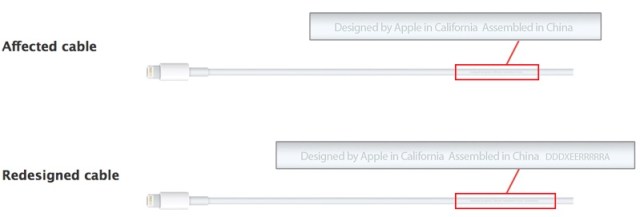
Apple is providing new, redesigned USB-C charge cables to MacBook owners with faulty cables at no cost. In addition to cables that shipped with the MacBook, the replacement program also includes faulty cables that were sold as standalone accessories.
Customers who supplied a valid mailing address when registering their product or purchasing it through the Apple Online Store will receive their new cables automatically, while other eligible MacBook owners can contact Apple Support, find an Apple Authorized Service Provider, or visit an Apple retail store to get their cables replaced. Affected USB-C charge cables can be replaced under this program until June 8, 2018.
The Retina MacBook first went on sale in April of 2015, so the problematic cables were sold for approximately two months before a redesigned version was released.
Discuss this article in our forums
JBL Legend receiver with Android Auto support now up for preorder

JBL’s new in-dash smartphone receiver, the Legend CP100, is now available for preorder.
The receiver sports a 6.75-inch touchscreen and is compatible with both Android Auto and Apple CarPlay. The receiver is compatible with your car’s backup camera, as well as Bluetooth, and also allows you to make calls, send messages and navigate safely. It can also be used with your car’s steering wheel controls.
JBL is offering the Legend CP100 for $399.95 on its website. JBL says that preordered receivers are expected to be delivered Feb. 19.
Source: JBL
Come comment on this article: JBL Legend receiver with Android Auto support now up for preorder
UCLA Engineering makes public powerful image detection algorithm

For a while now, an Engineering research group at UCLA has been working hard on creating an algorithm that helps computers “see” information contained in images that human eyes are unable to detect. The algorithm works at lightning speed, and researchers believe the code could be integrated into facial recognition software, fingerprint matching tech, and iris recognition. The possibilities for security purposes are obvious, but it’s also likely that some applications might be found for things like self-driving cars or industrial infrastructure maintenance.
 See also: Forget fingerprint scanners, Samsung wants to use your veins to identify you
At its core, the algorithm processes images in such away as to define the boundaries and features of individual objects. It then enhances these edges, which enables the computer to know not just the shape of the object, but its texture as well. The UCLA, true to form, is making this software available for everyone via Github and Matlab File Exchange. They believe that making this technology open source will encourage collaboration and innovation rather than halting scientific advancement with monopolies, patent lawsuits, and copyrights.

The Phase Stretch Transform algorithm has its roots in cancer research. Earlier versions of the process were used to detect cancer cells in blood using ultrafast imaging. Research developing this algorithm was funded by the Office of Naval Research via the Optical Computing Multi-disciplinary University Research Initiative program.
It’s possible that this imaging technology, or a variation thereof, might have innovative applications on mobile devices. Developers working on apps or procedures that focus on recognizing objects in images might be interested in giving the Phase Stretch Transform algorithm a whirl. For those intrigued, check it out on Github or Matlab File Exchange.
 Next: How to take better pictures with your Android smartphone
 AIVAnet