


OnePlus One to go on flash sales throughout the week, starting from $249

OnePlus’s big announcement for today is not the OnePlus 2 some of you may have wanted, but a $50 off promo on the OnePlus One.
After dropping the invite system for good (though invites will still be required for the OnePlus 2), the Chinese company is now putting the OnePlus One on sale. But, this being OnePlus, it’s not a regular promo: instead of a one limited time deal, the OnePlus One will be made available with a $50 discount in a series of daily flash sales. The first round is already underway (and stock is likely exhausted), and here’s the schedule for the entire week:
- June 1 – 12:00 GMT (8 am EST)
- June 2 – 2:00 GMT (10 pm EST -1 day)
- June 3 – 12:00 GMT (8 am EST)
- June 4 – 2:00 GMT (10 pm EST -1 day)
- June 5 – 12:00 GMT (8 am EST)
- June 6 – 2:00 GMT (10 pm EST -1 day)
- June 7 – 12:00 GMT (8 am EST)
During the flash sales, the 16GB Silk White model will cost $249, while the 64GB Sandstone Black model will be $299.
OnePlus will announce the sales on its social channels, but you can simply go to OnePlus.net at the announced times and hope for the best.
One more thing, this promo is only open for the global version of the device, so OnePlus fans in India and Southeast Asia will have to sit this one out.
As for the second generation of the OnePlus, the official timeline is still Q3 2015, or from July to September. OnePlus fans may have a long wait ahead, but the thought of a second, fashion-focused OnePlus phone should bring them some solace.
Let us know if you managed to snag a OnePlus One today!
Sound Guys Monthly – UE BOOM International Giveaway
We try to review a few different types of items every now and then, but it seems that May was a month of firsts. Not only did we review our first 5.1-channel home theater speaker system, but we also reviewed our first pair of computer speakers.
Of course, the world doesn’t (entirely) revolve around Sound Guys. Cool stuff happened elsewhere in the world of audio too.
The SuperStar BackFloat is Monster’s new waterproof speaker

We didn’t fall in love with the Monster SuperStar when we reviewed iast year, but it was still a decent Bluetooth speaker. Make it float, and it could be a lot cooler. That’s what the SuperStar BackFloat is all about. We remain dubious about the sound quality, but we’re willing to wait and see.
The new RHA T20 in-ears are coming this summer

On the other hand, we fell in love with the RHA T10s. Finding out that the company is releasing a sequel definitely has us excited. They’re keeping the build and swappable filters, but making the insides even better. We can’t wait to see these.
The Sound Torch is a Bluetooth speaker for pyromaniacs

It’s an indisputable fact that while fire may not always make things better, it will absolutely always make things more awesome. A Bluetooth speaker that spits fire out of the top while you’re listening? That is Mad Max levels of awesome.
Sonos PLAY:1 speaker starter set saves you $50

Sonos systems are great, but getting started can be a little tough, especially when you don’t know which speaker to go with first. The company has made that a little easier with a new bundle pack that features two speakers that can be used independently or as a stereo pair. Oh, and it shaves $50 off the price.
Denon announces the HEOS 1 and HEOS 1 Go pack

Denon’s HEOS system is a Sonos competitor of sorts, and while it’s picking up steam, it still has a way to go. The new entry-level HEOS 1 and the HEOS 1 Go pack, which adds Bluetooth functionality, should go a long way toward getting more people onboard.
Coolest of the month: Monoprice 8427 5.1-channel home theater speaker system

It’s usually tough picking the coolest thing we reviewed in any given month, but to be honest, this month it was pretty easy. A full 5.1 speaker system for under $100 bucks? That’s impressive.
Best bang for the buck: Creative Sound Blaster Jam

It was tempting to give this to the Monoprice 8247, but the Creative Sound Blaster Jam is a pair of Bluetooth headphones that costs roughly $50 and actually sounds good. Bargains like that are what this category was made for.
Giveaway: UE BOOM

Congratulations to the winner of last month’s giveaway, Jeromy L from Hong Kong, who won the Beats Powerbeats 2. This month we’re giving away the well-loved UE BOOM. While I didn’t love it as much as everyone else does, we’re sure there are plenty of people who will be happy to win it.
For information on how to enter, head over to Sound Guys!
Asus adds two capable 13MP cameras to the ZenFone recipe: meet the ZenFone Selfie

Asus is jumping on the selfie-phone bandwagon with the ZenFone Selfie, a 5-5-incher whose claim to fame is its dual 13MP camera setup.
Announced today in the opening of Computex Taipei along the ZenWatch 2 and the new ZenPad series, the ZenFone Selfie keeps many of the specs of the well-reviewed ZenFone 2, and adds some goodies that will please the selfie-crazed crowd.
Starting with the basics, the ZenFone Selfie is similar to the ZenFone 2, featuring the same general design with rear-mounted buttons, but with a more cheerful, pastel color scheme. On the inside, the 5.5-inch Full HD ZenFone Selfie features a Snapdragon 615 processor (64-bit, octo-core), 2GB or 4GB of RAM, and 16, 32, or 64GB of expandable internal storage.

The Selfie comes with 13MP cameras both on the front and back, and both shooters make use of dual-tone LED flashes. There are some differences: the f 2.0 rear camera is equipped with a laser-assisted auto-focus system, a la LG G4, while the front shooter features an f 2.2 lens with an 80-degree viewing angle. Like any selfie-centric phone worth its salt, the ZenFone Selfie packs a beautification mode that can “soften facial features, slim cheeks, and enhance skin tone to add vibrancy, all in real time.” Now that’s progress! There’s also a panorama selfie mode, that stitches together several shots, perfect for group selfies, or as Huawei memorably called them, “groufies.”
Available in cyan, pink, and white, the ZenFone Selfie comes with an optional accessory called Swing, that can act like a kickstand or as an arm extender of sorts, selfie sticks be damned! Check it out in action, via Engadget.

Like with its other announcements today, Asus has not revealed pricing and availability details for the Selfie. But if the ZenFone 2 is any indication, we expect an affordable price tag and a rather long wait to actually see the ZenFone Selfie in stores.
Nikkei reports that next Nintendo console could be running Android
<ins class="adsbygoogle"
style=”display:block”
data-ad-client=”ca-pub-8150504804865896″
data-ad-slot=”8461248232″
data-ad-format=”auto”>
(adsbygoogle = window.adsbygoogle || []).push();
If I said that it were possible that the next Nintendo console could be running Android, I wouldn’t be surprised if you called me sacrilegious. Unusually, that is exactly the news that has dropped today according to Japanese financial paper, Nikkei, who claims that not only will the games giant develop games for Android, but also build hardware that will run Google’s operating system. This would be a huge change in direction for Nintendo who has up till now relied on their own proprietary hardware and software to power its video game consoles.
There are pros and cons for Nintendo if this does turn out to be true – an Android based console would definitely make Nintendo relevant again in a console war that is increasingly only about Sony and Microsoft. On the other hand, current Android games are hardly console-ready – a handful could pass for low budget games while others were console games 5+ years ago. Either way, it’s a tantalizing possibility, and we hope we find out more about this possible Nintendo-Android console sooner rather than later. E3 2015 here we come!
What do you think about a Nintendo console running Android? Let us know your thoughts in the comments below.
The post Nikkei reports that next Nintendo console could be running Android appeared first on AndroidSPIN.
Android Lollipop update for Samsung Galaxy Note 4 to roll out by the end of July
<ins class="adsbygoogle"
style=”display:block”
data-ad-client=”ca-pub-8150504804865896″
data-ad-slot=”8461248232″
data-ad-format=”auto”>
(adsbygoogle = window.adsbygoogle || []).push();
It’s been a pretty messy year of software updates and plenty of people are left wondering when their Android Lollipop fix is going to come. In particular, the Android Lollipop update for Samsung Galaxy Note 4 has been a long time coming, but thankfully the wait might not be for much longer. According to a report by SamMobile, the update for the Note 4 will be rolling out by the end of July, though as always, don’t expect to have Lollipop by July 31st on the dot – your upgrade could lag a few weeks depending on where you are in the world.
Still, it’s good news that Samsung hasn’t forgotten the Note 4, and in turn, its other devices like the Galaxy S5 and Galaxy Note 3 which are next in line for the update in the near future – assuming Android M doesn’t come out before then.
What do you think about the Android Lollipop update for Samsung Galaxy Note 4 coming out by the end of July? Let us know your thoughts in the comments below.
Source: SamMobile
The post Android Lollipop update for Samsung Galaxy Note 4 to roll out by the end of July appeared first on AndroidSPIN.
ASUS announces the ASUS ZenWatch 2 at Computex with more sizes and a new button
<ins class="adsbygoogle"
style=”display:block”
data-ad-client=”ca-pub-8150504804865896″
data-ad-slot=”8461248232″
data-ad-format=”auto”>
(adsbygoogle = window.adsbygoogle || []).push();
Right on the heels of Google I/O, as usual, is Computex, Asia’s version of Mobile World Congress, and ASUS has kicked off in typical style with the announcement of several heavy hitting devices. Chief among these is a new Android Wear smartwatch, the ASUS ZenWatch 2, the follow up its original ZenWatch and was introduced with a number of things that make it seem quite a lot like another recently released smartwatch (read: the Apple Watch).
 The similarities begin with the ZenWatch 2 being offered in two different size variants, with 22mm and 18mm watch band versions – no doubt this is probably to cater for the female audience who generally have the smaller wrists. Overally, the ZenWatch 2 doesn’t look too dissimilar to its predecessor – the curved glass over the display returns, but is now joined by a button on the side, which kind of makes sense for a watch but almost looks ungainly on the sleek ZenWatch 2 profile.
In terms of colour choice, you’ll be able to select from either a silver, gunmetal or rose-gold body as well as a number of different straps made from rubber, leather, metal or even a crystal encrusted watch band. That’s all the details we have right now, but no doubt more information will become available as Computex wears on.
What do you think about the ASUS ZenWatch 2? Let us know your thoughts in the comments below.
Source: engadget
The post ASUS announces the ASUS ZenWatch 2 at Computex with more sizes and a new button appeared first on AndroidSPIN.
Google I/O 2015: What you may have missed
Unless you were residing under a rock last week, you are surely now aware of last week’s yearly developer conference, Google I/O. Well, in case you happened to not be available, or need a place to catch up on everything that was announced or talked about, AndroidGuys is here to save the day. From Android M to new Developer Tools and the new Photos service, there was surely a lot that was covered during the Google-fest, known as Google I/O 2015.
Android M
While this didn’t come as a surprise to many, Google decided to show off their latest iteration of Android, to the world. Android Lollipop, announced and released last year, obviously brought the Material Design UI design change to the forefront. Android M, because Google did NOT announce the name of the latest version, seems to bring a slew of additional features to the forefront. It may seem like an incremental update at first, but rest assured, there are more than a few changes that can be found with Android M.
Granular Permissions
The first big change announced was the addition of Granular Permissions with apps across the whole OS. What this means is that you will be able to approve or deny any permissions that a specific app may need to use in order to function correctly, or want the ability to use. Currently, users agree to all the permissions necessary for an app to be installed, upon installation from the Google Play Store. Whoever reads all those, every time you download an app, is a brave soul. I literally equate it to reading the terms and conditions of downloading any type of software update from Apple. TLDR.
Something to note in regards to these permissions changes, is that Google is paving the way for developers to build their apps that still work, even if a user denies any specific permissions request within the app. That’s a nice little touch to ensure that your apps will all still work even if you deny permissions.
Doze Mode
Everybody complains about battery life, regardless of what device you are using. iOS or Android. Well with Android M, Google is bringing a new feature known as Doze Mode, which is essentially puts your phone into a deeper sleep mode than what is currently available. No worries, Google still thought about the fact that you are expecting to receive notifications and such throughout the day, so those will still come through as normal. Google is claiming that Doze Mode could increase the battery life of a device, two-fold. Doubled the battery life, without having a bigger battery, is an interesting concept, so it will be interesting to see how it works in RL.
USB Type-C
This seems to be the year of USB Type C, with Apple introducing the MacBook, which has only the USB Type C port on it. The latest rendition of the ChromeBook Pixel also has two USB Type C ports on it, so why not introduce this technology on our mobile devices. Well Google did just that today. While they didn’t mention any devices that will include the USB Type C charging port, Google still explained what this will mean when an Android device is released with this new charging port.
Imagine this. You need to charge your phone up, but all you have is your tablet. (Of course this is a hypothetical situation, just stick with me here.) You remember that you got both of these awesome devices from Google and they both have USB Type C. So you plug the USB to USB from your tablet into your phone, and boom. Your phone is now charging. Well that’s what the introduction of USB Type C brings to the table now. On top of the fact that our Android devices will FINALLY have a reversible cable, reducing the frustration in trying to stick it in the right way.
Android Pay
Just about everyone has, or has had Google Wallet. Just about everyone has also heard about how Apple Pay works in unison with the iPhone 6 and iPhone 6+ along with the fingerprint scanner. Well Android M is bringing Android Pay with built-in fingerprint support for those devices that have a fingerprint scanner already, and of course with any new devices.
Similar to Apple Pay, Android Pay will be built right in to the OS, so that you can get up and running right away, out of the box. Google was also to gain support from Verizon, AT&T, and T-Mobile to allow Android Pay to be installed, without restrictions, right out of the box.
As for stores that are on board, Google announced that there are over 700,000 retailers that Android Pay will be accepted, across the US. Essentially, Android Pay will be supported wherever you can find an NFC payment station at your retailer of choice.
Google is also building into Android M, the ability to “Buy with Android Pay”, which will allow users to pay just by tapping the icon, and your items will be instantly paid for through the credit/debit card that is attached to your Android Pay account.
App State Backup
Any apps that will be installed on devices running Android M, will automatically back up to Google’s cloud. This was introduced so that you can have your apps backed up and ready to go whenever you switch to a new device, or perform a full-wipe on your device. I can find this extremely useful for us geeks that switch phones like we change socks, but also for those clumsy one’s who need go through phones like diapers.
The Android M Developer Preview was made available a few hours after the keynote had ended. It is compatible with the Nexus 5, 6, 9 and Nexus Player. We can expect to see Android M fully released in Q3 of this year, while there is a road-map to give users an idea of when to expect the next versions of the Developer Preview.
Android M Developer Preview Downloads
Google Photos
Before getting into the smaller announcements from yesterday’s event, let’s get into the other big announcement from the Google I/O 2015 keynote. Google Photos. It’s finally here, and you can expect to see a slew of articles claiming that this is the beginning of the end for Google+, but we know differently. Of course, the redesigned Google Photos isn’t anything that we didn’t already know about, but now we can finally play around with the features. The big feature, for me at least, was the cross-syncing between Android, the Web, and iOS.
Bundled with unlimited storage, Google is touting Google Photos as a backup service, more than anything else. However, there is a catch for that. Your photos will have a 16 Megapixel cap, and videos will have to be uploaded at 1080p or lower. There is an option, upon start up, to use your Google Drive storage capacity, which is nice if you have boat loads of extra storage sitting around, but the “unlimited storage” option will be just fine for most.
Depending upon how granular you get with your photo organization, things can be pretty rough sometimes. Google Photos is hoping to help out with some of that, by being able recognize and categorize your photos automatically for you. Photos will be able to identify people, places, landscapes, food, and will categorize those photos for you automatically. While Photos seems to walk the walk, it’s only a matter of time before we know if it can talk the talk.
Users can access their photos across the web, iOS, and Android, so that you have a copy of your favorite pictures, no matter where you’re at. If you want to share one of those photos, you will be able to pull up the sharing menu, and be able to get a link specific to the picture that you are attempting to share.
Another feature announced with Google Photos is your new Assistant. Nope, not a Google Now replacement, or anything like that. Instead, think of it as a modified version of Auto-Awesome for Google+. Your Assistant will help you create albums, custom stories, or movies, and what makes this even better, is that you don’t have to wait for Auto-Awesome to do its thing. You can make these adjustments to your photos, yourself.
Obviously these are just some of the many changes and announcements that Google brought to the Android world at Google I/O 2015. What are some of your favorite announcements? Was it the separation of Google Photos from Google+? Or was it the announcement of Android M and the release of the first batch of Developer Previews? Let us know what you think about everything in the comments below.
Google I/O 2015
The post Google I/O 2015: What you may have missed appeared first on AndroidGuys.
US limits the NSA’s reach ahead of sweeping reform

The Senate has voted overwhelmingly to reform the powers of America’s security services, at the expense of renewing existing provisions of the Patriot Act. In a contentious debate leading up to midnight, the house belatedly opted to support the USA Freedom Act, which will eventually end the bulk collection of phone metadata. By opting not to extend the existing legislation, agencies such as the NSA and FBI will supposedly no longer have unfettered access to our phone records, be able to request “roving wiretaps” or seize business records for an investigation.
BREAKING: The Senate has officially advanced USA Freedom, 77-17.
– EFF (@EFF) May 31, 2015
Naturally, these agencies are already looking for workarounds, believing that the provisions still apply to cases opened before Sunday night. The decision has angered plenty on both sides of the floor, with Mitch McConnell and John McCain both saying that the provisions are essential for security. As Reuters points out, however, a 2013 investigation reported that metadata collection has never been essential to preventing a terrorist attack. Either way, we’d still suggest holding back on sharing pictures of your genitals over the internet, since someone, somewhere, will probably still want to stare at them.
[Image Credit: Getty]
Filed under: Internet
Google simplifies security and privacy with new account hub

Many of us are dependent on Google apps like Gmail and now Photos, but Google has a rep for being less than transparent on security and privacy, especially in Europe. Now, the search giant has just put all those things into one big hub in an attempt to make things clearer to users. Its new “Accounts” page lets you see at a glance where to change sign-in, device, ad and personal settings, and also has a pair of new wizards to help you review security and privacy settings. In addition, even if you don’t have a Google account, you can now personalize search, ads, apps like YouTube and other settings.
For those with an account, there are three setting groups (above) used to control your accounts. The “sign-in & security” card lets you manage how you sign in and control devices and apps that use Google accounts. Running through the security setup wizard will let you see and modify your passwords and two-step security controls, then verify all your phones, computers and tablets. You can also tweak apps that use Google security, many of which (if you’re like me) you may have forgotten about.
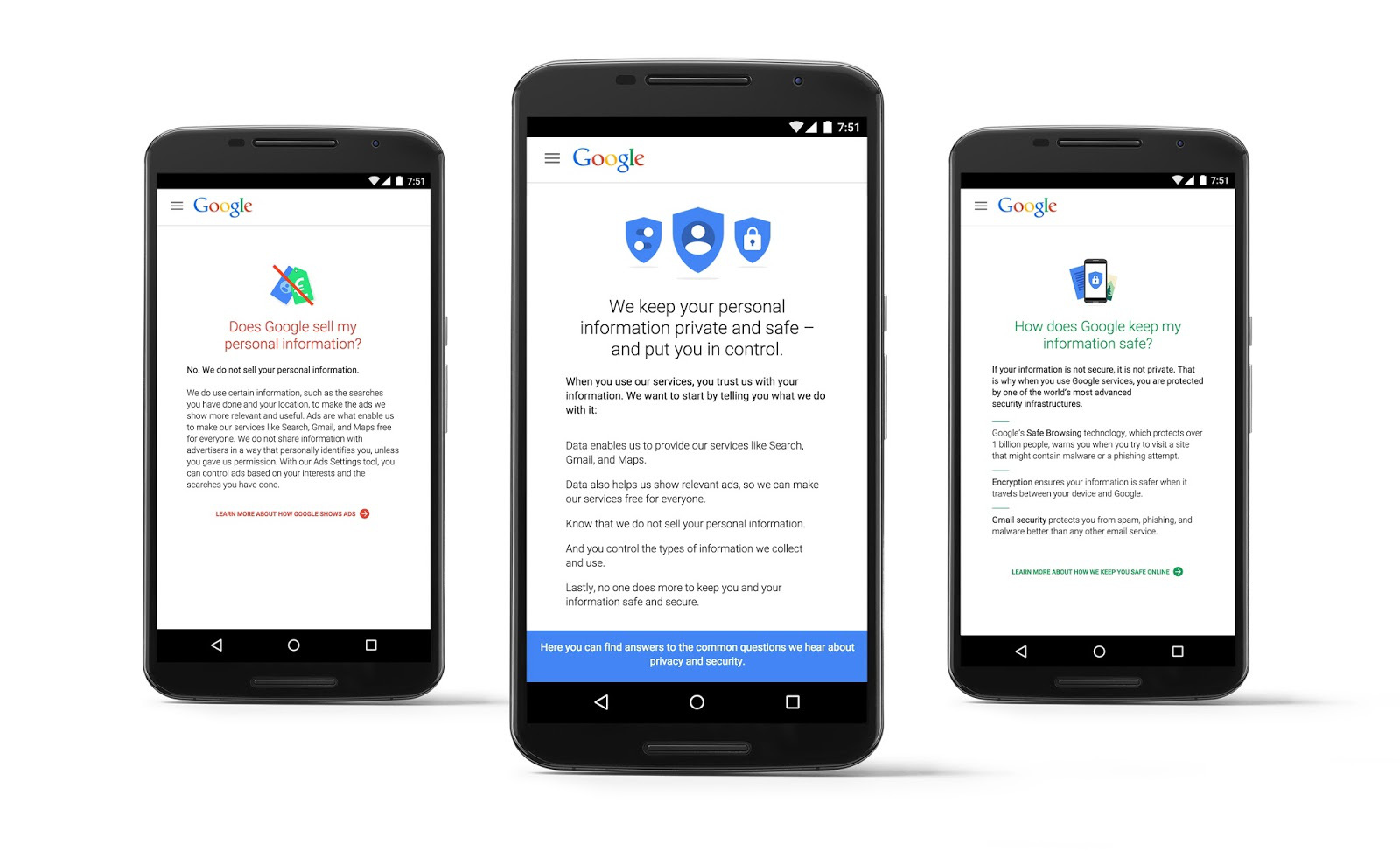
The second set of settings is for privacy control. Did you know that Google can go ahead and feature your publicly shared Google+ images as a background for its products & services? Well, now you do, and Mountain View lets you tick a box if you want them to cut that out. You can also control whether it shows your app reviews on Google Play, how you share YouTube videos and how it serves you ads, to name a few other tweaks. The final “account preferences” card lets you change your language and input tools, adjust Google Drive storage and delete accounts or devices.
Google also revealed a new privacy policy that details what data it collects from you, how it uses it, how it targets you with ads and what you can do to control all that. So why all the changes? Google’s under pressure from governments to change how it handles privacy, and has also been criticized for its overly complicated security settings. It said that “today’s launches are just the latest in our ongoing efforts to protect you and your information on Google,” and added that “there’s much more to come.” Whether or not the tweaks assuage its critics remains to be seen, but anything companies like Google can do to simplify security and privacy is fine by us.
Source: Google (1), (2)
HangKeys makes a fun game out of an iOS keyboard

When messaging a friend of family member begins to drop off, wouldn’t it be good if you could fire up a game to liven things up a bit? Normally, you’d have to meet your would-be opponent in an app like Words With Friends, but new iOS keyboard HangKeys is able to skip the formalities and drop a fresh game of Hangman in any messaging app on your phone. Feel like you could use something like this during your next Facebook Messenger exchange? All you need to do is to switch to the HangKeys keyboard on your iOS device, enter a word and send the grid over to your adversary. They can then reply with their suggestions from any platform, whether it be Android, Windows Phone or PC. Luckily, the app does most of the heavy lifting but you will need to manually select each letter and send back the automatically updated grid after each turn. It’s a small bit of work for what is an otherwise fun game. While nearly all of the iOS keyboards we’ve seen focus on making texting easier, this little app could offer some light relief if the conversation runs dry.
Filed under: Cellphones, Internet, Software, Mobile, Apple
Via: The Next Web
Source: HangKeys (App Store)
 AIVAnet