Google I/O 2015: What you may have missed
Unless you were residing under a rock last week, you are surely now aware of last week’s yearly developer conference, Google I/O. Well, in case you happened to not be available, or need a place to catch up on everything that was announced or talked about, AndroidGuys is here to save the day. From Android M to new Developer Tools and the new Photos service, there was surely a lot that was covered during the Google-fest, known as Google I/O 2015.
Android M
While this didn’t come as a surprise to many, Google decided to show off their latest iteration of Android, to the world. Android Lollipop, announced and released last year, obviously brought the Material Design UI design change to the forefront. Android M, because Google did NOT announce the name of the latest version, seems to bring a slew of additional features to the forefront. It may seem like an incremental update at first, but rest assured, there are more than a few changes that can be found with Android M.
Granular Permissions
The first big change announced was the addition of Granular Permissions with apps across the whole OS. What this means is that you will be able to approve or deny any permissions that a specific app may need to use in order to function correctly, or want the ability to use. Currently, users agree to all the permissions necessary for an app to be installed, upon installation from the Google Play Store. Whoever reads all those, every time you download an app, is a brave soul. I literally equate it to reading the terms and conditions of downloading any type of software update from Apple. TLDR.
Something to note in regards to these permissions changes, is that Google is paving the way for developers to build their apps that still work, even if a user denies any specific permissions request within the app. That’s a nice little touch to ensure that your apps will all still work even if you deny permissions.
Doze Mode
Everybody complains about battery life, regardless of what device you are using. iOS or Android. Well with Android M, Google is bringing a new feature known as Doze Mode, which is essentially puts your phone into a deeper sleep mode than what is currently available. No worries, Google still thought about the fact that you are expecting to receive notifications and such throughout the day, so those will still come through as normal. Google is claiming that Doze Mode could increase the battery life of a device, two-fold. Doubled the battery life, without having a bigger battery, is an interesting concept, so it will be interesting to see how it works in RL.
USB Type-C
This seems to be the year of USB Type C, with Apple introducing the MacBook, which has only the USB Type C port on it. The latest rendition of the ChromeBook Pixel also has two USB Type C ports on it, so why not introduce this technology on our mobile devices. Well Google did just that today. While they didn’t mention any devices that will include the USB Type C charging port, Google still explained what this will mean when an Android device is released with this new charging port.
Imagine this. You need to charge your phone up, but all you have is your tablet. (Of course this is a hypothetical situation, just stick with me here.) You remember that you got both of these awesome devices from Google and they both have USB Type C. So you plug the USB to USB from your tablet into your phone, and boom. Your phone is now charging. Well that’s what the introduction of USB Type C brings to the table now. On top of the fact that our Android devices will FINALLY have a reversible cable, reducing the frustration in trying to stick it in the right way.
Android Pay
Just about everyone has, or has had Google Wallet. Just about everyone has also heard about how Apple Pay works in unison with the iPhone 6 and iPhone 6+ along with the fingerprint scanner. Well Android M is bringing Android Pay with built-in fingerprint support for those devices that have a fingerprint scanner already, and of course with any new devices.
Similar to Apple Pay, Android Pay will be built right in to the OS, so that you can get up and running right away, out of the box. Google was also to gain support from Verizon, AT&T, and T-Mobile to allow Android Pay to be installed, without restrictions, right out of the box.
As for stores that are on board, Google announced that there are over 700,000 retailers that Android Pay will be accepted, across the US. Essentially, Android Pay will be supported wherever you can find an NFC payment station at your retailer of choice.
Google is also building into Android M, the ability to “Buy with Android Pay”, which will allow users to pay just by tapping the icon, and your items will be instantly paid for through the credit/debit card that is attached to your Android Pay account.
App State Backup
Any apps that will be installed on devices running Android M, will automatically back up to Google’s cloud. This was introduced so that you can have your apps backed up and ready to go whenever you switch to a new device, or perform a full-wipe on your device. I can find this extremely useful for us geeks that switch phones like we change socks, but also for those clumsy one’s who need go through phones like diapers.
The Android M Developer Preview was made available a few hours after the keynote had ended. It is compatible with the Nexus 5, 6, 9 and Nexus Player. We can expect to see Android M fully released in Q3 of this year, while there is a road-map to give users an idea of when to expect the next versions of the Developer Preview.
Android M Developer Preview Downloads
Google Photos
Before getting into the smaller announcements from yesterday’s event, let’s get into the other big announcement from the Google I/O 2015 keynote. Google Photos. It’s finally here, and you can expect to see a slew of articles claiming that this is the beginning of the end for Google+, but we know differently. Of course, the redesigned Google Photos isn’t anything that we didn’t already know about, but now we can finally play around with the features. The big feature, for me at least, was the cross-syncing between Android, the Web, and iOS.
Bundled with unlimited storage, Google is touting Google Photos as a backup service, more than anything else. However, there is a catch for that. Your photos will have a 16 Megapixel cap, and videos will have to be uploaded at 1080p or lower. There is an option, upon start up, to use your Google Drive storage capacity, which is nice if you have boat loads of extra storage sitting around, but the “unlimited storage” option will be just fine for most.
Depending upon how granular you get with your photo organization, things can be pretty rough sometimes. Google Photos is hoping to help out with some of that, by being able recognize and categorize your photos automatically for you. Photos will be able to identify people, places, landscapes, food, and will categorize those photos for you automatically. While Photos seems to walk the walk, it’s only a matter of time before we know if it can talk the talk.
Users can access their photos across the web, iOS, and Android, so that you have a copy of your favorite pictures, no matter where you’re at. If you want to share one of those photos, you will be able to pull up the sharing menu, and be able to get a link specific to the picture that you are attempting to share.
Another feature announced with Google Photos is your new Assistant. Nope, not a Google Now replacement, or anything like that. Instead, think of it as a modified version of Auto-Awesome for Google+. Your Assistant will help you create albums, custom stories, or movies, and what makes this even better, is that you don’t have to wait for Auto-Awesome to do its thing. You can make these adjustments to your photos, yourself.
Obviously these are just some of the many changes and announcements that Google brought to the Android world at Google I/O 2015. What are some of your favorite announcements? Was it the separation of Google Photos from Google+? Or was it the announcement of Android M and the release of the first batch of Developer Previews? Let us know what you think about everything in the comments below.
Google I/O 2015
The post Google I/O 2015: What you may have missed appeared first on AndroidGuys.
US limits the NSA’s reach ahead of sweeping reform

The Senate has voted overwhelmingly to reform the powers of America’s security services, at the expense of renewing existing provisions of the Patriot Act. In a contentious debate leading up to midnight, the house belatedly opted to support the USA Freedom Act, which will eventually end the bulk collection of phone metadata. By opting not to extend the existing legislation, agencies such as the NSA and FBI will supposedly no longer have unfettered access to our phone records, be able to request “roving wiretaps” or seize business records for an investigation.
BREAKING: The Senate has officially advanced USA Freedom, 77-17.
– EFF (@EFF) May 31, 2015
Naturally, these agencies are already looking for workarounds, believing that the provisions still apply to cases opened before Sunday night. The decision has angered plenty on both sides of the floor, with Mitch McConnell and John McCain both saying that the provisions are essential for security. As Reuters points out, however, a 2013 investigation reported that metadata collection has never been essential to preventing a terrorist attack. Either way, we’d still suggest holding back on sharing pictures of your genitals over the internet, since someone, somewhere, will probably still want to stare at them.
[Image Credit: Getty]
Filed under: Internet
Google simplifies security and privacy with new account hub

Many of us are dependent on Google apps like Gmail and now Photos, but Google has a rep for being less than transparent on security and privacy, especially in Europe. Now, the search giant has just put all those things into one big hub in an attempt to make things clearer to users. Its new “Accounts” page lets you see at a glance where to change sign-in, device, ad and personal settings, and also has a pair of new wizards to help you review security and privacy settings. In addition, even if you don’t have a Google account, you can now personalize search, ads, apps like YouTube and other settings.
For those with an account, there are three setting groups (above) used to control your accounts. The “sign-in & security” card lets you manage how you sign in and control devices and apps that use Google accounts. Running through the security setup wizard will let you see and modify your passwords and two-step security controls, then verify all your phones, computers and tablets. You can also tweak apps that use Google security, many of which (if you’re like me) you may have forgotten about.
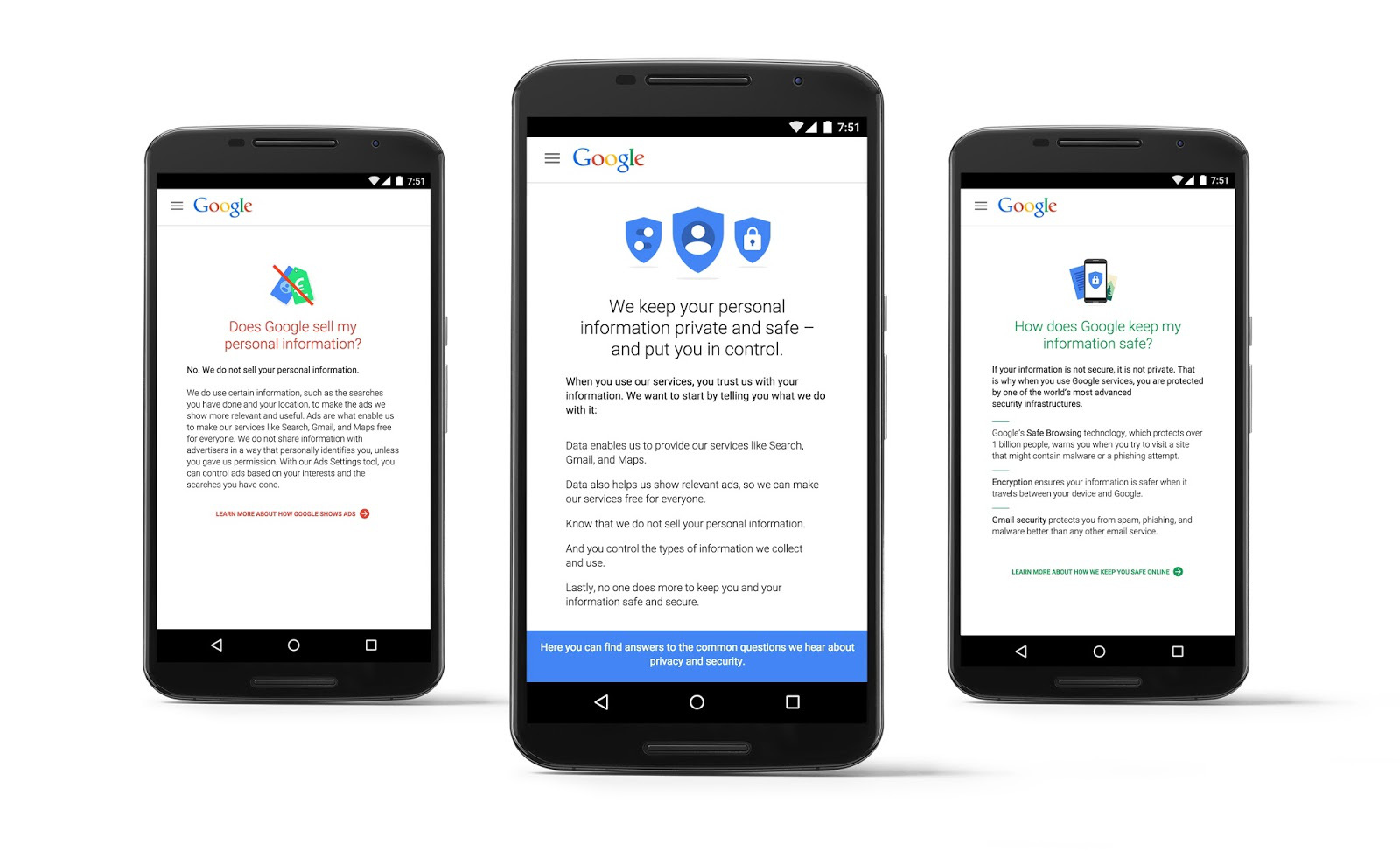
The second set of settings is for privacy control. Did you know that Google can go ahead and feature your publicly shared Google+ images as a background for its products & services? Well, now you do, and Mountain View lets you tick a box if you want them to cut that out. You can also control whether it shows your app reviews on Google Play, how you share YouTube videos and how it serves you ads, to name a few other tweaks. The final “account preferences” card lets you change your language and input tools, adjust Google Drive storage and delete accounts or devices.
Google also revealed a new privacy policy that details what data it collects from you, how it uses it, how it targets you with ads and what you can do to control all that. So why all the changes? Google’s under pressure from governments to change how it handles privacy, and has also been criticized for its overly complicated security settings. It said that “today’s launches are just the latest in our ongoing efforts to protect you and your information on Google,” and added that “there’s much more to come.” Whether or not the tweaks assuage its critics remains to be seen, but anything companies like Google can do to simplify security and privacy is fine by us.
Source: Google (1), (2)
HangKeys makes a fun game out of an iOS keyboard

When messaging a friend of family member begins to drop off, wouldn’t it be good if you could fire up a game to liven things up a bit? Normally, you’d have to meet your would-be opponent in an app like Words With Friends, but new iOS keyboard HangKeys is able to skip the formalities and drop a fresh game of Hangman in any messaging app on your phone. Feel like you could use something like this during your next Facebook Messenger exchange? All you need to do is to switch to the HangKeys keyboard on your iOS device, enter a word and send the grid over to your adversary. They can then reply with their suggestions from any platform, whether it be Android, Windows Phone or PC. Luckily, the app does most of the heavy lifting but you will need to manually select each letter and send back the automatically updated grid after each turn. It’s a small bit of work for what is an otherwise fun game. While nearly all of the iOS keyboards we’ve seen focus on making texting easier, this little app could offer some light relief if the conversation runs dry.
Filed under: Cellphones, Internet, Software, Mobile, Apple
Via: The Next Web
Source: HangKeys (App Store)
Deal: Samsung microSD cards (16 to 64GB) available for more than 50% off on Amazon

Samsung’s highly rated microSD cards are available on Amazon today with discounts exceeding 50%.
Both EVO (48MB/s) and PRO (90MB/s) models are available, but the discounts differ based on the capacity of the card.
Here’s a breakdown of the biggest discounts:
- Samsung 32GB PRO Class 10 Micro SDHC up to 90MB/s with Adapter for $17.99 (51% off)
- Samsung 16GB EVO Class 10 Micro SDHC with Adapter up to 48MB/s for $6.99 (51% off)
- Samsung 32GB EVO Class 10 Micro SDHC up to 48MB/s with Adapter for $13.99 (63% off)
- Samsung 64GB EVO Class 10 Micro SDXC up to 48MB/s with Adapter for $24.99 ( 58% off)
These are the best prices ever for Samsung microSD memory on Amazon, so this limited promo is a great occasion to stock on cheap storage for your Android tablet or smartphone.
Happy shopping!
Exclusive: Huawei P8 will have 3-year warranty in selected markets

While most modern smartphones come with standard manufacturers’ warranty, some companies are trying to offer additional services to entice customers. LG is offering free screen replacements in Korea with the LG G4, HTC is offering free damage protection in the USA with the One M9 and we can exclusively reveal that Huawei is offering three years warranty with next-day or three-day turnaround time for repairs with the Huawei P8 in selected Western European markets.
The Head of Device Service for Western Europe at Huawei spoke to us and told us that the company is testing different propositions to see which works best for customers. We’ve already exclusively revealed that the Huawei P8 will come with free same day warranty replacements and now we can reveal the service benefits that Huawei is offering Western European customers who buy its latest flagship.
As part of its Huawei VIP service, customers in the following Western European markets will receive the following service levels with their Huawei P8 smartphone:
| Country | Service |
|---|---|
| UK | 3 years warranty for the first 5000 customers to register on the Huawei website 24 hours Turn Around Time (TAT) with next-day door-step replacement. |
| FR | 3 years warranty requires registration and submission of Proof Of Purchase |
| DE | 3 years warranty when you register with Huawei Club Out of Warranty insurance free for first 3 months |
| IT | Special line customer care Express Pick up and delivery from customer home for repairs |
| ES | 3 days TAT for repairs special hotline & courier pick up from customer |
| NL | 3 years warranty 3 days TAT |
| PT | 3 years warranty if you buy the device before 31st July 2016 |
| BE | 3 years warranty 3 days TAT |
| CH | 3 days TAT |
The 24-hour turn around time for repairs in the UK is certainly impressive, given that most OEMs can only offer 7-14 days TAT and the 3 years warranty will certainly ensure your handset continues to work for longer than the contract you bought it on. In Germany, three months out-of-warranty insurance should provide some reassurance for customers that, if the worst should happen, at least Huawei will foot the bill for the first three months.
.rvs_wrapper
width: 350px;
.rvs_wrapper.align_left
float: left;
.rvs_wrapper.align_right
float: right;
.rvs_wrapper.align_center,
.rvs_wrapper.align_none
width: 100%;
.rvs_wrapper.align_center
text-align: center;
.rvs_wrapper.align_center.cbc-latest-videos ul li
float: none;
display: inline-block;
vertical-align: top;
.rvs_wrapper.cbc-latest-videos:not(.align_none) ul li:nth-child(2n+1)
clear: both;
.rvs_title
font-weight: 600 !important;
margin: 0 !important;
font-size: 24px !important;
.rvs_wrapper.align_right .rvs_title
padding-left: 20px;
.rvs_title a
font-family: ‘Roboto Condensed’;
color: #3a3a3a;
.rvs_wrapper.cbc-latest-videos ul
padding-top: 10px;
.rvs_wrapper.align_left.cbc-latest-videos ul li,
.rvs_wrapper.align_none.cbc-latest-videos ul li
padding: 0 15px 0 0;
.rvs_wrapper.align_right.cbc-latest-videos ul li
padding: 0 0 0 15px;
float: right;
.rvs_wrapper.align_center.cbc-latest-videos ul li
padding: 0 7px;
.rvs_wrapper.cbc-latest-videos ul li > a
font-weight: 400;
.rvs_wrapper.cbc-latest-videos ul li > a .yt-thumbnail
margin-bottom: 0;
@media only screen and (max-width : 480px)
.rvs_wrapper
width: 100%;
text-align: center;
body .rvs_wrapper.cbc-latest-videos ul li
padding: 0 7px;
display: inline-block;
float: none;
vertical-align: top;

Do you think warranty is important enough? Has the extra warranty or the other added benefits influenced your decision on whether to buy the Huawei P8? Let us know your views in the comments below!
NVIDIA’s G-Sync brings smoother graphics to gaming laptops

NVIDIA’s G-Sync promised to kill a lot of gaming issues like lag and stutter on desktop PCs, but you need both a supported graphics card and monitor to make it work. However, that’s obviously not an issue for laptops, and NVIDIA has just announced G-Sync support for several high-end gaming notebooks. The models it has certified use the latest 960M, 956M, 970M and 980M discreet mobile graphics chips, including the 17.3-inch ASUS G751, the Aorus X5, the MSI GT72 G and two 4K laptops from Clevo.
Those G-sync-enabled gaming laptops feature screens approved by NVIDIA with 75Hz refresh rates designed to cut tearing, input lag, stuttering and other problems. You’ll also get a few new features like windowed mode for for borderless gaming and the ability to customize your refresh rates. If you’ve got one of those models (or are thinking of getting one), here’s the best part: the new drivers are now available with NVIDIA’s latest drivers.

The Clevo P770ZM-G 17.3-inch gaming laptop with NVIDIA GTX 980M graphics
;”>
Filed under: Gaming, Laptops, NVIDIA
Source: NVIDIA
GoPro’s Hero+ LCD puts a touchscreen on its entry-level camera

Last week, GoPro unveiled some advanced tools for the more ambitious content creator. Today, for the folk that just want to snorkel in the Bahamas, or jump off a cliff there’s a new member of the GoPro camera family to consider: the Hero+ LCD. If you’re familiar with the company’s naming conventions, you’ve probably figured out that this is a revision of the bare bones Hero that was introduced last fall (and that yes, it has an LCD). The new camera has a few significant revisions over the original Hero though, including a decent bump in the price.
The key feature is, of course, the built-in touchscreen LCD. This was something exclusive the the Hero 4 Silver until now. The LCD was one of our favourite features on the Hero 4, as it makes menu navigation, shot setup and viewing back videos so much easier than your previous best option — using the GoPro app. Unlike the Silver, the Hero+ LCD can’t be removed from its waterproof case, and this means accessing the display will always require opening the rear door (it’s unclear if the doors can be swapped to one with a cutout for the screen like the Hero 4 has).
The LCD is joined by a some decent improvements to the actual camera, too. The first Hero could record video up to 1080p at 30 frames per second (or 60fps at 720p). The Hero+ LCD can record 1080p at 60fps, and take 8-megapixel stills (compared to 5MP on the original Hero). Other upgrades include built-in WiFi and Bluetooth, something sorely lacking last time, and there’s HiLight tagging too, another feature inherited from the higher-end members of the GoPro family.
There’s even a new feature that’s not been seen on any GoPro before, and that’s in-camera video trimming. Now, you can snip duff footage at the beginning or end (usually a close up of your mug after you pressed record), and have a clip that’s (more) ready to share via the app. Don’t expect this feature to remain exclusive to the Hero+ LCD for long though.
New features come at a new price, and that’s $300. That’s over twice what you’ll pay for the standard Hero ($130). For perspective, GoPro will still sell you a Hero 3+ Silver for $300 which gives you more shooting modes (960p etc. plus 10-megapixel stills), more time lapse and burst modes and an HDMI port. It’s also not bonded to its housing, so you can fit it in more accessories. The Hero+ LCD is trading that off for the convenience of the display, and a few software tricks. At this price, the Hero+ LCD goes up against tough competition from the likes of Sony’s nearest equivalent with a similar feature set, but the display is a wearable accessory, or the excellent Drift Ghost S (also with 1080p/60fps and a built-in LCD). The Hero+ LCD will be available in the US this Saturday (6th), internationally by the 12th.
“Okay, Google” command from any screen returns to Galaxy S6

Google confirmed, and we verified, that the “Okay, Google” hotword command is now working again on the Galaxy S6 and Galaxy S6 Edge.
The feature has been broken for weeks, and the fact that the option to activate it was completely missing from the Settings section made some users believe it was an intentional omission by Samsung. As it turns out, the reason was a plain old bug, or more precisely a conflict between the Google app and Samsung’s own voice command feature, S Voice.
A Google representative announced on the company’s product forums that the problem has been fixed. In order to get the feature to work, you will need to have the latest Google app update (4.5 or higher, the current one being 4.6). If you have the latest version and you can’t see the feature, try uninstalling the updates to the Google app and then updating it to the latest version. That’s how our Nirave managed to get it to work on his Galaxy S6 and S6 Edge. Worst case, you may need to clear the cached data of the Google app, though that means you will be signed out of your Google account.
One more thing: because of said conflict with S Voice, enabling “Okay, Google” from any screen will disable S Voice, except for the times when the screen is off. Basically, you will have to decide between the two assistants, but we’re pretty sure that won’t be a problem for many of you.
Nintendo’s new ‘NX’ console will reportedly run Android

Nintendo has already said that it won’t be talking about its new NX console until 2016, but that hasn’t stopped a few tantalising details from slipping out to the press. Nikkei reports that the new hardware will use the Android operating system, as Nintendo seeks a more open platform that’s already been embraced by third-party developers. We’re firmly in rumors and speculation territory here, but there’s some basis for the claim. Nintendo has hinted that the NX will be positioned alongside the 3DS and the Wii U, rather than as a direct replacement for either system. The Wii U has been a commercial flop, but that doesn’t mean the NX will be a traditional home console competing directly with the PlayStation 4 and Xbox One. It could be something completely different — fans have suggested a hybrid device that gamers could play both at home and on the go.
Portability would play to Android’s strengths, particularly if Nintendo wants to leverage its upcoming phone and tablet games. However, if the company does indeed use the platform, there’s no guarantee that it’ll look like the typical Android experience found on phones and tablets. The Wii U and 3DS suffer from sluggish operating systems, menus and apps — Nintendo could use a heavily modified version of Google’s platform to quietly offload the problem and focus on what it does best, which is making high quality games.
Source: Nikkei
 AIVAnet