



Microsoft optimizes OneNote for Android tablets, adds handwriting support

Microsoft’s OneNote has long been available for Android (among many other platforms), but this latest update makes it easier to use specifically on tablets. The note-taking app now comes with handwriting support that takes advantage of the devices’ relatively bigger screens, as well as with better options for formatting your notes. If you’re going back to school soon and have a Windows device, though, OneNote for Windows sounds like the better choice with its new ink highlighter, printing support and ability to insert files and PDFs. Finally, the latest Livescribe+ update lets you set up a OneNote notebook where the Livescribe 3 pen can automatically upload what you’re writing down on paper. All these changes are rolling out right now, so expect to get pinged for an update soon if it hasn’t appeared yet.
Filed under: Tablets, Mobile, Microsoft
Source: Google Play, Office Blogs, Livescribe+
.CPlase_panel display:none;
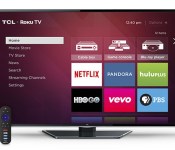
Roku-powered TVs now let you skip the set-top box

With scads of set-top boxes and sticks on the market, you could just choose a basic TV and play the field. But if you like Roku enough to shack-up, HDTVs from TCL and Hisense powered by the Roku OS are finally available. You can access the usual array of Roku content, including 1,500 channels like YouTube, Netflix, Hulu Plus and Amazon. The company’s iOS and Android apps also work on the TVs to stream and control your content, just as they do with Roku streaming devices. Rather than Roku’s standard remotes, however, you’ll get custom TCL and Hisense models with prominent buttons for Netflix, Amazon, Rdio and Vudu (no headphone jacks though). TCL has four models from 32- to 55-inches, with the top-end 1080p model running $649, while the Hisense lineup has 40- to 55-inch 1080p models and pricing to be set by retailers. You’ll be able to grab them starting next month.
Filed under: Home Entertainment, HD
Source: Roku
.CPlase_panel display:none;

Now you only have to barely move your hand to control your smart glasses
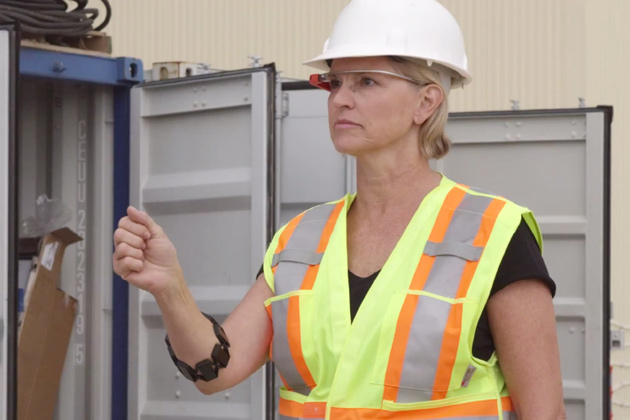
One main obstacle to making smart glasses mainstream is their awkward control methods, but that may change courtesy of Thalmic Labs, the maker of the $149 Myo muscle-sensing armband due in this fall. With the help of several enterprise partners, the startup has managed to integrate its futuristic wearable with Google Glass, Epson Moverio and Recon Jet, thus allowing users to quickly flick through documents, contacts and apps with subtle hand plus finger gestures, as opposed to fiddling with a tiny trackpad. In the videos after the break, it seems that there’s great potential for the Myo in the medical space, heavy industries plus outdoor sports, albeit at the risk of making the users look a little silly.
Filed under: Wearables
.CPlase_panel display:none;

Scottish Power is the latest energy provider to offer its own smart thermostat

Not to be outdone by British Gas and nPower, Scottish Power has become the latest energy supplier to jump aboard the smart thermostat bandwagon. While its rivals are either pushing their own controls or have teamed up companies like Nest to help customers automate their heating, Scottish Power is doing a bit of both by spinning off a white-label version of the Climote thermostat. Unlike nPower, which part-subsidises the cost of the Nest, Scottish Power is offering the Climote under its own “Connect” branding, starting at £10 per month for two years (with a £66 upfront payment). The thermostat lets customers set up heating schedules or control temperature in real time using an app, browser or even by SMS. Good news if you’re looking to make your home smarter, but aren’t keen on switching providers or letting Google into your place of rest.
Filed under: Cellphones, Household, Internet, Software
Source: Scottish Power Connect
.CPlase_panel display:none;

ASUS teases smartwatch for September 3rd event

If we’re honest, it’s reasonable to assume that ASUS will announce a smartwatch on September 3rd. After all, if the rumors saying that the company’s working on an Android Wear device aren’t enough, then the pretty obvious teaser image should be. According to those pesky rumor-mongers, the unit will be priced between $99 and $149, making it the cheapest Google-approved wearable on the market. We’ve also heard, thanks to our own sources on the grapevine, that despite the lower price, the watch will use similar hardware to both the Gear Live and G Watch. The only concession apparently being in the battery life department, which will linger somewhere between the 300mAh on the Gear Live and the 400mAh found on the G Watch. Still, whatever the truth, there’s only a fortnight to go before we’ll find out for ourselves.
Filed under: Wearables, ASUS, Google
Source: ASUS (Twitter)
.CPlase_panel display:none;
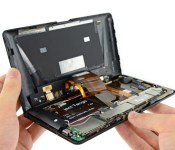
Project Tango tablet teardown reveals its custom 3D mapping gear

If you’ve been wondering just what parts let Google’s Project Tango tablet work its 3D mapping magic, iFixit is more than happy to show you. The DIY repair outlet has torn down the experimental Android slate to reveal a truly unique sensor array. While it resembles a Kinect at first, Google notes that it had Mantis Vision build a custom infrared projector (which bathes the world in a light grid) that works in tandem with the 4-megapixel IR camera; there’s no way you’d replace either with off-the-shelf parts. The big, dual-cell 2,480mAh battery was also made to order, since the ATAP team wanted to let developers draw as much power as necessary for their 3D-savvy apps. The Tango tablet is undoubtedly a very clever design, then, but you’ll have to handle it with kid gloves if you ever try it — you probably won’t get another one if it breaks.
Source: iFixit
.CPlase_panel display:none;

Baby Groot dancing boot animation will get you happy while your phone boots up
 I saw Guardians of the Galaxy over the weekend and pretty much like everyone else, I feel in love with Groot – if you haven’t watched it yet, go do it. Now. Because the next bit of this post is going to have a few spoilers.
My favourite part of the movie was right at the end of the movie when you see Baby Groot jiving to Jackson 5′s I Want You Back behind Drax’s back; it was pretty hard not to crack into a huge smile seeing the little guy do his thing. Because I like that scene so much, I decided to try and keep a piece of that magic with me at all times, and as a result of that, I bring to you the Baby Groot dancing boot animation:
It’s not perfect – probably won’t be until the DVD is out – but it’s definitely better than nothing if you’re hoping to get some Baby Groot onto your phone. If you’re interested in trying it out, I’ve included the bootanimation.zip I used down below:
Baby Groot dancing bootanimation.zip
Of course, you will need root access and the whole shebang if you want to install the boot animation. Also, if you haven’t caught our own David Pena reviewing the movie, be sure to check it out here. What was your favourite part of Guardians of the Galaxy? Let us know your favourite part in the comments below.
Source GIF: Geeks of Doom
//<![CDATA[
ord = window.ord || Math.floor(Math.random()*1E16);
document.write('‘);
//]]>
The post Baby Groot dancing boot animation will get you happy while your phone boots up appeared first on AndroidSPIN.
.CPlase_panel display:none;

Nabi’s Big Tabs are kid-friendly Android tablets the size of computer monitors

The term “big” seems like a bit of an understatement when it comes to the Big Tab HD, a new lineup of tablets that are no smaller than 20 inches. Produced by Fuhu, these massive slates are essentially a larger version of the company’s DreamTab series: The $449 20-inch version comes with a 1600×900 “HD+” display, while the $549 24-inch model sports a 1920 x 1080 Full HD panel. The new tabs, which will be available this fall, are designed primarily to educate and entertain kids, thanks to its simplified (and parentally controlled) Android-based Blue Morpho user interface. Of course, it could be helpful to seniors and for playing games as a family or group of friends. The tabs come with an adjustable and removable frame that gives it the ability to stand up at nearly any angle, but it also doubles as a coffee table device if you want to play games together.

Weighing 13 lbs and at nearly a full inch thick (0.9-inch, to be precise), this isn’t something you’ll be toting around everywhere you go, so chances are that you’ll want to stick this in one room and keep it there most of the time; it definitely isn’t something that the kids will be taking with them to school or a friend’s house. But that’s exactly what Fuhu’s intended the Big Tab to be used for — as a hub for activities like learning, watching movies and family gaming.
If you’ve seen Easy Mode or Kids Mode in other Android devices, the Blue Morpho interface will look familiar. The on-screen icons are huge and the text is easy to read. Just like the DreamTabs, the Big Tabs will feature a selection of DreamWorks movies, in addition to titles from Disney, Nickelodeon and others; there’s a curated App Zone designed specifically for kids, although parents can add in whatever Android apps they want. The grown-ups also have the ability to give Nabi coins to the kids, which is a special currency that they can earn for finishing chores, homework or any of the learning activities on the tablets. There’s even a service that lets kids do instant messaging, text their parents and sharing pics.
Parents enjoy a password-protected admin mode, which lets them take control over which apps, games and content are used, impose time limits on specific apps, monitor screen time, set up chore lists and offer rewards if the kids are doing what they’re supposed to do. As parents, you can also view progress and tweak controls using a smartphone app.
The tabs come with a 1,650mAh battery, 16GB internal storage and a quad-core NVIDIA Tegra 4 chipset, so they’re not intended to be top-of-the-line. But it’s easy to see how many parents might be into such a device: the large screens are ideal for watching movies, playing board-style games at the kitchen table and going through various learning activities. If you’re into keeping the kiddos safe and on task, this is certainly an effective way of doing it.
Filed under: Tablets, Wireless, Google
.CPlase_panel display:none;

September 2nd is likely the day Meizu announces the Meizu MX4 after invites
 Meizu isn’t exactly a household name in most places around the world, but the Chinese manufacturer looks ready to make a splash come September 2nd when it’s expected to announce its latest flagship smartphone, the Meizu MX4. We’ve previously had a look at the company’s outgoing flagship, the MX3, and were pleasantly surprised with its performance and overall value; hopefully, the MX4 is more of the same. Meizu will be holding an event on September 2nd, at 2:30pm Beijing time and comes just a few days before the start of IFA 2014.
Rumours surrounding the MX4 say that there will be two variants of the device, the “standard” model with a 5-inch display and a “pro” version with a 5.5-inch display. The processors will also differ – a Exynos 5430 for the “standard”, Exynos 5433 for the “pro – and both will have 3GB RAM, a 20.7MP rear camera and a 8MP front camera. According to leaked photos, the MX4 is also going to have extremely then side bezels (as shown above). This all sounds very good, and the “standard” device is allegedly going to be sold for a very reasonable $406 USD, but it will have to be reasonably priced if it has any hope to go against the newly found might of home-grown competitor, Xiaomi.
Would you be interested in the Meizu MX4 if it had the specs listed above? Let us know your thoughts.
Source: Phone Arena (1), (2)
//<![CDATA[
ord = window.ord || Math.floor(Math.random()*1E16);
document.write('‘);
//]]>
The post September 2nd is likely the day Meizu announces the Meizu MX4 after invites appeared first on AndroidSPIN.
.CPlase_panel display:none;

Flying drone arranges rendezvous with ground bot, lands on it

Fictional super robots like Megazord, Voltron and Voltes V can assemble themselves, because their smaller components can coordinate with each other while docking. That’s the idea behind this new study, which has successfully found a way for an unmanned aerial vehicle to autonomously land on a similarly unmanned ground vehicle. These two drones find each other by sending their locations to their partner and meeting at a pre-set landing point, according to the paper published by researchers John M. Daly, Yan Ma and Steven L. Waslander. The technology has tons of potential applications — for instance, it could allow flying military drones to dock on land vehicles if they need gas or a recharge. In case the FAA decides to OK delivery drones in the future, trucks could carry several flying machines to a particular area so they can do their job and then rendezvous afterward for more deliveries. Unfortunately, a super robot’s not likely to happen soon, but you can watch the drone-on-drone demo in the video after the break.
[Image credit: Mooshuu/Flickr]
Filed under: Robots
Via: TechCrunch, Robohub
Source: Autonomous Robots
.CPlase_panel display:none;
 AIVAnet