


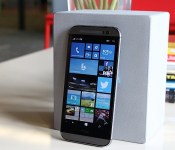
HTC One (M8) for Windows review: Same muscle, different soul

Since Windows Phone’s humble beginnings, Microsoft has been the underdog in the wireless industry. Four years later, nothing’s changed — except, perhaps, a few more percentage points of market share. Even then, it’s got a long way to go before catching up to Android and iOS. Let’s give the company credit for pushing forward, improving its platform and not giving up, though: When I reviewed the last major OS update, I said I could finally use Windows Phone as my daily driver. The one element that Microsoft continued to lack, however, was buy-in from large phone makers. They put more focus on Android products, which meant anyone interested in Windows Phone had a small selection of devices to choose from.
For Microsoft, it’s time to experiment with a new, simpler approach. The software giant has buddied up with HTC to convert the One M8, its Android flagship, into a Windows Phone. That’s all there is to it. There’s absolutely no change to the hardware — and it’s a fantastic idea. If it fails, neither company loses much from the deal; since they’re using an existing phone, the cost of design and engineering is far lower than it would be on a standalone device. If it’s successful, it may inspire other manufacturers to follow suit, resulting in a market with a wide variety of Windows Phones to choose from. If you can’t beat ‘em, join ‘em, right?
Hardware

The hardware section is typically one of the longest in a phone review, but this time, the opposite is true. That’s because the HTC One M8 for Windows, as awkward as the name is, is exactly that: an HTC One M8 that happens to run Windows Phone instead of Android. (Why the name omits “Phone” is beyond me, however.) The aluminum unibody chassis, 1080p display, Snapdragon 801 processor, BoomSound speakers, 2,600mAh battery, even the UltraPixel Duo Camera setup — it’s all there. It comes with the infrared blaster embedded into the power button as before, and all of the buttons, LED flashes and card slots are all precisely in the same place. In fact, if it weren’t for the Windows Phone logo on the back, the hardware would be virtually indistinguishable. Of course, that also means that it’s still just as slippery and just as tall as the Android version, so if you didn’t like it before, nothing about this phone will change your mind.
The version I’m reviewing is the Verizon-exclusive model, which only comes in a gunmetal gray color with 32GB of internal storage (and a microSD slot that handles cards up to 128GB). If Verizon isn’t your thing, AT&T announced that it plans to release the device after the exclusivity period is over. HTC’s been tight-lipped about whether the phone will eventually head to other markets or carriers.
The Verizon version of the M8 for Windows comes with quad-band LTE, which covers both of Verizon’s high-speed frequencies and a couple of bands (3 and 7) friendly to many countries in Europe, Africa and Asia. In case the LTE doesn’t work when you’re traveling abroad, it also comes with quad-band HSPA+ (up to 14.4 Mbps) and quad-band GSM/EDGE. Regardless of where you travel, you’re bound to have some sort of connection, even if it isn’t incredibly fast.
Software

It’s only when you turn the two devices on that you’ll really notice the difference. For the first time since the Palm Treo days, you can choose between two different operating systems running on the same hardware. I want to see more companies try this, but most manufacturers seem wary of dedicating resources to make Windows Phone available on existing Android devices. Of course, this wasn’t even an option until Microsoft introduced Windows Phone 8.1 earlier this year, when it announced that manufacturers could take any Android phone they wanted and just slap on the third-place mobile OS instead. (Sadly, Microsoft and Google aren’t so keen on letting anyone use both at the same time.)
What matters is that it’s here now, and Windows Phone flagships are no longer limited to Nokia’s Lumia series; it introduces more options for fans of the OS, and it gives the platform more visibility for everyone else.
If you’ve used a Windows Phone before, the user experience will be familiar. HTC tweaks aside (I’ll tackle those shortly), the M8 is a Windows Phone 8.1.1 device without a custom user interface. Which makes sense: Microsoft doesn’t allow skins. As you’d expect, then, the phone features Cortana, Live Tiles, quick controls, notifications, folders and the new lock screens, among other things. If you’ve seen one Windows Phone, you’ve seen them all.
The biggest early question about the M8 for Windows was how (or if) it would utilize HTC’s homemade software features from its Android skin, such as Zoe, BlinkFeed, Duo Camera capability, Sense TV and Video Highlights. Fortunately, all but Zoe made it into the phone, although there are slightly different implementations for each feature. BlinkFeed on Windows is its own separate app and Live Tile as opposed to a full home screen panel on Android. Ditto for Video Highlights, which takes the form of a standalone app. The camera UI is the same, but only some Duo Camera editing features made the OS jump. Finally, the HTC Dot View case is supported.

BlinkFeed feels more at home on Windows Phone than it does on Android, primarily because its interface is tile-based. Its functionality is similar on both platforms: You have access to your social network feeds (yes, including Google+) and a wide variety of highlighted feeds (like Engadget!). At present time, the Windows Phone version doesn’t come with a search option or custom feeds, so you’ll just have to stick with what HTC offers. It also comes with an active Live Tile that shows the most recent news updates.
Video Highlights has been around since the HTC One M7 came out in early 2013. It compiles your photos and videos and combines them into a 30-second highlight reel; you can choose from several different themes (akin to Instagram filters) as well as music, including pre-loaded tracks and selections from your own library. Once the clip is created, you can share it however you want. On Android, the video highlight-creation tool is a part of the Sense gallery app, but here it’s a standalone app. The basic setup is the same on both platforms, but their designs match their respective OSes. All told, too, the functionality is the same, though the WP option doesn’t appear to have the ability to choose which images or clips to start and end with.
The on-screen navigation bar is a recent addition to Windows Phone, and a very welcome one, at that (Android has had this functionality for a while). The bar consists of the usual WP buttons like back, home and search. You can choose to have the bar be dark, match the background of the app you’re in (which doesn’t seem to change too often) or match your accent color instead. It’s also possible to hide the bar, in case you’re watching a 1080p video or using another app that wants to take advantage of the full screen rather than getting cut off at the bottom. By default, you can press a small arrow on the left side to tuck it away and swipe up from the bottom bezel to bring it back; however, you can choose to disable the button and swipe up for both actions instead.
The Dot View case is an optional accessory introduced on the One M8 for Android, but HTC’s made it compatible with the Windows Phone version as well. You’ll still get the time on top and a symbol for notifications on the bottom, but there’s a new feature: Swiping down from the top will activate Cortana, who will begin listening to you without any further action.
Unfortunately, this swipe-down functionality isn’t available without the case. In fact, the One M8 motion gestures are limited to a simple double-tap-to-wake option; you can’t swipe your finger in any direction to take it directly into specific apps. Even worse, the only way to activate the camera is to manually unlock the screen and tap on the Live Tile or go through the Action Center. I’d prefer to have a faster shortcut to the camera for quick access.
Camera

The M8 for Windows sticks with the same love-or-hate UltraPixel Duo Camera setup as its Android brother, and it even offers a nearly identical user interface. (The only differences are in the settings, which must adhere to Windows Phone UI elements.) In general, HTC’s UltraPixel option takes decent pictures and fares well in low-light settings, though shots tend to be less detailed than on other flagship devices.
But while the camera modules are exactly the same, a quick image comparison between the Windows Phone and Android versions reveals a few minor disparities. The M8 for Windows seems to do better at capturing dynamic range, and the photos are more saturated in color. The default white balance is also marginally colder. The gap between camera performance widens further in low-light situations, in favor of the Android version. The M8 for Windows produced images that were fuzzier and less detailed than those taken on its counterpart. This may be in part due to the length of time HTC’s worked on optimizing its UltraPixel tech on Android versus Windows Phone, and I’m hopeful this can be fixed in a future update.
For now, one version isn’t better than the other in every department; you’ll have to pick and choose the factors that are most beneficial to you. If you want the full gamut of imaging options, however, stick with the Android model for now. HTC’s signature Zoe feature, which takes a few seconds of video and burst-mode shots and converts it into a Harry Potter-esque moving picture, isn’t available; the Zoe app, which is a social network that lets you show off your Video Highlights to friends and family, is also restricted to Android 4.4. Lastly, the Windows edition lacks a few of the M8′s Duo Camera editing tools. It comes with UFocus (which lets you change the area of focus), Foregrounder (adds funky visual effects to objects in the background), Dimension Plus (gives the picture a faux-3D feel), rotate/crop tools, most filters and a few frames. Copy/paste, stickers, draw/flip/straighten tools and seasons (a pointless feature that shows leaves, snowflakes, etc. falling down in front of your picture) didn’t make the cut, but I rarely use those features on the Android version anyway.
Performance and battery life

In its early days, Windows Phone earned a reputation for robust performance that has continued to the present. Until recently, the gap in performance between flagships and entry-level devices had been relatively small because Microsoft imposed restrictions on which processors and other specs could be used on the platform; phones like the Nokia Lumia 520 are cheap, but perform well given their limited processing power and RAM. As Microsoft has slowly lifted those restrictions, flagships have now become even more powerful, possessing the same specs as many top-of-the-line Android devices.
With the One M8 for Windows, you’re going to enjoy all of the same performance benefits as the Android version — on paper, at least. It has a quad-core 2.3GHz Snapdragon 801 chipset with 2GB of RAM, so it’s no slouch. The M8 for Windows runs WP 8.1 Update 1, which is still only available as a Developer Preview on other devices; this is the first time it’s been included on a new device out of the box.
The M8 for Windows runs well most of the time. To nitpick (’tis my burden and duty), the Android version is a little faster when loading apps and multitasking, primarily due to the time-wasting animations scattered throughout the Windows Phone OS. It’s a difference of a couple seconds each time, which likely won’t matter at all to most users. Games run smoothly with few to no frame skips, but the same titles on Android were consistently more fluid. Occasionally, the processor on the Windows version would slow down, making games extremely choppy for around 15 seconds, after which it’d smooth out for two or three seconds before returning to its frozen state. A reboot usually cleared up the problem, but I’ve never run into similar issues on the M8 for Android.
I’ve also noticed that the two 1080p displays aren’t calibrated identically; it appears that both devices use different temperatures (the original M8 is a tad warmer), though the brightness and viewing angles are both good. Images and graphics on the Windows Phone model appear to be fuzzier and have less clarity when looking at the two devices side by side, as if they’re displayed at a lower resolution somehow, but at least text and games look great.

Running benchmarks can be a little tricky when doing cross-platform comparisons, since most Android tests aren’t available on Windows Phone. Microsoft’s OS was slightly better on internet-based tests like SunSpider (609ms vs. 649ms, where a lower time is better) and Google Octane (2,801 vs. 2,666), while the Android version did better on GFXBench 2.7 (28 fps vs. 19 fps). The latter score is the most concerning, as it’s a much larger difference than I’d expect to see on two devices with identical hardware. Compared to the Icon, the M8 does better on Octane and GFXBench but worse on SunSpider and WPBench. So, just like it was on the camera, there’s no clear-cut answer to which phone is the better choice. Since the differences are minor, only a few power users may be dissuaded by the results.
Battery life is a mixed bag. The benefit in testing identical hardware on competing operating systems is that you can compare the two much more easily and closely study the effect each platform has on power efficiency. In my testing so far, it appears that the WP option is better than the Android version in some ways and worse in others. (My tests are ongoing and I’ll continue to add more results as they come.)
First, the good news: You can still get through an entire day of normal usage with a little left to spare when you hit the sack. When using the device for email, taking a few photos, browsing the web and running an occasional app, I was able to get slightly more battery life than on my Android M8. When streaming movies through Netflix, the Windows Phone M8 soundly defeats its Android counterpart. Additionally, it lasted for 12 hours and 10 minutes in our standard video rundown test, an increase of 40 minutes over the Sense-clad version.
I wouldn’t recommend playing games without having a charger nearby, however; titles like Asphalt 8 and Frozen Free Fall (my kids’ favorite) drain up to 30 battery percentage points per hour, as compared to around 15 percentage points on the Android M8. (As an aside, both versions of the M8 get hot when playing graphics-intensive games for more than 10 minutes, the point where it becomes uncomfortable to hold.) Finally, the M8 for Windows lasted two hours and 35 minutes in the standard WPBench CPU stress test, in which it forces the processor to work at high intensity. That’s pretty typical: The Lumia Icon delivered nearly identical runtime of 2:36. (It scored 2:42 on our initial review, which was on older firmware.)
The competition

Now that a flagship phone is available on more than one major mobile platform, it’s tougher to clearly define its competition; whether you’re a fan of Windows Phone, Verizon or nothing more than good phone design, there are plenty of factors to consider. The M8 for Windows is available for $100 on-contract, which is half of what the Android edition cost when it first came out. It may have limited appeal at first because of its exclusivity, but Windows Phone users on Verizon will appreciate it because they can now choose among this and two other flagship devices: the Lumia Icon, which is renowned for its 20-megapixel camera, and the Samsung ATIV SE, which is somewhere between a GS4 and GS5 in terms of specs. The Icon is definitely a well-built phone, but the M8 has more curb appeal thanks to its robust aluminum frame and arched back.
Let’s go more into specifics on how it compares with the Lumia Icon, its direct Windows Phone competitor. If you’re looking for a superior imaging experience, go with the Icon; the M8 is in no way a horrible picture-taking device, but Nokia’s had a lot more time and experience to get things right on Windows Phone than HTC has. (And since the Icon still does quite well in low-light situations, the UltraPixel tech isn’t quite as persuasive in this case as it may be on Android.) The screen size is only 0.1 inch smaller on the Icon, but the chassis is significantly shorter and much less slippery. HTC offers a great audio experience with BoomSound; the Icon has a hardware shutter button for faster access to the camera; and you’ll also need to decide between capacitive buttons and virtual ones.
In a way, the M8 for Windows is competing against its Android brother as well, but HTC’s goal isn’t to cannibalize sales. By adding a second platform, it’s allowing HTC to reach a new set of smartphone users without the high cost of designing, developing and producing a brand-new device. I also doubt many people have held off on buying the M8 because it wasn’t on Windows Phone, as fans of the platform will have already looked at other options already available to them.
Wrap-up

This is the first time in years that a user can select a device’s hardware and software at the same time; you usually have to choose one and then live with the other. People who already use and love Windows Phone now have a flagship option that isn’t the latest Lumia device. This phone won’t end the platform wars by showing undeniable proof that Windows Phone trumps Android or vice versa; both devices clearly have pros and cons in different areas, and it ultimately comes down to your personal preference.
If your go-to OS is Windows Phone, the M8 is one of the best options, thanks to great design and solid performance. The Lumia Icon still has a bit of an edge, but you’ll be happy with either device. If given the choice between M8s, I’d go with the Android version for now because HTC’s had much more time, experience and flexibility to get things right on that platform. The performance is a bit more optimized in most cases, and it comes with more of the HTC-branded functionality that makes the One M8 unique. But isn’t it nice to finally have a choice?
Filed under: Cellphones, Mobile, HTC, Verizon
.CPlase_panel display:none;
Dropbox Expands Pro Plan With Improved Security Controls, New 1TB/$10 Monthly Plan [Mac Blog]
Dropbox today announced changes to its Pro subscription, offering a single plan that provides up to 1 terabyte of storage for $9.99 a month or $99 per year. The new Pro plan also improves its sharing controls and adds new security options that make it easier and safer to share your data with friends, family and colleagues.

The new Dropbox Pro makes it easier to secure your shared data with new password and expiration options. Pro plan users now can add a password to a shared link as well as set an expiration date that limits how long files are being shared. When sharing a folder, Dropbox now has a new “View-Only” permission option that controls whether recipients can view or edit files within that shared folder.
For smartphone, tablet and notebook users, Dropbox has added a new remote wipe feature that allows users to delete files from a lost or stolen device. This feature destroys the data on the compromised device, while keeping a copy safely stored on Dropbox’s servers.
Dropbox’s biggest change is in its pricing, with the Pro plan now offering up to 1 TB (1,000 GB) of data for $9.99 per month. This pricing leapfrogs Amazon with its 1TB/$500 yearly plan and brings Dropbox in line with Google, which also offers a similar 1TB/$10 monthly option. Apple is launching its own iCloud Drive solution later this year alongside iOS 8 and OS X Yosemite, but pricing at the 1 TB level has yet to be announced. Apple’s 200 GB plan will be priced at $3.99/month.
.CPlase_panel display:none;
Imagination Technologies will give its ‘Raspberry Pi on steroids’ away for free

Grab someone in the street and ask them about Imagination Technologies and they’re more likely to run away than tell you that it’s the company that designs the graphics chips for Apple’s mobile devices. The company is more than just the home of PowerVR, however, and bought MIPS in order to become a direct rival to ARM, its more famous UK chip-design neighbor. Now, the company has decided to produce a Raspberry Pi-style development board in the hope of taking MIPS mainstream, describing it as “Raspberry Pi on steroids.” Aside from the differences in hardware and chip architecture between the two devices, there’s one big change in approach: Imagination Technologies is giving its board away for free.
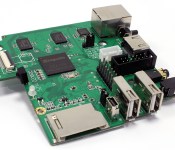
The romantically-named MIPS Creator CI20 is a barebones board that’s capable of running Linux distros like Debian 7, as well as Android 4.4, and measures 90.2mm by 95.3mm. The hardware is packing a 1.2GHz MIPS32 CPU, 1 GB RAM and a PowerVR SGX540 GPU – the same GPU that is used inside Google Glass, Kindle Fire, Razr I and Galaxy Tab 3 7.0. Combining that graphical prowess with dedicated video controllers that’ll support 1080p at 60fps makes the C120 ideal as a barebones HTPC, something the company takes great pains to point out. There’s also 8GB of on-board storage and a full-size SD card reader, a step up from both the BeagleBone Black and the Pi Model B+. Connectivity-wise, in addition to the usual Ethernet port, the CI20 also comes with Bluetooth 4.0 and 802.11 b/g/n WiFi as well as two full USB ports and a HDMI-out port.
Of course, you’re probably itching to find out how to get hold of one of these for precisely zero money, but it won’t be as simple as fluttering your eyelashes in the direction of its Kings Langley HQ. The company is asking that you sign up on its online store (it’s in the source link) to register, offering up both your personal details as well as the details of the project you’re planning to develop — for instance, a nice HTPC — with the hardware. The company will then work with you to garner feedback from your projects in the hope of, at some point in the future, selling a future variant in the same way as the Raspberry Pi is now.
Filed under: Misc
Source: Imagination Technologies, Request a MIPS Creator CI20
.CPlase_panel display:none;

London to start trialling wirelessly-charged buses

While London’s public transport network is getting more hi-tech by the minute, the city’s buses and trains aren’t as green as they could be — at least not yet. Transport for London (TfL) has already deployed 800 hybrid and a handful of all-electric buses on the capital’s streets, but keeping them charged isn’t easy when they’re miles from a depot. In a bid to keep them running as efficiently as possible, TfL has kicked off a new trial that will see inductive charging stations built into four east London bus stops, allowing its Enviro400H E400 hybrid buses to charge wirelessly while they pick up passengers.
Once TfL has completed the necessary installations, the charging system will be tested on electric hybrid buses traveling route 69 (for locals, that’s between Canning Town and Walthamstow) from next year. Topping up at regular intervals means they can run for longer using only their batteries (instead of falling back onto diesel power), which reduces their running costs and impact on the environment. TfL says the trial will allow it to gauge whether wireless charging can stand up to the pressure of powering buses full of tourists and commuters across the whole city.
[Image credit: wirewiping, Flickr]
Filed under: Transportation
Via: Pocket-lint
Source: TfL
.CPlase_panel display:none;

Lockheed Martin to track space junk from the Australian Outback

In the movie Gravity, masses upon masses of floating debris hurtled through space at alarming speeds and collided with the heroine’s space shuttle, killing her crew. Space junk isn’t just something made up for the movies, though — it’s a real issue that’s costing space agencies a whole lotta money. As such, Lockheed Martin has teamed up with Australian company Electro Optic Systems to build a space object tracking facility in western Australia, which the latter has been planning for years. While the U.S. Air Force’s debris-tracking Space Fence (also developed by Lockheed Martin) uses radar systems, this one will use an optical technology like those found in telescopes to zoom in on objects, and lasers to calculate their speed and distance from Earth.
Space agencies typically avoid debris by moving vehicles when trackers warn that they’re bound to collide with floating junk. When the Lockheed Martin facility’s construction wraps up in 2016, it’ll be able to track 200,000 pieces of space junk, which could be anything from rocks to pieces of old satellites, even those as small as a baseball. Seeing as even the tiniest speck of trash can shatter windows on space vehicles, the new facility can help save NASA and other agencies some serious cash.
[Image credit: Gravity/Warner Bros. Pictures]
Filed under: Science
Source: The Wall Street Journal, Lockheed Martin
.CPlase_panel display:none;
6 ‘Missing’ smartphone features: PriceBag Survey
 We have feature-laden smartphones today, be it flagship devices or their mid-range counterparts. But there are certain features that you always need but nobody bothers about working on them. The features that you need the most are not gimmicks like Quad HD displays but stuff that would make your life easy and will be used everyday voluntarily. We did a survey of 455 people and compiled a list of features that we think are necessary for easing everyday life:
Spam Call

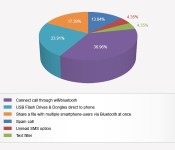
What if someone you did not want to talk to calls you and you don’t get to know when that person called, unless you check your notifications? In today’s times when the Do Not Disturb systems can be bypassed, a feature which allows you to stop pesky callers from disturbing you and you can turn it on and off at your own free will would do wonders. Who knows you might need to call these pesky callers and want to talk to them about something that is important for you. After all, fail-safe measures are necessary too. 13.04 per cent respondents voted for this feature which we call Spam Call.
Unread SMS option
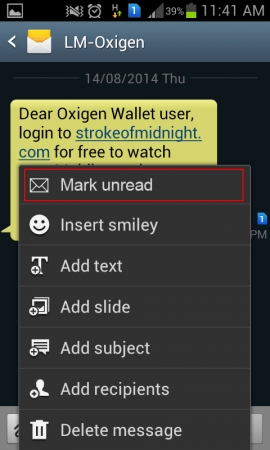
You receive some odd 5 SMSes on an average daily, even if you are using WhatsApp or other Internet Messengers. But some of those messages are important and when you need to look at them again, you need to search through your message inbox for them. But what if you could read them and mark them as unread? That would make looking at important messages handy and your life easy. This feature, we call it Unread SMS option, had 4.35 per cent respondents gunning for it.
Text filter
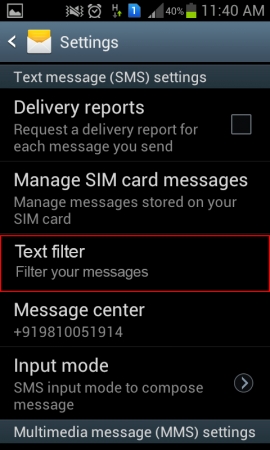
There are certain messages that you don’t ever want to read but still have to encounter, like property dealers’ messages for instance. What if your phone could block these messages from landing in your inbox on the basis of what is written in them. For sure you would thank the phone maker who brings this feature to their smartphones(s). The feature called (by us) Text Filter got the yes vote from 4.35 per cent of total respondents.
Connect call through Wifi/Bluetooth

Why is it that we have to rely on our mobile carriers to talk to any person we want? Should this dependence not be cut down upon? What if you could call someone using Wifi and Bluetooth connections? That would have few advantages like (a) you will reduce your dependence on intercom networks at workplace or residence; (b) the connections would be faster and more reliable, reducing call drop rates and; (c) you will be able to talk for as long as you want without having to worry about racking up sky-high bills. A whopping 36.96 per cent of all respondents want their phone to have this feature. We wonder what telecom operators have to say about it.
USB Flash Drives & Dongles direct to phone
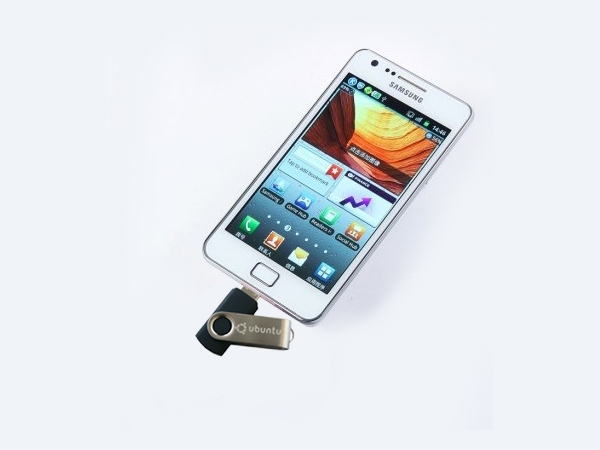
There is something called USB On-The-Go which enables you to connect your phone to your pendrives to expand storage. However, that is where its usability ends. Now imagine, you have your web dongle and your 3G connection is running at low speed. If your phone could connect to internet using that dongle, it would just enable you to finish your tasks faster. A downside is that 3G adoption rates would come down, but then 3G rates would also get slashed, making the high-speed network accessible to more users than ever. Among one of the most prudent features, it had 23.91 per cent respondents at its side. Time to bring down the 3G data rates, telecom operators.
Share a file with multiple smartphone-users via Bluetooth at once
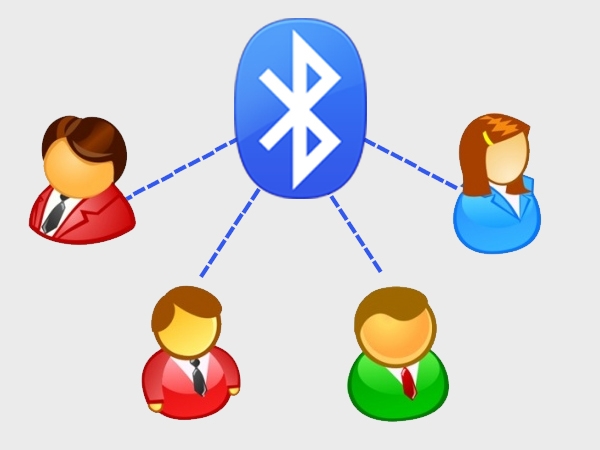
Right now, your phone can connect to only one Bluetooth device at a time. But there are times when you want to share a file with multiple users and fast. Due to Bluetooth’s limitations, you need to resort to means like e-Mail, Internet Messengers, etc. If your phone could connect to more than two devices via Bluetooth, it would just make your tasks easier and Bluetooth more useful for you than it is right now. Out of the total 455 respondents, 17.39 per cent want this feature to be packed in their phones.
Via PriceBag
.CPlase_panel display:none;

LG’s big screen phone-of-the week gets a laser camera

Now that LG’s flagship G3 is a big success, it’s pulling a Samsung by throwing esoteric spin-offs like the G3 Stylus against a wall to see what sticks. The latest is the not-so-brilliantly named Gx2 (the company already has a G2x) that packs a huge, 5.7-inch screen and laser camera focus borrowed from the G3. Other specs are run-of-the-mill: a quad-core 1.2GHz CPU, 1.3-megapixel front camera, 1.5GB of RAM, 8GB memory, 720p screen resolution and a 3,200mAh battery that should run forever. Oddly the meek 8-megapixel camera doesn’t seem to deserve the laser system, but maybe there’s a “focus buff” market we’re unaware of. Pricing and availability have yet to be revealed, but it’s likely to stay in Asia.
Filed under: Cellphones, Mobile, LG
Source: LG (Translated)
.CPlase_panel display:none;
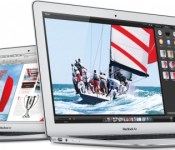
Apple to Reportedly Launch Thinner MacBook in Late 2014 or Early 2015
Apple will launch a thinner MacBook near the end of this year or early next year, according to a new report from Digitimes. Citing supply chain sources in Taiwan, the report notes that component production has already begun in small volumes. Apple will also reportedly cease production of the 13-inch non-Retina MacBook Pro by the end of 2014.

A report last month claimed that Intel’s continued delays of its Broadwell chip may cause Apple to push back the release of its 12-inch MacBook until late this 2014 or early 2015. The 12-inch MacBook is said to include a Retina display and may either be a successor to the MacBook Air or join Apple’s current 11-inch and 13-inch models.
A previous report in June stated that Apple would begin production of a 12-inch MacBook Air in the third quarter of this year, with Quanta Computer in charge of assembly. The 12-inch MacBook Air was also described as appearing similar to the 11-inch and 13-inch models, but featuring a Retina display and internal changes to various components.
Other reports throughout the year have also shared information on a 12-inch MacBook Air, with NPD DisplaySearch and KGI Securities analyst Ming-Chi Kuo also stating that the new notebook would feature a Retina display. A user on a Chinese forum who previously shared accurate information noted that the 12-inch MacBook Air would incorporate a new cooling system and button-less trackpad design.
If Apple is indeed looking to launch a new MacBook late this year or early next year, the company may unveil the notebook at an October event following the introduction of the iPhone 6 in September.
.CPlase_panel display:none;

Tokyo’s Shibuya gets a big-screen Google voice search terminal

Arguably, the whole convenience of Google’s search and map skills (and by association, the voice-guided version) is the fact it’s on your smartphone — which is right in your pocket. However, In a bid to explain to Tokyo-ites that there’s more to the eminently tech-friendly Shibuya outside of That Starbucks and the scramble-crossing, Google’s erected a temporary structure right outside the station. Not only can you make voice search requests for the nearest tech store or… french patisserie, it’ll display a map and directions on a huge 138-inch screen — which you can then take a photo of, presumably, with your smartphone.

As you can see, the interface looks almost identical to voice-based interactions on Android phones. There’s a giant mic to pick up your commands over the throngs of people constantly ducking in and out of the nearby station. From our time with it, Google’s robots still found it hard to pull out simple commands from the buzz of the crowds. When it does pick it up, it’ll then parse what you’re saying and offer up suggestions just like, well, Google voice search. The collaboration with Shibuya’s tourist board and local businesses aims to offer visitors some navigational help when getting around. Given the area’s reputation for tangled back-alleys and hidden shops, you might need all the assistance you can get.
Filed under: Google
.CPlase_panel display:none;
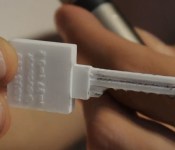
3D-printed ‘bump keys’ are a tech-savvy lockpicker’s best friend

We’ve all locked ourselves out of our homes or offices at least once, but what do you do when there aren’t any handy spare keys laying around? Well, seeing as how we live in the future, you could always 3D print one. Printing a plastic replica of a key you’ve already got in your possession is a piece of cake, but the real trick for the curious and the criminal alike is figuring out how to print a key that’ll open locks without having an original key on hand. Wired spoke to a pair of lockpickers who did just that — with just a photo of a keyhole, some understanding of the lock’s depth and a bit of crafty purpose-built software called Photobump, security consultants Jos Weyers and Christian Holler can print so-called “bump keys” that allow them to jimmy open nearly any lock with just a bit of elbow grease.
Haven’t heard of bump keys before? Long story short, they’re specially filed keys that you slip into a keyhole and hit with a mallet. Why? The energy from that thump is transferred up from the key’s grooves and into the two layers of pins that normally keep the lock from rotating — if you strike the bump key just right while trying to turn it, that top layer of pins will leap out of the way long enough for you to unlock the whole shebang. If that sounds a little too easy, well, you’ve got a point. Thankfully, Weyers and Holler aren’t trying to sell their tech to the highest, most nefarious bidder — they’re instead trying to coax manufacturers into crafting locks that can better resist these sorts of techniques.
Source: Wired
.CPlase_panel display:none;
 AIVAnet