



NASA’s massive Space Launch System rocket is slated for a 2018 launch

Upstarts like SpaceX might get most of the attention, but let’s not forget that NASA — you know, the folks who actually put 12 guys on the moon — isn’t done pushing to explore the heavens just yet. Case in point: the agency is working on a whopper of a rocket called (unimaginatively enough) the Space Launch System that’ll eventually propel a manned Orion capsule in Mars’ direction, and officials just green-lit that massive booster for development. The formulation phase is over folks, time to build this crazy thing. There is, however, a downside. You see, the SLS was originally slated to make its first official test flight with an uncrewed Orion capsule in December 2017, but it’s looking at this point like that inaugural launch will actually take place nearly a year later. Yeah, we can hardly wait either, but it was going to be a long while before all the development and infrastructure fell into place anyway — NASA associate administrator Robert Lightfoot reaffirmed in a statement that we won’t be flinging humans at the red planet until the 2030s. Think you can beat that, Mr. Musk?
Filed under: Science
Source: NASA
.CPlase_panel display:none;

Hail nearby medics with the GoodSAM smartphone app

In a serious medical emergency, action in the first few minutes can be key to a positive outcome. An ambulance might be only a few miles away, but what if someone with medical training, who could provide immediate care while the cavalry’s on route, was sitting just next door? It’s this kind of scenario a doctor with London’s Air Ambulance service had in mind when he created GoodSAM, an Android and iOS app that sends out a request for any nearby professionals to lend a hand in an emergency.
Well, there are actually two different apps. GoodSAM Alerter is available to everyone, and it’s through this you can broadcast a call for help. During the app registration process, you can also add medical details you think could be important for the first person on the scene, should you be the one in trouble. The app uses GPS and Google Maps to pinpoint your location, then notifies the nearest person who might be able to provide aid, before hailing others if they’re unavailable. Once you’ve made a request for immediate support, the app then asks if you want to call the emergency services, assuming you haven’t already.
GoodSAM Responder is the app for those who can actually do the helping. As you’d expect, the registration process is much stricter — you need to prove you have the right qualifications and training to give emergency care. If you fit the bill, you’ll be the one receiving notifications of people in need through the Responder app. Confirm you’re able to help, and the app will direct you to the scene, as well as set up a messaging channel with the smartphone that sent the alert. Responders also have access to a crowd-sourced map of defibrillator locations if they need to find one quickly. GoodSAM isn’t the first app of its kind, but it could be the first to have a global impact. We’re told the app is currently most useful in London due to a high number of registered responders, but it’s hoped with ongoing awareness campaigns the app will become a valuable tool worldwide.
[Image credit: David Holt London/Flickr]
Filed under: Cellphones, Software, Mobile
Via: Sky News
Source: GoodSAM
.CPlase_panel display:none;

Boston Children’s Hospital preps surgeons with custom 3D-printed models

Undoubtedly, 3D printing has taken root in a variety of disciplines, and medicine is no stranger to leveraging its tool kit. At Boston Children’s Hospital, surgeons are using printed models to prep for the operating room. “With 3D printing, we’re taking a step that allows experienced doctors to simulate the specific anatomy of their patients and allows the best of the best to become even better,” says Peter Weinstock, MD, PhD. Dr. Weinstock is working on an in-house service that’s capable of constructing the models in short order. Using scans from the hospital’s radiology department and a 3D printer capable of super high-resolution output (16 microns, to be exact), the models allow doctors to examine details of a baby’s skull or brain. What’s more, the machine can use multiple materials to sculpt the final result, simulating the unique facets of bone, skin and blood vessels individually. For surgeons-in-training, the custom-made prints can illustrate the details of a medical condition rather than an average look.

Filed under: Misc
Via: ABC News
Source: Boston Children’s Hospital
.CPlase_panel display:none;

Instagram shows how Hyperlapse stabilizes your jittery videos

Instagram has already revealed a bit about how Hyperlapse turns your shaky handheld footage into smooth time-lapses, but what if you really want to know what makes it tick? Don’t worry — the company will happily satisfy your curiosity with a deep dive into the app’s inner workings. Ultimately, you’re looking at a significant extension of the Cinema tech used in Instagram itself. It’s still using your phone’s gyroscope to determine the orientation of the camera and crop frames to counteract any shakiness. The biggest change is in how Hyperlapse adjusts to different time-lapse speeds. It only checks the positioning for the video frames you’ll actually see, and that crop-based smoothing effect will change as you step up the pace.
Importantly, Instagram’s approach contrasts sharply with what we saw in Microsoft’s similarly-named technique. There, Microsoft is calculating a 3D path through the scene and stitching together frames to create a seamless whole. That approach is potentially nicer-looking, but it’s a lot more computationally intensive; Instagram is taking advantage of your phone’s built-in sensors to create a similar effect without as much hard work. You don’t need to know the nitty-gritty about Hyperlapse to appreciate the effect it has on your clips, but the post is definitely worth a read if you have unanswered questions.
Filed under: Cellphones, Internet, Mobile, Facebook
Via: 9to5Mac
Source: Instagram Engineering Blog
.CPlase_panel display:none;
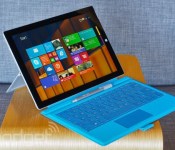
Microsoft’s Surface Pro 3 tablet lands in 25 more countries

Microsoft’s Surface Pro 3 has only been available in a handful of places so far, but it’s about to get a much, much wider audience. As promised, Microsoft is launching its latest Surface in 25 more countries. Most of them are Asian and European nations, including China and the UK; if you’re reading this, there’s a good chance that you can snag a Windows slate for yourself. All five models are available, so you won’t have to settle for a device you don’t want. You’ll have to be a little more patient if you want the docking station, though. It’s available for pre-order today, but you’ll have to wait until September 12th to pick one up on impulse.
Filed under: Tablets, Microsoft
Source: Surface Blog
.CPlase_panel display:none;

Nimblebit’s ‘Tiny Tower Vegas’ Now Available Worldwide [iOS Blog]
The sequel to Nimblebit’s popular free-to-play tower building game Tiny Tower is now available for download worldwide after soft launching in several countries earlier this summer. Tiny Tower Vegas incorporates the same tower building gameplay found in the original game, melding it with several Las Vegas-themed mini games like poker and slot machines.
As in the previous game, the idea is for players to continually build up and manage a tower filled with various businesses that generate coins. Like many free-to-play titles, Tiny Tower Vegas includes various countdown timers for functions like restocking floors, which can be sped up with the use of real life currency.
Tiny Tower Vegas can, however, be played without investing any real money. There are three types of currency in the game: coins, bux, and poker chips. Coins are earned from the tower’s occupants, while bux are won from the included gambling mini games, which are played using poker chips. While poker chips can be purchased in app, there are also continual mini events in the game that reward players with the currency.
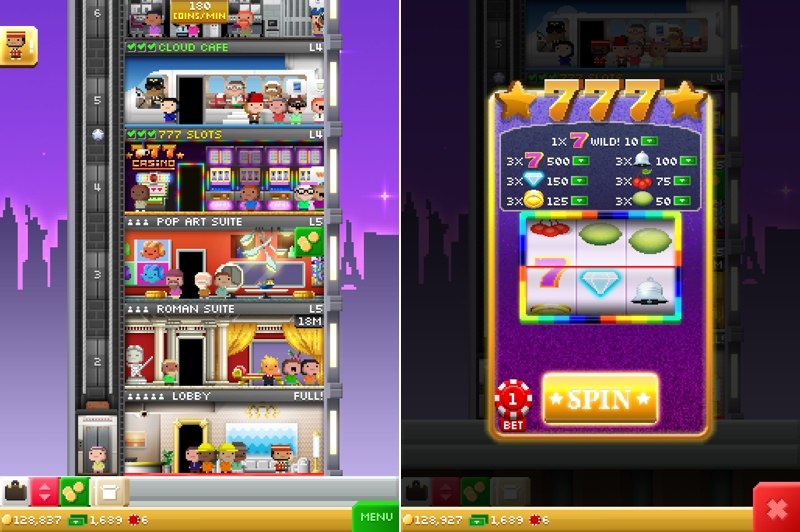
The game includes several tower customization options and features that were available in the original Tiny Tower, including a BitBook with funny status updates, elevator upgrades, and multiplayer options that allow users to visit friends’ towers and team up with other users in the Players Club.
Tiny Tower is back, and this time we’re going to Vegas, baby!
– Build and manage your own hotel & casino filled with shopping, dining & entertainment floors!
– Amass a fortune of bux by betting chips in a multitude of casino games!
– Earn chips when your friends visit and play the games in your tower!
– Customize your tower with impressively themed roofs, elevators and lobbies!
– Keep tabs on the thoughts of employees and guests by reading the “BitBook” virtual social network!
Tiny Tower Vegas is a universal app that can be downloaded from the App Store for free. [Direct Link]
.CPlase_panel display:none;
Apple Denied Sales Ban on Samsung Devices From Second Patent Trial [iOS Blog]
Apple has again been denied a permanent injunction on Samsung products that infringe on its smartphone patents, reports Bloomberg. Judge Lucy Koh today rejected Apple’s plea for a sales ban on nine different Samsung devices involved in the second Apple vs. Samsung patent infringement trial.
According to Koh, Apple did not demonstrate irreparable harm in the form of lost sales, despite efforts to target specific infringing features on the Samsung devices.

“Apple has not satisfied its burden of demonstrating irreparable harm and linking that harm to Samsung’s exploitation of any of Apple’s three infringed patents,” the judge wrote. “Apple has not established that it suffered significant harm in the form of either lost sales or reputational injury.”
Earlier this year, a jury ruled that Samsung had willfully infringed on three Apple patents, ordering the company to pay $119.6 million in damages. Devices involved in the lawsuit included the Galaxy S III, Galaxy Note II, and Galaxy Tab 10.1.
The $119.6 million that Samsung owes from the second trial is in addition to the damages awarded to Apple in the original Apple vs. Samsung trial, which added up to approximately $890 million after a recalculation.
Apple and Samsung agreed to end their non-U.S. patent disputes in early August, but their battle in the United States is ongoing despite efforts to find “common ground.”
.CPlase_panel display:none;
Dropbox Pro gets better plus offers 1TB now for $9.99 a month
There are plenty of cloud storage options out there for users to choose from like MediaFire, Google Drive, Copy and Dropbox. While many of you have a few of them, others only use one or two. Today Dropbox might catch your eye again, or still, as they have added a few things to the Pro side of their services. That would be the one where you pay.
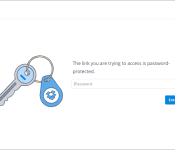
One addition is password protection for shared links. This function lets you share a link to a friend or coworker that will prompt them to enter the password you have set for it to actually access it. FYI – you should use a different password than your Dropbox account.

Along with the Password protection, Dropbox has also initiated a new safeguard in the event that you lose your device. While many use lockscreen passwords, codes, and other security measures to safeguard our information on our phones, tablets and laptops, it never hurts to have another backup plan. With the new safeguard you can remotely unlink and wipe your Dropbox files from a linked device.
The final change coming from Dropbox today is a unified plan option. You won’t have multiple choices to choose from any more, instead you can grab 1TB for $9.99 a month or $99.00 a year. The good news is that Dropbox plans to migrate all current Dropbox Pro users to the new plan.
Source: Dropbox
//<![CDATA[
ord = window.ord || Math.floor(Math.random()*1E16);
document.write('‘);
//]]>
The post Dropbox Pro gets better plus offers 1TB now for $9.99 a month appeared first on AndroidSPIN.
.CPlase_panel display:none;

Pandora’s radio app for Glass lets you tune into Haim using your head

If you regularly go out wearing Google Glass, you’ve probably lamented the lack of major music app choices. There’s Play Music and… well, that’s about it. Never fear, though, as Pandora has just released a Glass app for its internet radio service. The wearable-ready software lets you control streaming without ever having to reach for your phone; you can create or choose stations solely using your voice, and the touchpad lets you both skip annoying tunes and give the thumbs-up to songs you like. It won’t cost you anything to download the app, although you can’t really call this free. Besides the $1,500 Glass itself, you’ll likely want to buy Glass-specific stereo headphones — that’s a lot of money just to get internet radio on an eyepiece.
Filed under: Wearables, Internet, Mobile, Google
Via: The Next Web
Source: Pandora Blog
.CPlase_panel display:none;
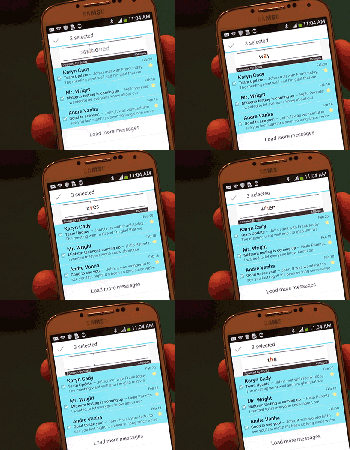
Sound off! Do you use any speed-reading apps?

Speed-reading apps seem like the new weather apps. There are tons of different examples to choose from and they tout benefits that range from better memory retention to more free time and even healthier, shinier hair (one of those may not be totally true). So, have you used one to take your reading skills from average speed to ludicrous speed? Head over to the Engadget forums and share your experiences.
.CPlase_panel display:none;
 AIVAnet