



Microsoft may ditch the Charms bar in its next big Windows update

Some would already argue that Windows 8 is anything but charming, but a slew of new reports indicate that Microsoft might give one of Windows 8′s most iconic interface elements – the Charms bar – the axe in its next big OS release. Not much for names? The Charms bar is that love-it-or-hate-it disappearing menu that offers up access to device settings, sharing and the Windows search function (among other things). The tricky bit about it is that it’s just peachy to use on touchscreen devices, but flicking your mouse cursor into a corner of your desktop’s screen to invoke it gets tiresome after a while.
For a while there, it was unclear just how sweeping this change would be: Winbeta.org originally reported that the Charms bar might only disappear from your desktop and not from tablets. ZDNet’s (awfully well-connected) Mary Jo Foley later chimed in, citing sources who claimed that the Charm bar will be completely gone once Windows Threshold starts rolling around. To hear her tell the tale, some pertinent Charm bits will find their way into the title bars of Windows 8 apps, but developers will have to implement new sharing functions if they want their users to get social. Either way, it shouldn’t be long before we start experiencing the Charm-less life for ourselves: a preview of Windows Threshold is expected to go live some time in the fall.
Via: The Verge
Source: ZDNet
.CPlase_panel display:none;

Facebook Messenger adds support for Android Wear

Facebook Messenger has become the latest high profile application to integrate support for Android Wear. An update to the app now lets users view and respond to messages in addition to being able to “Like” them. Once a message arrives you can swipe to enable a voice reply or a tap to “Like” it. Good luck hiding…… Read more »
The post Facebook Messenger adds support for Android Wear appeared first on AndroidGuys.
.CPlase_panel display:none;

36 new University Campuses get the Google Street View Treatment
Google Street View is a great way to take a virtual tour or locations your are planning to visit, or even places you wish you could visit but just can’t. It also comes in handy when you are looking for something and like having visual landmarks in your head before you go. Today Google announced that they have released Street View access to 36 new college universities across Canada and the U.S.

A few new school highlights are of Georgetown University, as seen above, University of Miami and the University of Regina in Canada. Street View campus tours already take you on virtual tours of hundreds of other school campuses across the globe.
To see if a Street View tour of your dream school is available, search for a particular university on Google Maps and click on Pegman to enter the Street View imagery. Visit our Street View gallery for global highlights and other popular universities around the world.
I know I have spent countless hours searching around Google Maps and hitting up Street View to take a look at what is around. It can be fun and you can often times find things you didn’t even know where there.
Source: Google LatLong
//<![CDATA[
ord = window.ord || Math.floor(Math.random()*1E16);
document.write('’);
//]]>
The post 36 new University Campuses get the Google Street View Treatment appeared first on AndroidSPIN.
.CPlase_panel display:none;

Google now considers website security for search rankings

There really isn’t such a thing as being too secure online, and Google is trying something new to get more website owners thinking about keeping their users’ information safe. After a few months of experimentation, the search giant now considers how secure a site is when it decides how prominently it gets placed in search results.
It’ll be neat to see just how Google’s push for security ultimately influences what our search results look like, but don’t expect a seismic shift just yet. According to a post on Google’s Online Security blog, the security factor won’t be the biggest decider of how well a site ranks in your search results — it only comes into play for 1% of all search queries right now. Still, the team readily admits that could change down the line — they just might up its importance to “encourage” webmasters to adopt HTTPS security for their sites. Google’s been pushing this security angle for a while now, and it’s been eager to spearhead the push at home by encrypting the data that flows between its services. This newest move doesn’t come completely out of the blue, either. Matt Cutts, Google’s webspam chief, said earlier this year that he’d like to see the company reward responsible sites in this very way — frankly, it’s about time.
Source: Google Online Security
.CPlase_panel display:none;

Sproutling’s new wearable tracks your infant’s sleep patterns

Baby wearables. With the boom in fitness trackers, you must’ve seen them coming, right? Now, a pair of ex-Apple and Google employees has launched the Sproutling baby monitor, a device the company likens to Nest in terms of design and simplicity. Unlike the Withings Baby Monitor camera, however, it’s meant to be worn around your baby’s ankle. That way, it can monitor parameters like heart rate, skin temperature and body movement, while also tracking the room’s temperature, humidity and light levels. All that data is sent to a smartphone app, which crunches it to create simple notifications. For instance, it can tell you whether her heart rate is higher than normal, if she’s sleeping on her back, if it’s warmer than ideal in the room or whether she’s now awake and not in a good mood.
On top of that, the system can learn a baby’s habits over time and predict things like when he’s ready to wake up or if the room’s too warm to sleep. Sproutling said it worked with parents, engineers and pediatric specialists to develop those features while keeping the app user-friendly. It’s also built from hypoallergenic silicone, and can be tossed in a washing machine thanks to the removable sensor. Though we’ve seen other baby wearables like the Mimo Baby, the Sproutling’s setup looks simpler and possibly more comfortable.
The Sproutling uses a wireless charger that also assumes most parents are kinda busy: To power it up, you just place it on a charging “bowl” which doubles as the environmental sensor. The company said it tried to make notifications simple for busy parents so as not to overwhelm them with information. (To avoiding any “What does this mean? Call the doctor!” reactions from paranoid new parents.) The Sproutling is now up for pre-order at an early-bird price of $249 (it’ll run a hefty $299 at retail), and will ship early next year.
Filed under: Cellphones, Wearables
.CPlase_panel display:none;

LG’s G3 A is a stripped-down model of its flagship smartphone

LG has to be pleased by the overall reception to the G3, from press and consumers alike. That said, perhaps in an effort to keep the momentum going, the electronics company just launched the G3 A, a smaller and slightly lower-specced version of its popular flagship handset, the G3. This isn’t to say LG’s new, 5.2-inch G3 A, which will be available in South Korea through SK telecom, is by any means a dud, as it does sport some pretty good features of its own. The smartphone comes with a 1080p screen, a Snapdragon 800 processor (2.6GHz) alongside 2GB RAM, 32GB of built-in storage, Android KitKat and, best of all, the same 13-megapixel camera found on the G3. Of course, introducing a different model to the G3 family is nothing novel to LG — the company announced the G3 Beat recently and, apparently, there’s also a G3 Stylus on the way.
Filed under: Cellphones, Mobile, LG
Via: Phone Arena
Source: LG
.CPlase_panel display:none;

‘Siri for Mac’ Virtual Assistant Described in New Apple Patent Application
Rumors suggesting Siri will make its way into OS X have been circulating for years, but the personal assistant has yet to debut on the Mac. A new patent application published by the U.S. patent and Trademark Office and spotted by AppleInsider revives these rumors with the description of an intelligent assistant for the desktop that provides features far beyond the current dictation available in OS X.

The patent application, which was filed in February of this year and based on a provisional application from a year earlier, describes a system that in one iteration can sit in the dock, waiting for touch input or voice commands to activate a personal assistant in a manner similar to Siri in iOS. The assistant would then perform tasks based on input by the user. The same system can function as a third hand, allowing users to interact physically with a mouse and keyboard while simultaneously performing a secondary task using their voice.
Methods and systems related to interfaces for interacting with a digital assistant in a desktop environment are disclosed. In some embodiments, a digital assistant is invoked on a user device by a gesture following a predetermined motion pattern on a touch-sensitive surface of the user device. In some embodiments, a user device selectively invokes a dictation mode or a command mode to process a speech input depending on whether an input focus of the user device is within a text input area displayed on the user device. In some embodiments, a digital assistant performs various operations in response to one or more objects being dragged and dropped onto an iconic representation of the digital assistant displayed on a graphical user interface. In some embodiments, a digital assistant is invoked to cooperate with the user to complete a task that the user has already started on a user device.

Though Apple is bringing some aspects of iOS to OS X such as Reminders, Apple has yet to integrate Siri into its desktop platform. The feature was not mentioned when Apple unveiled OS X Yosemite, and there is no known evidence in the current beta version of Yosemite that suggests Apple may integrate its personal assistant into future versions of the desktop OS. Still, it is clear Apple is thinking about ways to bring Siri-like features to OS X.
.CPlase_panel display:none;
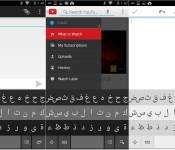
Fleksy Keyboard launches Arabic beta, demos typing in Chinese, and brings four new themes!

The folks over at Fleksy are always working hard to bring you the next big thing when it comes to typing. The app is updated just about every month with what seems like 1,000 improvements every time. We’ve got another one here, and if you’re at all interested in Arabic or Chinese, you should take… Read more »
The post Fleksy Keyboard launches Arabic beta, demos typing in Chinese, and brings four new themes! appeared first on AndroidGuys.
.CPlase_panel display:none;
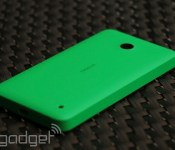
Microsoft’s idea of severance pay is a free Lumia 630

If your firm, like Microsoft, was preparing huge layoffs, you’d expect a sweet incentive to leave, like a fat check, or the right to rob the stationery cupboard guilt-free. For workers at a former Nokia factory in China, however, the reward on offer’s a little less than spectacular. MarketWatch is reporting that Microsoft is offering workers in a former Nokia factory a free Lumia 630 if they apply for the company’s voluntary resignation scheme. The handsets are being handed out on a first come, first served basis, with the first 300 employees to leave each day bagging one of the phones. Of course, given that the low-end handset retails for the equivalent of $130, it’s hardly the gold watch and golf club membership you’d expect to leave your job with.
Filed under: Cellphones, Microsoft, Nokia
Source: MarketWatch
.CPlase_panel display:none;
HTC lets One M8 users share their camera tricks with the rest of the world

Thanks to its depth-sensing Duo Camera setup, the new HTC One M8 lets you take picture post-production way beyond adding a simple sepia filter. There’s only so long you can expect friends to huddle round while you play with the advanced editing features, though, but with the new version of HTC’s Gallery app, you can let them get creative too. By sharing your photos to the web from the updated app, others can toy with the depth of field and bokeh, add effects and filters to parts of the image, and manipulate picture point-of-view from within a browser window. The Duo Camera is doing the hard work of capturing the scene, after all, so HTC’s simply ported the fancy editing features to the web for those without access to their latest and greatest phone to enjoy, which is pretty cool by anyone’s standards.
Filed under: Cellphones, Software, Mobile, HTC
Source: HTC Gallery (Google Play store)
.CPlase_panel display:none;
 AIVAnet