


Review roundup: Intel’s 8-core Haswell-E is the fastest desktop CPU ever

Since it was teased in March, enthusiasts have been itching to see how Intel’s 8-core Haswell Extreme Edition processor (the i7-5960X) performs. It has now launched (along with two other Haswell-E models) and the reviews are in. Yes, it’s the world’s fastest desktop CPU — but the general consensus is “it could have been better.” Why? Because Intel recently launched a “Devil’s Canyon” CPU for $340 with a base clock speed of 4.0GHz that can easily be overclocked to 4.4GHz. The $1,000 Extreme Edition chip, on the other hand, has a base clock of 3.0GHz and max turbo speed of 3.5GHz. Since clock speeds are often more important to gamers than multiple cores, that might disappoint many a Battlefield 4 player. On the other hand, with DDR4 support and eight cores (Intel’s highest count ever on the desktop), the chip should excel at pro tasks like 4K video processing and 3D rendering. Given the price tag, that might be the only market that can afford it. Here’s what the experts think.
Hot Hardware

Hot Hardware called the Haswell-E 5960X “a mix between kick-ass and meh,” saying that it was actually topped in some tests by the i7-4960X, last year’s Extreme Edition model. That’s because despite having two less cores, the latter has higher clock-rates. Still, it found the new chip to be “mostly superior to the previous-gen,” in terms of gaming and graphics performance. And if you’re into overclocking, the chip is more configurable than other Haswell processors. ASUS told Hot Hardware the chip was easy to take up to around 4.4GHz or so with decent liquid or air cooling, thanks to adjustable voltage, turbo and other settings. If you decide to do that, however, beware of your power bill: the chip has decent power efficiency at regular settings, but can jump to 180 watts or more when overclocked.
Anandtech

“Using the 8-core monster… does some financial damage,” was Anandtech‘s succinct sum-up of the CPU’s economics. $1,815 and up is the bare minimum price for a fully configured system, but that can easily stretch to $5,000 or more if you max out the RAM and graphics. The $1,000 price of the CPU doesn’t help, but another issue is memory: DDR4 RAM is considerably more expensive than last-gen DDR3, running about $250 per 16GB. On the other hand, you will save a bit of money once it’s up and running. Tick for tick, the new CPU is more efficient than last year’s Extreme Edition 6-core model (provided you don’t overclock), and the DDR4 RAM runs at a lower voltage and consumes less power as well. Still, you’d have to be a serious gamer to justify the mild performance bump for the not-so-mild leap in price over chips like the 4GHz Devil’s Canyon model.
Tom’s Hardware

However, if you’re into video or 3D graphics, where time is money, it might be worth paying more. Tom’s Hardware took a close look at some real-life benchmarks, including 3ds Max, Adobe Photoshop CC, Premiere Pro CC and Handbrake media encoding. The new chip tops almost all the charts, and actually bests Intel’s 8-core Xeon E5-2687W v2 in most — and that processor costs twice as much. Since most of the applications are heavily multi-threaded (unlike many games), it also wallops the quad-core, 4Ghz Core i7-4790K in all the tests. That means a 3ds Max render would run about 25 percent faster — which could easily save hours of time.
Oddly, Tom’s also showed that if you’re into gaming, the two processors introduced along with the Extreme Edition CPU — the $389 Core i7-5820K with four cores and the $583 6-core 5930K — might actually be better. It said “games often favor architecture and clock rate over core count,” and sure enough, Battlefield 4 and other titles get higher frame rates on those chips, thanks to the higher clock speeds. So if you’re a gamer, today’s announcement isn’t a total loss — but you may want to ignore the glamor chip and look at the two CPUs playing second fiddle instead.
Source: Intel
.CPlase_panel display:none;

4.7-Inch iPhone 6 Built From Parts Supports Theory of 1334 x 750 Display
Yesterday, we shared a video and some photos from Feld & Volk [Instagram page] apparently showing a 4.7-inch iPhone 6 built from parts actually booting to the “Connect to iTunes” recovery mode screen.
A Tweet today from developer Steven Troughton-Smith points out that the graphics shown on the display during this booting process “*seem* to confirm” John Gruber’s arguments in favor of the device being equipped with a 1334 x 750 display at the same 326 pixels per inch density of previous Retina displays. More specifically, the evidence points toward an approximately 667 x 375 point display, which would presumably arrive in the form of a 2x Retina display at 1334 x 750 as Gruber suggests.
Sparked by Troughton-Smith’s observation, we have independently examined photos of the booting device provided to us by Feld & Volk and come to the same conclusion.
 iPhone 6 (left) and iPhone 5s (right) shown booting to recovery mode. Letterboxing on iPhone 6 visible below Lightning cable.
The method relies on the fact that the “Connect to iTunes” image does not completely fill the display on the iPhone 6, with the Lightning cable ending above the bottom edge of the screen whereas on current iPhones it extends all the way to the edge. Assuming this “letterboxing” is due to the image not being optimized for the larger iPhone 6 display, it would correspond to the image filling an area equivalent to a 4-inch screen centered on the device’s 4.7-inch display.
This would account for the margin of black seen between the cable and the bottom of the display, and measuring the ratio of the space (plus a presumed equal one at the top) to the overall display size should yield an approximation of how much larger the viewable area is in points on the iPhone 6.
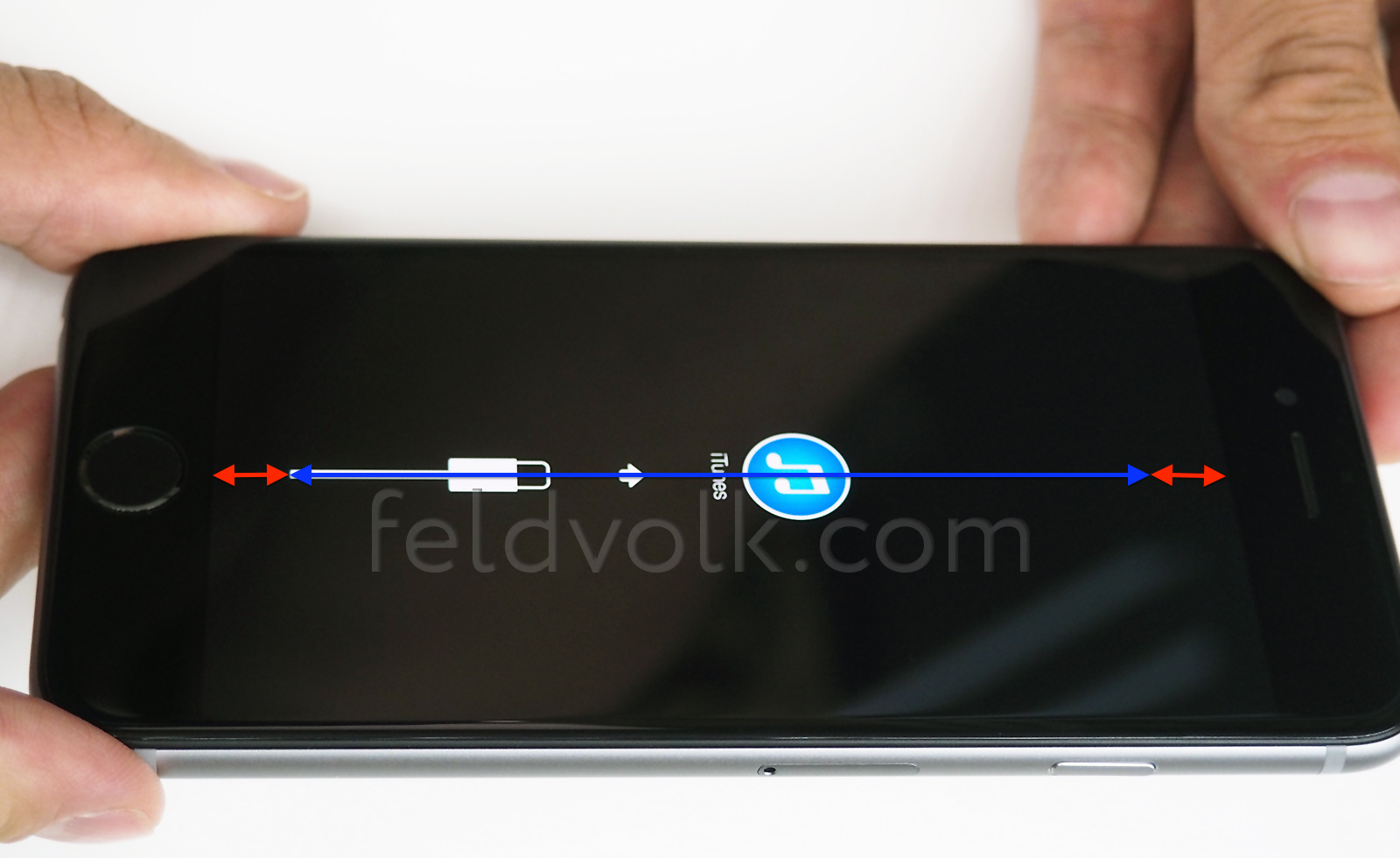 4.7-inch iPhone 6 display showing apparent letterboxed areas (red) with image optimized for 4-inch display (blue)
(Click for larger)
By our calculations, the border areas not covered by the image together suggest that the iPhone 6 display carries approximately 17.5% more points in the vertical dimension than a current 4-inch display. This would move the current 568-point height of the iPhone 6 (1136 pixels at 2x Retina) to 667 points (1334 pixels assuming 2x Retina) on the iPhone 6.
Assuming the aspect ratio of the screen remains the same as in the iPhone 5s, which by all indications it does, this would mean a 667 x 375 point (1334 x 750 pixels Retina) display for the iPhone 6. Performing the calculation in the horizontal dimension is more difficult due to nature of the recovery mode image, with no portion of the visible graphics extending to the side edge of the overall image to determine how much letterboxing space is on the sides.
This analysis obviously addresses only the 4.7-inch iPhone 6 that Feld & Volk has acquired parts for. Gruber suggests the 5.5-inch iPhone 6 will likely contain a 2208 x 1242 display at a sharper 3x factor than the current 2x Retina. As pointed out by developer James Thomson and 9to5Mac, the current iOS 8 beta is indeed showing some behavior indicating a preference for displaying 3x images when available.
.CPlase_panel display:none;

Back to School 2014: The 13 best accessories

Once you’ve figured out your laptop and smartphone situation, chances are you’ll want to invest in a nice backpack or a few extras to make the dorm room feel like home. Our back-to-school accessories picks are a perfect mix of necessities and extravagant nice-to-haves. Check them out below, and head over to our guide homepage to see more.
Filed under: Misc
.CPlase_panel display:none;

IRL: A tablet holder for using your device in bed

There are times when I just want to lie in bed and surf random YouTube channels on my phone or tablet, but it’s impossible to hold the device above my head for a prolonged period (we’ve all been there, right?).
Luckily, I stumbled upon this neat kit in Shenzhen one day: a balanced-arm tablet holder by some random brand called Usiabu, and it only cost me CN¥80 or $13, as it was from a wholesale dealer (retail price is around $25 in Hong Kong). As you can tell from the price, this product doesn’t involve any groundbreaking technology: you’ve probably already come across desk lamps that use this type of spring-loaded mechanism.
Installation is simple: secure the c-clamp mounting base onto the edge of a desk, insert the steel arm via its rotation pin and mount the plastic tablet bracket onto the dual-axis pivot for 180-degree vertical and 360-degree rotation. The arm stretches to about 90cm — which is sufficient — and the tablet bracket can handle screen sizes from 7 inches up to 12 inches; you adjust it by sliding one half of the bracket, and lock its position with a latch on the back. The tablet can also be lightly tilted within its bracket courtesy of sliding padded feet.
I’ve been using this tablet holder for over a year now (though not every single night, of course) and find it to be very handy, more so than the bendy versions that require more effort to position one’s tablet or phone. The hinges are still surprisingly tight, so thankfully, my tablet hasn’t yet dropped onto my face. If anything, I’m just disappointed by how some of the metallic fixtures have gone slightly rusty. The tablet bracket’s release mechanism can be a bit fiddly when I’m lying on my bed, as the loosened latch drops down due to gravity, which then still locks the bracket’s sliding part. Still, given how little I paid for it, these issues are relatively minor.
Filed under: Peripherals, Mobile
.CPlase_panel display:none;

Scientists discover why mozzarella is the ideal pizza cheese

Pizza is essentially the perfect food. Well, so long as you aren’t lactose intolerant or have problems with gluten. We realize that those are pretty big caveats, but stay with us for a second — it’ll be worth it: NPR spotted a study of why different cheeses diverge in looks and taste when baked. Seriously. In a paper called “Quantification of Pizza Baking Properties of Different Cheeses, and Their Correlation with Cheese Functionality,” researchers found that, among other things, the reason why mozzarella is so unique of a topping has to do with the way it’s prepared. The cheese bubbles and browns because of its inherent elasticity due to stretching. In contrast, cheddar isn’t as ideal because it isn’t very elastic, thus it doesn’t bubble as well. The same apparently goes for Edam and Gruyere, too.
Lest you think this paper was just an excuse for the scientists to eat lots of pizza (maybe it was), they claim that by understanding why foods behave in certain ways, they could unlock the knowledge needed to hack our grub. For example, developing a cheese that’s healthier for us and that tastes just as good as the stuff likely to cause debilitating heart conditions could come from this. Pizza that’s actually good for you? That’s something we can get behind.
[Image credit: AFP/Getty Images]
Via: NPR
Source: Journal of Food Science
.CPlase_panel display:none;

Recommended Reading: The (second) rise of virtual reality
Recommended Reading highlights the best long-form writing on technology and more in print and on the web. Some weeks, you’ll also find short reviews of books that we think are worth your time. We hope you enjoy the read.

The Rise and Fall and Rise of Virtual Reality
by The Verge
Unless you’ve been under a rock the last couple of years, you’ve read some collection of words about the return of virtual reality at the hands of Oculus and others. Thanks to a multifaceted interactive piece from the folks at The Verge, you can get caught up on the technology’s history, its current state of affairs, VR in pop culture and more. Heck, there’s even a look at a step-by-step process for building a simple, 3D-printed headset for an iPhone.
|
What Happened to Motorola Wondering how Motorola went from a formidable tech company to its Motorola Mobility sector losing $198 million during the first quarter of 2014? This piece for Chicago Magazine takes a look at the history of the company that dates back to 1928 through present day — a few months after Lenovo snatched up its smartphone business from Google for a cool $3 billion. Pocket!function(d,i)if(!d.getElementById(i))var j=d.createElement(“script”);j.id=i;j.src=”https://widgets.getpocket.com/v1/j/btn.js?v=1″;var w=d.getElementById(i);d.body.appendChild(j);(document,”pocket-btn-js”); |
Why Top Tech CEOs Want Employees with Liberal Arts Degrees While you might think you’ll need a degree in science, engineering, math or computer science to nab a career in tech, industry CEOs are saying not so fast. Company heads are holding fast to the idea that folks with liberal arts degrees can make an impact based on education in disciplines like philosophy, religion and other humanities. Pocket!function(d,i)if(!d.getElementById(i))var j=d.createElement(“script”);j.id=i;j.src=”https://widgets.getpocket.com/v1/j/btn.js?v=1″;var w=d.getElementById(i);d.body.appendChild(j);(document,”pocket-btn-js”); |
|
Metro Redux: What it’s Really Like to Develop for PS4 and Xbox One We’ve placed selections that examined the challenges of developing games for both the Xbox One and PS4 in this roundup before, but here, 4A Games’ Oles Shishkovstov gets pretty detailed about the process in a Q&A with Eurogamer. Pocket!function(d,i)if(!d.getElementById(i))var j=d.createElement(“script”);j.id=i;j.src=”https://widgets.getpocket.com/v1/j/btn.js?v=1″;var w=d.getElementById(i);d.body.appendChild(j);(document,”pocket-btn-js”); |
How Steve Ballmer Became a Rookie Basketball Mogul By this point, you’ve likely read one or two headlines about former Microsoft CEO Steve Ballmer snatching the NBA’s Los Angeles Clippers for a cool $2 billion. Now, The Wall Street Journal has a look at the events leading up to the new owner closing the deal. Pocket!function(d,i)if(!d.getElementById(i))var j=d.createElement(“script”);j.id=i;j.src=”https://widgets.getpocket.com/v1/j/btn.js?v=1″;var w=d.getElementById(i);d.body.appendChild(j);(document,”pocket-btn-js”); |
Filed under: Misc
.CPlase_panel display:none;

Dell says its curved monitor will help make you a better gamer

What good is having an ultra-powerful PC if you’re still connecting it to a dusty old monitor? We reckon doing so would be pretty silly. Good thing that alongside the new Alienware Area 51, Dell’s pulled the curtain back on its 34-inch Ultrasharp U3415W display then. It boasts a wider-than-widescreen 21:9 aspect ratio that’s paired with 3,440 x 1,440 lines of resolution (just under 4K’s 3,840 x 2,160) and a curved screen. Dell says that the monitor’s wide field of view mated with its curves will give gamers a leg up on the competition because, compared to flat monitors, less eye movement is needed to take advantage of the player’s peripheral vision. Intrigued to test that claim? You can do so come this December. We’re hoping that regardless of size, though, a curved screen doesn’t necessarily equate to an expensive screen — Dell hasn’t announced pricing for these displays just yet.
Filed under: Desktops, Gaming, Home Entertainment, HD, Dell
.CPlase_panel display:none;

Buttons Icon Pack Review: Samer Zayer does it again, pushes all the right buttons
 Before there was the Arus Icon Pack, there was the Buttons Icon Pack, a beautiful new set of icons from one of our favourite icon designers, Samer Zayer. These icons take their functions literally – they are all buttons anyway. Each icon is round with an effect given to them to make them look like they pop off the screen, and my, do they look good. Check out our video review of the Buttons Icon Pack to get a better idea of what they look like in person:
The Buttons Icon Pack has 1100+ icons with regular updates made to the icon repository. There are also a number of wallpapers that are stored on the cloud, saving you precious storage space and makes it easier for new wallpapers to be added. If you want to keep track of updates and his new projects, be sure to circle Samer Zayer on Google+ here. The Buttons Icon Pack is available now for $1.49 USD, so if it pushes your buttons, be sure to pick it up at the Play Store links provided below.
What do you think about the Buttons Icon Pack? Let us know your thoughts in the comments below.
//<![CDATA[
ord = window.ord || Math.floor(Math.random()*1E16);
document.write('‘);
//]]>
The post Buttons Icon Pack Review: Samer Zayer does it again, pushes all the right buttons appeared first on AndroidSPIN.
.CPlase_panel display:none;

Twitch’s peak viewing numbers rival CNN and MTV’s prime-time audience

So we know that Twitch’s online broadcasts trump those of WWE and traditional sports, but how does it stack up against cable networks like CNN? According to the New York Times, the game-streaming giant’s peak viewership numbers have surpassed the average prime-time viewers for Headline News, CNN, E!, MSNBC and TruTV since this January. At its best, Twitch had over 720,000 viewers in July alone, but as the NYT points out, it’s still pretty far behind the likes of Netflix and YouTube when it comes to total hours-viewed per month. It’s all pretty fascinating stuff, and there are even breakdowns for what competitive gaming tournament broadcasts are getting the most eyes, too. Spoiler: for this month it’s Riot Games’ League of Legends. Considering that we’ve seen Twitch expanding into more than just gaming broadcasts recently (hosting concerts and even entire conventions) it’s pretty likely that the outfit’s numbers will only continue to climb. Surely Jeff Bezos wouldn’t mind.
Filed under: Gaming, Home Entertainment, HD
Via: Joystiq
Source: New York Times
.CPlase_panel display:none;

Here’s how Google’s Project Loon retrieves its internet balloons (video)

Project Loon’s balloons could not be more different than your typical party variety — it’s loaded with research equipment and LTE capability, providing high-speed internet connection wherever they go. Obviously, Google’s X Lab researchers (the ones behind this crazy balloons-as-hotspot project) will want their data and expensive equipment back. So, they equipped their balloons with GPS and formed a special team to retrieve the floating hotspots when they land. Apparently, the researchers plan out when and where to land balloons for whatever reason (they mostly choose flat areas that are uninhabited but have decent road access), which the field personnel then seek out through their coordinates.
Since this process allows the Project Loon folks to clean up after themselves and reuse old equipment to save money, they take retrieval seriously. Once, team member Nick Kohli even traversed New Zealand’s waters in a small fishing vessel for two days, in order to collect balloons that landed in the area. Since he’s most qualified to talk about how retrieval operations work, you can listen to him explain it in detail and watch how it all goes down in the video below.
Source: Project Loon (Google+)
.CPlase_panel display:none;
 AIVAnet