



Chrome’s latest stable release brings 64-bit Windows support out of beta

Sure, a computer with a 64-bit processor can run almost anything designed for a less robust CPU — but programs designed specifically for these chips tend to just run, well, better. Google’s been trying to drag its web browser into the modern age for a few months now, and today it finally has: Chrome officially supports 64-bit processors on Windows. A beta of the 64-bit code showed up last month, but now it’s part of the regular stable release. Why upgrade? Well, aside from gaining a more secure and stable browser, Google says the update significantly increases graphics and media performance on supported machines, and decodes HD YouTube videos 15% faster. Sound good? Check out that source link below.
Source: Google
.CPlase_panel display:none;
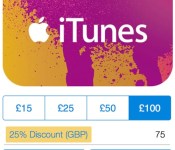
PayPal Offers 25% Off iTunes Gift Cards in the UK [iOS Blog]
PayPal is currently offering 25 percent off digital iTunes cards in the United Kingdom, allowing users to purchase iTunes codes for the App Store, Mac App Store, iBooks Store, and iTunes Store at a discount.

Under the terms of the deal, an £15 iTunes card drops to £11.25, while a £25 card drops to £18.75. Larger denomination iTunes cards of £50 and £100 are available for £37.50 and £75. Cards are only redeemable in the UK iTunes Store.
The offer lasts until Thursday, August 28 at 11:59 BST, but as with all PayPal iTunes discounts, there are a limited number of codes available and discounts will only be available while supplies last.
.CPlase_panel display:none;
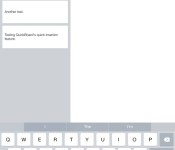
Hands On With QuickBoard, a Quick Text Insertion Keyboard Coming to iOS 8
When iOS 8 is released to the public in the fall, iOS users will be able to take advantage of several new operating system features, including system wide third-party keyboards, which will bring fresh functionality to the default iOS keyboard.
Third-party keyboards are available on Android devices and have been long-desired on iOS, so several popular keyboard developers announced plans to bring their software to iOS shortly after third-party keyboard integration was announced at WWDC. After iOS 8 launches, we’ll be seeing new keyboards from well-known developers like Fleksy, Swype, SwiftKey, and TouchPal.
iOS 8′s third-party keyboard support will also allow new entrants into the customized keyboard arena, with developers bringing us apps that offer all kinds of different functions to improve the way we use our keyboards. One such developer, Kevin Wolkober, has created a quick text insertion keyboard that offers a unique function we haven’t seen with previously previewed keyboards.
While keyboards like Swype and Fleksy focus on improving the typing experience through gestures and predictive text, Wolkober’s QuickBoard is designed to give users a quicker way to enter the snippets of text that they type repeatedly into their iOS devices, including addresses, credit card information, email signatures, and more.
QuickBoard is actually split by function into three separate keyboard elements, including TextBoard, MeBoard, and LocationBoard. Each of these three keyboard functions lets users to tap to insert often-repeated text elements in any app to save time and effort.
TextBoard allows users to store snippets of text, accommodating any text from a one line signature to a lengthy paragraph. MeBoard stores all of a user’s contact info, such as name, email, and home address, and is handy when filling out forms. LocationBoard will automatically determine a user’s current location, allowing them to paste in a Google Maps URL or coordinates, or an approximate address, which is useful when a location needs to be shared outside of Messages.
Like any other customized keyboard, QuickBoard operates through an app that’s installed on the iOS device and set up in iOS 8′s Settings, as described in our hands-on TouchPal installation guide. The personal information and pre-written snippets of text available in the QuickBoard keyboard are created using the installed QuickBoard app.
 Inserting text into the QuickBoard app
Chunks of text can be entered into TextBoard section of the app, for example, while the MeBoard pulls in information like name, address, and phone number. Though MeBoard is currently limited to information pulled from the Contacts app, custom information will be added before the app’s official launch. Location data isn’t inserted in the app itself, since it is pulled from the phone’s current location whenever it’s used.
The text elements saved in the QuickBoard app can be used in any other app, including Mail, Safari, Messages, Notes, iWork, and more. Inserting saved text into one of these apps is as simple as tapping on the globe icon on the keyboard to activate QuickBoard and then tapping on the relevant block of text.
Personal information, such as name and address, can be inserted by tapping on the person icon, and the arrow will determine a user’s approximate location, allowing it to be quickly inserted into a text message, email, or other app. Location information is especially useful, as it cuts out several steps that would normally be necessary when sharing a location an email or other app.
 QuickBoard demonstrated in the Notes app
QuickBoard includes access to a space bar, return key, and delete key for formatting purposes, but the rest of the typing is left to another keyboard app or iOS 8′s default predictive text function. QuickBoard works seamlessly with any other keyboards installed, and switching between them is as simple as tapping on the globe icon.
Though simpler than most of the other keyboards we’ve seen before, QuickBoard hints at some of the innovative ways developers will take advantage of third-party keyboard integration in iOS 8. At the current time, QuickBoard is still in the beta testing phases, but Wolkober tells MacRumors that the app will be ready for download shortly after iOS 8 officially launches in the fall, with pricing yet to be determined.
.CPlase_panel display:none;
 AIVAnet