


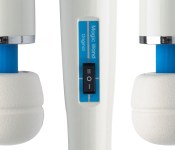
The 46-year-old sex toy Hitachi won’t talk about

1968. It was the year of the Tet Offensive; of Martin Luther King Jr.’s and Robert Kennedy’s assassinations; of the Democratic National Convention riots. It was also the first time humans had photographed the Earth from deep space. It was a year of great innovation and devastation. American values were in upheaval and the sexual revolution was well underway, calling into question outmoded sexual stereotypes.
In the midst of all of this, an unlikely star was born.

The US Patent and Trademark Office lists the Hitachi Magic Wand’s first use in commerce as April 25th, 1968. In the 46 years since, this big, white hunk of plug-in plastic, which bears some resemblance to a bass drum mallet, has come to represent an awkward duality for many Americans. It’s marketed and sold as a personal massager in department stores and pharmacies, while also serving as a trusted masturbation aid.
The Magic Wand isn’t what you’d expect from a modern sex toy. In fact, it could very well be your grandmother’s vibrator. It weighs 1.2 pounds, measures 12 inches from base to tip and has a bulbous, “tennis ball-sized” head. It’s made of hard plastic, has two speeds — high (6,000 vibrations per minute) and low (5,000 vibrations per minute) — and connects to a power outlet via a 6-foot cord. It’s neither waterproof, nor water-resistant and has a tendency to overheat after 25 minutes of use. Shortcomings aside, the Magic Wand continues to outsell more technologically advanced competitors, even as the company that created it distances itself from what has become one of the most iconic sex toys in existence.
“Electric vibrators were sold as massage machines and I bought them in the small-appliance section of Macy’s,” Dodson said.
The same year the Magic Wand appeared on the market, a New York-based artist by the name Betty Dodson had her first sexually explicit one-woman exhibition at the Wickersham Gallery on Madison Avenue. According to Dodson, often attributed with single-handedly popularizing the device, the show’s opening marked her foray into sex education. Four years later, she launched a series of instructional classes called Bodysex Workshops, where she used vibrators to teach women about masturbation, and in 1974 she released her first book, Liberating Masturbation. Dodson, like so many women at the time, sought sex toys in rather conventional venues.
“Electric vibrators were sold as massage machines and I bought them in the small-appliance section of Macy’s,” Dodson said.
While Liberating Masturbation was sold alongside the Magic Wand at Eve’s Garden, a new and rather subversive sex shop that catered specifically to women, Dodson opted for the Panasonic Panabrator in her early demos. It wasn’t until 1975 that she replaced it with the Magic Wand. According to Dian Hanson, former editor of Juggs, Leg Show and various other men’s magazine, and current Sexy Book Editor at Taschen publishing, Dodson turned her on to the Wand in 1977 and she’s been a devotee ever since.
“She told me to get a Hitachi Magic Wand, but to be careful of its power, both physical and psychological, as it’s an addictive agent right behind heroin,” Hanson said. “My only previous vibrator experience was a pink plastic thing that held two D-cell batteries and the Hitachi was a whole ‘nother world.”
Hanson’s reaction to the Magic Wand isn’t unique. The internet is flooded with accounts of its strength, versatility and staying power. It’s commonly referred to as the Cadillac of vibrators and has been a best-seller at progressive sex shop Good Vibrations since it opened in 1977. It’s moved from ads in the back of the liberal political rag Mother Jones in the ’80s to being the punchline on an episode of Louie earlier this year. In the meantime, it’s become a regular in the pages of women’s magazines like Cosmo, appeared as a trusty sidekick in adult films and spawned an army of unauthorized offspring. In the near 50 years since its birth, technological advances have led to massive leaps in consumer technology, but the Magic Wand has remained largely unchanged.
“She told me to get a Hitachi Magic Wand, but to be careful of its power, both physical and psychological, as it’s an addictive agent right behind heroin,” Hanson said.
That is until last summer. Hitachi ditched the old, 1980s packaging, retooled the materials for a lighter, more durable product and switched out the circuit board. To the uninitiated, it looked just like mom’s old Magic Wand, with one notable exception: The Hitachi name was nowhere to be found.
The Magic Wand occupies a special place in the history of both female sexuality and consumer electronics, but it’s neither the first device of its kind to be marketed as a personal massager, nor the first produced by a leader in the electronics industry. GE sold its own, as did Panasonic and Oster (best known for its blenders). According to Rachel P. Maines’ The Technology of Orgasm, the first electronic vibrator appeared in 1878, predating radio, television and a slew of other groundbreaking technologies. Maines describes a device, powered by a massive battery, invented by an English physician named Joseph Mortimer Granville and manufactured by Weiss, a medical instrument manufacturer.
Weiss’ motorized merrymaker was first used to treat hysteria, an antiquated medical condition thought to be cured through female orgasm. As Maines points out, by the early 1900s, there were dozens of models on the market, and their uses had expanded to include treatment for everything from arthritis and constipation to sore muscles.

Since Mortimer Granville invented the first electric vibrator, they’ve successfully penetrated the mainstream with appearances in major motion pictures, popular TV shows and fashion magazines. Even Oprah Winfrey’s not afraid to speak her mind on the subject. (Apparently the big O prefers something the size of a “perfume sprayer” to outsized back massagers like the Magic Wand.) Attitudes toward sex and sex toys have changed drastically, but no other vibrator has captured the mainstream imagination like the Magic Wand, save for maybe the multi-pronged Rabbit, which had its own turn in the spotlight on an episode of Sex and the City.
With the help of mainstream media, serious discussions about masturbation have moved from the confines of women’s sexuality workshops to the national level. In 1994, then-Surgeon General Joycelyn Elders, already a controversial figure, was forced to resign after suggesting that schoolchildren be taught to masturbate to curb the spread of AIDS. We’ve come a long way since Elders’ ouster; archaic laws restricting the sale of sex toys have slowly dropped from the books and public figures like Oprah have legitimized the subject in mainstream media, but masturbation and its accoutrement are still taboo. In fact, information about the Magic Wand is hard to come by outside of personal anecdotes and the device’s official site. MagicWandOriginal.com contains a list of specs, user reviews and a vague history of the device, but zero mention of its origins.
It’s commonly referred to as the Cadillac of vibrators and has been a best-seller at progressive sex shop Good Vibrations since it opened in 1977.
It appears that silence is no mistake. We reached out to Hitachi multiple times while researching this story and received no answer. In fact, according to Eddie Romero, director of operations for Vibratex, the primary US importer of the device, Hitachi was ready to pull the plug entirely before last summer’s redesign. As he puts it, Hitachi is a “very traditional” Japanese company and didn’t want its name attached to what is essentially the most recognizable sex toy on Earth. Vibratex, not ready to lose its biggest moneymaker (it’s sold 250,000 units since last summer), convinced Hitachi to continue producing it as the Original Magic Wand.
“Evidently, Mr. Hitachi Sr. didn’t like the idea that his massage machine was giving millions of women orgasms,” Dodson said. “Tough shit! It remains my favorite vibrator to this day.”
.CPlase_panel display:none;
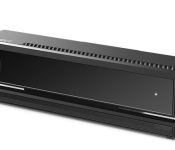
Xbox One’s Kinect goes for $150 on its own October 7th

Ever since Microsoft cut its motion- and voice-sensor from the Xbox One package, the second version of Kinect has been in limbo. Sure, you could still get one if you shelled out $500 for the deluxe version of Xbox One, but there was no way to pick one up on its own. What if, say, a new Dance Central game for Xbox One were to be announced? Microsoft always said it would offer the device standalone, and now it’s got a release date and price: October 7th for $150 ($50 less than the Windows version, for those wondering). Even better: Kinect on Xbox One comes with the aforementioned new Dance Central game. Not a terrible nod to the most important third-party game studio making Kinect games.
Despite taking Kinect out of the box — mostly to stay competitive price-wise with Sony’s PlayStation 4, which is repeatedly besting the Xbox One in monthly sales — Microsoft says the standalone release is more evidence of the company’s belief in the sensor. “We believe Xbox One is better with Kinect,” Microsoft’s blog post reads, “offering unlimited possibilities.” Specifically, the company cites voice commands and Skype as the primary reasons for owning Kinect, in addition to calling out a handful of Kinect-enabled titles (Kinect Sports Rivals, Dead Rising 3, Project Spark).
The key here, Microsoft says, is choice. “We’re excited to offer you more choices for purchasing Xbox One — with Kinect, without Kinect for $399, bundled with games like Madden NFL 15 or Sunset Overdrive, or by adding the standalone Kinect sensor at a later date.”
It’ll be interesting to see what numbers, if any, Microsoft releases on standalone Kinect sales after October 7th. The original Kinect, an add-on for the Xbox 360 game console, sold tremendously well as a standalone peripheral. The approach this time around, however, is a lot different; Microsoft has to overcome the malaise of spurned consumers who didn’t love their first Kinect (which was barely supported, with many bad games) and get past the public perception that the Xbox One isn’t an inferior console to the PlayStation 4.
Filed under: Cameras, Gaming, Peripherals, Software, HD, Microsoft
Source: Microsoft
.CPlase_panel display:none;

Don’t forget to enter our Back to School 2014 sweepstakes!

Gearing up for a new academic year can be stressful, and that’s where our Back to School 2014 guide comes in handy. Whether you’re crossing items off your shopping list or simply perusing your options, you’d be silly not to enter our sweepstakes as well. If you’re one of 15 randomly selected winners, you’ll be the proud owner of a Timbuk2 bag stuffed with the gear seen above — and that’s just a taste of what’s inside! Enter the raffle below for a chance to win, and make sure to keep tabs on our giveaway page for more opportunities to enter.
Filed under: Announcements
.CPlase_panel display:none;
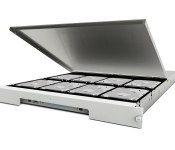
LaCie 8big Rack Now Available With Up to 48 TB Storage, Dual Thunderbolt 2 Ports [Mac Blog]
LaCie today announced the availability of its 8big Rack storage device. Unveiled earlier this year at the annual NAB trade show, the LaCie 8big Rack is the company’s first Thunderbolt 2 rackmount storage solution.

The 8big Rack includes 48 terabytes of capacity with eight Seagate 6 TB 7200 RPM hard drives that deliver speeds up to 1330 MB/s. Geared towards 4K videographers and other professional media editors, the 8big Rack also features Raid 5/6 data redundancy and dual Thunderbolt 2 ports that expand the storage potential of the Mac Pro to 1.7 petabytes.
The LaCie 8big Rack (48TB) is available today for $4,599.99 through LaCie and its authorized resellers. The storage solution also is available in a four–disk 12 TB or an eight–disk 24 TB configuration for $1,599.99 and $2,599.99, respectively.
.CPlase_panel display:none;

More Evidence of NFC Support for Both iPhone 6 Models
Last week, Chinese repair firm GeekBar shared a claimed schematic for the iPhone 6 showing what was claimed to be the pinning diagram for the device’s rumored near field communications (NFC) chip. The part addressed on the schematic, PN65V, was thought to be a version of NXP’s PN65 NFC package currently used in several Android devices.
The leak is one of several schematics shared by GeekBar over the past week and a half, and while some of the components have been misidentified, it is looking increasingly likely that the schematics themselves are legitimate. Seen in that light, it is worth taking a look back at the NFC claim to see if there is additional evidence for it.
 Closeup of 4.7-inch iPhone 6 logic board with likely NFC chip location boxed in red, LTE modem boxed in green
MacRumors forum member chrmjenkins has pointed us toward a document showing the package used by NXP for its PN65, noting that it measures 5 mm x 5 mm with 32 terminals for connectivity. In examining the bare logic boards from the 4.7-inch and 5.5-inch iPhone 6 models, chrmjenkins believes he has spotted where that chip will be located.
 Broader view showing likely NFC chip location boxed in red: 4.7-inch iPhone 6, iPhone 5s, 5.5-inch iPhone 6 (left to right)
The location on the board is a square patch that does not correspond to any component from the iPhone 5s logic board, indicating that it may indeed be for a new component such as an NFC chip. Existing components may of course see changes in shape between generations, but many of the current major components can be mapped reasonably well to locations on the iPhone 6 logic boards, leaving relatively few candidates for this new square patch.
Rumors of NFC for the iPhone have circulated for years, but they have yet to come to fruition. As a result, this year’s crop of NFC rumors has understandably been greeted with skepticism, although the volume and specificity of the rumors has seemed greater this time around, with multiple sources pointing toward an NXP chip solution for the iPhone. And with Apple rumored to be making a push into mobile payments as soon as later this year, the time may finally be right for Apple to bring NFC to the iPhone.
.CPlase_panel display:none;

Time Warner Cable claims routine maintenance caused nationwide outage

Large chunks of the US will have woken up this morning in a panic. No, not a natural disaster, their Time Warner Cable internet was down. A mother-of-all-outages saw TWC’s Internet service down from New York to, well, pretty much everywhere (see map below). What’s more curious, is that a statement from the company claims it was due to planned maintenance that went awry. Still, for at least an hour and a half, Netflix’s main beef with the company won’t have been about neutrality.
Time Warner outage map: #timewarnercable pic.twitter.com/lSb7AcjQBM
– Diana (@Sollitaire) August 27, 2014
Source: Re/code
.CPlase_panel display:none;

Would the world be any better without any privacy? One guy wants to find out

We live in an imperfect world, full of imperfect beings, but if everyone declared that they had nothing to hide, would that make us better people? It’s a question that one man is hoping to answer by opening up every aspect of his life to the world’s scrutiny for a whole year. Anti-privacy activist Noah Dyer believes that unless people choose to abandon privacy, society will never improve. In his mind, the information imbalance between bodies like the NSA and individuals encourage abuse and poor decision making that those affected, cannot see or question. It’s a subject that Dyer is sufficiently passionate about, he handed over his email account to The Atlantic for detailed inspection.
Of course, Dyer requires our support for his experiment, since the college professor can’t purchase the same level of surveillance apparatus that the government uses. That’s why he’s asking for $300,000 to hire crews to film his every moment, as well as equipment and hosting for a live stream that’ll be broadcast online. He promises that, logistical and technical hurdles aside, he’ll offer footage of his entire life, including eating, sleeping, spending time with his kids and even going to the bathroom. In those tender moments, however, he requests that you respect his privacy, but won’t shut the cameras off.
If he raises up to $700,000, then Dyer will also run for political office in 2016 – although Kickstarter expressly forbids political donations – and will remain under constant surveillance throughout his term. Should that figure, somehow, reach $1,000,000, then Dyer will also set up an “anti-privacy ashram” for others to live their lives under constant surveillance, complete with glass bathroom stalls and Arianna Grande’s brother… sorry, we got a little confused there.
Noble as Dyer’s aims are, we’re fairly sure that a society in which everyone is as nude as each other is one we’d particularly enjoy living in. After all, the bulk of our lives are spent trying to compensate for our imperfections and pretending that we’re all not as gross as we secretly are. As The Atlantic comments, saying you have “nothing to hide” opens you up to declaring every illness you’ve ever had, revealing every relationship you’ve broken and broadcasting your children’s most traumatic experiences to the world. Still, I wish the experiment all the best. After all, it makes a great counterpoint to the people I met while researching How To Disappear Completely.
Filed under: Internet
Via: The Atlantic
Source: Kickstarter
.CPlase_panel display:none;

High-res imaging satellite demos what it can do with crystal clear pics of Madrid

DigitalGlobe’s WorldView-3 satellite has only been in space for less than half a month, but it’s already proven itself capable of shooting high-res images just like the company promised. Just a few days after Lockheed Martin flew it to orbit, the satellite quickly went to work, snapping pictures of Madrid, Spain. As you can see in the gallery below, it’s pretty easy to spot vehicles, rooftops and landmarks in these images. DigitalGobe says its services can benefit companies and governments that want to assess vehicles and monitor a region’s development (housing, infrastructure and road networks), among other things. Conservationists can also use it to monitor natural resources. While these first set of images are already great, the company will start delivering even clearer, closer satellite snapshot to all its customers by February next year.
Source: DigitalGlobe
.CPlase_panel display:none;
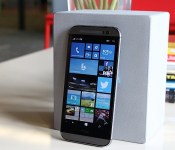
HTC One (M8) for Windows review: Same muscle, different soul

Since Windows Phone’s humble beginnings, Microsoft has been the underdog in the wireless industry. Four years later, nothing’s changed — except, perhaps, a few more percentage points of market share. Even then, it’s got a long way to go before catching up to Android and iOS. Let’s give the company credit for pushing forward, improving its platform and not giving up, though: When I reviewed the last major OS update, I said I could finally use Windows Phone as my daily driver. The one element that Microsoft continued to lack, however, was buy-in from large phone makers. They put more focus on Android products, which meant anyone interested in Windows Phone had a small selection of devices to choose from.
For Microsoft, it’s time to experiment with a new, simpler approach. The software giant has buddied up with HTC to convert the One M8, its Android flagship, into a Windows Phone. That’s all there is to it. There’s absolutely no change to the hardware — and it’s a fantastic idea. If it fails, neither company loses much from the deal; since they’re using an existing phone, the cost of design and engineering is far lower than it would be on a standalone device. If it’s successful, it may inspire other manufacturers to follow suit, resulting in a market with a wide variety of Windows Phones to choose from. If you can’t beat ‘em, join ‘em, right?
Hardware

The hardware section is typically one of the longest in a phone review, but this time, the opposite is true. That’s because the HTC One M8 for Windows, as awkward as the name is, is exactly that: an HTC One M8 that happens to run Windows Phone instead of Android. (Why the name omits “Phone” is beyond me, however.) The aluminum unibody chassis, 1080p display, Snapdragon 801 processor, BoomSound speakers, 2,600mAh battery, even the UltraPixel Duo Camera setup — it’s all there. It comes with the infrared blaster embedded into the power button as before, and all of the buttons, LED flashes and card slots are all precisely in the same place. In fact, if it weren’t for the Windows Phone logo on the back, the hardware would be virtually indistinguishable. Of course, that also means that it’s still just as slippery and just as tall as the Android version, so if you didn’t like it before, nothing about this phone will change your mind.
The version I’m reviewing is the Verizon-exclusive model, which only comes in a gunmetal gray color with 32GB of internal storage (and a microSD slot that handles cards up to 128GB). If Verizon isn’t your thing, AT&T announced that it plans to release the device after the exclusivity period is over. HTC’s been tight-lipped about whether the phone will eventually head to other markets or carriers.
The Verizon version of the M8 for Windows comes with quad-band LTE, which covers both of Verizon’s high-speed frequencies and a couple of bands (3 and 7) friendly to many countries in Europe, Africa and Asia. In case the LTE doesn’t work when you’re traveling abroad, it also comes with quad-band HSPA+ (up to 14.4 Mbps) and quad-band GSM/EDGE. Regardless of where you travel, you’re bound to have some sort of connection, even if it isn’t incredibly fast.
Software

It’s only when you turn the two devices on that you’ll really notice the difference. For the first time since the Palm Treo days, you can choose between two different operating systems running on the same hardware. I want to see more companies try this, but most manufacturers seem wary of dedicating resources to make Windows Phone available on existing Android devices. Of course, this wasn’t even an option until Microsoft introduced Windows Phone 8.1 earlier this year, when it announced that manufacturers could take any Android phone they wanted and just slap on the third-place mobile OS instead. (Sadly, Microsoft and Google aren’t so keen on letting anyone use both at the same time.)
What matters is that it’s here now, and Windows Phone flagships are no longer limited to Nokia’s Lumia series; it introduces more options for fans of the OS, and it gives the platform more visibility for everyone else.
If you’ve used a Windows Phone before, the user experience will be familiar. HTC tweaks aside (I’ll tackle those shortly), the M8 is a Windows Phone 8.1.1 device without a custom user interface. Which makes sense: Microsoft doesn’t allow skins. As you’d expect, then, the phone features Cortana, Live Tiles, quick controls, notifications, folders and the new lock screens, among other things. If you’ve seen one Windows Phone, you’ve seen them all.
The biggest early question about the M8 for Windows was how (or if) it would utilize HTC’s homemade software features from its Android skin, such as Zoe, BlinkFeed, Duo Camera capability, Sense TV and Video Highlights. Fortunately, all but Zoe made it into the phone, although there are slightly different implementations for each feature. BlinkFeed on Windows is its own separate app and Live Tile as opposed to a full home screen panel on Android. Ditto for Video Highlights, which takes the form of a standalone app. The camera UI is the same, but only some Duo Camera editing features made the OS jump. Finally, the HTC Dot View case is supported.

BlinkFeed feels more at home on Windows Phone than it does on Android, primarily because its interface is tile-based. Its functionality is similar on both platforms: You have access to your social network feeds (yes, including Google+) and a wide variety of highlighted feeds (like Engadget!). At present time, the Windows Phone version doesn’t come with a search option or custom feeds, so you’ll just have to stick with what HTC offers. It also comes with an active Live Tile that shows the most recent news updates.
Video Highlights has been around since the HTC One M7 came out in early 2013. It compiles your photos and videos and combines them into a 30-second highlight reel; you can choose from several different themes (akin to Instagram filters) as well as music, including pre-loaded tracks and selections from your own library. Once the clip is created, you can share it however you want. On Android, the video highlight-creation tool is a part of the Sense gallery app, but here it’s a standalone app. The basic setup is the same on both platforms, but their designs match their respective OSes. All told, too, the functionality is the same, though the WP option doesn’t appear to have the ability to choose which images or clips to start and end with.
The on-screen navigation bar is a recent addition to Windows Phone, and a very welcome one, at that (Android has had this functionality for a while). The bar consists of the usual WP buttons like back, home and search. You can choose to have the bar be dark, match the background of the app you’re in (which doesn’t seem to change too often) or match your accent color instead. It’s also possible to hide the bar, in case you’re watching a 1080p video or using another app that wants to take advantage of the full screen rather than getting cut off at the bottom. By default, you can press a small arrow on the left side to tuck it away and swipe up from the bottom bezel to bring it back; however, you can choose to disable the button and swipe up for both actions instead.
The Dot View case is an optional accessory introduced on the One M8 for Android, but HTC’s made it compatible with the Windows Phone version as well. You’ll still get the time on top and a symbol for notifications on the bottom, but there’s a new feature: Swiping down from the top will activate Cortana, who will begin listening to you without any further action.
Unfortunately, this swipe-down functionality isn’t available without the case. In fact, the One M8 motion gestures are limited to a simple double-tap-to-wake option; you can’t swipe your finger in any direction to take it directly into specific apps. Even worse, the only way to activate the camera is to manually unlock the screen and tap on the Live Tile or go through the Action Center. I’d prefer to have a faster shortcut to the camera for quick access.
Camera

The M8 for Windows sticks with the same love-or-hate UltraPixel Duo Camera setup as its Android brother, and it even offers a nearly identical user interface. (The only differences are in the settings, which must adhere to Windows Phone UI elements.) In general, HTC’s UltraPixel option takes decent pictures and fares well in low-light settings, though shots tend to be less detailed than on other flagship devices.
But while the camera modules are exactly the same, a quick image comparison between the Windows Phone and Android versions reveals a few minor disparities. The M8 for Windows seems to do better at capturing dynamic range, and the photos are more saturated in color. The default white balance is also marginally colder. The gap between camera performance widens further in low-light situations, in favor of the Android version. The M8 for Windows produced images that were fuzzier and less detailed than those taken on its counterpart. This may be in part due to the length of time HTC’s worked on optimizing its UltraPixel tech on Android versus Windows Phone, and I’m hopeful this can be fixed in a future update.
For now, one version isn’t better than the other in every department; you’ll have to pick and choose the factors that are most beneficial to you. If you want the full gamut of imaging options, however, stick with the Android model for now. HTC’s signature Zoe feature, which takes a few seconds of video and burst-mode shots and converts it into a Harry Potter-esque moving picture, isn’t available; the Zoe app, which is a social network that lets you show off your Video Highlights to friends and family, is also restricted to Android 4.4. Lastly, the Windows edition lacks a few of the M8′s Duo Camera editing tools. It comes with UFocus (which lets you change the area of focus), Foregrounder (adds funky visual effects to objects in the background), Dimension Plus (gives the picture a faux-3D feel), rotate/crop tools, most filters and a few frames. Copy/paste, stickers, draw/flip/straighten tools and seasons (a pointless feature that shows leaves, snowflakes, etc. falling down in front of your picture) didn’t make the cut, but I rarely use those features on the Android version anyway.
Performance and battery life

In its early days, Windows Phone earned a reputation for robust performance that has continued to the present. Until recently, the gap in performance between flagships and entry-level devices had been relatively small because Microsoft imposed restrictions on which processors and other specs could be used on the platform; phones like the Nokia Lumia 520 are cheap, but perform well given their limited processing power and RAM. As Microsoft has slowly lifted those restrictions, flagships have now become even more powerful, possessing the same specs as many top-of-the-line Android devices.
With the One M8 for Windows, you’re going to enjoy all of the same performance benefits as the Android version — on paper, at least. It has a quad-core 2.3GHz Snapdragon 801 chipset with 2GB of RAM, so it’s no slouch. The M8 for Windows runs WP 8.1 Update 1, which is still only available as a Developer Preview on other devices; this is the first time it’s been included on a new device out of the box.
The M8 for Windows runs well most of the time. To nitpick (’tis my burden and duty), the Android version is a little faster when loading apps and multitasking, primarily due to the time-wasting animations scattered throughout the Windows Phone OS. It’s a difference of a couple seconds each time, which likely won’t matter at all to most users. Games run smoothly with few to no frame skips, but the same titles on Android were consistently more fluid. Occasionally, the processor on the Windows version would slow down, making games extremely choppy for around 15 seconds, after which it’d smooth out for two or three seconds before returning to its frozen state. A reboot usually cleared up the problem, but I’ve never run into similar issues on the M8 for Android.
I’ve also noticed that the two 1080p displays aren’t calibrated identically; it appears that both devices use different temperatures (the original M8 is a tad warmer), though the brightness and viewing angles are both good. Images and graphics on the Windows Phone model appear to be fuzzier and have less clarity when looking at the two devices side by side, as if they’re displayed at a lower resolution somehow, but at least text and games look great.

Running benchmarks can be a little tricky when doing cross-platform comparisons, since most Android tests aren’t available on Windows Phone. Microsoft’s OS was slightly better on internet-based tests like SunSpider (609ms vs. 649ms, where a lower time is better) and Google Octane (2,801 vs. 2,666), while the Android version did better on GFXBench 2.7 (28 fps vs. 19 fps). The latter score is the most concerning, as it’s a much larger difference than I’d expect to see on two devices with identical hardware. Compared to the Icon, the M8 does better on Octane and GFXBench but worse on SunSpider and WPBench. So, just like it was on the camera, there’s no clear-cut answer to which phone is the better choice. Since the differences are minor, only a few power users may be dissuaded by the results.
Battery life is a mixed bag. The benefit in testing identical hardware on competing operating systems is that you can compare the two much more easily and closely study the effect each platform has on power efficiency. In my testing so far, it appears that the WP option is better than the Android version in some ways and worse in others. (My tests are ongoing and I’ll continue to add more results as they come.)
First, the good news: You can still get through an entire day of normal usage with a little left to spare when you hit the sack. When using the device for email, taking a few photos, browsing the web and running an occasional app, I was able to get slightly more battery life than on my Android M8. When streaming movies through Netflix, the Windows Phone M8 soundly defeats its Android counterpart. Additionally, it lasted for 12 hours and 10 minutes in our standard video rundown test, an increase of 40 minutes over the Sense-clad version.
I wouldn’t recommend playing games without having a charger nearby, however; titles like Asphalt 8 and Frozen Free Fall (my kids’ favorite) drain up to 30 battery percentage points per hour, as compared to around 15 percentage points on the Android M8. (As an aside, both versions of the M8 get hot when playing graphics-intensive games for more than 10 minutes, the point where it becomes uncomfortable to hold.) Finally, the M8 for Windows lasted two hours and 35 minutes in the standard WPBench CPU stress test, in which it forces the processor to work at high intensity. That’s pretty typical: The Lumia Icon delivered nearly identical runtime of 2:36. (It scored 2:42 on our initial review, which was on older firmware.)
The competition

Now that a flagship phone is available on more than one major mobile platform, it’s tougher to clearly define its competition; whether you’re a fan of Windows Phone, Verizon or nothing more than good phone design, there are plenty of factors to consider. The M8 for Windows is available for $100 on-contract, which is half of what the Android edition cost when it first came out. It may have limited appeal at first because of its exclusivity, but Windows Phone users on Verizon will appreciate it because they can now choose among this and two other flagship devices: the Lumia Icon, which is renowned for its 20-megapixel camera, and the Samsung ATIV SE, which is somewhere between a GS4 and GS5 in terms of specs. The Icon is definitely a well-built phone, but the M8 has more curb appeal thanks to its robust aluminum frame and arched back.
Let’s go more into specifics on how it compares with the Lumia Icon, its direct Windows Phone competitor. If you’re looking for a superior imaging experience, go with the Icon; the M8 is in no way a horrible picture-taking device, but Nokia’s had a lot more time and experience to get things right on Windows Phone than HTC has. (And since the Icon still does quite well in low-light situations, the UltraPixel tech isn’t quite as persuasive in this case as it may be on Android.) The screen size is only 0.1 inch smaller on the Icon, but the chassis is significantly shorter and much less slippery. HTC offers a great audio experience with BoomSound; the Icon has a hardware shutter button for faster access to the camera; and you’ll also need to decide between capacitive buttons and virtual ones.
In a way, the M8 for Windows is competing against its Android brother as well, but HTC’s goal isn’t to cannibalize sales. By adding a second platform, it’s allowing HTC to reach a new set of smartphone users without the high cost of designing, developing and producing a brand-new device. I also doubt many people have held off on buying the M8 because it wasn’t on Windows Phone, as fans of the platform will have already looked at other options already available to them.
Wrap-up

This is the first time in years that a user can select a device’s hardware and software at the same time; you usually have to choose one and then live with the other. People who already use and love Windows Phone now have a flagship option that isn’t the latest Lumia device. This phone won’t end the platform wars by showing undeniable proof that Windows Phone trumps Android or vice versa; both devices clearly have pros and cons in different areas, and it ultimately comes down to your personal preference.
If your go-to OS is Windows Phone, the M8 is one of the best options, thanks to great design and solid performance. The Lumia Icon still has a bit of an edge, but you’ll be happy with either device. If given the choice between M8s, I’d go with the Android version for now because HTC’s had much more time, experience and flexibility to get things right on that platform. The performance is a bit more optimized in most cases, and it comes with more of the HTC-branded functionality that makes the One M8 unique. But isn’t it nice to finally have a choice?
Filed under: Cellphones, Mobile, HTC, Verizon
.CPlase_panel display:none;

Dropbox Expands Pro Plan With Improved Security Controls, New 1TB/$10 Monthly Plan [Mac Blog]
Dropbox today announced changes to its Pro subscription, offering a single plan that provides up to 1 terabyte of storage for $9.99 a month or $99 per year. The new Pro plan also improves its sharing controls and adds new security options that make it easier and safer to share your data with friends, family and colleagues.

The new Dropbox Pro makes it easier to secure your shared data with new password and expiration options. Pro plan users now can add a password to a shared link as well as set an expiration date that limits how long files are being shared. When sharing a folder, Dropbox now has a new “View-Only” permission option that controls whether recipients can view or edit files within that shared folder.
For smartphone, tablet and notebook users, Dropbox has added a new remote wipe feature that allows users to delete files from a lost or stolen device. This feature destroys the data on the compromised device, while keeping a copy safely stored on Dropbox’s servers.
Dropbox’s biggest change is in its pricing, with the Pro plan now offering up to 1 TB (1,000 GB) of data for $9.99 per month. This pricing leapfrogs Amazon with its 1TB/$500 yearly plan and brings Dropbox in line with Google, which also offers a similar 1TB/$10 monthly option. Apple is launching its own iCloud Drive solution later this year alongside iOS 8 and OS X Yosemite, but pricing at the 1 TB level has yet to be announced. Apple’s 200 GB plan will be priced at $3.99/month.
.CPlase_panel display:none;
 AIVAnet