


LG’s L-series phones keep the flair but drop the specs

With its latest L-series devices, LG is sticking to its script of building low-spec devices that retain some of the design cues, features and software of its higher-end handsets. Like earlier models, both the new L Fino and L Bello phones are aimed at emerging and youth markets with specs like 1.2GHz/1.3GHz quad-core CPUs, low-res WVGA screens, no LTE and 8-megapixel rear/1-megapixel front cameras (front VGA only for the Fino). Rather than specs though, LG is emphasizing the UX software features carried over from the G3 and other models.
Those include a back button, the Knock Code unlocking system and the QuickCircle case for fast access to the camera and other functions. Both models also have a recent version of Android KitKat, 4.4.2, and come in a range of colors like gold, red and green.
Given competition like the Moto E, which looks to have a bit more style, the success of the devices will likely depend in large part on their price. LG has yet to release that info yet, but seems to have confidence in the new handsets, judging by the aggressive launch schedule. They’ll start rolling out in Latina America this month, followed by Europe, Asia and other regions soon.
Filed under: Cellphones, Mobile
Source: LG
.CPlase_panel display:none;

Your smartphone can now tell you if you have a heart condition

How’s the ticker? Some dangerous heart problems can exist without any symptoms whatsoever, like “atrial fibrillation” (A-fib) a type of abnormal cardiac rhythm that affects one in four people. A visit to your physician is normally required to detect it (and is still a must), but a company called AliveCor has just announced that its AFib Dector algorithms have been approved by the FDA for professional or personal use. It consists of the company’s $199 heart monitor (also available in an integrated iPhone 5/5s case, shown above) which attaches to an Android or iOS smartphone and rests on your fingers or chest to record your electrocardiogram (ECG). It then sends the info to your smartphone via an ultrasonic signal which is picked up by your phone’s microphone, requiring much less power than a Bluetooth system.

Via the AliveECG app, that info can be uploaded to AliveCor’s servers, where the FDA-approved AFib Detector will give an almost instant, highly accurate interpretation for free. You can then send the information to a board-certified cardiologist or your personal physician, who can perform further tests to confirm the diagnosis. It sounds great and we’re all for DIY health devices, but of course it’s no substitute for a checkup — if you have even the slightest doubt about your heart, ask your doctor.
Filed under: Cellphones, Wearables, Software, Mobile
Source: AliveCor
.CPlase_panel display:none;

EE expands 4G roaming to 14 more countries, but the USA’s still MIA

EE has today announced a fresh batch of countries its customers can take advantage of 4G roaming in, after starting out in France and Spain earlier this year. It’s a diverse list, with 4G now available in several other European destinations (Germany, Italy, Portugal, the Netherlands, Norway, Poland, Luxembourg, Switzerland, Moldova, Russia), as well as Canada, Saudi Arabia, the United Arab Emirates and from tomorrow, South Korea. The USA is the only country absent from the list that EE said would be added by summer, but the network is promising to reach “all major travel destinations” by year’s end. While the carrier might be making progress towards this goal, it’s still using the tiresome model of selling capped data bundles to travellers. O2 and Vodafone, on the other hand, let you take your normal allowances abroad for a small fee, and Three being Three, provides the same service for free.
Filed under: Cellphones, Wireless, Mobile
.CPlase_panel display:none;

Spotify’s resident media artist program unlocks the power and beauty of data

It’s always a gamble for a company to attach itself to an artist. But Spotify sees it as a natural extension of its corporate culture. For a company that holds regular hackathons and hack weeks, in which employees are encouraged to experiment and step outside of the box, bringing in a resident artist just makes sense. Kyle McDonald, an adjunct professor at ITP, is kicking off the company’s new Media Artist in Residence program (after hounding the company on Twitter) with Serendipity, a web app that shows when two people start playing the same song simultaneously. All the app does is tap into Spotify’s API and look for when a song starts in two locations within 100ms of each other. Then it highlights them on a map that zooms in and out, and dances about. Shockingly, this happens at least 10 times a second! Kyle said that for the most popular songs up to 10 different people will queue them up at the exact same moment, but for the purposes of his experiment he stuck with only displaying two instances.
The trick is pretty neat, for sure, but it was just one of easily a hundred ideas Kyle had in brainstorming document he showed me. And just one of a handful of those ideas that became actual pieces of code art over the last several months as he worked with engineers at Spotify. Other projects were also impressive, though perhaps a little less polished. One simply displayed every instance of a track playing in Spotify as a twinkle on a rotating globe, while another spat out every track shared through the service along with any included comments. The second got closer to the goal of pulling out the hidden personal connections in the data stream, but both were quite overwhelming to look at.
The immediate use for knowing when two people simultaneously play a song doesn’t seem obvious, and we wouldn’t count on it popping up in the next version of the Spotify desktop app. But Serendipity does show what’s possible thanks to the streams of data flowing through the company’s APIs. And that’s he whole idea. The Media Artist in Residence program isn’t about creating new features, it’s about igniting creative sparks that eventually lead to new features. The people at Spotify focused on its social tools are now looking at what Kyle built over the last couple of months and starting to think of practical ways leverage the tools he’s created.
Spotify hopes this is just the first in a series of partnerships with artists. There are no others lined up at the moment, but the company is taking applications through its Media Artist in Residence page. The results of those marriages might not be “useful” in the traditional sense. But maybe these pieces of code art will get Spotify’s engineers thinking about social networking or music discovery in new and interesting ways.
Filed under: Internet, Software
Source: Spotify, Serendipity
.CPlase_panel display:none;

Nokia Lumia 930 review: like the Icon, but better

Microsoft’s acquisition of Nokia is now bearing fruit, but as often happens when big companies merge, there aren’t enough jobs to go around. More than 10,000 former Nokia employees are due to be laid off by the end of the year, but their legacy will live on for a time in the Lumia 930: one of the last all-Nokia creations. If you live in the UK, then you already know where to get the flagship Windows Phone, but the more important question is whether you want one. We’ve already taken a deep dive on the 930 in our review of the Lumia Icon, which is essentially the same phone, just exclusive to Verizon in the US. Let’s revisit the good, the bad and the competition.
The Lumia 930 won’t leave many wanting when it comes to raw specs, but it could leave the more design-focused buyer a tad underwhelmed. It’s a fairly inconspicuous marriage of Gorilla Glass 3, aluminum and polycarbonate, with the latter adding a dash of Lumia color to brighten up the proceedings. If you’re not a fan of Nokia’s more playful, plastic-clad models, then the 930′s utilitarian look might be right up your alley. The aluminum band spanning the perimeter of the phone is a nice reminder you’re dealing with a top-end device that deserves a dose of premium materials. A slight pillowing of the back panel makes the 930 comfortable to hold, and with a 5-inch display, it has much more agreeable dimensions than the 6-inch Lumia 1520. The smaller device is still relatively heavy at 167g (or sturdy, depending on how you look at it), but well within most people’s tolerances.
| Nokia Lumia 930 | |
|---|---|
| Dimensions | 137 x 71 x 9.8mm |
| Weight | 5.89 oz. (167g) |
| Screen size | 5.0 inches |
| Screen resolution | 1,920 x 1,080 (441 ppi) |
| Screen type | OLED ClearBlack; sunlight readability enhancement; high brightness mode; Gorilla Glass 3 |
| Battery | 2,420mAh Li-Ion (non-removable) |
| Internal storage | 32GB |
| External storage | None |
| Rear camera | 20MP Zeiss, OIS, f/2.4, wide-angle lens, AF |
| Front-facing cam | 2MP sensor (1.2MP stills) |
| Video capture | 1080p/30 fps (rear); 720p (front) |
| NFC | Yes (with secure element on SIM) |
| Radios |
LTE Bands 1, 3, 7, 8, 20 GSM: (850/900/1800/1900) HSPA: (850/900/1900/2100) |
| Bluetooth | v4.0 LE |
| SoC | Qualcomm Snapdragon 800 (MSM8974) |
| CPU | 2.2GHz quad-core |
| GPU | Adreno 330 |
| RAM | 2GB |
| Miscellaneous | FM radio, GPS/GLONASS, micro-USB 2.0 HS, four-mic setup |
| WiFi | Dual-band, 802.11a/b/g/n/ac |
| Wireless Charging | Yes, Qi standard |
| Operating system | Windows Phone 8.1, Lumia Cyan |
The Lumia 930 launched already running Windows Phone 8.1, but the Icon, its US doppelganger, was built before Microsoft eased up on design requirements with the release of 8.1. As a result, the 930 is probably the last phone you’ll see with capacitive navigation keys and a physical camera button alongside the standard power and volume rocker arrangement. Undoubtedly, one of the best bits of the external hardware is the 5-inch display: a 1080p AMOLED ClearBlack panel nestled under a sheet of Gorilla Glass 3. It’s hard to fault, what with its great sunlight readability, viewing angles and color saturation.

You can check out our Windows Phone 8.1 review if you’re unfamiliar with what the latest update to Microsoft’s mobile OS brings, but the biggest features to note are the addition of a notification center and virtual assistant Cortana. The latter is still in beta in the UK, but that in itself means we shouldn’t be far from a consumer-friendly release. Aside from the two main highlights that make for a much more competitive OS, the keyboard now supports swipe-based typing, and there are various other improvements to the core experience, like a new battery saver mode and redesigned calendar app, among others.
Being a Lumia, the 930 also reaps the benefits of Nokia’s Cyan update on top of Windows Phone 8.1, which includes enhanced Camera, Creative Studio and Storyteller apps. Packing the heaviest hardware in Nokia’s lineup, the 930/Icon and 1520 get some special treatment, like the Living Images photo feature that creates multi-frame moving pictures. Then there are the improvements to sound-recording quality when shooting video, as well as color temperature, low-light capture and autofocus when using the camera in general.

On the imaging front, the 930 has a more-than-capable 20-megapixel PureView camera with f/2.4 aperture. It’s not quite on the level of the Lumia 1020, but it’s also not as inferior as the raw specs would suggest. Low-light performance is especially good, and Nokia’s Camera app allows you to tweak deeper settings like white balance, ISO and shutter speed straight from the viewfinder — things you may actually find yourself doing on a mobile with such a large sensor. While picture quality may be impressive, video is of a slightly lower standard. The overly skittish autofocus noted in our Icon review is much improved with Windows Phone 8.1, but auto-exposure compensation is still somewhat overactive. The audio that accompanies the video is basically as good as it gets, thanks to four microphones that focus on the sound in front of the lens and while canceling out what’s behind it.
There’s nothing negative to be said about the overall user experience. Windows Phone is designed to run smoothly on super-cheap hardware configurations, so with a 2.2GHz quad-core Snapdragon 800 and 2GB of RAM to work with, the 930 does it better than any. All that power isn’t at the expense of running time, though, and the 2,420mAh battery will keep the 930 chugging along happily for at least a full day, even with intensive use. You can also juice it up wirelessly thanks to an integrated Qi coil — every 930 comes with a wireless charger in the box, too, which isn’t the case with the Icon. Incidentally, the Icon also doesn’t support any form of LTE roaming, making it well and truly a Verizon-exclusive handset. The 930, on the other hand, works on bands 1, 3, 7, 8 and 20, which should take care of all needs, foreign and domestic.

For now, the Lumia 930 is simply the top of the pile when it comes to Windows Phone handsets, and with flagship status comes flagship pricing. Unlocked, you can currently pick up a 930 for £395 in the UK, but search around and you’ll find the Apple iPhone 5c, HTC One M8, LG G3, Samsung Galaxy S5 and Sony Xperia Z2 all within roughly £50 of that price. As Verizon called dibs on the Icon, it’s unlikely we’ll see US carriers ranging the 930 any time soon. That said, if you’re keen on the 930′s wider LTE frequency support, unlocked models are available on Amazon from around $580.
Chances are you might not want to pay up front for the handset in the UK, and should you journey the contract route, there’s almost no delineation in prices across the top handsets. For around £30 per month, you’re free to pick your poison. And if your poison happens to be a top-spec Windows Phone with unmatched performance, a great display and a camera that’s practically as good as they get, well, prepare to get very sick indeed.
Filed under: Cellphones, Mobile, Microsoft, Nokia
.CPlase_panel display:none;

N3twork wants to be the Pandora of internet video

The music industry is extremely well-blanketed on the web, what with services like Pandora, iHeartRadio, Spotify, Rhapsody, iTunes Music and many, many more. But one can easily argue that the same can’t be said about online videos — namely, those available at no cost on YouTube, Vimeo, DailyMotion and other similar sites. Here’s where N3twork believes it can help. The startup, which describes itself as a “personal network for internet video,” has taken a cue from Pandora on how it delivers content to you. The new app, available only on iOS at launch, uses your personal interests to tailor a feed of videos, allowing users to employ swipe gestures to skip (left) or watch later (right) — think of the latter option as a DVR of sorts.
N3twork uses its sign-up process to know a little more about you, as that’ll determine what your stream looks like; the populated channels are hashtag-based, so there’s always the ability to keep subscribing to different stuff as you continue to use the app. And you can search, too, by simply pasting in a URL or using keywords for whatever category you’re into, including sports, photography, technology and others. In addition to that, N3twork also acts as a social network of sorts, as it lets you have followers and interact with people by way of likes and comments, as well as repost videos that you may have run into and liked. What stood out the most is how the application displays thumbnails — they’re not static images, but rather 15-second previews of the videos that are coming up on your feed. You can upload your own content as well, which can then be shared to your friends on Twitter or Facebook, as is the case for videos from your personalized stream.
Since it is fully invested in iOS at the moment, N3twork told us it went the extra mile to create a second-screen experience for Apple TV (pictured above), which should provide a nice touch for people who want to use AirPlay to watch videos on a bigger screen. “The internet isn’t just cat videos. We want to put content that you care about in front you,” N3twork’s founder and CEO, Neil Young, said to Engadget about what he hopes to accomplish with the new service.
Filed under: Internet, HD, Mobile, Apple
Source: N3twork
.CPlase_panel display:none;

New Photos Claim to Show Various Internal Parts from iPad Air 2
New photos shared by French Apple news website iPhonote (Google Translate) claim to show a number of components for the upcoming iPad Air 2, including the device’s GPS antenna, microphone, and Wi-Fi module. While previous leaks have shown off the device’s front panel and rear shell, these images could be the first look at the various internal components in the iPad Air 2.
 Purported iPad Air 2 GPS antenna, microphone, and WiFi module
The website also posted a variety of comparison images between each component for the iPad Air 2 and its corresponding part on the current iPad Air. While no major changes can be immediately spotted from any of the comparisons, it does appear that the next-generation iPad Air’s GPS antenna is longer than its predecessor. Also shown are pictures of the iPhone 6′s front panel, which appear similar to prior leaks of the component.
Apple is expected to announce the iPad Air 2 alongside the next-generation Retina iPad mini at an event this fall. A report from Re/code claimed that Apple would be unveiling the iWatch at an October event, which may also include the introduction of both new iPads. The iPad Air 2 may feature a thinner design thanks to an integrated display, anti-reflective coating, a Touch ID fingerprint sensor, a faster A8 processor, and 2 GB of RAM.
.CPlase_panel display:none;
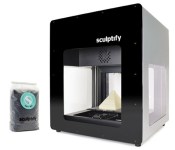
3D printer saves you money by using pellets instead of plastic filaments

If traditional printers use ink and toner cartridges, most commercial 3D printers use plastic filament spools to create the objects you want. These filaments, however, are typically made from plastic pellets, so an Ohio company called Sculptify thought: “Hey, why don’t we make a 3D printer that uses pellets straight up?” Thus, David, a 3D printer loaded with open source software, was born. David can print objects using a number of soft and flexible materials, such as Polylactide (PLA) and ethylene vinyl acetate (EVA), though it can surprisingly use wood, as well. Since pellets are usually much cheaper than filaments (according to Sculptify, a 2-pound bag of pellet costs around $18, while a 2.2-pound spool costs roughly $48), you’ll be saving quite a bit of money.
“…using pellets allows for access to a wide variety of unadulterated materials, stripped of several layers of cost and time,” the Sculptify team wrote on their Kickstarter campaign page to raise funds for David’s production. “In short, you get to print with higher quality materials, for less money.” Before you get to enjoy the savings, though, you’ll first have to pay a considerable amount up front, as you can only get a unit for a minimum pledge of $2,745. If the team manages to raise $100,000 via Kickstarter, they plan to use the money to finalize David’s hardware and to purchase whatever else they still need for mass production. Sculptify expects to ship out the first units by April 2015 if the campaign ends up a success, but for now, you can watch David do its job in the videos below.
Filed under: Peripherals
Source: Kickstarter
.CPlase_panel display:none;

Google Glass’ new features let you switch chat methods on a whim

Some of Google’s rapid-fire Glass updates have been more useful than others, but its latest is something you’re likely to appreciate — especially if you’re a socialite. The wearable’s 20.1 upgrade gives you a much better contact system (shown below) that gives you quicker access to your friends. You can reach 20 of your favorited and recent contacts through voice, and your phone’s entire address book is easily accessible. It’s also much easier to switch communication methods. If you want to jump from email to Hangouts to deal with a heated conversation, you only have to swipe to make it happen.
There are a few more tricks up Glass’ sleeve. It can now show you nearby events, like concerts; you’ll also see a currency converter in Google Now when you’re traveling, and a wider range of voice commands should keep you from reaching for the touchpad for simple tasks like changing the volume or sending a photo. Android users should get all the new features as soon as they update Glass, while iOS users will have to wait roughly a week to get the needed MyGlass app.

Filed under: Wearables, Google
Via: Google Glass (G+)
Source: Google Glass Support, Glass Community
.CPlase_panel display:none;

Xbox One gamers could soon try before they buy with a ‘Free Play Day’

At $60 per year, an Xbox Live Gold subscription isn’t cheap, but Microsoft’s working to make the all-access package a bit more attractive to gamers. The ‘Games with Gold‘ offering that we first saw with Xbox 360 made its way to One as well, and now it appears that the company’s latest console may soon get a second bonus feature. Xbox One beta users noticed a new ‘Free Game Day’ option this week, which enables 24 hours of access to select titles, giving you a chance to preview games before making a purchase. Max: The Curse of Brotherhood appears to be the first offering, and if an Xbox Support tweet is any indication, a broader rollout may be on the way very soon.
Filed under: Gaming, Microsoft
Via: VG24/7
Source: Eurogamer
.CPlase_panel display:none;
 AIVAnet