


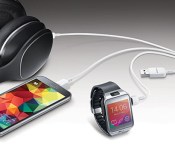
Samsung USB cable lets you charge three mobile devices at once

If you’ve owned a handful of portable gadgets in recent years, you’ve probably managed to build up a healthy supply of micro-USB cables. Spending 40 bucks to acquire another might sound absurd — unless this is the cable you’re looking to buy. While a bit pricey, this Multi-Charging Wall Charger from Samsung packs three connectors at the tail end, letting you power multiple devices from a single USB port. There’s a 2-amp charger included in the box, which outputs two amps of power when charging one device, one amp per device when you have two attached or 667mA each when you’re using all three ports. Samsung hasn’t announced a ship date yet, but you can pre-order the cable today.
Filed under: Cellphones, Peripherals, Samsung
Via: BGR
Source: Samsung
.CPlase_panel display:none;

HP SlateBook 14 review: Android? On a laptop?

There’s mounting evidence that HP, once the leading PC maker, does not know what it’s doing. After announcing plans to cut up to 5 percent of its work force, the company is basically throwing stuff at the wall and seeing what sticks. Recent experiments include a luxury smartwatch, Chromebooks, a $199 Window notebook and now, a laptop running Android. Here’s the sales pitch, and bear with me if this doesn’t make sense: The SlateBook 14, according to HP, is for students and teens who already use Android on their mobile devices. In other words, they already own a Galaxy S5 or what have you, and they should have an Android laptop to match. The idea is that they might choose this over a Chromebook because it has more apps, and because it’s more familiar. Ditto for Windows laptops — except, you know, Windows actually has lots of apps too. Setting aside HP’s flawed logic (they never said Windows users should stick to Windows Phone): Why would you pay $430 for a laptop running an OS that was primarily meant to be used with the fingers?
Hardware

Take what I say here with a grain of salt: The same way Vogue editor Anna Wintour is allowed to like a dress covered in futuristic space-snails, I’m allowed to like a laptop decked out in Lamborghini yellow. Personally, I kinda dig how the black lid and keyboard deck contrast with the bright hinge and sides. The only place where HP goes too far is the bottom side of the machine. It’s all yellow — right in your face. Ditto for the prominent Beats Audio logo, located on the right side of the hinge, right in your line of sight whenever you’re looking at the screen. In any case, whether you love or hate the yellow accents, I think we can agree on this: It’s insane that in addition to releasing an Android laptop in the first place — a niche product if ever there was one — HP chose the most polarizing design possible, and didn’t even offer any color options. Want that yellow to be cyan instead? Tough noogies, kiddos. You can have a yellow laptop running Android or… something else entirely.
It’s a shame, because this is otherwise a fairly well-made laptop, especially for $430. The lid is made of aluminum, and while the rest is constructed from plastic, those bits still feel solid; the thing never bends when you grab it by the palm rest. The 1080p touchscreen is sharper than almost everything else I’ve seen in this price range, and while the LED-backlit panel doesn’t provide the best viewing angles, the quality is still a big step up over every Chromebook I’ve tested. The keyboard is sturdy too, with well-spaced buttons that provide a decent amount of travel. And of course, Beats Audio offers better sound than what you’ll get on other budget notebooks. Still, I can see where someone might overlook all of that if they couldn’t get past the screaming yellow.

At 3.71 pounds, the laptop is on the heavy side. Not for a 14-inch laptop, mind you, but it’s still much weightier than a smaller Android tablet with a detachable case or keyboard dock. It’s also heavier than most Chromebooks, as well as some budget Windows laptops (I’m talking about the netbook-sized 11-inch models here). Considering Android isn’t that useful on a laptop, I have to question whether owning a relatively heavy notebook is worth it when you could just buy a tablet or Chromebook and call it a day.
It’s also not like you get that many more ports on a machine this big. As on some Chromebooks, there’s a full-sized HDMI socket, a headphone jack and a memory card reader to help offset the rather paltry 16GB of built-in storage. Incidentally, that slot actually takes microSD, not SD, cards — a normal spec for phones and tablets, but an oddity on a 14-inch laptop. All told, the main difference in I/O between this and a Chromebook is that you get three USB ports here instead of two, but I’d hardly call that a selling point.
Performance and battery life

Excuse me while I point out the obvious: Android was not designed to be used with a mouse. Personally, I use the Moto X as my daily driver. I spend more hours a day staring at KitKat than I’d like to admit. And yet, when I opened the SlateBook for the first time, I paused for a moment, unsure of what to do next. After a couple seconds, of course, I came to my senses and did what any reasonable person would do: I reached up and touched the screen. And so it went. Several days into using the SlateBook, and I’ve rarely touched the trackpad. It happens to be a very nice trackpad, and it comes in handy when I’m reading a website and would rather not reach across the keyboard to scroll down the page. Otherwise, though, I use my fingers, just as I would on my phone.
| HP SlateBook 14 | NVIDIA Shield Tablet | Tegra Note 7 | Samsung Galaxy Tab S | ||
|---|---|---|---|---|---|
| Quadrant 2.0 | 16,482 | 20,556 | 16,066 | 18,597 | |
| Vellamo | 2,458 | 3,055 | 3,314 | 1,672 | |
| 3DMark IS Unlimited | 16,040 | 30,970 | 16,473 | 12,431 | |
| SunSpider 1.0 (ms) | 685 | 463 | 586 | 1,109 | |
| CF-Bench | 34,655 | 43,033 | 34,386 | 31,695 | |
| SunSpider: Lower scores are better. | |||||
The same way there’s only one color option for the SlateBook, there’s just one spec configuration. That would be the $430 model I tested here, which has 2GB of RAM, 16GB of built-in storage and an NVIDIA Tegra 4 chip — the same one used in the Note 7 tablet. But in a way, the performance is moot. I mean, of course you want the device to run smoothly. And it does. Apps launch quickly. The OS is quick to respond if I want to see a list of my open programs; closing and switching applications is a breeze. Web pages load quickly, albeit not as fast as most Chromebooks. The thing is, the SlateBook’s quad-core Tegra 4 processor can handle even more than that. You know, like games. But on a device like this, why would you even bother? Who wants to cradle a 14-inch, 3.7-pound laptop, all so that they can tilt their way through Need For Speed? Who wants to reach across the keyboard when you could rest a tablet in your lap? And if you’re content to only play browser games, why don’t you use your $430 to buy a proper laptop?
The more I use the SlateBook, the more I think Android users would be better served by a tablet that can pair with either a keyboard case or detachable keyboard dock; you’d get more portability, similar battery life (more on that in a minute) and greater versatility when it comes to gaming. And yet you’d still have that keyboard when you needed it. If you’re the sort of person who does a ton of typing — email, web surfing, office docs — you’d be better off with either a Chromebook or a Windows machine. At least those operating systems were meant to be used with a mouse.
|
Battery life |
|
|---|---|
| HP SlateBook 14 | 9:03 |
| ASUS C200 | 11:19 |
| ASUS Transformer Book T100 | 10:40 |
| Dell Chromebook 11 | 8:37 |
| ASUS Transformer Pad TF103C | 8:26 |
| NVIDIA Shield Tablet | 8:23 |
| Samsung Chromebook 2 (13-inch) | 8:22 |
| Toshiba Chromebook | 8:15 |
| Acer C720 Chromebook (Intel Core i3) | 7:53 |
| Acer C720 Chromebook (Intel Celeron) | 7:49 |
| HP Chromebook 11 | 5:08 |
| Chromebook Pixel | 4:08 (WiFi)/3:34 (LTE) |
The SlateBook 14′s 32Wh battery is rated for nine hours of runtime and indeed, I got exactly nine hours and three minutes of continuous video playback (that’s with WiFi on, fixed brightness and Facebook and Twitter set to poll periodically). On the one hand, that’s great for a laptop; it’s the sort of longevity you’d expect from a $1,000 Ultrabook, but not necessarily a bargain-basement notebook, especially not one like this with a bigger screen.
On the other hand, nine-hour battery life is only marginally better than what most Chromebooks are capable of, and again, those tend to be more portable than the machine we have here. It’s also on par with Android tablets, like the new NVIDIA Shield tablet or the ASUS Transformer Pad TF103C, which costs $299 with a keyboard dock. Even if you wanted a Windows system, you could find a low-powered laptop or hybrid that delivers long battery life. (There are plenty of options in the 11-inch range.) Have I made my point clearly enough? Long battery life is not a good enough reason to buy this.
Software

Not that it matters — I’m recommending you don’t buy this — but the SlateBook runs Jelly Bean (version 4.3), with an upgrade to KitKat expected to arrive sometime in Q4. Thankfully, HP left Android as is; there are no skins here, no home screen panels that are impossible to remove. Nope, this is Android as Google meant it to be experienced. Really, the only mark HP left on the device is a handful of pre-installed apps. These include ones for Box.com, Evernote, Skitch, Skype, Hulu Plus, Splashtop, NVIDIA TegraZone, Kingsoft Office and CyberLink PowerDirector Mobile. You’ll also find some apps from HP itself, including Connected Drive, Connected Music, Connected Photo, ePrint, Media Player and File Manager. There’s also a “Games” app, which is really just a store for WildTangent titles. In any case, if none of this strikes your fancy, you can always uninstall them in the settings and free up a little bit of space.
Wrap-up

The SlateBook is an interesting specimen. That’s why I wanted to review it: because I was curious about the idea of an Android laptop, and thought you might be too. And it is interesting. But by no means should you actually buy one. The SlateBook takes Android, an otherwise intuitive operating system, and manages to make it… cumbersome. It’s a pain to use with a mouse, and yet if you want to use your fingers, you have to reach across the keyboard. Because that keyboard doesn’t detach, the device is far heavier than a standalone tablet, and the battery life isn’t even that much better.
If you love the Android experience, just buy a tablet with a keyboard case. If the typing experience is paramount, there are Windows laptops that are less expensive and more portable. Even a Chromebook would make more sense than the SlateBook; at least Chrome OS was designed to be used with a mouse. Samsung’s 13-inch Chromebook 2, for instance, has just as sharp a display and costs $30 less, and there are loads of options that are even cheaper. Frankly, I’m not sure I’d recommend an Android laptop at any price, but for $430 the answer’s easy: Just don’t do it.
Filed under: Laptops, Mobile, HP
.CPlase_panel display:none;

‘Snowboard’ through the city streets with LEIF’s electric freeboard

Add two inline skate wheels with 360-degree rotatable casters to the base of a skateboard and you’ve got a Fast and Furious-style drifting device known as a freeboard. Developed in the ’90s, these boards are an off-season way to enjoy the smooth carving and extended slides of snowboarding when all you have are city streets. But just like on the slopes, when the hills flatten out, so does a lot of the fun. That’s what spurred snowboarder Aaron Aders into action in October 2013. He founded LEIF Technologies with the idea for an electric “snowboard for the streets” that could tackle downhill, flat ground and even uphill terrain with ease. While the technology is still in the prototype phase, the company has its eyes on the future and continues to fine-tune the device at its Brooklyn-based workshop. A Kickstarter campaign is currently underway and the final product is scheduled for a spring 2015 release. We caught up with Aders earlier this week to check out the LEIF in person and take it for a spin.
Electric skateboards have been popping up over the years, and after pushing hard on my human-powered deck over rough terrain for 30 minutes to get to the meeting, I can see their allure. Of course, not having skated for about six years will set alight all kinds of soreness, but that’s part of the fun. Unlike most electric boards, the LEIF isn’t just about making it easier to go from point A to point B. Its freeboard design is all about cruising, carving and enjoying drifts far longer than you can maintain on a normal skateboard. For the uninitiated, a freeboard is essentially a skateboard with a “Rollerblade” type skate wheel mounted on a spinning caster along the inside of each truck. These inner wheels are raised slightly beyond the height of the outer four, allowing you to “float” at sideways angles, similar to carving through the snow on a snowboard. The outer wheels act as edges, providing traction to slow down or grip the road when turning. After a full day of testing one of the first prototypes, Aders found that the LEIF wasn’t that far off from its wintry counterpart. Not having ridden a snowboard for a while, he said that the LEIF elicited aches and soreness in all the same places that he’d experienced after a day on the slopes.
The real magic of the LEIF design lies in its tandem 360-degree, rotatable, power caster wheels driven by 18 nano-phosphate lithium-ion batteries (LiFePO4) — nine for each motor. The battery pack is housed in a 3D-printed shell on top of the deck and sends juice to the two 2,000W brushless motors underneath, providing about 5.5HP and propelling the board at speeds of up to 20MPH. The current design for the casters delivers electricity to three concentric rings of copper through three conductive pads that press against them like needles in a record groove, allowing for its full 360-degree range of spin. The final design aims to use bearings for the rotation, as well as conducting the electrical current to the motors.

Speed is controlled through a single hand-held 2.4GHz radio remote, which Aders found to be more reliable and resilient in the field than IR and had less competing noise than Bluetooth (at least in the city). After jumping on the board for a test ride, it only took a minute or two to figure out the right amount of pressure for the throttle and holding the control was less of a bother than you might think. To slow down, you simply let off the throttle and use the wheels as traction to reduce speed or spin to a stop.
The setup is currently a Freebord brand deck, trucks and wheels, and falls somewhere between a regular skateboard and a longboard in length. And with all the motors and batteries on board, it weighs in at a respectable 15 pounds, although it’s hardly noticeable while riding since it’s motorized. Snowboarders and skateboarders should have no trouble getting comfortable on it, although skaters may need a moment to get used to the idea of foot clips. If you lose your balance and need to bail, though, it’s easy enough to jump out of them without getting hung up.

As for battery life, the LEIF’s rechargeable system lasts for about eight miles of riding — depending on the terrain. The battery pack can be replenished through a standard wall outlet — although LEIF is considering solar as a possible alternative — and takes only about one hour to get the battery up to 100 percent. That’s more than enough juice for a local commute or a decent day’s session out on the streets.
You can get in on a Kickstarter Early Bird deal starting at $1,299 for one of the first production run LEIF boards — at least until the campaign ends on August 31st. That price puts it on par with other electric boards when you consider the feature set, range and power. So, whether you’re a snowboarder, skater, surfer or a Segway user who’s looking for a bit more style, the LEIF should probably be on your radar.
Edgar Alvarez contributed to this report.
Filed under: Transportation
.CPlase_panel display:none;

Apple Job Postings Point Towards Continued Work on Voice Over LTE
Several new job listings suggest Apple is continuing to work on building support for Voice Over LTE (VoLTE) into its line of mobile devices. VoLTE is designed to allow carriers to send voice calls over LTE networks, right alongside data. On the consumer end, this results in higher quality voice calls and faster call connection times.
Subscribers on CDMA networks (Sprint and Verizon) will further benefit from VoLTE, as it allows the simultaneous use of data and voice, something that’s not currently possible.

First discovered by LightReading (via Gigaom) job openings at Apple include Cellular Systems Protocol Engineer and Senior Baseband Audio Engineer. The protocol engineer position requires hands-on experience with VoLTE, among other wireless technologies, while the senior position also asks for experience with the VoLTE specification. Several additional positions also ask for experience with Session Initiation Protocol, which is essential for creating a connection between devices and LTE networks.
The company is currently advertising for a cellular systems protocol engineer, calling for experience with “VoLTE” and “IMS.” Other positions are calling for experience with the Session Initiation Protocol (SIP) protocol. […]
Apple is also looking for a senior baseband engineer to work on “cutting-edge” audio for its devices, which will include the Adaptive Multi-Rate Wideband (AMR-WB) speech compression codec, which is part of the VoLTE specification. The engineer will help to “implement, port, and deploy AMR-WB, AMR-NB, CELP, EVRC-B, EVRC, EVS Vocoders, and Jitter Buffers on Mobile devices,” according to the ad.
VoLTE is in the early stages of a rollout, with a full implementation hinging on support from both carriers and device makers. In the U.S., carriers have already begun exploring and investing in VoLTE technology. Earlier this year, Verizon Wireless announced plans to roll out Voice Over LTE in 2014, promising “an HD Voice experience.”
AT&T and T-Mobile have also announced support for VoLTE on a limited number of devices and in a limited number of markets, also promising higher quality calls. VoLTE is also picking up steam in other countries around the world, with several global carriers now offering support for the technology.
While Apple is posting new job listings related to VoLTE, it is likely the company has been working on the technology for some time, in response to a carrier shift towards VoLTE. Previous reports from 9to5Mac have suggested that Apple may enable support for VoLTE alongside the launch of iOS 8, with support built into the iPhone 6.
Because the Qualcomm LTE chips used in Apple devices since the iPhone 5 natively support voice, it is also possible that existing devices, in addition to the iPhone 6, will be able to offer support for VoLTE following a software update. It does, however, remain unclear if this is a feature that will roll out immediately with the launch of iOS 8 or in a future iOS 8 update in late 2014 or early 2015.
.CPlase_panel display:none;

Apple in Talks With Insurance Companies Over HealthKit Partnership
In addition to seeking partnerships with several different hospitals and health institutions for its HealthKit initiative, Apple is also speaking with major U.S. insurance companies like UnitedHealth and Humana.
In a report on rising medical costs and partnerships between insurance providers, corporate employers, and fitness device makers, Bloomberg suggests that Apple has spoken with insurance companies about HealthKit, but no specifics on the conversation were provided.
The focus of the piece, highlighting the insurance perks that companies can offer to employees with healthy habits, implies that Apple may be exploring partnerships that would possibly allow its collected data to be shared with insurance companies and other medical providers.
Under the Affordable Care Act, the new national health-care law, companies can spend as much as 30 percent of annual insurance premiums on rewards for healthy behavior.
Technology companies are taking note. Apple Inc., which has new health-tracking software called HealthKit that will be released this year and is said to be developing its own wearable device, has talked with UnitedHealth, the biggest U.S. insurer, and Humana, about its health initiatives, executives at the insurance providers said. The companies wouldn’t provide specifics about the conversations. Apple declined to comment.
An example of a partnership between a fitness company, an insurance provider, and a corporation is the agreement between Fitbit and oil company BP. As explained by Bloomberg, BP gave employees the option to wear a Fitbit fitness tracking device to earn points resulting in cheaper health insurance.
 Apple’s Health app
It is unclear if Apple is in talks about similar programs, but the company has been exploring many different options for its HealthKit initiative. First introduced during WWDC, HealthKit is a set of APIs designed to be incorporated into apps and hardware devices, collecting and aggregating a wealth of health and fitness data into one convenient location.
HealthKit pairs with the newly introduced Health app, which provides an interface for users to view all of this health data. Apple has already announced several partners it is working with on HealthKit, including Nike, the Mayo Clinic, and Epic Systems, a company that deals with electronic health records.
A recent report from Reuters has also suggested Apple is in talks with multiple health providers at Mount Sinai, Cleveland Clinic, Johns Hopkins, and Allscripts, with the company pushing HealthKit and its Health app as an all-in-one patient data resource for medical professionals.
The Health app, built into iOS 8, will be available to the general public as of next month, and the first fitness and health apps and devices will likely introduce support for HealthKit shortly after iOS 8 debuts. The Health app is also said to be heavily tied to Apple’s own upcoming wearable, which may measure several different health-related metrics including fitness levels and sleep quality.
.CPlase_panel display:none;

iCloud Services Currently Down for Some Users [Mac Blog]
It appears that many individuals are currently experiencing issues with iCloud, with several people reporting difficulties receiving/sending iCloud mail and logging into iCloud.com. Users attempting to access iCloud.com are receiving the following error message: “iCloud encountered an error while trying to connect to the server.”

Users appear to have been experiencing issues for the last half an hour or so, but Apple’s System Status page does not list any downtime and some users are still able to access the service, suggesting the outage is regional.
Over the last several months, iCloud has been down multiple times, with the longest outage happening just over a month ago. In July, a small percentage of users were unable to access iCloud Mail for approximately 27 hours.
.CPlase_panel display:none;

Comcast launches internet-delivered cable TV at MIT and several other schools

For several years now, Comcast has been testing cable TV that streams over the internet at several college campuses but this fall it’s officially launching. Available at Bridgewater College, Drexel University, Emerson College, Lasell College and the University of Delaware included as a part of room and board, and on a trial basis at a few others including Massachusetts Institute of Technology and the University of New Hampshire, Xfinity on Campus brings live cable TV to PCs, tablets and phones — as long as they’re on campus. The package includes 80 or so channels and includes access to stuff like video on-demand and WatchESPN and HBO Go (if you have HBO), which will work even when they’re off of the college’s network.
Currently, there’s no DVR option or even a way to put it directly onto a TV. On mobile devices there’s an iOS app (with AirPlay disabled) and an Android app is in the Play Store, but apparently not quite ready for prime time yet. Comcast says an option to upgrade to a cloud DVR (Multichannel News points out that it’s similar to the cloud DVR option available for X1 cable customers in a few markets already) where users can “check out” and download recordings to watch offline. The video can stream in HD, and while up to three devices can be activated at a time, only one on an account can stream video at a time.
While this makes for an interesting test case for the possibility cable TV for regular customers coming over the internet, Comcast has said that the point here is to hook young customers that aren’t willing to watch TV just on their TV, and are opting for services like Netflix or Hulu (if they’re paying for TV at all). If it can get them using the streaming service in the dorms, it figures there’s a better shot at turning them into customers when they move off campus or after graduation. According to Multichannel News, Comcast plans to add other universities in its footprint to the program soon, although there’s competition from a startup Philo, that also offers a cable IPTV package at several universities including Harvard, Stanford and Yale.
Filed under: Home Entertainment, Internet, HD
Source: Comcast (Businesswire), Xfinity on Campus
.CPlase_panel display:none;

Bring a friend to T-Mobile and you’ll both get unlimited data for a year

T-Mobile’s approach when it comes to luring new customers continues to nab loads of users. This time around, the so-called UnCarrier is offering a year of unlimited data on its LTE network for customers that convince friends to make the switch from Sprint, AT&T or Verizon. And yes, the acquaintance that actually has to sign the papers gets the same 12-month deal. The limited-time offer takes aim at Sprint’s recent efforts to lure customers from rival carriers with increased data allotments for families, and follows the yellow-hued network ending its quest to purchase T-Mobile earlier this month.
[Photo credit: Michael Loccisano/Getty Images for HBO]
Filed under: Cellphones, Mobile, T-Mobile
Source: T-Mobile
.CPlase_panel display:none;

Sprint’s new individual plan gets you unlimited everything for $60

Sprint didn’t waste any time after reshuffling its leadership — the SoftBank-owned carrier kicked into high gear by announcing a competitive limited-time $100 family plan promotion just a few days after new CEO Marcelo Claure filled the void left by Dan Hesse. Tomorrow, it’s taking another step into the aggressive pricing war by introducing a $60 unlimited talk, text and data plan for individuals. Unlike the family plan, this new option will be available to both new and existing (upgrade-eligible) customers alike, but you’ll need to sign up on the Easy Pay plan. This means that you’ll need to either bring your own Sprint-compatible device with you onto the plan or purchase one at full retail price; if you choose to finance a phone, you’ll pay that amount on top of the $60 plan.
This doesn’t appear to be a limited-time option like the family plan, but there’s never a guarantee that it’ll stick around for long — especially if it doesn’t succeed at bringing new customers into the Now Network fold. In comparison, this is $20 lower than T-Mobile’s unlimited everything plan; and as Sprint boasts, AT&T and Verizon don’t have unlimited plans at all. There’s a bit of fine print, however: While Sprint won’t be throttling data speeds, it admits that other plans may receive a higher priority on bandwidth availability. So if the network’s having a hard time keeping up with traffic, customers on higher plans will be more likely to get faster data speeds. Still, it’s hard to get mad at catches like this if it helps you squeeze a few more bucks out of your paycheck.
Filed under: Cellphones, Wireless, Mobile, Sprint
Via: Recode
Source: Sprint
.CPlase_panel display:none;

This lizard’s DNA might hold the key to regenerating human tissue

The humble green anole has but a few claims to fame: it was featured on the cover of the very first Animorphs book, and it can self-amputate and regrow its tail after coming face to face with a predator. It’s that latter ability that’s tickled the scientific community’s fancy (though c’mon, Animorphs was really good), and now researchers claim to have cracked the genetic code behind the anole’s little trick. Turns out, the key to the anole’s near-Whovian regeneration ability are 326 genes that come into play once the tail has been detached, and Arizona State University’s Dr. Kenro Kusumi thinks a better understanding of that process might ultimately lead to a way to regenerate lost or damaged human tissue.
“By following the genetic recipe for regeneration that is found in lizards, and then harnessing those same genes in human cells, it may be possible to regrow new cartilage, muscle or even spinal cord in the future,” he said. Here’s one thing to keep in mind, though: Yes, this little lizard can regrow its tail, but it’s not quite the same as the original. Scientists (also from ASU, go figure) learned a few years back that the replacement tail has shorter muscle fibers than the original, to say nothing of the tube of cartilage where the vertebrae used to be. That might be a tough break for an anole recovering from a predator attack, but this breakthrough could mean we’re approaching a future where birth defects and once-debilitating injuries become temporary setbacks instead of lifelong hindrances.
Via: The Scotsman
Source: PLOS One (PDF)
.CPlase_panel display:none;
 AIVAnet