



‘Ignore No More’ app makes sure your kids can’t dodge your calls

Once you tiptoe past a certain age, ignoring calls from mom and dad sort of becomes de rigueur as you go about your day. That sort of filial nonsense doesn’t fly when you’re younger though, and now there’s an app to make sure you return you young’uns return your parents’ calls – it’s called Ignore No More, and it essentially works by locking down your smartphone until you call them to verbally check in.
For better or worse, the setup process takes just a bit of doing. Parental units need to create an account and make sure the app is installed on all the phones in question (at a cost of $2 a head). Once that’s done though, all it takes is a few taps to lock down access to nearly everything else on the device — the only way to regain access is for the phone’s owner to place a call to someone on a preset list of contacts. Voilà: parents have a surefire way to get junior on the phone whenever they’d like. Fortunately for the Apple faithful, this app is Android-only for now; feel free to dodge your folks with impunity until the iOS version is released.
Filed under: Cellphones, Software, Mobile
Via: Digital Trends
Source: Ignore No More
.CPlase_panel display:none;
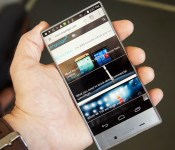
Sharp’s AQUOS Crystal is all screen

It’s sure been a long time since Sharp shipped a smartphone to American consumers. And, let’s be honest with ourselves, the FX Plus wasn’t exactly taking the market by storm. The Sidekick-esque slider was dated even by 2011 standards. But the company is hoping its AQUOS Crystal will have better fortunes. The (almost) bezel-less device offers high-end looks with decidedly mid-range internals. The 1.2GHz chip inside isn’t going to set land-speed records, but it should be enough for most folks. The most important feature, though, is the edge-to-edge 5-inch display. While Sharp’s description of it as a “groundbreaking” device might be a little over the top, we must admit it’s quite a stunning panel — especially for being five inches and only 720p.
While we’ve seen plenty of devices before that claim to be free of bezel, the AQUOS Crystal comes the closest to actually fulfilling that claim. There’s only the tiniest sliver of silver around the edges. In fact, it felt much smaller in the hand than many 4.7-inch phones. Even my tiny hands were easily able to reach across the display (a feat that’s a bit of a stretch on my aging Galaxy Nexus). Sharp’s expertise in building LCDs is obvious when you look at the phone. The screen is bright; the blacks are deep; colors are vibrant; and the viewing angles are solid (though just short of what we’d call impressive). Really the only complaint is that the high-gloss coating produced a ton of reflection and glare in even moderately lit environments.
Fans of the OG Nexus 7 will love the dimpled plastic back. It’s not a soft-touch plastic, but the little indents look nice and offer a good amount of grip. You’ll appreciate every little bit of traction since this thing is so light you could forget you’re holding it. Thankfully, even though it’s primarily plastic and weighs about as much as a small bundle of feathers, it still manages to avoid feeling cheap. We wouldn’t quite call it “premium,” but it certainly doesn’t feel like Sharp cut too many corners on the construction. And that’s important since this is the company’s big reintroduction to American smartphone consumers.
Sharp and Sprint also go easy on the customization, which is nice. There’s minimal bloatware and only minor UI tweaks. Otherwise this is the KitKat you’ve come to know and love. What few changes there are here are actually welcome additions to the Android UI. For instance, swiping diagonally from the top-left corner will take a screenshot and save it to a clipboard along with a related URL for quick and easy sharing. You’ll also find Harman’s Clari-Fi inside, which is designed to improve the audio quality of compressed audio tracks, like those you’d stream from Spotify. Perhaps most importantly though, it works on Sprint’s speedy Spark network.
The AQUOS Crystal will hit Sprint and its prepaid sub-brands soon, though we don’t have an exact date just yet. If you pick it up on Sprint, it’ll cost you $10 a month with a service plan, or you can get it for $150 from Boost or Virgin.
Filed under: Cellphones, Mobile, Sprint, NVIDIA
.CPlase_panel display:none;
ADT wants to automate your home with the help of IFTTT

Now that home automation is all the rage, household security outfit ADT is looking to dive further into the fray with a hand from If This Then That (IFTTT). Using the home alarm company’s Pulse system and the appropriate channel from the recipe-based app, you’ll be able to leverage automated chores from IFTTT’s library of tasks including disarming the alarm when your wearable switches out of sleep mode. You can also set a coffee maker in your kitchen to start brewing when your phone alarm wakes you and get a real-time video clip when the doorbell rings. ADT Pulse allows for remote control of a home security system from a mobile app, sending alerts and sorting remote video monitoring, too. It can the wrangle the connected thermostat and outlets for lighting and small appliances as well. Right now, the cooperative effort is looking to enter beta testing shortly with plans to open up a channel to the public afterwards that’s full of pre-made recipes alongside the ability to create your own.
Filed under: Household, Internet, Software, Mobile
Source: ADT (Businesswire)
.CPlase_panel display:none;

‘Antiselfie’ app uses face tracking to ruin your best pout

The onward march of the selfie, there’s no stopping it. Many people shudder at the slightest mention of the (now official) word. Others need only the flimsiest (and sometimes eyebrow-raising) reason to extend one arm and assume the duck face. Unsurprisingly, as with any part of popular culture, there’s a backlash. SLMMSK is an “antiselfie” app for iOS (and Android eventually) that subverts the selfie, using the art form’s very own weapon of choice — the filter — to obscure, rather than enhance, the subject’s face. The app also adds a CCTV-esque grain effect and VHS-style timestamp to ramp up the underground vibe. You just need to pull your best grin, say YOLO, and take the snap. The “filters” include a black censor bar, heavy pixelation, warping and more. The dislike for selfies doesn’t extend to social sharing though — you can upload your best shots to Instagram and Facebook and jostle for attention among the uncensored self portraits as per usual. Judging by the associated (and equally anarchic-looking) website, you might even increase your infamy by bagging a featured spot.
Filed under: Cellphones, Mobile
Via: Cool Hunting
Source: iTunes
.CPlase_panel display:none;

The 49ers’ high-tech fan experience falls short in first real test

When an NFL team builds a brand new stadium, it’s usually packed with the latest tech to insure a flashy introduction. The Dallas Cowboys have absurdly large video screens over the field and the Arizona Cardinals can move the entire playing surface outdoors to soak up some rays. This season, the San Francisco 49ers moved from Candlestick Park to Levi’s Stadium: the first of the NFL’s venues to be LEED certified, thanks in part a solar collection system that will power all ten home games. To enhance the fan experience, there’s a smartphone app that sorts tickets, concessions and wrangles instant replay. In fact, you can use it to scout the line at the nearest beer cart or place an order in advance for pickup or seat-side delivery. As you might expect, this past weekend’s first game action put the new system to the test, and as is common with most new large-scale tech, fans felt the bugs pretty quickly.
The ability to pay for food and have it delivered right to your seat sounds like a welcome change… if the system works. Fans reported issues with concessions portion of the app not receiving orders, leaving one particular season ticket holder rather hangry. Also, the instant replay portion of the app wasn’t switched on for the first preseason game in Santa Clara, so fans weren’t able to access what’s sure to be a popular feature of the stadium’s software — especially for those folks in the nosebleeds. To lend a hand with the issues, so-called Ninerds are on hand to help troubleshoot tech troubles that may arise.
The Levi’s Stadium WiFi and network at large held up pretty well today. More work to do but we feel good.
– Dan Williams (@danw49) August 18, 2014
Deadspin reports that the stadium’s WiFi network peaked when 20,000 devices hit it at the same time, but the venue seats 68,500 fans — of which I’d surmise 75% are likely to be carrying a smartphone. For those who were able to connect, speeds hovered around the 2-3 Mbps mark until the blowout loss at the hands of the Denver Broncos sent some fans home early lessening the burden on the system. According to a tweet from 49ers VP of technology Dan Williams, wireless access worked admirably in its first go, but the necessary improvements are on the way. So it seems that while coaching staffs work out the bugs with the sideline Surface tablets during the preseason, the folks at Levi’s Stadium will look to do the same with its remaining exhibition. A regular season crowd will put the app and its network to the test during Week 2′s matchup with the Chicago Bears.
[Photo credit: Ezra Shaw/Getty Images]
Filed under: Misc, Internet, Software, Mobile
Source: Deadspin, Mobile Sports Report
.CPlase_panel display:none;
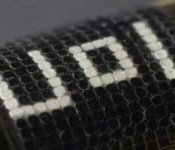
Octopus-like camouflage can hide you in plain sight

Octopuses and other cephalopods are masters of disguise — their prey often doesn’t realize the danger until it’s too late. It only makes sense to model active camouflage after that behavior, then, and a team at the University of Illinois has managed just that. Their octopus-like material uses layers of photosensors, actuators and temperature-sensitive pigment to detect ambient light and change colors in response. Individual points on the unversity’s test skin can turn from black to transparent within a second or two, letting it quickly blend into its surroundings — or purposefully stand out, as you see above. The technology will ideally allow for many colors in the future, although that’s not an immediate priority.
The US Navy is backing the project, and it’s easy to see the potential benefits for the fleet: warships could fade into the background during combat, or make themselves easy to spot when allies are nearby. There are civilian uses, too. You could have clothing or wallpaper that changes along with your environment, or simply to suit your mood. Researchers are quick to stress that the nature-inspired surface is a long way from reaching products, but it’s an important first step toward making the concept a practical reality.
[Image credit: Cunjiang Yu, University of Illinois]
Filed under: Science
Via: BBC
Source: PNAS
.CPlase_panel display:none;

Apple Updates Final Cut Pro, Compressor With Reliability Improvements, Bug Fixes [Mac Blog]
 Apple today updated its professional video editing software Final Cut Pro to version 10.1.3, adding reliability improvements and fixing several bugs. An issue that caused instability when burning a Blu-ray Disc has been fixed, and color corrections pasted between clips are now retained during Share.
The reliability of automatic library backups has been improved, as has the stability of the software when skimming growing files in the browser. A full list of changes can be found below:
What’s new
– Fixes reliability issues when burning a Blu-ray Disc or creating a Blu-ray disk image
– Color corrections pasted between clips are retained during Share
– Effects applied to clips in the Browser in prior versions of the app are retained when adding those clips to the timeline
– XML round-trip imports correctly when using gap clips
– Improves reliability of automatic library backups
– Improves stability when skimming growing files in the Browser
Today’s minor Final Cut Pro update follows a June update that added a range of new features and improvements. Apple has also updated Compressor to version 4.1.3, fixing several bugs and improving the app’s performance.
What’s new
– Support for Apple ProRes 4444 XQ
– Status display and improved responsiveness when using “Send to Compressor” from Final Cut Pro X and Motion
– Improved performance and color accuracy when encoding H.264 source files from GoPro cameras
– Fixes issues transcoding alpha channels in image sequences
– Includes general stability improvements
Final Cut Pro can be downloaded from the Mac App Store for $299. [Direct Link]
Compressor can be downloaded from the Mac App Store for $49.99. [Direct Link]
.CPlase_panel display:none;
 AIVAnet