



HTC is bringing its in-house apps to the rest of Android

HTC’s been making Android skins and apps for a long time, but now the company wants its home-grown software to conquer more devices — even those made by other manufacturers. According to Recode, the Taiwanese phonemaker has started developing apps for Android phones in general, courtesy of a new business unit called HTC Creative Labs. The Creative Labs team’s first product is called Zoe (originally available on the One M7), which has the power to stitch together up to 16 videos or images. You merely need to select a theme along with the images/videos, as well as a soundtrack, and it can automatically create a highlight reel.
HTC also developed Zoe to be able to share creations, so friends and family can tweak them, perhaps in an effort to come up with an Instagram or Vine of its own. Still, the app’s pretty basic at this point, and while it’ll be available to competitors like Samsung and LG, it can only be installed on high-end devices loaded with Android 4.4. HTC has plans to help boost Zoe’s presence despite those limitations, though, including forging partnerships with music and sports companies. The new Zoe will come out later this week, with more to follow, as the Creative Labs team plans to release other HTC apps from its own phones’ confines in the future.
Filed under: Cellphones, Mobile, HTC
Source: Recode
.CPlase_panel display:none;
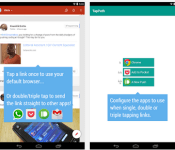
Chris Lacy Brings Us App Innovation Once Again with ‘TapPath’

The innovator from the land down under, Chris Lacy, has done it again. He has already brought well received apps such as Action Launcher and Link Bubble, but now Lacy wants to solve another problem we have had since the beginning of Android. Clicking on links within feeds usually always brings up a pop up window to choose which browser you want to use, or app you want to use. You can easily default which ever browser you use the most, but say you want to use different browsers or apps to open these links. That is where TapPath comes in.
TapPath gives you the option to use clicks to determine what you want use to open these links within your feeds. Click once and Link Bubble can open the link. Click twice and allow Chrome to open the link. Click three times and you can have a pop-up window to share the link to where ever you want to share it. It’s one of those apps that makes you think, “how was I doing this before this app came along?” Check out the demo video from Lacy below. You will have to fork over a dollar to get the app, but show him some love.
//<![CDATA[
ord = window.ord || Math.floor(Math.random()*1E16);
document.write('’);
//]]>
The post Chris Lacy Brings Us App Innovation Once Again with ‘TapPath’ appeared first on AndroidSPIN.
.CPlase_panel display:none;

Google launches a teaching tool to help schools ditch paper

Google’s itching to get Chromebooks into classrooms (and it’s doing a pretty good job too), but the search giant just went full steam ahead with another product meant to help it shape the school experience. It’s called (unsurprisingly) Classroom, and the free service is finally ready for enterprising Stand And Deliver types to take it for a spin before school starts again in earnest. Haven’t heard of it before? Who could blame you — chances are it won’t be as downright crucial to your day-to-day the way Gmail is… unless you’re a teacher plagued by too much paper. You see, Classroom lets teachers craft assignments that can be distributed, collected and graded from a sleek web interface, as well as start discussions and issue announcements to students (in 42 languages, no less). The upsides for teachers seem pretty straightforward, but Google’s gains are substantial too: between Classroom and all those cheap Chromebooks, schools itching to smarten up could easily pledge their allegiance to Mountain View rather than Redmond or Cupertino.
Via: TechCrunch
Source: Google Classroom
.CPlase_panel display:none;

Engadget Daily: the price of cable TV, inside Sky Sports News HQ and more!

Today, we investigated the rising prices of cable TV, toured the Sky Sports News HQ, learned about Sony’s 2.0 PS4 update and more! Read on for Engadget’s news highlights from the last 24 hours.
.CPlase_panel display:none;

Google now rejects scam email that tricks you using non-Latin characters

Google did a favor for Gmail users worldwide when it added support for non-Latin characters in email addresses. However, it also opened up a can of worms — scammers can write from addresses that seem legitimate, but are really using non-native letters to (potentially) fool you into trusting a message’s contents. Thankfully, the crew in Mountain View is already aware of the threat. Gmail now tosses out email with odd combinations of letters that are likely to represent phishing attempts, reducing the chances that you’ll hand your account details to a “bɑnk” instead of your actual bank. The filtering relies on a Unicode standard, too, so you’ll know the exact criteria Google is using. Other email providers will have to follow suit for the measure to really hit data thieves where it hurts, but this represents an important first step.
Source: Google Online Security Blog
.CPlase_panel display:none;

Peel doesn’t need any extra hardware to make your iPhone a Dish and DirecTV remote

The ability to turn iPhones into remote controls is something Peel has done before, but this time out it’s doing things slightly different. With its new iOS app, Peel now lets you use your iPhone, iPod touch and/or iPad as a smart remote for Dish Network and DirecTV boxes, without the need for additional hardware — which was the case with the Fruit, a $99 peripheral the startup introduced about three years ago. Peel’s iOS application isn’t just a remote, however; it also comes with discovery features that bring you personalized recommendations on stuff you should watch. In addition to that, Peel acts as a TV guide too, allowing you to easily find shows or movies even if you’re not a Dish or DirecTV subscriber. Peel Smart Remote and TV Guide is compatible with the Dish Hopper and Hopper with Sling (excluding some models), as well as any WiFi-equipped DirecTV box.
Filed under: Home Entertainment, Peripherals, Software, HD, Mobile, Apple
Via: TechCrunch
Source: App Store
.CPlase_panel display:none;
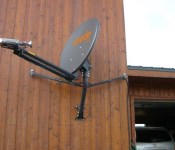
ViaSat adds ‘virtually unlimited’ Freedom satellite internet plan for $70 per month

It didn’t happen overnight, but ViaSat’s finally on its way to transforming the satellite internet space, be it through speedy in-flight WiFi on JetBlue and United or the Exede residential service. That latter product, while the fastest internet option for customers without access to cable or fiber, isn’t without its critics, due in no small part to some rather prohibitive monthly data caps. Well, no more. The company’s new Freedom plan, available beginning August 18th for $70 per month (or $60 when bundled with phone service), delivers “virtually unlimited” access for streaming, web browsing and anything else you might plan to do. Officially, there’s a monthly cap of 150 GB, but ViaSat likely won’t enforce that limit. Of course, Exede still won’t be a fit for downloading terabytes of video or linking up your remote server farm, but if you plan to do some work during the day and stream an HD movie each night, you should be good to go.
Filed under: Wireless
Source: ViaSat (MarketWatch)
.CPlase_panel display:none;

Even more awesomeness to expect at Engadget Live Boston

If you’re a Boston area resident who loves technology, we’ve got something for you to do on Friday, August 22nd. Join us at Royale at 7PM for our editorial dance-off third Engadget Live event of the year. Flip through the gallery below to find out why this is a cant-miss event.
You can get your free tickets for this event right here. After we wrap up in Boston, we’ll do one more Engadget Live in Los Angeles on October 3rd. After that, we’re not taking any vacations. We’ll gear up for our free Engadget Expand event kicks off November 7th at the Javits Center in New York City, which you can learn more about right here.
Filed under: Announcements
.CPlase_panel display:none;

Roam Britain’s most famous art gallery with some nocturnal robots

Ever fancied roaming an art gallery through the eyes of a robot? For the next five days, that’s the opportunity that London’s Tate Britain is offering the citizens of the internet. After Dark will see four telepresence ‘bots roam the halls of the gallery outside of visiting hours, piping the video feeds straight to the internet. Users will then be able to guide the devices around the exhibits for a short period of time, with optional color commentary from an art historian if you spot something of interest. Oh, and if you’re thinking about using the gear to pull off some audacious art heist, be warned: get too close to the exhibits and the power will cut out. No pretending to be Thomas Crown for you.
Via: The Huffington Post
Source: Tate, After Dark
.CPlase_panel display:none;

Here’s what Samsung’s VR headset looks like in real life

Sure, you’ve seen a 3D render of Samsung’s widely leaked virtual reality headset, but what’s it like in the real world? Well, you may be looking at it right now — The Verge has posted what it says is a photo of the Oculus-backed eyewear. It’s not quite as sleek as the earlier imagery, but the basic formula lines up with what we’ve heard; a faceplate at the front lets you plug your phone in and use it as a screen for VR games and other apps. The biggest change from the early image is the presence of a focus dial that helps you see clearly. There’s no certainty that this is exactly what Samsung will unveil at next month’s IFA show, assuming it’s authentic in the first place, but it wouldn’t surprise us in the least to see this wearable display on stage.
Filed under: Cellphones, Displays, Wearables, Mobile, Samsung
Source: The Verge
.CPlase_panel display:none;
 AIVAnet