



Solidoodle’s latest 3D printer is friendly to newcomers

As much as 3D printers have evolved in their short history, they still tend to look like they were made for hobbyists, by hobbyists. You’ll see boxy frames, sometimes with exposed parts — and you may have only limited help if something goes awry. Solidoodle isn’t happy with these intimidating designs, so it’s launching a fifth-generation peripheral (appropriately, the Solidoodle 5) that’s kinder to first-time users. The 512 cubic inch printer comes in a friendlier, enclosed design that looks more like a mini fridge than the raw machinery of Solidoodle’s previous models. The spool is protected to prevent plastic filament jams, and the printing bed automatically calibrates itself — you won’t have to adjust it every time it’s uneven.
The 5 should arrive in September for $599 ($349 in an early sale), which is just a tad more accessible to rookies than its $699 predecessor. Don’t worry if you’re a fan of the expert-oriented second- and third-generation 3D printers, though; the company hasn’t forgotten about you. It’s releasing small (Workbench Apprentice), medium (Press) and large (Workbench, shown below) printers that preserve the open chassis and let you modify the innards to your heart’s content. The medium-sized Press will be the cheapest of the bunch at $599 due to its plastic body and single extruder; both the $799 Workbench Apprentice and $1,299 Workbench switch to metal frames and add one more extruder. If any of these more industrial-looking printers strike your fancy, they’ll ship at roughly the same time as the Solidoodle 5.

Filed under: Peripherals
Source: Solidoodle
.CPlase_panel display:none;

Why your brand new plane doesn’t have a seat-back TV

Earlier this year, I boarded a United flight from Newark to San Diego. After passing the first few rows, a young boy turned to his mother and asked, “Why aren’t there any TVs?”
“It’s probably an older plane,” she responded — but that couldn’t be further from the truth.
The aircraft, a 737-900 with Boeing’s Sky Interior (a Dreamliner-esque recessed ceiling lit with blue LEDs), had only been flying for a few weeks. It looked new, and it even had that “new plane smell” most passengers would only associate with a factory-fresh auto. But despite the plane’s clean and bright appearance, the family only noticed the glaring absence of seat-back screens. To them, our 737 might as well have rolled off the assembly line in 1984.
Dozens of other passengers made similar remarks as they walked by my seat, and many more probably inquired with a flight attendant or aired their complaints on Facebook or Twitter. I had a similar experience while flying the same route last week. I was seated next to a corporate executive who normally travels on United’s better-equipped international fleet — he was clearly unhappy about the entertainment situation, and, like the mother I heard earlier in the year, assumed that our brand-spankin’-new 737 predated the 21st century. It’s reasonable to assume a new plane would be delivered with the latest technology, but unfortunately that isn’t the case.
That new plane smell

The Newark-to-San Diego flight, scheduled for more than six hours from gate to gate, is a prime candidate for airline-provided entertainment. If you don’t come prepared, those raggedy catalogs and magazines in the seat-back pocket can occupy an hour or two at best. Unfortunately, airlines don’t make it easy to figure out whether you’ll have on-demand content, live video or absolutely nothing at all on board. Our flight was equipped with Exede, the fastest WiFi in the sky, provided by the speedy ViaSat-1 satellite and installed by LiveTV, the same company responsible for outfitting United’s 737 fleet with seat-back DirecTV. But leisure travelers seem to be most interested in video, as low quality as it may be.
Instead of the DirecTV logo that occasionally appears in the entertainment section of United’s flight status page, the flight only listed onboard WiFi, along with a promise from the airline: “Personal device entertainment is coming soon,” which will enable you to view content streaming from the plane using your own laptop, smartphone or tablet. Boeing delivers all of United’s 737s without entertainment or WiFi — instead, a third party handles the installation. But since airlines want to get their new planes into service immediately, they usually schedule installations, which take an aircraft out of commission for several days, for a few weeks or months down the line. That means hundreds of bored passengers every day, and a negative perception of the plane and the airline.
Streaming video, like the version United’s planning to launch, is very attractive to airlines. Seat-back displays cost carriers thousands of dollars a pop, and outfitting an entire aircraft is very expensive, even before you factor in maintenance and costs to upgrade once a better solution becomes available. Displays at each seat also add significant weight, which causes each plane to burn pricey fuel more quickly. So, instead of installing TVs, many carriers are opting to let passengers use the tablets and laptops they already have to access content on a server in the aircraft’s belly.
Bring your own Device

It’s a means to the same end. You get to be entertained, and the airline can collect that coveted ancillary revenue. Even though it’s rarely in HD, the content you watch on your tablet or laptop will often look much better than what you’d get with an aging seat-back screen, and passengers on red-eye flights won’t have to deal with the light from unused displays filling the cabin and keeping them awake. You will be on the hook for power (many planes now have outlets installed at every seat), and your device will likely get in the way during the meal service, if there is one, but the trade-offs are worthwhile, for airlines and passengers alike.
Gogo, the most prolific in-flight internet provider, also leads the market when it comes to streaming-entertainment service. More than 1,500 American, Delta, US Airways and Scoot (an Asian low-cost carrier) planes have Gogo Vision installed, and Aeromexico, Alaska and JAL are scheduled to carry it, too. Most of the planes with Gogo’s WiFi have Vision available as well — the company can use the existing WiFi infrastructure, adding only a content loader in the cabin for maintenance to refresh movies and television shows using a USB flash drive. Alaska Airlines is planning to install a unique version of the system that excludes internet access, so passengers can still stream content on routes without coverage.

A USB flash duplicator copies streaming content onto loader drives at Gogo’s Chicago headquarters.
Global Eagle, the company behind the Row 44 satellite internet installed on Southwest’s fleet, takes streaming content one step further with live TV. If your plane is connected to the web, you’ll also have access to streaming television content. Dish provides that service on Southwest’s 737s, where you can choose from 19 live channels and up to 75 recorded TV episodes on each flight. You can also purchase movies for $5 each, with more than 25 titles available on each plane. Like Gogo, Global Eagle can stream content to customers on planes that aren’t connected to the web. That product, called WISE, is already installed on some of Philippine Airlines’ planes, and it’s scheduled to launch with a second Asian carrier soon.
LiveTV is another major in-flight WiFi player in the US. That company was formerly a JetBlue subsidiary, but was recently acquired by Thales Group, a French aerospace conglomerate. Unfortunately, LiveTV executives, who now report to Thales, were unable to detail their future offerings, but we do know the company has been hard at work installing speedy Ka-band satellite WiFi on JetBlue’s A320s and United’s 737s.
The airlines play a big part in how you use this technology, too. While Global Eagle, Gogo and LiveTV install the systems used to provide content, each carrier sets pricing. Most movies and TV shows available through Delta Studio, a Gogo service, are free for international, First Class and Economy Comfort passengers, for example, though other airlines can charge anywhere from $1 to $7 per program, depending on pricing models and studio arrangements. If you’re able to stream content from a third-party site, such as Hulu, you’ll likely pay an upcharge for faster in-flight service, so even if you don’t purchase programming from the airline, it’ll still collect a fee.
Streaming from the web

JetBlue’s trying something different with its Fly-Fi in-flight internet. Instead of blocking access to bandwidth-heavy streaming sites, the airline’s allowing you to view content (even in HD) from a variety of websites, assuming you’re willing to pay a relatively high fee. ViaSat provides the satellite service, which is capable of supporting many passengers streaming video simultaneously. Even if you watch several movies over the course of a flight, however, it probably isn’t worthwhile to pay the $9-per-hour fee (that adds up to $45 for a single five-hour flight) — you’ll end up spending less if you download rentals while you’re still on the ground.
As for Gogo, Chief Commercial Officer Ash ElDifrawi expects future generations of its service to enable streaming content from outside the plane, be that live television or media already available over the internet, through sites like Hulu and Netflix. Gogo’s current air-to-ground service isn’t fast enough for HD streaming, but the company’s next-generation GTO (ground-to-air) product should support it. That satellite system could also enable the company to offer live TV, like the Global Eagle service you’ll find on Southwest’s planes, but Gogo’s next-generation infrastructure is still a few years out.
“At some point, we see an opportunity for products like IPTV, music and other media content,” ElDifrawi said. “We also see an opportunity for streaming through connectivity as more bandwidth becomes available.”
Of course, a TV-less future impacts the flight crew, especially just before takeoff — without seat-back or overhead displays, crews will need to do a live safety demo before each flight. That means reading a script over the PA as flight attendants throughout the cabin show you how to fasten your seatbelt, use an oxygen mask and put on a life vest. It’s a time-consuming task and removes flight attendants from other duties, such as checking the cabin thoroughly before takeoff.
While inconvenient for the crew, the pros still outweigh the cons for airlines that barely break even on any given flight. Revenue from streaming services could impact a route’s profitability, while a screen-free cabin helps the carrier trim some fat, resulting in a lighter aircraft that burns less fuel. As with in-flight WiFi, it may take a while for streaming services to become a compelling option for all passengers, but the next time you board a plane that doesn’t have TVs, know that the future looks very bright.
[Photo credit: Boeing (empty cabin and flight attendant)]
Filed under: Home Entertainment, Transportation
.CPlase_panel display:none;

Apple’s Supply Chain Diversification Hitting Samsung’s Chip Business Hard
Apple has been expanding its supply chain, bringing in companies like Taiwan Semiconductor Manufacturing to produce components for its iPhone and iPad devices. This supply chain diversification may benefit Apple, but it is having a negative effect on rival Samsung’s chip manufacturing business, reports The Wall Street Journal.

Since 2007, Samsung has enjoyed the coveted position of being the only manufacturer of Apple’s Ax series of processors and their predecessors. But after several years of negotiations and technical work as the popularity of Apple’s iOS devices has soared, Apple has brought TSMC on board to produce A-series chips for the next generation of devices. This transition away from Samsung as the sole supplier of the main chip for iOS devices is cutting into the Korean company’s logic chip business.
“Sales and profitability from System LSI (logic chip business) worsened as demand from main customers continued to decline,” Robert Yi, Samsung’s head of investor relations said last week.
Samsung’s logic chip division struggled in the just-ended quarter, and the outlook for the business is equally bleak with Samsung acknowledging the continued low demand from customers will remain an issue going forward.
The sharp turnaround has led to analysts such as IBK Securities’ Lee Seung-woo predicting losses of approximately 877 billion won ($848.5 million) for the division in 2014, compared to operating profits of 203 billion won ($196.3 million) in 2013 and 1 trillion won ($967.8 million) in 2012.
.CPlase_panel display:none;

GameStop now offers 20 percent more cash for your old titles

Between pre-orders, promotions and credit offers, it feels as if you need a PhD in economics just to trade-in used games. Thankfully, GameStop has decided to simplify its arcane pricing structure and, best of all, increase the price of each trade by 20 percent. According to documents leaked to Kotaku, you’ll get the “optimal value” for each title, the only difference being if you take credit and/or have a Power Up Rewards subscription. In the example, an untitled game that you could swap for $29 in cash would be worth $37.70 if you took credit and were part of the rewards program. According to the slides, the new rules will start on August 18th, and you’ll know the staff have been given the new details if they ask you “when’s the last time we bought some of your items?” The correct answer, of course, is to wink, pause a moment and then say “In London, April is a spring month.”
Filed under: Gaming
Source: Kotaku
.CPlase_panel display:none;
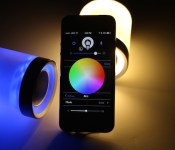
Lightfreq is like the lovechild of Jambox and Hue

Since the death of the incandescent bulb we’ve seen light-emitting oddities of all kinds pop up, but for the most part, they’ve been rather, well, silent. LightFreq is aiming to change that, however, with a smart lightbulb that has a built-in speaker and customizable color output. The speaker connects to an app on your phone via Bluetooth 4.0 and WiFi, as does the light itself, allowing you to beam your music from room to room and even have your tunes and lights follow you, automatically turning them off after you pass by and illuminating the next before entering. The LightFreq also acts as an intercom system, wherein you can broadcast voice messages from your device to an individual unit in another room or all bulbs at once. The features don’t stop there, as you can even set individual colors for specific push notifications and alerts on your phone; a flashing red-to-blue pulse when your police-officer dad calls, for instance.
The pitch video (embedded below) claims, among other things, that the speaker packs better audio quality than the Beats Pill. A single bulb with app-access will set you back $55 if you’re quick on the draw, and after the early-bird units run out, the price jumps to $70 — sitting at about the mid-range when compared to something like the Philips Hue. If all of the above sounds amazing and the project gets enough backers, perhaps Sharknado Party Mode at your house could be mere months away.

Filed under: Household, Mobile
Source: Kickstarter
.CPlase_panel display:none;

Touch+ turns any surface into a gesture controller for your PC

Haptix (now Ractiv) promised a cheap sensor that would turn any surface into a multi-touch PC controller, and it’s making good on its word today by shipping the device worldwide. The $75 add-on has received a new Touch+ name and a sleek redesign, but it otherwise uses the same basic concepts we saw when the project got its crowdfunding a year ago. Put the device on a desktop stand or a laptop and its dual cameras turn your finger movements into gestures; you can play a first-person shooter by swiping across your keyboard, or sketch in Photoshop using your desk as a drawing tablet. It’s definitely not for everyone, but it might be up your alley if you’d rather not reach out to a touchscreen (or use Leap Motion’s in-air tracking) just to get more advanced input than a run-of-the-mill mouse or trackpad.
Filed under: Peripherals
Source: Ractiv
.CPlase_panel display:none;

Watch This App: Wear – Holo Compass – Android & Wear

So you’ve got an Android Wear device and now you’re looking for some Android apps to go along with it. We’ve got you covered. Our Watch This App column is designed to help educate readers in the various apps available for the platform and highlight the best of the bunch. Watch This App: Wear – Holo Compass – Android…… Read more »
The post Watch This App: Wear – Holo Compass – Android & Wear appeared first on AndroidGuys.
.CPlase_panel display:none;

iStat Menus 5 Brings Refreshed Look, OS X Yosemite Support, More Data [Mac Blog]
Bjango today released iStat Menus 5, the newest version of its popular Mac system monitor. The program brings a refreshed design, compatibility with OS X Yosemite, and enhanced per-app metrics and stats. Additionally, time and world clocks are now available for more than 120,000 cities along with support for additional languages.

New menubar icons and revamped-drop down menus are emphasized in the new look of iStat Menus 5, which has been designed to fit more in line with the overall look of OS X Yosemite. The app also contains a variety of Yosemite-only and Mavericks-only features, which include overviews for apps using significant energy and Dark Mode compatibility among others.
In addition to these changes, stats on read and write disk activity for individual apps are now available, along with data on specific upload and download activity. Finally, access to additional network information and improved GPU monitoring are also provided through iStat Menus 5.

All of the new additions to iStat Menus 5 join the program’s core monitoring abilities, which allow users to track metrics such as realtime CPU and GPU usage, sensors, memory, battery and power, disk usage, and more.
iStat Menus 5 can be downloaded now and comes with a free 14-day trial, as a single license and Family Pack license sell for $16 and $24, respectively. Users upgrading from iStat Menus 3 or 4 are eligible for reduced pricing, with the single license on sale for $9.99 and the Family Pack license available for $14.99.
.CPlase_panel display:none;

Martin Scorsese voices support for preserving the future of cinema on film

Saving celluloid film is a big deal for many reasons, and the movement recently got another major voice in its corner. Legendary director Martin Scorsese (Raging Bull, Goodfellas, Casino) has come out in support of the Hollywood coalition to save Kodak. In a statement spotted by First Showing, Scorsese notes the advantages of shooting digitally (like lighter and cheaper cameras), but fervently details why film needs to continue to exist, likening the medium to paintings.
“Would anyone dream of telling young artists to throw away their paints and canvases because iPads are so much easier to carry? Of course not.”
He also echoes the fact that film is the only way to reliably archive and preserve the history of cinema. Something that, say, an all-digital medium like video games doesn’t have afforded to it. For the full statement from one of Hollywood’s greatest living talents, as well as a snippet of his interview from Side by Side where he speaks on this very topic, scroll down a bit.
We have many names for what we do – cinema, movies, motion pictures. And…film. We’re called directors, but more often we’re called filmmakers. Filmmakers. I’m not suggesting that we ignore the obvious: HD isn’t coming, it’s here. The advantages are numerous: the cameras are lighter, it’s much easier to shoot at night, we have many more means at our disposal for altering and perfecting our images. And, the cameras are more affordable: films really can be made now for very little money. Even those of us still shooting on film finish in HD, and our movies are projected in HD. So, we could easily agree that the future is here, that film is cumbersome and imperfect and difficult to transport and prone to wear and decay, and that it’s time to forget the past and say goodbye – really, that could be easily done. Too easily.
It seems like we’re always being reminded that film is, after all, a business. But film is also an art form, and young people who are driven to make films should have access to the tools and materials that were the building blocks of that art form. Would anyone dream of telling young artists to throw away their paints and canvases because iPads are so much easier to carry? Of course not. In the history of motion pictures, only a minuscule percentage of the works comprising our art form was not shot on film. Everything we do in HD is an effort to recreate the look of film. Film, even now, offers a richer visual palette than HD. And, we have to remember that film is still the best and only time-proven way to preserve movies. We have no assurance that digital informaton will last, but we know that film will, if properly stored and cared for.
Our industry – our filmmakers – rallied behind Kodak because we knew that we couldn’t afford to lose them, the way we’ve lost so many other film stocks. This news is a positive step towards preserving film, the art form we love.
[Image credit: Getty Images for Spike TV]
Filed under: Cameras, Home Entertainment, HD
Via: The Verge
Source: First Showing
.CPlase_panel display:none;

LG may soon imitate Samsung’s Galaxy Note with the G3 Stylus

LG hasn’t finished with new G3 variants yet, judging by a promotional video (below). It appears that a G3 Stylus will soon join the flagship Quad HD G3 and its much smaller and lesser equipped sibling, the 4.7-inch G3 Beat. There’s not much to go on other than the stylus, though it looks even bigger than the 5.5-inch G3. Don’t count on an Optimus Vu resurrection, though — a previous UA profile leak detailed an LG Stylus with a qHD 960 x 540 screen, which would make it similar to the new G Vista for Verizon. If that proves accurate (and it may well not be), the new handset would be less Galaxy Note 3 and more Galaxy Note 3 Neo. Meanwhile, Samsung’s latest stylus-equipped Galaxy Note 4 device is expected soon with a 2,560 x 1,440 screen — that’s “QHD” with a capital “Q.”
Via: Android Central
Source: LG
.CPlase_panel display:none;
 AIVAnet