



Google is reportedly separating its photo service from its social network

Love Google’s services, but not a fan of its social network? Good news: the Mountain View company may be spinning Google+’s photo features into their own product. According to Bloomberg sources, Google is hoping to attract new users by making some of its social network’s best features available to consumers who aren’t interested in Google+. The company has already made Hangouts available sans Plus to some business customers, but wouldn’t confirm or deny if the reported photo spinoff was really happening. “Over here in our darkroom, we’re always developing new ways for people to snap, share and say cheese,” a Google spokesperson told us. Well, that’s certainly cheesy.
Source: Bloomberg
.CPlase_panel display:none;

NASA successfully tests microwave thruster, paving the way for speedier space travel

As with airplanes and many other self-powered machines, the fuel a shuttle engine requires can weigh nearly as much as the object it’s propelling, increasing costs while significantly limiting range. It’s a challenge we’re going to need to overcome before launching long-distance treks through space, where carrying enough fuel may not currently be possible. One proposed method for getting future spacecrafts to their destinations is by utilizing a device called a microwave thruster. A British scientist named Roger Shawyer managed to build a similar engine called an EmDrive several years ago, and while a Chinese team also accomplished the same, the rest of the world hasn’t paid much attention until NASA confirmed from its own research that such a device could work during a presentation earlier this week.
NASA’s device, a microwave thruster called the “Cannae Drive,” was built by US scientist Guido Fetta. It works by bouncing around microwaves within a sealed container, using a method that seemingly contradicts the law of conservation of momentum. Miraculously, the thruster seemed to function as described, and while the model NASA tested is hardly capable of moving any large object through space, the fact that it registered any measurable movement is promising. If the agency can scale up the device significantly, it could be used for anything from limited satellite propulsion that uses solar power exclusively to a spacecraft that can carry astronauts from Earth to Mars in just a few weeks.
Filed under: Science
Source: Wired (UK), NASA
.CPlase_panel display:none;
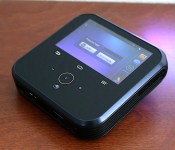
Sprint LivePro review: A mediocre projector hotspot that appeals to few

The “Swiss Army knife of electronics.” That’s the best way Sprint can define the LivePro, a touchscreen projector/Android hotspot made by Chinese manufacturer ZTE. The device, which goes for $300 with a two-year contract, is the first in a brand-new hybrid category — and depending on how successful it is, it may well be the last. Although the LivePro has a wide range of capabilities that make it useful on many different fronts, its demand will be incredibly niche. What kind of person needs such a unique device, and is it good enough to even attract them?
Hardware

The LivePro is an awkward-looking box, but then again, it’s clearly not trying to win any beauty contests — what do you expect from an Android-powered hotspot with a built-in projector and 4-inch display? It’s portability and utility that buyers will crave the most; this odd little thing will spend most of its time dragged around by a suit in a briefcase, purse or roller bag en route to endless meetings. Sprint customers won’t buy the LivePro to show off at parties.
For the sake of comparison, it looks in some ways like a larger (4.7 inches square) and fatter (1.1 inch) version of the Apple TV with a screen and buttons fashioned onto the top and a few ridges and curves on each side. That’s still a stretch, though: Despite a few commonalities, you’re unlikely to mistake the two devices. (Come to think of it, you probably won’t mistake it for anything else, either.) The LivePro weighs in at 14.1 ounces (0.88 pound), in large part due to the projector and fan that sit inside. Not only that, but you’ll also need to take your charger along with you if you plan to use the projector (more on that later), so you’ll need more packing room as a result.
The LivePro has several job descriptions, including a projector, mobile hotspot, media player, smart device and external battery charger for other devices. It’s a jack-of-all-trades and master of none, but that was likely ZTE’s objective in the first place: Bundle all the things together so it’s ideal for road warriors and families who want to consume media during a long road trip.

The 4-inch WVGA display on top is disappointing. Not only because its 800 x 480 resolution produces a below-average experience and viewing angles are quite bad, but also because of how the screen is laid out. The most comfortable way to hold the device is in landscape mode, but you’re given very little space to work with; whenever I needed to send an email, the keyboard blocked out the entire text field, so I had to minimize it anytime I wanted to see what I was typing. It’s possible to switch to portrait mode, but it’s even more awkward to hold the LivePro this way, because the screen is situated on the right side of the device. Simply put, you won’t want to use the LivePro as an Android device unless you’re turning on the hotspot or finding something to watch on the projector.
Adding to the awkwardness is the spread of buttons below the display. In addition to three capacitive navigation buttons (back, home and menu), there’s also a key to fire up the projector, another to turn the display on and off and separate controls for adjusting the volume. A couple buttons line the left side of the box: One is a standard power button and the other one turns the power bank on and off. Additionally, there’s a dial to adjust the focus for your projector and a hidden tab covering the micro-SIM and microSD card slots. (The latter can support up to 32GB cards, a bit low compared to most Android devices on the market today.)
On the bottom of the device sits connector ports for 12V power input, USB, HDMI and 3.5mm headphone jacks. You can put away all of the micro-USB cables you have, though, because you won’t find any such port here. At least the LivePro comes with USB and HDMI cables in the box, so you don’t have to dig through boxes of old cords to find some that work. Miracast support is also included in the device for wireless mirroring, and you’ll get Bluetooth 4.0 throw in as well.
You won’t be able to take the LivePro on a trip around the world, because it only comes with support for Sprint’s frequencies (bands 25, 26 and 41) and CDMA.
Projector

Your purchase of the LivePro hinges on how often you plan to use the projector. Why else would you want to get a high-priced device that takes up precious space in your backpack or purse? If all you need is an Android-powered hotspot, there are plenty of smartphones, tablets and other devices out there that will take care of you (and they’ll likely be much smaller, too!). By adding a projector into the mix, Sprint is targeting specific demographics: Professionals who are always traveling and giving presentations, and parents looking for new ways to entertain their kids when they’re away from a TV (but close to a power outlet).
With a 100-lumen DLP bulb, the LivePro features a standard projector compared to most in its price range. (The best I’ve seen is a $350 Viewsonic model with a 3,000-lumen bulb, but that’s an extreme outlier; most comparable devices are around $300 and sport 85 to 100 lumens.) Of course, this isn’t an apples-to-apples comparison, since the LivePro is subsidized under a service agreement ($300, or $450 off-contract) and ZTE tacked on a full Android device; a brighter bulb would’ve increased the cost of manufacturing. The resulting picture is still respectable, and it’s a massive improvement over older devices like the 15-lumen Samsung Galaxy Beam, which simply was a waste of a phone altogether.

In case you get any crazy ideas, don’t even think about using the LivePro for your home cinema. You’ll definitely need something larger, brighter and more expensive. It’s fine in a pinch, as you get a reasonable amount of color in a dark room, but it’s meant to help you temporarily rather than be a permanent fix. However, presentations, documents, shared-app demos — the LivePro is more than ideal for any of those. It features a native resolution of 854 x 480 and can project up to a 120-inch display on the wall or ceiling, so you won’t get a very high-quality viewing experience, and it’s pretty tough to see anything when you’re in a well-lit room. You’ll also want to place the LivePro between 10 inches and 10 feet from the surface you’re projecting onto.
The other problem you’ll run into is the audio. The device is actually pretty loud, but the built-in fan is even louder, which makes it incredibly difficult to get a good experience when you’re watching a quiet movie or on the far side of a long conference room. It’s not bad if you’re close to the LivePro, but the farther away you are, the more you’ll be straining your ears. In this case, you’ll need to add a Bluetooth speaker to your list of things to pack around with you.
While you’re rounding up extra stuff to take along with you, add a small tripod to your list. There’s a small kickstand to prop up the LivePro if needed, but the device comes with a tripod mount if you need to adjust the projection height and angle (this will happen more often than you think).
Software

The LivePro comes with a mostly stock version of Android 4.2 Jelly Bean, which is nearly two years old. I’ve grown so accustomed to using devices with KitKat that using the LivePro felt like going back in time. Of course, there are a few differences: As you’d expect, you won’t find any phone-related features here, nor is there a camera. Sprint’s also added a File Manager and Lookout security, but otherwise the carrier kept bloatware to a minimum. In fact, you won’t even find Hangouts, Calendar or Google+ pre-installed on the device. You can still download them, but since the LivePro comes with less than 2GB available storage (4GB total internal space), it was smart of Sprint to cut down on the number of preloaded apps.
There are a few minor tweaks to the UI. The lock screen and notification bar are both ZTE creations, and a homemade hotspot widget occupies a large chunk of real estate on the front screen. (You can move it or get rid of it if you’d like, but you’re going to need it if you plan to connect other devices via HDMI or WiFi Direct). Aside from these, you won’t find many significant changes; just an old operating system with few software features or limited internal storage.
Performance and battery life

An hour and a half. That’s how much battery life I got when the projector played a 720p movie (the display was turned off during this time). It’s barely long enough to get through a Disney princess movie, and it definitely won’t get you through most standard films, either. A 5,000mAh battery may sound large, but it’s nowhere close to what’s required to run a small projector. If you’re planning to use the projector, a charger will be mandatory regardless of where you go.
The battery can be used to power other electronic devices, but look elsewhere if this is on your list of top LivePro features. There are plenty of external battery chargers on the market at a much lower cost, and they’ll still provide ample power for your devices without taking up as much room. When I used the power bank, the LivePro lasted for around four hours from full to empty.
The LivePro comes with a 1.2GHz dual-core Snapdragon S4 chipset, which is even older than the OS it’s powering up, and 1GB RAM. Specifically, this device uses the same MSM8930 processor found in the HTC One VX and SV, both of which were mid-range smartphones when they came out in early 2013. I’ll cut ZTE a little bit of slack for this since the user experience is focused more on using the device as a media player and mobile hotspot, so the processor isn’t meant to be taxed with intensive tasks. Few people will find it easy, pleasurable or necessary to use this like a tablet.

This is one of those rare instances in which I was less interested in what I could do on the device’s display (the low specs and subpar screen certainly don’t help) and more interested in other things I could potentially do with the product. For instance, I was able to project my Xbox One via HDMI. I played a few rounds of Titanfall, but as I expected, the gaming experience wasn’t anywhere close to my 1080p TV. I couldn’t see enough details; I barely could differentiate who was on which team; and darker maps were ridiculously hard to see. But at least in terms of performance, everything was just as smooth here as it is on my television. Any HDMI or WiFi Display device is compatible with the LivePro, so there are quite a few potential uses for it outside of just playing Netflix — just don’t expect the LivePro to outshine HDTVs and larger projectors.
Lastly, because Sprint is Sprint, the hotspot performance will depend primarily on where you’re at. The carrier’s Spark network is still only located in a handful of cities (oddly, San Francisco isn’t covered yet, but Oakland is), while the remainder of Sprint’s network is comprised of inconsistent EVDO and LTE service. I’m located in an area with moderate LTE and have averaged around 2 Mbps down and 2 Mbps up, but Spark will likely be much faster.
Wrap-up

The LivePro is the best product of its kind… because it’s the only product of its kind. To ZTE’s credit, it came up with a crazily unique device that nobody’s ever seen before. Most consumers won’t find much interest in it, but Sprint likes it because it adds variety to its existing lineup and introduces a product category that none of the other carriers have explored. Unfortunately, the few who might find the LivePro useful may be turned off by its short battery life, high price and aging specs. It’s a device that could catch the attention of the corporate world — if it’s done correctly.
Filed under: Cellphones, Wireless, Mobile, Sprint
.CPlase_panel display:none;

Researchers turn culture in to cold, hard data

You may have put a lot of thought into your carefully constructed status update, but have you considered how, exactly, that update socially ties you to your peers? Probably not — but researches from Yahoo Labs, the University of Torino and Stanford University have. The small research team is trying to work out the “grammar of society” by categorizing types of social interactions and mapping out how conversations flow on different social networks. Using concepts sourced from theoretical computer science, the team tried to frame culture as a computational concept — using Flickr and aNobii (a community for book lovers) as models for uncovering the “source-code” of social interactions.
The data itself is an overwhelming analysis of online conversation divided into three categories: social status (an acknowledgement of a social tie like a ‘follow’), social support (affection) and messages exchanging knowledge. The group found that social status based messages were most common in short conversations, but also prefaced longer discussions that often developed into more complex mixtures of knowledge exchange and social support.
It’s a very granular look at how our social interactions and culture shape the world we live in — but there are bigger pictures to consider, too. A different group of researchers recently set a different kind of data in a computational frame: the birthplace and deathbeds of 120,000 notable human lives. Historians at the University of Texas at Dallas used these lifespans to map mankind’s development and expansion over a 2,600 year period, discovering how the cultural centers of the world evolved from small towns to international meccas and finding out that not all roads “lead to Rome” after all. Check out the in-depth analysis of social networking at the source link below, or just scroll down to see how significant world travel really is.
Via: Technology Review, The Verge, Nature
Source: Cornell University Library, Science
.CPlase_panel display:none;

President Obama signs cellphone unlocking bill into law

After getting the approval of both the House and the Senate, the US cellphone unlocking bill needed just one more signature to remove the carrier-swapping restriction. Today, President Obama signed the Unlocking Consumer Choice and Wireless Competition Act into law, making it once again legal for smartphone owners to unlock their device without direct permission from the carrier it’s locked to. If you’ll recall, the effort began as a petition, and is what the White House is calling “an example of democracy at its best.” Should you be in need of refresher on the finer points, we explain the whole thing right here.
[Photo credit: Chip Somodevilla/Getty Images]
Filed under: Cellphones, Mobile
Source: White House Blog
.CPlase_panel display:none;

Google Now Launcher available for most Android phones

The trusty Google Now launcher that debuted on the Nexus 5 had already made its way to the rest of that family and Play Edition devices. Now, folks wielding any handset running Android 4.1 (Jelly Bean) and later can grab the feature, even if it’s absent one of the aforementioned monikers. The software add-on makes Google’s card-based repository accessible by swiping to the right of the home screen or speaking an “OK Google” voice command from that main UI. Gadgets that weren’t officially stamped by Google hadn’t been privy to the functionality, but now even if OEMs drape the OS with their own look and features (looking at you, Samsung), you can still get a taste of stock Android.
Upgrade your home screen with the #GoogleNowLauncher – launching today for all #Android 4.1+ devices http://t.co/2blmlJE0Vh
– Android (@Android) August 1, 2014
Filed under: Cellphones, Software, Mobile, Google
Via: Android (Twitter)
Source: Google Play
.CPlase_panel display:none;

Moto 360 to be made out of plastic?

When Motorola announced Moto 360 smartwatch they haven’t exactly revealed much details about the smartwatch itself. Everyone assumed the device will be made out of metallic material, most probably stainless steel. Latest report indicate that might not be the case though. According to a Chinese portal “TechWeb”, Moto 360 might be made out of plastic……. Read more »
The post Moto 360 to be made out of plastic? appeared first on AndroidGuys.
.CPlase_panel display:none;
 AIVAnet