


Live from the Engadget CES Stage: Wacom CEO Masahiko Yamada

Wacom’s been long known for offering up a different sort of tablet than the consumer models that tend to flood the CES show floor. And while the Cintiq marks a bit of an experimental step in that direction, the device is still firmly grounded in what the company does best: offering up high-end pen-based tablets for graphics professionals.
Gmail now lets you email Google+ users directly, still keep your email address private if you choose to

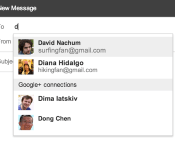
Even though the rest of the tech world is preoccupied with a little trade show in Vegas, the folks in Mountain View are still working hard. Today, Google has rolled out a nifty new feature for Gmail and Google+ users: letting them email each other whether or not they’ve actually exchanged email addresses. That’s right folks, now, when you are typing in email recipients, Gmail will make suggestions to add from your Gmail and G+ contacts, too. Naturally, users can decide which of their circles get access to their inbox, or whether to accept emails from social networkers at all. In practice, should a Google+ contact in one of your circles send you a message, it’ll pop up in the Primary category of your inbox, while all others coming from G+ will wind up under the Social tab. Sound good? The feature will be rolling out worldwide soon, so look for an email from Big G telling you how to set it up in the next few days.
Filed under: Google
Source: Official Gmail blog
Gmail app updated to 4.7.2
Google is pushing out its latest update to Gmail with version 4.7.2. As many users have requested that automatic images show up, they have heard your plea! If you don’t want it, just simply go into settings and disable it!
The download is not pushing out just yet, but courtesy of Android Police, they have provided a link to the official APK here! Let us know if you’ve received it “officially” or any other changes you see as well!
Source: Android Police
The post Gmail app updated to 4.7.2 appeared first on AndroidGuys.
Samsung: “We will go back to the basics” for Galaxy S5
Due by April, the next-gen flagship will debut with a new Galaxy Gear
Samsung, speaking with Bloomberg this week, confirmed that the Galaxy S5 will debut by either March or April. Also due at the same time is a new version of the Galaxy Gear smartwatch.
According to Samsung, the handset maker is taking a “back to basics” approach for the Galaxy S5. Conceding that most customers could not discern the differences between the Galaxy S3 and the Galaxy S4, this year’s model will be more obvious.
Mostly, it’s about the display and the feel of the cover
Additional features that may or may not make the cut for the Galaxy S5 are said to include a fingerprint reader or eye scanner.
As for the wearable tech, Samsung says the Galaxy Gear refresh will feature more advanced functions and will have a less bulky design.
The next-generation Galaxy Note (4) could offer customers a wraparound display when it debuts in the second half of 2014.
“We are targeting consumers who want more professional use and tend to be willing to pay more for handsets”
Brace yourself, we are about to run face-first into the buzzsaw that is the Galaxy S5 rumor mill. As if it weren’t already the subject of much speculation and conjecture, the next two months could crank things up a notch.
The post Samsung: “We will go back to the basics” for Galaxy S5 appeared first on AndroidGuys.

Social calendar app Sunrise finally comes to iPad

Launching on iPhone in February 2013, Sunrise changed our perception of calendar apps with its ability to provide more context to daily events. By connecting to Google, iCloud, Facebook, LinkedIn and Foursquare accounts, Sunrise can intelligently integrate appointments, birthdays and even checkins into its slick calendar UI, giving users a complete picture of what they’ve done in the past and the things they need to do in the future.
Despite its iPhone-only availability, the free app has grown to become one of the most popular third-party iOS calendar apps, consistently ranking in the App Store’s top 100 productivity apps in the final quarter of last year. Almost a year on, Sunrise developers Pierre Valade and Jeremy Le Van have decided it’s finally time to bring the stylish calendar app to iPad, complete with visualization and synchronization improvements.
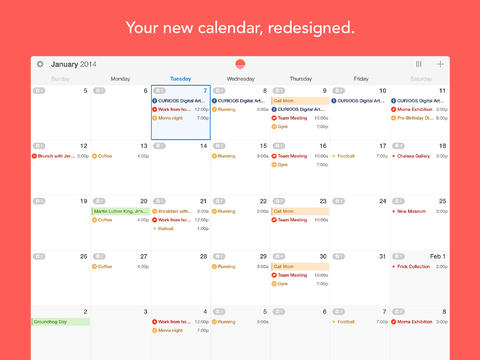
Like its iPhone counterpart, the Sunrise iPad app will immediately request that you connect your cloud accounts when you open it for the first time, helping to feed it with information it’ll need to remind you about later. Valade says the team has worked hard to bring the best Sunrise experience to the iPad, and so it’s created two new weekly and monthly views that “make it easier to plan from your iPad and navigate in time quickly.”

If you’ve used Google Calendar or Apple’s Mac Calendar.app, you’ll be familiar with Sunrise’s time-based views, although Sunrise will deliver more information at-a-glance. If you see that you have a particularly busy day coming up, the week view will let you dive deeper and see how much free time you have outside of those events. The new week view has also been ported to the iPhone app and can be selected by tapping the week icon next to the new event button.

Tapping on a day will generate a new pop-up tab that displays all of your appointments and reminders. Drawing from the original iPhone UI, Sunrise for iPad not only chronologically lists events, it also categorizes them by assigning them a small icon related to the activity you have planned (or the service they are connected to). As you can see from the screenshot above, if you’ve planned a movie night, the app will assign a little movie ticket icon to the entry. If there’s a location attached to an appointment, Sunrise will provide directions, although Apple Maps, Google Maps or Waze will do the heavy lifting. It’s little things like this that make this that make Sunrise really stand out from other calendar apps.
In the past, if you wanted to ensure Sunrise had an up-to-date list of your upcoming appointments, you’d have to open the app and have it download them, which is especially annoying if you add events from different devices. Sunrise version 2.1 eliminates that frustration by integrating background updates that will synchronize all of your connected cloud accounts every hour by default, or at 30 or 15 minute intervals (if you need tasks to show up a little quicker).
While there’s no shortage of productivity apps on the App Store, Sunrise’s slick user interface and iterative features consistently continue to push the bar for iOS calendar apps. Soon, Apple users won’t be the only ones enjoying the app: desktop and Android versions are expected later this year. Today’s update, however, sees the app go universal while remaining free to download — hit the source link below to try it for your yourself.
Filed under: Tablets, Internet, Software, Mobile, Apple, Google
Via: Sunrise Blog
Source: Sunrise Calendar (App Store)
Snapchat responds to privacy scares by letting users unlink their phone number

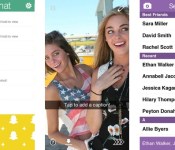
Snapchat has just taken its first steps toward addressing the exploits that led to a leak of 4.6 million phone numbers late last year. Updates to its Android and iOS apps now let you opt out of linking your phone number to your username, preventing others from easily finding you. The company is also reducing the chances for abuse by requiring that you verify your phone number when using Find Friends. They’re not perfect remedies by any means — we’re sure that some would prefer that phone number use is opt-in rather than opt-out, for instance. Snapchat says it’s working on more improvements, though, so it’s at least aware that there’s more work to do before its users can truly feel at ease.
Filed under: Cellphones, Mobile
Source: Snapchat Blog, App Store, Google Play

Live from the Engadget CES Stage: Twentieth Century Fox Home Entertainment’s Mike Dunn

CES is always a big show for TV manufacturers, but what about the video that we’ll actually be playing on those sets? Twentieth Century Fox Home Entertainment President Mike Dunn will join us to discuss his company’s vision.
Filed under: Home Entertainment, HD

Sunrise Calendar Updated with Full iPad Support, Background Updates [iOS Blog]
Smart calendar app Sunrise Calendar has received an update today, bringing full support for the iPad, a new week view for the iPhone that allows users to view three days at once, and automatic background refreshes for events and notifications.
iPad
We’ve worked hard to bring the best Sunrise experience to your iPad. It’s the most beautiful calendar everywhere now.
We are introducing two new visualisations: Week and Month. They make it easier to make plans from your iPad and navigate in time quickly.Week View (for iPhone too!)
This new visualisation makes it easier to see free-time between events, see your day at-a-glance, or find a time to get dinner with a friend next week.
Tap on the week icon next to the new event button to reveal it. The best part: it works perfectly in portrait mode.
A lot of people have tried to design a week view before, but we think that you’ll enjoy the design of Sunrise better!Background Updates
Sunrise will now update in the background (every hour by default), so you won’t need to open Sunrise to get the latest changes. Notifications will always be up to date.
The app originally launched in February after being developed by former Foursquare engineers, and offers a feed populated with Google Calendar, iCloud, and Facebook events in addition to birthdays and weather information.
Users can also navigate around using swipe gestures for quick switching between calendar days, and like Fantastical, allows for colloquial language when entering events. For example, typing “Dinner with Michelle at 8pm tomorrow” will schedule the appropriate event in the calendar.
Sunrise Calendar is a free universal app and can be downloaded from the App Store. [Direct Link]

     |
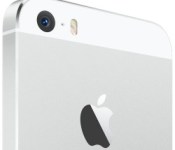
iPhone 6 Rear Camera to Retain 8-Megapixel Sensor, Offer Improved Image Stabilization?
 iPhone camera module supplier Largan Precision saw its stock take a significant dip yesterday amid rumors that Apple will not be upgrading the resolution of the rear camera for the iPhone 6 later this year, reports The China Post.
The report cites analysts from Nomura Securities who indicate that while the iPhone 6 should see some camera improvements such as enhanced optical image stabilization, the device will continue to use an 8-megapixel sensor rather than a higher-resolution sensor in the 12-16 megapixel range.
According to Nomura Securities, Largan’s recently lagging performance in the market is caused by rumors that Apple may adopt an 8 mega-pixel (MP) camera with improved optical image stabilization on its upcoming handset, instead of the 16 MP upgrade anticipated by industry observers. Apple’s decision is based on the design requirement to retain the handset’s more portable form factor, said Nomura Securities. […]
Largan retains a leading edge among competing suppliers, as even though the camera’s pixel count remains the same, the company is among the few companies capable of coping with the complexity of the camera module, said Nomura Securities. The production of smaller-factored camera modules would require significantly improved optical aperture and resolution attributes, which are the company’s competitive strengths, said Nomura Securities.
Apple first introduced an 8-megapixel rear camera on the iPhone 5 back in 2012 and used essentially same module for the iPhone 5c last year. Apple’s 2013 flagship iPhone 5s model continues to use an 8-megapixel sensor, but achieves significant camera improvements through increased pixel size, a larger aperture, new “True Tone” dual LED flash, software enhancements, and more.
| |
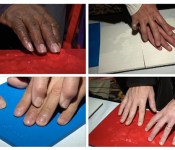
3D-printed images help the blind ‘see’ Hubble’s photos of space (video)

The Hubble Space Telescope has produced some of the most spectacular images known to man, but there’s a large segment of the population who’ve been unable to enjoy them: the blind. A pair of astronomers from the Space Telescope Science Institute aim to change that, though, by producing tactile “images” of the universe using a MakerBot Replicator 2 3D printer. While such prints can be made from almost any object, the duo’s biggest challenge was figuring out the 3D structure of objects like galaxies — and then making it possible, through feel, for the visually impaired to picture them in their mind’s eye. So far, they’ve developed 3D prototypes showing stars, gas clouds, filaments and more using lines, raised circles and dots formed formed in plastic. The group hopes to one day produce tactile pictures for schools, libraries and the public — meanwhile, check the video after the break to see what the first users thought about it.
[Image credit: NASA, ESA and M. Estacion]
Via: TG Daily
Source: NASA
 AIVAnet