


Meet Rebecca Richards, the NSA’s new Privacy Officer

It’s safe to say that the NSA will need more than a pressure hose to wash away the scandals of 2013. As part of the plan to rehabilitate its image, the NSA advertised for a privacy officer back in September, and now the role has been filled by Rebecca Richards. Currently working in Homeland Security’s privacy office, Richards’ job will be to advise the NSA’s director on ways to ensure that civil liberties aren’t being ignored by the data-hungry agency. We were going to post the new executive’s mugshot, but it appears that she’s already gotten the hang of this online privacy lark.
Filed under: Internet
Via: Washington Post
Source: Lawfare

Nintendo bosses take big pay cuts in penance for Wii U failure

We don’t really need numbers to tell us the Wii U’s flopping, but figures released today quite clearly spell it out. Something’s gotta give at Nintendo, and that something is head honcho Satoru Iwata’s salary, and that of his chums. The AFP is reporting Iwata’s paycheck is to be cut in half, which is the same reduction he took as recompense for poor early uptake of the 3DS, while several of his execs will see a 20 to 30 percent drop. Much to the frustration of Acer’s top tier and their dwindling income, Iwata & Co’s pay cut is only a temporary measure to claw back some cash, with things changing again in July when sentences have been served. Perhaps it’s time for Nintendo to think about a move into mobile after all? There’s money to be made from apps, or so we hear.
Filed under: Gaming
Via: Polygon
Source: AFP

Your Hard Drive Failed? Don’t Panic
Hard drive failure is a part of life in the computer age. Whether due to that underbelly of research and development known as planned obsolescence or just due to the fact that things with working parts will eventually wear out and not work anymore, if you spend any time on a computer, at some point, your time will be spent lamenting potential data loss.
When you lose your computer files to a black screen, a scrambled one, or an “On” button that will no longer do its job, there are plenty of ways to soldier on and recover your data. In fact, data recovery is such a common need that panic rarely needs to enter into the equation. Data can survive a hard drive failure and so can you.
 What Kind of Failure?

When a computer quits working, a number of things could have gone wrong, but two very different problems are more common:
- Physical Hard Drive Failure. If the hard drive itself has failed, it means your computer is allright, but the place it stores all your information is not. It’s as if one of the rooms in your house just suddenly went missing. Your house is ok, but where is the bathroom? With this kind of failure, you will know it by the noises it makes. A malfunctioning hard drive will click, cluck, grind and whir. A faulty cooling fan will, too, so be sure the bad noises are coming from the drive. If your drive has just started to make these noises, the end may be near. Back up your data now!
- Logical Hard Drive Failure. This version of computer crashing occurs when your operating system fails, and it can happen for a number of reasons: viruses, human errors, faulty software that interacts poorly with your system and more. If this is the kind of failure you’re facing, it’s as though your house has lost all the doors that would let you enter it. Your house is still there, and it seems fine, but how do you get in?
How Data Survives a Hard Drive Crash
It may seem impossible—if the computer won’t turn on, if the data looks like it’s gone, how is the opposite true? Unless data is corrupted, a hard drive’s failure is either a mechanical issue or a software-related one. It’s kind of like having valuable papers inside a storage container whose lock will no longer accept the key. The papers are still inside the storage box, it’s just getting at them that has become difficult, but options remain.
What to Do to Recover Your Data
If you’re like most computer users, the inner workings of our daily bouts with technology are infinitely mysterious. When those inner workings cease to work, the mystery deepens and brings up feelings of helplessness and despair. Thankfully, data recovery services abound, and oftentimes, you can utilize their services yourself—without the assistance of an on-site professional. Here are some ways to go about recovering your data:
- Check cabling. While it isn’t often the case, every now and then, the problems with a computer have to do with the wires that connect it to itself and its power supply.
- Remove the hard drive. If you’re savvy enough to get into your PC and remove the hard drive, do so and connect it to a different computer. If the new computer reads it fine, you may have a problem with your computer’s motherboard.
- Enlist Data Recovery Software. By far the easiest thing for a non-savvy user to do is to enlist the help of data recovery software. Plenty of services exist, and they can help you choose which service fits your problem.
Beat the Failure to the Punch
Because computers, software, hardware and hard drives will inevitably fail, it’s best to have a solid and regular backup plan in place. From regularly updated cloud storage solutions to an external hard drive that you use to back up data, the most important piece of data recovery is not needing to recover it, and the only way to ensure that is to have your data in more than one place at all times. Ideally, you should have your data backed up to two storage devices that are separate from your computer.
When your computer fails, it can feel like the end of the world. Thankfully, data recovery services exist that can access your valuable data for you. Regardless of the reasons for the failure, the chances are good that hope—and data— are not lost.
About the Author: Joseph Collins is a contributing writer. He works as an IT customer service specialist.
When to choose DVD replication

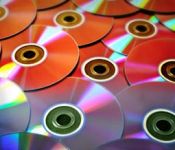
DVD replication is the replication of a DVD so that the same data contents have been copied onto multiple DVD disks. Whereas smaller quantities of DVDs are usually best copied using duplication, replication allows the user to produce many disks all of which are the same as one another, in a quick and cost effective manner without compromising on quality. Replication is the ideal solution when the client wishes to produces large numbers of the same DVD for wide sale or distribution.
Duplication and replication
Whilst for smaller volumes, duplication is usually the most cost effective way of creating DVDs when looking at quantities of greater than 500 disks, replication is the most cost and time effective solution. Replication of DVDs allows you to produce high numbers of the same DVDs whilst maintaining a high quality result.
The process for creating these larger batches is different and because of this the end product is also differs from the results of DVD duplication. Replication produces three different types of disk, these are: DVD-5, DVD-9 or DVD-10.
DVD 5 has one side with a single layer of recording; this has enough capacity for 4.7GB of data.
DVD 9 has one side with dual layers of recording; this has enough capacity for 8.5GB of data.
DVD 10 has both sides with a single layer of recording; this has enough capacity for 9.4GB of data. This requires turning at 4.7GB.
Advantages of DVD replication
DVD replication has a whole host of advantages which makes it’s a useful process, these include:
– A standardised and high quality result meaning no degradation from disk to disk, this means less concern about faulty products
– A cost effective solution to produce large numbers of DVDs meaning that profit margins on disks for sale can be increased
– A quicker turnaround time than duplication on high quantities of disks
– The ability to exploit all of the functionality of DVDs, including large capacity as well as ability to add menus to your disk
The process of DVD replication
A DVD replicator uses a different process in that it does not involve ‘burning’ the DVD disks as you would for DVD duplication. Instead the following process is used meaning that each disk is produced individually. This ensures the uniformity of the disks as well as a high-quality result.
Firstly, a glass ‘master’ is produced using the client’s original master, this is the disk which contains the data that you wish to copy. The next step is that this glass master is used to produce a nickel ‘stamper’ tool, this is the tool that will be used to create the disks. Each disk is then injection moulded using clear optical-grade polycarbonate substrates from the nickel stamper. The clear disks that are produced from the stamper are then metallised and lacquered to produce the finished DVDs. These DVDs are then ready for any final processes such as printing and packaging prior to their distribution.
For more information please visit the website: Duplicationcentre.co.uk.
Martin Jonson is director of the UK’s leading DVD/Blu-ray/CD duplication company providing exceptional quality at the lowest UK prices. He offers next day delivery anywhere in the UK and will complete your job quickly with the greatest care. You can connect with him on Google+.

[Review] Jelly Bean Extreme Icon Theme by BigDX

JellyBean to the Extreme BigDX Style
I’ve been out of the scene for a little while, stopped in to see what was going on, and I was offered the chance to do a write up on a new icon set, when I heard it was by BigDX I had to jump at the chance. After downloading and installing I’m in Icon Heaven. I always love to do icon reviews because it’s great to have the opportunity to see how each developer interprets the design of the icons and how their personal touches give the icon sets a personality all their own.
This icon set is huge, at my best guess, I’d put it close to or exceeding 800 icons, that’s just incredible. What else is incredible is the time and detail that each of the 800+ icons received. I find myself just browsing through the app pages to see what icons are in the set, and while I haven’t made it all the way through, it’s still fun to look. Ok, down to business.
BigDX has put out this icon pack app but it pairs up well with his JB Extreme Theme app perfectly. So, (hint hint) pick that one up too.
The icon pack, as I said, is very well endowed. As I’ve moved through the app and saw everything I could find, I took pics along the way so I would be able to find my way out again, without getting lost anyway. This is what I found:
Multi Launcher support, ADW/EX, Apex, Nova, Action Launcher, Next, Atom, Go Launcher EX, Smart Launcher, Solo Launcher, and TSF Shell. Each launcher has similar application attributes, Apply app icons and dock elements, but others have the ability to install app drawer elements, folder widgets, contact widgets, and launcher images to name a few. The theme installs with a simple click and apply method, my 4 year old can do it, which makes installing these easy for anyone and I do mean everyone.


 Did I forget to mention, it comes with a killer wallpaper set as well as full contact info within the app? I may have, but it does, and does not disappoint.

 While in the app settings, checking out the icons, you can easily swipe from side to side to check out the different app icons that are themed, and while it may take a while, they are all there in their glory. I personally like the fact you can edit icons (depending on your launcher) and hand pick what icons you want with different apps. I picked one out of the misc section for my app drawer icon, there are some sweet unassigned ones in there ready to be put wherever you feel the need to interject some of your own personality. Many people like the icons because of what it does for their phone, the look, the feel, the fluidity of the whole theme. Me, I like it because, as with many aspects of the wonderful world of Android, I can make it to be how I see fit, what suits me the best, with this app, it is not hard to find what speaks to you…well, with all the options it may take some time, but you’ll get there.
Show BigDX some love, his work is long standing in the Android Community and it’s developers like him that help make out Android Landscape that much better. I have several of his themes and love them all, they get better with each release and even when I think that’s the top of the pyramid in quality, look, and feel…I am mistaken and the bar raises yet again with the next release. What is on the horizon for the next BigDX release? I am not sure, but I am looking forward to it.
BigDX Contact Info:
Big DX G+ Page, BigDX Twitter Page, BigDX Blog, BigDX Play Store Page
Application: Jelly Bean Extreme Launcher Theme
Developer: BigDX
Cost: $1.99
Application: Jelly Bean Extreme CM11/AOKP Theme
Developer: BigDX
Cost: $1.99

Evleaks Posts Test Image Taken by a Verizon Galaxy S5

Evleaks is up to his old tricks again. This time concerning the Galaxy S5. The image above is a supposed picture taken by a Verizon Galaxy S5, but we can’t really tell of course. He also confirmed the 16 MP camera, which is a nice piece of spec that a lot of you can wrap your brains around. This isn’t the first time we’ve seen images like this. I remember when the Galaxy S4 was going through the rumor mill, there were many images supposedly taken by the phone, and that has been the case for other devices as well. I think you all would agree that we would actually rather have an image of the device (blurrycam or not) than having an image taken by the device itself. But still…it’s something.
First test photo from VZW’s Samsung Galaxy S5? EXIF says SM-G900V, 16MP. Original here: [http://t.co/7n6QSyYbiM] pic.twitter.com/1W33odPBLK
— @evleaks (@evleaks) January 29, 2014
When it comes to leaks, he is the man to look upon for that kind of information. Yes, the image doesn’t show us much, but evleaks has been spot on in the past. Give us your thoughts about this image in the comments area.
Source: Evleaks
Mark One 3D printer creates carbon fiber objects, costs $5,000

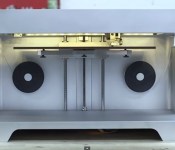
There’s a new 3D printer in town, and unlike other models that use plastic, rubber or even chocolate, this one prints out objects using a far tougher material: carbon fiber. The printer, named Mark One, was designed by creator Gregory Mark as a way to reduce carbon fiber manufacturing costs. He sees Mark One as a way to make useful things like tools, replacement parts or even home fixtures, though nothing would stop you from printing out super-durable toys and knick-knacks, too. Of course, carbon fiber raw materials my not be so easy to come by, so Mark’s creation also works with other composites, like fiberglass, nylon and PLA plastic. Those who want to make tough little trinkets (and have $5,000 to spare) will have to wait until March to pre-order the Mark One, but folks in San Diego can see it in person right now at the SolidWorks World convention.
Via: TechCrunch
Source: Mark Forged
Olympus’ tiny OM-D E-M10 mirrorless camera arrives next month for $700

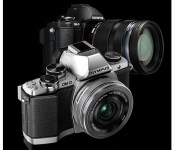
Olympus has just made an offer that may be too good to refuse for those tempted by its all-metal OM-D EM-1 or EM-5 mirrorless cameras, but who were put off by the $1,000+ price tags. It just launched the much more compact, but equally good-looking OM-D EM-10 for $700 (body only) or $800 with a 14-42mm f/3.5-5.6 kit lens. For that, you’ll get many of the features from the higher-end models: the EM-1′s 16-megapixel, optical low-pass filter-free sensor with a TruePic VII image processor and 25,600 max ISO, built in WiFi, a 1.44-megapixel electronic viewfinder from the EM-5 and 8fps high-speed sequential shooting with 81-point AF (or 3.5fps with continuous autofocus). Unlike the EM-5 or EM-1, there’s only 3-axis image stabilization instead of 5-axis, and the body also lacks the weather sealing of its pricier siblings. To go with the new camera, Olympus also announced another 14-42mm f/3.5-5.6 power zoom lens that shrinks to nearly pancake proportions for $350, and a lightweight 25mm f/1.8 lens for $400. If less weight, less money and a feature set only slightly less are sounding good, it’ll arrive by the end of February — check the source for more.
Filed under: Cameras
Source: Olympus

T-Mobile CEO John Legere Posts Three Ads in Response to AT&T’s Campaign

You got to love John Legere. Since he hopped on as CEO of T-Mobile, the not so popular carrier is now becoming one of the most popular carriers. Not only have they changed the carrier game with their UNCarrier plans, Legere’s antics towards the carriers can be quite hysterical. Mainly when he starts picking on AT&T.

AT&T started a new campaign giving T-Mobile customers a $450 incentive to come over to AT&T. It didn’t take long before T-Mobile fired back, and today, Legere posted three different responses to AT&T on his Twitter account.

Pretty funny stuff. T-Mobile has definitely got the other carriers scrambling to better their plans, but it doesn’t look like they are going to be able to catch up.
Source: Twitter

LG G Pro 2 pics leak out, show the G2’s rear button setup mounted on a larger phone

LG only just announced that it’s launching the G Pro 2 phone next month, and now two pictures that claim to show the device have surfaced on a Korean forum, DC Inside. Following up on last year’s 5.5-inch Optimus G Pro, the pictured device features a rear-mounted button setup mirroring LG’s most recent flagship phone, the G2. The pics lack accompanying details, although Android Central mentions rumors have hinted at a size bump to 6-inches, support for faster LTE-A networks, a Snapdragon 800 CPU and 1080p screen — it’s also unknown if the G Pro 2 will follow the G2′s software tweaks with “knock on” and QSlide multitasking. Check after the break for one more picture — we should have all the details confirmed by the time the Mobile World Congress 2014 event begins in Barcelona on February 24th.

Filed under: Cellphones, Mobile, LG
Via: Android Central
Source: DC Inside
 AIVAnet