


Apple TV Gains New Prominence in Apple Online Store with Valentine’s Day Update [Updated]
Apple’s storefront went offline last night and returned with a new Valentine’s Day theme featuring accents of red and a handpicked shopping guide for gift buyers. Holiday graphics replace the standard stock product photos and updated captions like “Love is in the Air” promote Apple’s top products for the Valentine’s Day shoppers.
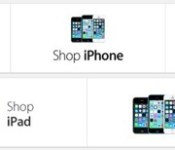
Perhaps the most important update is the new promotion of the Apple TV at the top of the Online Store, giving it similar prominence to Apple’s Mac, iPad, iPhone and iPod lines. The new placement for the Apple TV suggests that it’s moving out of the “hobby” status that Apple executives have long assigned it.
Previously, the Apple TV was relegated to the iPod section. Last week, it was rumored that Apple was considering adding game support with Bluetooth controllers and a new App Store to the Apple TV, possibly as soon as March.
 New (Top) and Old Apple Online Store Carousel
Apple has revised its shipping estimates with updated information for those shopping for gifts ahead of Valentine’s Day. All products, with the exception of the Mac Pro, currently are in stock and will arrive with free shipping in time for the holiday if ordered before February 5th. Deadlines for 2-3 day shipping and next-day shipping are February 10 and 11, respectively. Engraved items require additional processing and must be ordered one day earlier.
This advertising campaign extends to the company’s Apple Store app (iTunes link), which was updated with similar holiday graphics and a curated list of the “Top Valentine’s Gifts.” The Apple TV gets prominent placement in the app as well, appearing on the home screen just below the iPhone 5s and 5c.
Update: Apple is testing a much improved version of the Apple TV that would utilize existing iOS devices as game controllers, according to a report from 9to5Mac, and the company is also considering combining the Apple TV and AirPort Express products, testing a combined Apple TV and 802.11ac wireless router in order to ensure higher-quality streaming.
The site also says Apple is testing an Apple TV device that can control users’ existing cable boxes with an Apple user interface overlaying their existing content. It was reported last year that Apple was in negotiations with cable companies and TV networks to allow customers to skip commercials on recorded shows and Apple would compensate programmers for the lost revenue. The company has also been looking to “erase the distinction” between live and on-demand video content.
Apple has long been rumored to have an improved Apple TV in the works, though there have been a number of conflicting reports over what the device will include. Apple has repeatedly said that it has has a number of new products in the works for 2014, most recently during its quarterly earnings call with analysts yesterday.
     |

Rap Genius Launches ‘Genius’ iOS App for Song Lyric Discovery [iOS Blog]
Rap Genius, the site that recently had a run-in with Google for its dubious SEO strategies, today launched an official Genius iOS app that allows users to access the site’s archive of song lyrics.
The app includes access to annotated lyrics for millions of songs, and it also includes lyrical breakdowns and explanations that delve into the meaning behind phrases and words in music. Annotations found within the Genius app are designed to explain cryptic lines, reveal references and inside jokes, define unusual terms, and give context.

Have you ever been confused by a song’s lyrics? Or wondered what your favorite artist meant by a line? Now you’ll never have to worry about this (or anything) ever again! Genius breaks down lyrics with line-by-line annotations, many contributed by the artists themselves.
Genius also functions similarly to Shazam or Soundhound, identifying songs that are playing nearby. According to the app’s description, it uses “Genius Recognition Technology” to listen to songs and provide lyrics for whatever’s playing.
Genius isn’t just a music app; it’s your pocket guide to human culture. So whether you’re looking for the true meaning of a line from The Great Gatsby, a breakdown of President Obama’s latest speech, or a guide to Matthew 25, we’ve got you.
Genius by Rap Genius can be downloaded from the App Store for free. [Direct Link]
| |

Dutch ISPs overturn Pirate Bay blocking order, get pieces of eight for the trouble

In many countries, ISPs are regarded as partly culpable for the P-word that’s now synonymous with the internet. We’re talking, of course, about piracy. Government and legal pressure has forced several ISPs to block sites known for illegal file distribution, with The Pirate Bay being a prime target due to its popularity. Today, however, a court in The Netherlands has overturned an order compelling two of the country’s major ISPs to block The Pirate Bay, based on the belief that’s it’s ineffective and tantamount to censorship. Local anti-piracy group BREIN, with the help of a judge and gavel, put the restriction in place in 2012 — the ISPs appealed, and won. The Dutch court that’s sided with the providers has said that a block is not only against the freedom of information, but referenced a report showing it had little impact on torrent traffic. (As most of us know, for every site that’s squashed by the banhammer, there is a swarm of others providing the same services.) It gets even worse for BREIN, too, as now it’s been ordered to pay 326,000 euros (around $445,000) for the trouble it’s caused. That should buy at least a couple of lawyers lunch and new suits, we’d imagine.
Filed under: Internet
Via: TorrentFreak, Tweakers (Dutch)
Source: Court at The Hague (Dutch)

Wikipedia to store famous voices for posterity, starting with Stephen Fry’s

Virtually everyone in the UK (and many an Engadget reader) is familiar with Stephen Fry’s iconic voice, but will anyone remember it in, say, 50 years? He certainly hopes so, but just to be sure, Wikipedia has recorded it for posterity and pegged it to his bio page. The plan is to have a large number of well-known types do the same so that readers will know “what (those folks) sound like and how they pronounce their names.” Though there are only a handful of contributors so far (including US astronaut Charlie Duke and British peer Baron Knight of Weymouth), the effort will be soon be bulked up by some “500 to 1,000″ celebrity clips thanks to the BBC. As tat for its tit, the Beeb hopes to one day use the Wikipedia archive to power a real-time, open-source voice-recognition engine — and perhaps add some VIP pizzazz to its own collection of voices.
Filed under: Internet, Software
Via: Pocket Lint
Source: Wikipedia

Pebble Steel review: at last, a stylish smartwatch

Smartwatches are supposed to be pieces of jewelry that are just as personal as the smartphones they’re attached to, yet rarely are they thought of as fashionable. We’ve seen a handful (or is it wristful?) that are hip, ornate and sporty, but we’ve also admittedly endured plenty of ugly options as well. Sadly, none have successfully matched the opulence brands like Seiko, Rolex, Citizen and Victorinox are known for on the analog side. Granted, not many companies are in a position to even try this. Without a strong developer platform and guaranteed return on investment, few (if any) smart watchmakers want to take the risk.
It makes a lot of sense, then, that a company like Pebble is taking advantage of what appears to be a completely untouched segment of the smartwatch market. In just a short year, the nascent watchmaker quickly gained the experience, resources, platform and developer support required to even try tackling such a project. The result is the $249 Pebble Steel. It’s designed to be a more elegant version of the original Pebble, with few changes to overall functionality. So, have we finally found a smartwatch that you can feel comfortable showing off to your business partners on the golf course?
Hardware
If you’re holding out for a new Pebble with a nifty touchscreen, color display, always-listening mode or voice activation, keep waiting. The Steel isn’t supposed to be a next-gen device — it’s designed to be a more expensive version of the original Pebble that appeals to consumers with more… discerning tastes. The Steel, which comes clad in CNC-machined stainless steel (type 316, if you must know), is stately, refined and classy. That’s in stark contrast to the original, which we’d describe as “colorful.” Sporty. Fun. Its build materials and industrial design are better than any other smartwatch we’ve seen, and Gorilla Glass 2 helps make the watch feel durable. The catch: The watch’s dashing good looks come at a $100 premium over the original.
Before we continue, we want to clarify that the Steel isn’t meant to replace the year-old Pebble. It’s designed to be a premium option targeted at those who’d otherwise prefer to adorn their wrists with more expensive timepieces. Together, the two watches share the same innards: They use a 1.26-inch e-paper display (with a resolution of 168 x 144), ARM Cortex-M3 CPU, 130mAh battery and waterproof design (it can withstand up to five atmospheres, or 50 meters). There are a few differences, though: The Steel adds an RGB notification light, oleophobic anti-fingerprint coating and a new charger. There’s also a clever black band that wraps around the perimeter of the device and acts as an external Bluetooth 4.0 LE antenna, similar to the way Apple integrated antennas into the frame of the iPhone to improve signal attenuation.

The original Pebble gets its sporty look from a long, curved face and recessed sides, whereas the Steel goes with a flat, squarish face and straight sides. The 39 x 36.8 x 10.25mm Steel is shorter, slightly wider and thinner than the 52 x 36 x 11.5mm Pebble, but it’s also much heavier (it’s 16g heavier with the leather band attached, 59g if you use the metal band). The buttons on the Steel use the same layout as its predecessor, are just a tad smaller, stick out farther from the watch and they’re actually easier to press.
The Steel comes in your choice of black or brushed stainless (silver), with leather and metal wristbands included in the box. The black model comes coated with a Physical Vapor Deposition (PVD) finish, which provides impact strength and resistance to abrasion; the stainless one, meanwhile, only uses PVD on the bezel. As for the straps, the black leather band is adjustable, while the stainless steel option — my personal favorite — has a foldable clasp and links that can easily be added or removed using a tiny screwdriver and pliers. (Each box has extra links and a small screwdriver thrown in, just in case you prefer the DIY route.) Unlike the original Pebble, you won’t be able to swap out the Steel wristbands with any standard 22mm strap. You shouldn’t have to wait too long for more choices, though, since Pebble’s published a 3D model of the watch to make it painless for a manufacturer to produce accessories.

The notification light is nestled in the lower-left corner of the Steel, and is currently only used for one purpose: to indicate that the device is charging. This is a useful new feature, since we always have to double-check the original Pebble to make sure the weak magnets on the charger are actually doing their job. We’d love to see this opened up to developers down the road, though.
Primarily due to the new design, Pebble chose to fit the Steel with a different magnetic charger. The magnet pads are a little bigger than the ones on the original watch, which helps them stick to the device much better. On the first Pebble, we’re constantly worried about the charger falling off anytime the watch vibrates from a new notification, and it often takes a few attempts to even fit it properly.
Software

Come for the fancy new hardware, stay for the fancy new software. On the surface, the Pebble’s interface is the same one we’ve grown accustomed to over the past year, with one key difference: You can now find and download a plethora of watchfaces, games, productivity tools and other apps through a centralized app store. This is a significant improvement over the old method, which required Pebble users to endure eternal scavenger hunts through third-party websites and smartphone app stores (iOS’ and Android’s, to be specific) to get the best apps for their watch. The new store will be available on both Pebbles (existing Pebble owners should see a firmware update in the coming days), but this was the very first time we’ve had the opportunity to try it out.
The setup process is simple. Before you begin, you’ll need to pair the Steel with your phone using Bluetooth and then create a Pebble account (this will require entering an email address and choosing a password). The store uses this to remember your downloads and purchases, so if you have to switch devices or factory-reset your watch, you won’t have to gather your apps again — just enter your Pebble creds and all of your apps magically reappear.
The Pebble appstore consists of three sections: My Pebble, Get Watchfaces and Get Apps. My Pebble is where you manage the content you’ve already downloaded. You can have up to eight apps loaded on your watch at any one time, and these show up on the top half of the screen. Below that is the Pebble Locker, a handy place that stores extra apps that you may only need some of the time. This setup is a massive improvement over the old system, which didn’t store any of your discarded apps. Now, the process of loading and unloading apps on the watch takes only two clicks, and you don’t have to worry about digging out unloaded apps if you want to use them again later.

The other two sections, Get Watchfaces and Get Apps, are self-explanatory. As of this writing, more than 1,000 apps have been published in the store, a number that will probably grow steadily in the coming weeks and months. (Pebble also informed us that 6,000 developers have registered, so we can expect to see plenty more apps.) As is, we were wholly satisfied with the number and scope of available apps — even in its beta stage, we don’t feel there are any “must-haves” missing.
So what kinds of apps are available? First, let’s go over the categories that the apps are assigned to: notifications, daily, tools/utilities, remotes, games and fitness. You’ll find apps dedicated to tracking packages, customizable RSS feeds, metro status, your watch’s battery life, grocery lists and personal notes. An app lets you simulate a dice roll by shaking your wrist; you could use PebbGPS to load maps and routes onto your watch; you can pay for your drink at Starbucks with PebbBucks; and you can play games like Asteroids, Tetris or Connect Four. Heck, some apps even throw in text input, but it’s a slow and frustrating process that we’d only recommend if you’re physically stuck in your chair and can’t get up to grab your phone.

There are a few big-name apps on there as well. Pebble’s made deals with ESPN to update you with real-time scores; using Yelp, a flick of your wrist will pull up a random restaurant suggestion; you’ll be able to check in to Foursquare; and finally, you can use the watch as a GoPro remote.
The Pebble appstore will be available on both iOS and Android devices. We’ve only had the opportunity to play with the iOS version so far, but we’re told that the Android build will have a nearly identical interface with only a few minor differences. The vast majority of apps in the store will be cross-platform, but we noticed that there are a handful that work only on one or the other (for instance, some Android apps offer Tasker integration, which isn’t available on iOS, while there are a few iOS-only options as well); in cases like this, apps specify on their description page which platform they’re compatible with.
Performance and battery life

Since the Steel has the same components under the hood as the original Pebble, we weren’t surprised to see it deliver comparable performance. Part of the appeal of the Pebble line is that neither watch pretends that it’s a fully featured smartphone. Instead, Pebble always errs on the side of minimalism over complexity. In short, the Steel doesn’t try to be anything that it’s not — it’s an accessory that accentuates the functionality of your phone, and that’s all.
With that in mind, the Steel performs well. We barely observed any lag or stuttering (including when we entered and exited apps), although on rare occasions, we’d notice an animation stop halfway through (such as when we had to back out of a notification), but this was usually only for a second or two before the processor caught up and got us where we needed to go. We’ve experienced this enough times on the original Pebble that we weren’t surprised, but it’s something we hope Pebble can iron out in a future firmware update.

The Bluetooth performance here meets our expectations — the watch and handset communicate instantly. For instance, it takes only a fraction of a second to fast-forward to the next music track when we push its associated button on the Steel; it’s fast enough that my brain perceives the transition as instantaneous and seamless, which is exactly as fast as we want it to go. My only beef is that when I’m switching watchfaces, it sometimes takes a couple seconds for real-time information to pull up — and this is only a minor inconvenience at worst, especially since we experienced the same issues on the first Pebble. The most crucial information, the date and time, always show up without any hesitation.
We’re happy to say that battery life is quite promising. Our tests are still ongoing, as it’s difficult to test a smartwatch battery that claims five to seven days of regular use, but here’s what we’ve found so far: After three full days of what we consider to be heavy use — loading, switching and playing with countless apps as part of this review, using it as a remote for music playback and receiving more iOS notifications than we care to admit — we drained the battery down to 20 percent. This is a strong indicator that battery life will meet that five-to-seven-day goal with normal usage patterns. Company reps tell us that the new firmware comes with heaps of optimizations to increase efficiency, and so far we haven’t found any reason not to believe them. That’s a large improvement over the original Pebble, which often couldn’t get through three days on regular use.
Wrap-up

More Info
If functionality is the most critical factor for you when buying a smartwatch, the original Pebble is still a better deal at $150. It will do the same things as the Steel, which means there is very little incentive to paying an extra $100 for the nicer watch if that’s your motive. Additionally, the first Pebble is also more colorful and customizable, so some might still prefer it over the Steel.
On the other hand, the Steel serves a wide-open market segment: people who want a watch that looks good. Indeed, the Steel blends functionality with an elegant and durable design, and it does a fantastic job at it. You’ll get a long-lasting battery (by smartwatch standards, at least), a tough stainless steel body and a solid ecosystem that will continue to grow and get better. It seems like an ideal compromise for those who want a flashy watch that does more than just tell time, and even though it’s significantly more expensive than its first-gen counterpart, it’s still much cheaper than some of the Rolex-style timepieces you can buy.
Simply put, the Steel isn’t going to persuade many people to swap out their perfectly functional Hamilton, Movado or Citizen, but if you’re in the market for a replacement and want a smartwatch, this is your best option. What’s most important, though, is what the Steel represents: a realization that if smartwatches are going to become mainstream, they’ll need to appeal to people who prefer to adorn their wrists with jewelry. At the very least, the Steel is a significant step in the right direction.
Edgar Alvarez contributed to this review.
Nokia X (Normandy) specs revealed to be entry-level
Likely aimed at first-time smartphone buyers, Nokia’s first Android features low-end hardware
The purported specifications for Nokia’s first Android smartphone have leaked online, pointing to an entry-level experience. According to @evleaks, the so-called Nokia X shares much of the hardware of the affordable Nokia Lumia 520. Details include a dual-core 1GHz Snapdragon, 4-inch WVGA display, 512MB RAM, 4GB internal storage, and a 5-megapixel rear camera. Juiced by a 1500mAh battery, the phone should come in dual-SIM variants and sell in up to six colors.
Nokia X: 2 x 1GHz Snapdragon, 4″ WVGA, 512MB / 4GB / microSD, 5MP, 1500MAh, Nokia Store + 3rd party, dual-SIM, 6 colors.
— @evleaks (@evleaks) January 28, 2014
I would not be surprised if the Nokia line of Android devices featured pre-installed Nokia/Microsoft apps and services. As an entry-level smartphone it could give users enough to satisfy basic needs. Once a more powerful smartphone is called for, Nokia and Microsoft will likely position a Windows Phone in front of the user.
Should these specs prove accurate, and we think they will, the phone could be priced $50-$100 with a contract. We should find out all of the official details in the next few weeks; Nokia is expected to debut the Nokia X (formerly, Normandy) at Mobile World Congress in late February.
The post Nokia X (Normandy) specs revealed to be entry-level appeared first on AndroidGuys.
Amazon’s game console to launch in 2014, report indicates
Amazon will debut a game console later this year which will run Android, says gaming-centric site VG247. Expected to launch with a sub-$300 price tag, the console will reportedly allow for downloaded and streaming games.
Senior publishing sources have been meeting with Amazon for a briefing on the hardware – which currently goes by a number of different codenames – and popular Android and iOS games have been used to demo the device… roughly the same size as the PSone redesign, grey in colour, oblong in shape and with sharp edges…being created in conjunction with subsidiary Lab 126, designers of Amazon’s Kindle devices.
There has been a steady rise of Android-based gaming devices from a number of players over the last year, however none of them has the brand recognition of Amazon. Thus far, NVIDIA’s Shield is the best product we’ve seen designed to utilize Android in an entertainment and gaming aspect. Should Amazon introduce an affordably priced console that taps into its library of Android games it could knock out a few startups.
We would also expect that a console from Amazon would harness its own services such as Instant Video, Amazon Cloud, and more. Our gut tells us that this sort of product would come with incentives and/or promotions that tie together Amazon Prime and Kindle products.
The post Amazon’s game console to launch in 2014, report indicates appeared first on AndroidGuys.

Intel’s smart headset understands you even when you’re offline

Intel claims that its Jarvis headset’s voice recognition makes it smart, but we’ve seen voice commands on Bluetooth earpieces before — what’s so special this time around? It’s all about offline support, the company tells Quartz. Unlike many wearables, Jarvis can process complex voice requests without talking to a server. That’s most helpful when there’s no internet access, but it also leads to faster, more natural interaction than you typically get from the likes of Google Now or Siri. You won’t necessarily have to buy Jarvis to reap its benefits, either. Intel hopes to sell its voice recognition technology to phone manufacturers, so your handset may be the only smart device you need.
Filed under: Peripherals, Wearables, Intel
Source: Quartz

Engadget giveaway: win one of two Kobo Arc 10HD tablets

The e-reading enthusiasts at Kobo have been making some waves in the tablet market lately and the Arc 10HD is one of the biggest and best Kobo has to offer. As the name implies, this 10-inch slate boasts a 2,560 x 1,600 HD display, which is perfect for watching movies — but you should probably read the book first. The Arc 10HD runs Android 4.2.2 Jelly Bean and offers access to the Kobo bookstore, the Google Play Store and even integration with the Pocket app for offline reading. So let’s get down to brass tacks: The folks at Kobo have been kind enough to provide a pair of these tablets for two lucky Engadget readers to enjoy. Just head on down to the Rafflecopter widget below for your chance to win.
The Rules:
- Entries are handled through the Rafflecopter widget above. Comments are no longer accepted as valid methods of entry. You may enter without any obligation to social media accounts, though we may offer them as opportunities for extra entries. Your email address is required so we can get in touch with you if you win, but it will not be given to third parties.
- Contest is open to all residents of the 50 States, the District of Columbia, and Canada (excluding Quebec), 18 or older! Sorry, we don’t make this rule (we hate excluding anyone), so direct your anger at our lawyers and contest laws if you have to be mad.
- Winners will be chosen randomly. Two (2) winners will each receive one (1) Kobo Arc 10HD tablet (K110-KU-BK-K-AN16).
- If you are chosen, you will be notified by email. Winners must respond within three days of being contacted. If you do not respond within that period, another winner will be chosen. Make sure that the account you use to enter the contest includes your real name and a contact email or Facebook login. We do not track any of this information for marketing or third-party purposes.
- This unit is purely for promotional giveaway. Kobo and Engadget / AOL are not held liable to honor warranties, exchanges or customer service.
- The full list of rules, in all its legalese glory, can be found here.
- Entries can be submitted until January 29th at 11:59PM ET. Good luck!
Filed under: Announcements, HD, Mobile, Alt
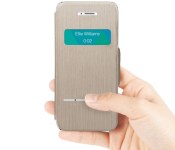
This iPhone case lets you answer calls while it’s closed

Both LG and Samsung have phone cases that let you take calls without exposing your screen to the elements, but what if you have an iPhone? As of today, you can check out Moshi’s SenseCover. The iPhone 5 and 5s flip case includes both a preview window as well as a touch strip that lets you answer the phone or silence alarms while the device remains safe. It’s not the cheapest design at $45, but it may be worthwhile if you’d rather not risk a shattered display just to start a conversation.
Filed under: Cellphones, Peripherals, Mobile, Apple
 AIVAnet
