


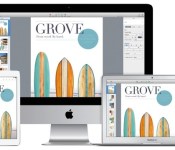
iWork updates let you share password-protected files through iCloud

Many fans of cloud services are used to sharing secure files with their friends, but that surprisingly hasn’t been an option for iWork users — at least, until today. Apple has updated both iWork for iCloud and all its Keynote apps to let productivity mavens share password-protected documents through iCloud links. Appropriately, iCloud now offers a list view that helps you find shared documents. Whether or not you’re the sharing kind, we’d suggest at least grabbing the Keynote update; both iOS and Mac users get better presenter display options, new transitions and more sophisticated charts. You’ll find all the iWork upgrades at the source links.
Filed under: Internet, Software, Apple
Via: GigaOM
Source: Mac App Store, iWork for iCloud, App Store

Apple Executives Consider Thirty Years of Macintosh, Say iOS and OS X Convergence ‘A Non-Goal’
To celebrate the thirtieth anniversary of the unveiling of the original Macintosh — tomorrow, January 24, 2014 — Macworld has published a lengthy interview with three Apple executives to discuss where the Mac has been, and where it is going. Senior Vice President of Worldwide Product Marketing Phil Schiller, Senior Vice President of Software Engineering Craig Federighi, and Vice President of Software Technology Bud Tribble — who was a member of the original Mac development team — all shared their thoughts and the full article is well worth a read.
Among the more interesting tidbits from the interviews is one particular statement from Federighi, where he notes that while iOS and OS X do share some cross-pollination of features and design, they will not become one operating platform without good reason. He says that the Mac has “been honed for over 30 years to be optimal” for keyboards and mice, while attaching a touchscreen to a PC — or a keyboard to a tablet — without a good reason to do so makes for a bad experience.

“We don’t waste time thinking, ‘But it should be one [interface!]‘ ‘How do you make these [operating systems] merge together?’ What a waste of energy that would be,” Schiller said. But he added that the company definitely tries to smooth out bumps in the road that make it difficult for its customers to switch between a Mac and an iOS device. For example, making sure its messaging and calendaring apps have the same name on both OS X and iOS.
“To say [OS X and iOS] should be the same, independent of their purpose? Let’s just converge, for the sake of convergence? [It’s] absolutely a non-goal,” Federighi said. “You don’t want to say the Mac became less good at being a Mac because someone tried to turn it into iOS. At the same time, you don’t want to feel like iOS was designed by [one] company and Mac was designed by [a different] company, and they’re different for reasons of lack of common vision. We have a common sense of aesthetics, a common set of principles that drive us, and we’re building the best products we can for their unique purposes. So you’ll see them be the same where that makes sense, and you’ll see them be different in those things that are critical to their essence.”
Macworld editor Jason Snell mentions that though he brought an iPhone, iPad and MacBook Air to the interview at Apple’s Cupertino campus, he ultimately chose to take notes on the MacBook — something not lost on the Apple execs.
“You had a bunch of tools,” Federighi said, pointing at my bag. And you pulled out the one that felt right for the job that you were doing. It wasn’t because it had more computing power … you pulled it out because it was the most natural device to accomplish a task.”
Schiller said Apple believed that the Mac “keeps going forever” because its differences make it really valuable. The current Mac lineup looks very different from what Steve Jobs introduced thirty years ago, but Apple clearly considers it crucial to the future of the company.
Images courtesy Shrine of Apple
     |

iWork for iOS and Mac Updated With Password-Protected Sharing, New Features
 Along with an update for its iWork for iCloud apps that brought an iOS 7-style redesign, Apple today released updates for its iWork apps for both Mac and iOS, as well as minor updates for both iMovie for Mac and Podcasts for iOS.
All of Apple’s iWork apps, including its iWork for iCloud apps, now have support for more secure document viewing with password-protected sharing capabilities.
In addition to password-protected documents, Keynote for iOS has also gained a built-in remote function, which will likely replace the standalone Keynote Remote app, while Numbers for iOS now offers landscape viewing and the ability to edit spreadsheets.
Keynote for Mac has gained new transitions, improved display options, the ability to share password-protected presentations via iCloud, and charts with time, date, and duration values. The update also includes improved compatibility with Microsoft PowerPoint 2013 presentations and support for custom number charts on imported Keynote ’09 and PowerPoint presentations.
Pages for Mac has new center and edge guides, while Numbers for Mac now offers tools for sorting multiple columns or rows. The updates for all of the apps should be available later today, with Slashgear and TechCrunch providing some additional information on the new features.
Apple’s iWork update will be a welcome change for Mac users who were disappointed with the upgraded iWork apps that were released in October, as the new apps were missing several features available in older versions of the software. In November, Apple pledged to re-introduce several lost features over the course of the next six months and today’s update is the first step in that direction.
The iWork suite of apps for iOS and Mac are available to users who owned previous versions of iWork and to users who have purchased new Mac and iOS devices. Customers who do not fit those criteria can purchase the iWork apps for Mac for $19.99 and the iWork apps for iOS for $9.99.
Pages for Mac – [Mac App Store]
Numbers for Mac – [Mac App Store]
Keynote for Mac [Mac App Store]
Pages for iOS – [App Store]
Numbers for iOS – [App Store]
Keynote for iOS – [App Store]
| |
Apple Seeds OS X Mavericks 10.9.2 Build 13C44 to Developers [Mac Blog]
Apple today seeded build 13C44 of OS X 10.9.2 to developers, marking the third developer beta iteration of 10.9.2. The release comes a week after the second OS X 10.9.2 beta, build 13C39, and a month after the first OS X 10.9.2 beta.

The update is available to registered developers through the Software Update mechanism in the Mac App Store as well as through the Mac Dev Center.
Apple has also seeded a new version of Safari 6.1.2 for Lion/Mountain Lion, asking developers to focus on General Website Compatibility, Accessibility, AutoFill features, Printing and Emailing from Reader, Dragging Tabs Between Monitors, and Extension Compatibility.
| |
Price drop for T-Mobile LG G2, Now Just $499.20
Looks like a price drop just happened for the T-Mobile LG G2. A slash pulls it down from $600 to $499.20. That would be a savings of $100.80. Seems like an odd price tag, but when you consider that this is with $0 down and EIP payments of $20.80, it adds up just fine over the 24 months period.
 That isn’t all though. It also looks like the price drops even further if you happen to qualify for an upgrade. As TmoNews pointed out, thanks to a reader, the LG G2 is hitting at $403 with $0 down and only $16.80 for 24 months. That would also appear to be a WEB ONLY offer.

Guess it is time to clear out some stock to make room for the LG GFlex. Head over T-Mobile.com if the LG G2 has been something you have been eyeballing.
Via TmoNews

Carmageddon Free in the Play Store for 24 Hours

Fans of the classic game Carmageddon can now download the mobile game on either iOS or Android, for the price of FREE today. They are doing a 24 hour promo for the no holds bar, demolition car game, so if you have been waiting to download it onto your mobile device, today is the day to do so. So hit the link below to go grab yourself a download. Let us know if you did.

TuneIn Radio Pro on sale for just $3.99
TuneIn Radio is an app that has been around for quite some time. It gives you quick and easy access to over 100,000 live radio stations and 2 million podcasts, concerts or shows directly to your phone or tablet. Heck, they even have college football games mixed in too. It is quite the feature packed app. With over 50 million installs and nearly half a million ratings begging it at 4.5 stars, it has to be a good app. (those numbers are for the FREE version)
 There is a secondary TuneIn Radio app, happily named TuneIn Radio Pro. Pretty much identical to TuneIn Radio, with the exception that the Pro version lets you record content that is streaming. A pretty useful function for event like live shows, games and concerts. TuneIn Radio Pro has been sitting comfortably at $6.99, but has just lowered the price tag to just $3.99. We don’t see a listing for why the price cut, such as a limited time promotion or a permanent reduction. So if TuneIn Radio Pro has been on your wish list, you might want to just grab it now. Hit the link image link below and enjoy.


Build your own analog synthesizer with Korg’s MS-20 kit

At NAMM 2013, we were able to get cozy with Korg’s MS-20 mini analog synth. This year, the company is putting the wrenches in your hands with its DIY MS-20 kit. For $1,400, synthesizer enthusiasts can nab the collection of parts needed to construct a working model of the iconic instrument, with no soldering or electrical expertise required. You can expect all the features, specs and even the same circuit path from the original with new MIDI input and USB connections. The kit remains true analog with 1/4-inch patch bay to boot, just in case you were concerned. There’s even two types of filters that pay homage to both the early versions and the later more mellow MS-20 sounds, toggled on the circuit board. Heck, the engineers of 1978′s original oversaw the process to insure the components replicated the circuitry of that synth. Only 1,000 kits will be available, so you’ll have to act quickly when packages become available in March.

Filed under: Misc
Source: Korg
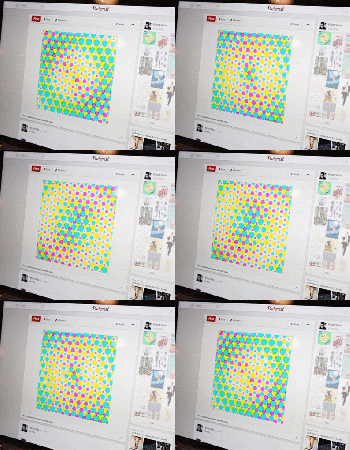
Pinterest adds the ability to play GIFs, makes your boards much more interesting

You’ll now be able to play GIFs on Pinterest, meaning your cooking, exercise-inspiration and arts-and-crafts boards are about to get a lot more lively. Sure, you’ve probably seen a GIF or two on the site already, but the new ability to view the graphics in their full, animated glory without clicking through is definitely welcome. According to the Pinterest blog, GIFs will soon be available on the mobile apps — for now, though, they’re limited to the desktop. Now if you’ll excuse us, we’ll be porting our favorite animated photos from Tumblr (along with an Engadget classic or two) to a brand-new board.
Filed under: Internet
Source: Pinterest Blog

Korg Gadget packs 15 synthesizers and drum machines into an iPad app

Fancy feeding your music production hobby with a slate rather than a collection of pricey gadgets? If so, Korg has added to its iPad-based offerings with the Gadget app. The software for Apple tablets bakes in 15 different sythesizers and drum machines (called Gadgets) that can be combined any way you’d like to construct those beats. Ranging from the Kiev digital synth to the Chicago tube bass machine, the app’s instrument arsenal (which can be previewed here) covers quite the sonic spectrum with drum and synth sounds a plenty. Keeping the orientation vertical, the UI is divided into two sections that allow for dual control at all times. This is aimed at making both track and instrument adjustments quick and easy. If you’re concerned about your lack of musical skill, there’s a scale function helps you avoid hitting a wrong note whilst getting your feet wet.
Already splurged for the latest iPad? Korg says you’ll be able to run more than 20 of the instruments at the same time, thanks to its beefed up chipset. Once those audio files have been tinkered with enough, options for sharing to Facebook, SoundCloud and Twitter or beaming them to Dropbox for safe keeping are all built in. There’s also access to GadgetCloud for showing off projects with fellow users of the software — complete with its own ranking system. The app is a bit pricey at $38.99, but if you commit before February 23rd, you can snag a $10 discount at that second source link below.

Filed under: Software
 AIVAnet
