


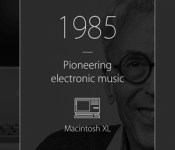
Apple gushes on 30 years of making Macs (video)

This year signifies the 30th anniversary of the Macintosh computer, and who better to reflect on this achievement than the almighty creator Apple? Cupertino has dedicated a corner of its website to such a retrospective, the focal point of which is an inspirational video starring several fans who talk about what Macs have meant to them (embedded below). After learning that Moby is still a thing and that Macs represent a “truly worldwide democratization of creativity,” you can peruse a slick, interactive timeline that walks you through all the iterations and how innovative each one was. You can also tell Apple about your first Mac and what you used it for, with that data populating polls around the site. There are worse ways to kill time, so if you’ve got some to spare, head to the source link and bathe in Cook & Co’s glory.
Filed under: Desktops, Laptops, Apple
Source: Apple
South Korea rules smartphone users can delete Android bloatware

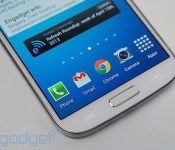
In a move that we can only hope inspires other mobile regulators, the South Korean government has struck a major blow against Android bloatware. Yonhap News reports that Korea’s Ministry of Science, ICT and Future Planning (MISP) is bringing the hammer down on preinstalled Android apps, introducing new guidelines that will enable users to delete them. Carriers won’t be forced to make apps related to Wi-Fi, user settings, NFC or app store removable, but even with core services excluded, it puts almost 60 apps installed by the country’s three biggest providers at risk. Samsung and LG won’t escape the judgement either, with more than half of their 40 default apps facing a less than certain future.
The ministry said preinstalled apps are an “inconvenience” to users and cause “unfair competition” between operators and carriers, so it asked them to offer detailed information to users on how much storage their preinstalled apps take up. It also intends to apply the same rules to Google’s suite of apps and services, which includes Gmail and Hangouts, although the regulator is still in talks with the search giant. Samsung, LG, SK Telecom and others have until April before the rules come into effect, which could mean Korean users will be able to tweak apps installed on their new Galaxy S5, should the device launch in the coming months.
Filed under: Cellphones, Wireless, Internet, Software, Mobile, Google
Via: ZDNet
Source: MSIP
Backup Software Plus External Storage Equals Data Stability

There are many options in backup software, from the programs offered with many major operating systems to selections for purchase or lease that range in features and price depending on your needs. While it is important to know just what your software can do and how to use it to its fullest potential, it is just as critical to see the software as just one piece in the entire computer backup puzzle. You need to know how to use the other elements of the equation as well, to arrive at a complete data security solution that works best for you. Most importantly, avoid the fate of two-thirds of computer users who reported losing home computer files; with Nova backup software used properly as part of an overall computer security and stability system, you will keep your files safe and current.
Understand Your Software
Depending on your computing needs and usage, the backup software needs to be flexible and customizable to your size and scale of data usage, but also should be programmable and automated so that it removes much of the human error factor of forgetting to run a back up on schedule. Most software allows you to set the schedule for the various types of backup, whether full system or incremental update, and use the type of file security that makes most sense in your case, including file compression for maximum efficiency and high-strength encryption to preserve the integrity of your data.
External Storage
An integral part of every solid file maintenance system is a means of external storage of data. Obviously, it makes no sense to store the backup files on the same hard drive that has the original files, or even on a separate drive that is physically present on the computer that you use every day. The USB port on your computer allows attachment of an external hard drive that can hold massive amounts of data, from 500 gigabytes or more on up to a few terrabytes, so you can be sure to include all your files in the backup. For smaller amounts of data, such as incremental updates capturing recently added or changed data, you could use a flash drive or perhaps even a rewritable compact disc, depending on the size of storage needed by your system.
Remote Storage
A range of quality options in remote storage of backup files and data online allows the value of secure location, apart from your equipment, and redundancy, maintaining multiple mirror versions of your critical data. Many companies provide features such as online access to your files and regularly scheduled backups that take the guesswork and risk of forgetting out of using your backup storage. While most companies provide these mentioned features, developing a technical career could give you a competitive advantage when applying for IT jobs. Using a web-based service with backup software makes sense, as you are able to store significant quantities of data at reasonable prices with a great deal of stability and security guaranteed. Many people find that a blend of systems, including some self-maintained data storage on a USB-connected external hard drive or flash drive, together with the stability and regularity of system backup on a remote datacenter system that provides full retention and easy access to backed up files, is the best solution to computer system stability.
Presented by CSI Now
Google patents ads that offer a free ride to your next shopping spree

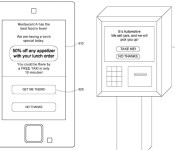
Having items shipped to our door when we order them — or even before — is nice, but a new Google patent flips things around and offers potential buyers an immediate trip to the store. Apparently, Mountain View’s toying with the idea of arranging transportation for customers who want to visit its advertisers’ stores. Unfortunately, that doesn’t mean everyone can get a limo ride: Google will look at people’s information (location, job, purchasing history, etc.) to determine what kind of transportation to offer.
Since the businesses will shell out cash for the arrangement, high-profile customers likely to spend more will get the VIP treatment and might even be driven around in one of Google’s self-driving autos. As for the rest of us, well, we’ll just have to make do with discounted tickets or reduced taxi fares. The company has quite the patent collection, so we might never see this happen, but those intrigued by the idea can check out the full filing at the USPTO website.
Filed under: Misc
Via: Slashdot
Source: USPTO

Netatmo’s Weather Station scores customized climate alerts, helps you avoid frost bite

IFTTT, an internet service that lets you connect various devices and apps together using a set of triggers and actions, has long played nice with home products like the Philips Hue lights, the Belkin WeMo Light Switch and the WiThings WiFi Body Scale. Now it’s added one more to the list, and that’s the Netatmo Personal Weather Station. As a reminder, Netatmo’s weather station is an aluminum cylinder tricked out with WiFi-linked sensors that can tell you all sorts of information about the surrounding air quality, humidity, pressure, temperature, noise levels and even CO2 levels via a mobile app. IFTTT’s integration, however, adds the ability to create personalized alerts. For example, you can set it so that your Philips Hue light glows red if the Netatmo station detects extremely high CO2 levels. Or you can have IFTTT send you a text message to put on a sweater if the temperature drops below 40 degrees. There are plenty more trigger-action recipes you could come up with of course, or you could just head to IFTTT’s Netatmo channel to see what others have created. Now you no longer have to, like, rely on your five senses to figure out what’s going on around you.
Filed under: Misc
Source: IFTTT’s Netatmo channel
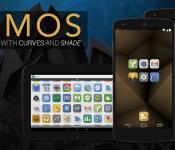
First Look at Lumos Icons from the Developer of Nox Icons

Nox Icons took the Android community by storm, simply because they are absolutely gorgeous. The 3D looking icons that seemed carved out of wood, caught the eyes of a lot of you, and I still use them to this day. Now Dave Kover is about to unleash some new icons tomorrow, January 24th, for the price of $2. I give you…LUMOS.
Lumos icons have a somewhat similar look to Nox, but Kover stepped it up a notch. The icons now have rounded corners, and the color is a little more dull. Kind of like a T-shirt that has been in and out of the wash many times, the dulled colors are actually very sexy looking. He still has his signature shade to the 3D effect, and everything just comes together nicely. I really dig these new icons, and hopefully you do too.
Lumos Icons will be available tomorrow in the Play Store, and once they are, I will place the Play Store link here in this post. Check out my video run-through to see the icons on my phone. Let us know what you think.
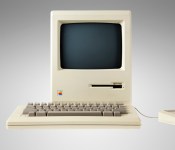
‘Celebrate the Mac’ Site Offers Photos of Vintage Macs in Celebration of 30th Anniversary [Mac Blog]
Jonathan Zufi, author of the coffee table book ”Iconic: A Photographic Tribute to Apple Innovation” and the man behind the Shrine of Apple site, has created a new website that includes photos of Macintosh computers and portables from Apple’s early years.

To celebrate Mac’s 30th birthday, I’ve created this micro site for all the world to enjoy. In 2009, I started taking photos of every Apple product ever made since 1976. Then I turned them into a really big photo site. I hope you enjoy this trip down memory lane, and I hope that the Macintosh’s anniversary brings your happy memories of your own experience with Apple.
Divided into four sections, the site focuses on classic Macs like the 1984 Macintosh 128K and the 1987 Macintosh SE as well as portables like the 1991 Macintosh Powerbook 100 and the 1992 Macintosh Powerbook Duo 230.
There’s also a section on the Macintosh II and LC, Apple’s lower-end consumer computers introduced in the late 1980s and 1990s, and a section entitled “Other Awesome Macs” that shows off products like the 1993 Macintosh TV, the 1992 Macintosh Quadra 950, and the “Flower Power” iMac G3 from 2001.

Each photo is accompanied by a detailed description of product taken from Wikipedia, giving website visitors a quick history of the iconic computers that gave Apple its start. The full site, which has more than 35 photos and product descriptions, is well worth visiting.
January 24, 2014 marks the 30th anniversary of the initial unveiling of the Macintosh. In celebration of the event, Apple executives Phil Schiller, Craig Federighi, and Bud Tribble interviewed with MacWorld to discuss the Mac and Apple CEO Tim Cook has plans to speak with ABC news about the anniversary tomorrow night.
Some of the original Macintosh development team, including Daniel Kottke and Mike Markkula, will hold an event with the Computer History Museum on January 25 to celebrate the anniversary as well. That event will take place at the Flint Center in Cupertino, California, where Steve Jobs originally introduced the Mac.
     |
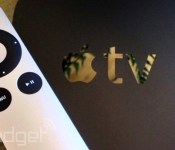
New Apple TV may include a revamped interface, more kinds of content

The current Apple TV is long in the tooth, to put it mildly — the basic design emerged in 2010, and the 2012 refresh was really about keeping up with the Joneses. However, 9to5 Mac claims that there’s a substantial update in the pipeline this year. Apple is reportedly “well into testing” a fourth-generation media hub that would include both a reworked (if still iOS-based) interface and new forms of content. Just what that content would be isn’t certain. iLounge hears that an Apple TV software revision may bring games and Bluetooth controller support, but it’s not clear if this would also entail a full-fledged app platform. If any of the rumors are accurate, we may not have to wait very long for the improved living room experience. The 9to5 tipsters believe that the new Apple TV will likely ship in the first half of the year, and iLounge anticipates new software by March.
Filed under: Gaming, Home Entertainment, HD, Apple

Android app learns from your phone to fend off malicious attacks

The last time we heard from Itzhak ‘zuk’ Avraham, he was at Defcon 2011 showing off an Android app that let even inexperienced users poke around networks for weak links and vulnerable computers. Now his company, Zimperium, is rolling out a new mobile intrusion protection app (or zIPS, for short) to help users figure out when their phones are subject to sneak attacks.
There’s no shortage of mobile antivirus apps out there, but according to MIT Technology Review Avraham doesn’t think the prevailing approaches are up to snuff. Many of them check downloaded files for known malware signatures, but zIPS’ machine learning system helps it figure out how your smartphone normally works and detects changes that may be symptomatic of something sketchy. That includes detecting seemingly benign apps that later download malicious payloads, man-in-the-middle-attacks and still more mobile nastiness.
Currently zIPS is enterprise-only, but a consumer version is in the works and the team hopes to hit iOS devices and a slew of connected home gadgets in short order.
Source: MIT Technology Review, Zimperium
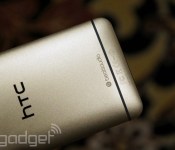
HTC One will get KitKat certification in the US next week

Eighty-four days. That’s how long it’s been since HTC announced its intent to bring Android 4.4 KitKat to all North American versions of the One within 90 days. With just six days left to go on the countdown, HTC just tweeted on its US account that the final software has finally entered the hallowed carrier labs for testing and will be certified (and, we hope, rolled out) sometime next week. Of course, the process is now essentially under the control of individual mobile operators, so let’s hope that they don’t make liars out of HTC — we’ve had Wednesday circled on our Sense calendars for quite some time now.
Filed under: Cellphones, Wireless, Mobile, HTC, Sprint, AT&T, T-Mobile
Source: HTC (Twitter)
 AIVAnet