


PlayStation Vita TV review: Sony’s first mini-console has some growing pains

Sony had a tiny surprise to share just ahead of the Tokyo Games Show: the PS Vita TV, appearing from inside SCE President Andrew House’s jacket pocket. Having already announced a new, slender PS Vita handheld less than an hour earlier, Sony showed off this minute console — roughly the same footprint as a smartphone — that plays Vita games, PlayStation games and streams video content, as well as music and video from Sony’s own store. It can also connect with multiple PS3 DualShock controllers, allowing for proper, responsive gaming — something we’re not quite used to getting from something so tiny.
You could see it as a brutal counterstrike from the PlayStation team against the cheap, mini-console likes of OUYA and GameStick, even Huawei. Aside from contemporary Vita titles and indie games, you can also tap into an ever-increasing catalog of hits from yesteryear — something that the Android and iOS platforms also dip their feet into, but with the peace of mind (read: stability) of PlayStation hardware, and the ability to steer the action with a DualShock controller. Sound like something you’d like to try out? Well, unfortunately, unlike the new PS Vita, this is currently a Japan-only deal. What’s more, availability in Nihon is directly tied to compatibility there, too; you’ll need a Japanese PSN account to even use it. We’re still getting a vague line from SCE on whether it will eventually arrive outside of Japan. (It would be a convenient bit of hardware to sell alongside Sony’s PlayStation Now streaming-game service, set to launch in the US later this year, right?)
So, is this just a tenuous experiment or a whole new console line for PlayStation? Or, given that it’s practically got all the same internals, would you be better off just buying a Vita?
Hardware

It’s deck-of-cards small. And stylish. And somehow cute. Sony clearly got the hardware right, with neatly curved sides and all the cable ports relegated to the back. It comes in an off-white finish, which, oddly, is slightly darker than the companion white DualShock controller that came included in the 15,000-yen ($144) value pack we tested for this review. The front panel is glossy, with some Sony branding on the left and a single LED to display when the Vita TV is on. There’s also the 19-year-old PlayStation logo on the top, but that’s about it. It’s an unassuming little console, and we like it for that, though once you’ve got all the necessary cables plugged in (HDMI, power, possibly Ethernet), it loses some of its style points. That can’t really be helped though, can it? Maybe. Sony could have tried powering the whole device through MHL (the same standard that allows smartphones to shift content to HDTVs while charging it at the same time) and that would have wrapped those display and AC adapter ports together. We’re guessing the relatively high level of graphics rendering and processing that the Vita TV has to do might be too much for an MHL port.
Because it isn’t housing bleeding-edge GFX, it’s quiet. So quiet. Sony has told us that it uses the same processor found in its Vita handheld, which makes sense: The mini-console loads and responds to navigation at an identical pace. You will, however, need the aforementioned DualShock controller to do this, which might bump up initial costs if you don’t already have one from a PS3. (As we’ll elaborate on later, a PS4 controller also works.)
The USB port along the back acts as the charging port for controllers, meaning you’ve got yet another cable there to clutter up the design. To the right, there are HDMI and Ethernet ports, while a 5V AC socket for powering everything is on the far edge. On the other side of the USB port, you’ll find the second media slot, alongside another for Vita game carts. This is for your Vita memory card, which could mean another add-on purchase, assuming you didn’t already plump for the value pack. The cards are still overpriced, but at least there’s now a 64GB one — which seems like it could be enough to last the lifetime of one’s Vita TV. If you already own a Vita handheld, you’ll need just the one card. We could eject the Vita game cart and memory card, slot them into our portable Vita and play the same games from the same game saves. Aside from wrestling the memory card out of the slot, it’s a pretty straightforward process, meaning you can continue your portable gaming on a bigger screen, with an arguably more comfortable control setup.
Along the back, on the far left edge, there’s a power button, although with a wireless controller in hand, we tended to power down from inside the menu — it’s one of several software differences between the Vita TV and the handheld that came before it.
Software

The PS Vita TV has the same interface as the Vita handhelds: Games and apps are housed in floating bubbles, and you press the PlayStation button to switch out of games, multitask and get back to the home screen. However, with the Vita TV there’s no touch panel to navigate through those icons and menus, which does fight against how it was originally designed.
Fortunately, its sheer simplicity means we had no real issues making our way through it using a DualShock controller. Yes, typing is more of a chore than with a touchscreen, but because the Vita TV explodes exactly the same view from the Vita handheld to your HDTV, the onscreen keyboard is just as huge and this editor found it easier to use than the one on the PS3. Again, this is a credit to its simplicity. Because of the lack of presses to hold and swipes to delete we were using on the Vita, the Vita TV occasionally throws up subtle reminders for how to do these things — a relief, because we wouldn’t have known how to otherwise.
As a games console, you can play Vita games (on physical media, or downloaded) as well as a back catalog of PSP and PSX titles, both of which are easy to play on a DualShock controller. However, a lack of touch input (the original Vita has both a touchscreen and rear touch panel) does ultimately hamper which games you can actually play. Tearaway, Metal Gear Solid HD Collection, Wipeout, Uncharted and Gravity Rush are all unfortunate casualties of this compatibility oversight, each requiring a degree of touch within gameplay. The TV unit also lacks cameras and a built-in compass — again reducing the list of compatible titles, but this doesn’t seem to preclude any especially notable games.
When a compatible game demands some sort of touch input, Sony’s come through with a system (included within a patch that automatically downloads) that attempts to lash a two-dimensional touch area to the analog sticks. Pressing R3 summons two pointers for the front panel, while L3 does the same for the rear one. Pressing both analog sticks down produces pointers on both. If our description sounds confusing, good — because it’s even more difficult to grasp in use, and it’s only really a workaround for a handful of cases. Those aforementioned titles simply won’t load to start with.
Regardless of which generation of PlayStation gaming you choose to dip your toes into, the Vita TV automatically upscales to 720p — an improvement over the manual process needed on the Vita. Predictably, it’s the Vita games that look the best on an HD screen. Animation is smooth and while upscaling from the handheld means that it doesn’t quite look as sharp as on the original (it’s a pixels-per-inch issue), it still looks good — which surprised us. We’d cite Ultimate Marvel vs. Capcom 3 as one game that handles the big screen particularly well.
The years haven’t been so kind to original PlayStation titles.
Alas, the years haven’t been so kind to original PlayStation titles. To their credit, the likes of Tomb Raider, Final Fantasy and the original Wipeout play just like they used to. The original PlayStation was the first Sony console to use a dual-analog pad, the DualShock 3′s distant ancestor, meaning that if there’s a game available on the PlayStation Store, it’ll work on the Vita TV. (Funnily enough, the Vita iteration of Wipeout doesn’t work.) Despite that, the Vita TV is a wake-up call to middling (cheap) plug-in consoles that haven’t quite made the cut. Regardless of the sluggish launch schedule of Vita games, there’s that huge back catalog of titles to play through, along with all those indie hits. And aside from that touchscreen barrier, they all work; they work well; and there’s no controller lag — it is a PlayStation, after all.
The Vita TV isn’t just gunning for cheaper console challengers, however. Alongside its gaming talents, there’s a handful of video services too, besides Sony’s own Video Unlimited store. Japanese rental chain Tsutaya offers both a video-on-demand store as well as a monthly subscription service for unlimited viewing. Hulu is meant to be here too. As of this writing, however, it still isn’t available at the store.
There are other services you’ve probably never heard of, and they offer a pretty limited selection. Skappa On Demand broadcasts live J-League soccer matches and, at the moment, nothing else. Video output is capped at 720p too, meaning the Vita TV trails the likes of Roku and Apple TV in picture quality. The mini-console’s talents outside of gaming are certainly secondary, which is a shame. It has such a small footprint that it could have been a great choice for making non-smart TVs a little more capable.
Because the Vita TV transposes nearly everything from the hand-held version, some of the apps, like the web browser, are downright diabolical on an HDTV. Due to the resolution limitations, you’ll have to read sites one giant paragraph of text at a time — it’s far from a comfortable experience. Ditto for social networking apps like Twitter and Facebook: the text is huge. We spent most of our time scrolling and scrolling and scrolling.
Wrap-up

More Info
Thanks to a combination of petite, understated hardware and more than a little nostalgia, there’s a lot to like about the Vita TV, especially if you grew up with PlayStation. However, Sony’s littlest console still has some game-support issues it needs to sort out. In particular, it needs to get its entire PS1 back catalog online and work out a better way of bypassing the lack of a touchscreen. Relief could come from the PS4 controller, which already houses a tiny touchpad, although Sony hasn’t said anything to that end and given that the fourth PlayStation hasn’t even launched here in Japan, it’s not something we’ve been able to test out. We’re also thinking this could be the cheapest way to play Sony’s incoming PS Now streaming-game service on your non-Sony TV, if/when PS Now and the Vita TV are both available in the same region.
For now, the PS Vita TV is, at its core, a cheap games machine (10,000 yen, or $96) that we can’t recommend as a media-streaming device — although that’s all icing on the cake anyway. But until Sony reveals global plans for the Vita TV, this mini-console remains a tempting Japan-only curio. That’s a shame, because there’s so much more here to recommend it over those similarly priced, rougher-edged Android consoles.
Sprint unveils $30 ZTE Optik 2 tablet
Sprint this morning announced the ZTE Optik 2, an Android 4.1.2 Jelly Bean tablet with a rock bottom price tag. Powered by a 1.2GHz quad-core Qualcomm Snapdragon processor with 1GB RAM, addition details include 8GB storage, a 5-megapixel rear camera, front-facing 2-megapixel camera, and 3G connectivity. The 7-inch ZTE Optik 2 is available through Sprint’s website and business sales and requires a two-year service agreement on a qualified plan.
The ZTE Optik 2 can be paired with any of Sprint’s Tablet Connection plans, including a special limited time offer featuring 2GB of data for $15. Additional plans allow for 25MB ($5), 100MB ($10), 3GB ($34.99), 6GB ($49.99) or 12GB ($79.99). The tablet can also operate as a mobile hotspot allowing up to five users to connect; an additional fee $19.99 (2GB) or $49.99 (6GB) is required.
The post Sprint unveils $30 ZTE Optik 2 tablet appeared first on AndroidGuys.

Tim Cook Discusses Apple’s Cuture of Secrecy, Sapphire, and More in ABC News Interview
In honor of today’s thirtieth anniversary of the introduction of the Macintosh, Apple CEO Tim Cook and executives Craig Federighi and Bud Tribble recently sat down for an interview with ABC News. ABC’s David Muir was a guest on Good Morning America this morning, where he introduced a short preview of the interview, which airs in full tonight.

In the clip, Muir talked candidly to the trio of executives about Apple’s culture of secrecy, the company’s plans for its Arizona sapphire manufacturing plant and the iWatch. Cook was forthcoming in the interview about his work habits and Apple’s rumored black curtains, but as usual he adeptly deflected questions about Apple’s future product roadmap.
The full interview will air tonight at 6:30 PM on World News with Diane Sawyer.
     |

Fast Forward: Be Kind to Your Audience With a Video Editing Program

There are many video editing programs to choose from, and they can all help you to make more professional looking videos that are more enjoyable to watch. It doesn’t matter whether you mainly film family videos of important events, business videos for your website or longer projects like films. Even the most simple videos can benefit from video editing software.
But which program should you choose? Here are some factors to consider when choosing an editing suite for your projects, as well as some of the best that are currently available on the market.
Choosing the Right Software
The first thing to do is decide on a budget. Video editing programs range from completely free to very expensive, and the more costly options tend to come with more advanced features. However, you need to decide whether you actually need all of these added features and are willing to pay for them.
Some editing programs are known for being very simple to use, even for people who have never edited videos before. Others are more complex but may come with more features. A simple interface is useful if you just want to edit the odd family movie, whereas if you are making more serious projects, you may be more willing to spend a long time working out all of the features.
You should not forget the system requirements of each program. Some editing programs may require a very powerful computer. If you don’t have one, this could affect your ability to run the software properly.
Also, don’t forget the level of technical support provided. If you are going to be working on more complex projects, you may want to be able to contact an expert support team to answer your questions, so find out whether you are able to call or email the technical support and receive a speedy response.
Top Editing Software Programs
Adobe Premiere Pro CC
Adobe Premiere Pro CC is one of the most comprehensive editing programs available, and it is used for professional level editing. A powerful computer is required to use it properly, and it comes with a huge range of advanced features.
Adobe Premiere Elements
Alternatively, you could choose Adobe Premiere Elements. This is a smaller and simpler version of Premiere Pro, and is more suited to casual home users.
Final Cut Pro
This is a fast and powerful video editing program from Apple that boasts a wide range of features including multi-cam support and a many professional tools for pro users.
iMovie
For Mac users who don’t want to splash out on Final Cut Pro, all new Macs come with Apple’s simpler editing suite, iMovie. This is a very popular video editing program, and one of the main advantages of iMovie is that it is very simple to use. However, although it is excellent for simple tasks like adding music and cropping, it does not have as many advanced features as some of the other more comprehensive programs.
Pinnacle Studio
Pinnacle Studio is an advanced editing program that is aimed at people who are already familiar with video editing rather than complete beginners. It comes with many features and special effects, and it also allows you to upload completed projects directly to various video sharing sites including YouTube. This makes it ideal if you want to share your video, and people can download it from YouTube using a program like YTD.
Corel VideoStudio Pro X6
This program is less expensive than some of the others, but is still very powerful and comes packed full of features, including excellent stop motion controls and more. It is a good option for amateurs who want to get access to a quality product for less.
Find the Right Editing Software for You
If you want to create stunning videos, you will need an editing suite. Choosing one from the many that are available can be difficult, so think over what you really need from your editing program before trying some out. Remember that many of these programs come with free trials so you can try them out for yourself and decide which one works best for you.
Make sure you remember to respect IP when downloading.
Steven Young likes to check out the latest video software and programs. He also likes to report back on his experiences with them to help others make the right choice.
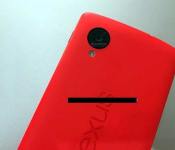
Red Nexus 5 photographed, potentially ready to release in Vietnam by next Month
 A few days ago we got a brief (and suspicious) look at a Nexus 5 page on the Google Play Store that appeared to suggest that Google was readying quite a large colour palette for their flagship smartphone. While a lot of discussion has gone on regarding the integrity of this source, a much more concrete source has cropped up in the last few hours; the above photo shows a red Nexus 5 in all its glory, allegedly a sample of a larger roll-out in Vietnam in late February or early March.
The report also states that Vietnam will also be receiving a yellow version of the Nexus 6 alongside the red variant, but didn’t state what other regions would be receiving coloured versions. I assume this could be some kind of colour coordination to match the country’s flag, but the report also could be fake. Whatever the truth it, it is all very overwhelming that all these reports of coloured Nexus 5s are coming in left, right and centre. What do you think is the truth: are there going to be coloured variants of the Nexus 5 coming out soon? Let us know what you think.
Note: There is a poll embedded within this post, please visit the site to participate in this post’s poll.
Source: Webtrek via PhoneArena

Scientists replicate kitty whiskers to help robots ‘feel’

Given how important feline whiskers supposedly are for sensory perception, they don’t stop the typical house cat from knocking every fragile object in your apartment to the ground. In an effort to replicate that level of precision synthetically, researchers at the University of California Berkeley have harnessed nanoparticles to create ultra-sensitive fibers that could grant automatons whisker-like powers. By coating elastic fibers with a layer of carbon nanotubes and silver nanoparticles, scientist Ali Javey and his team created a material that they claim is 10 times more sensitive to pressure than all previous resistive or capacitive pressure sensors (like those found in smartphones). As Javey tells it, these faux whiskers could be used for spatial mapping in difficult environments. Moreover, their high sensitivity could even keep track of your heartbeat and pulse rate — ideal for human-hunting robots of the near future.
Filed under: Robots, Science, Alt
Via: SlashGear
Source: Berkeley Lab (1), (2) (PDF)

Facebook gets into nerd feud with Princeton, hilarity ensues

In the tech industry, barely a week goes by without one entity saying that another one is doomed. Mostly, however, we just ignore them, but when Princeton claimed that Facebook would collapse in 2017, the social network decided to get its own back. With tongue placed firmly in cheek, data scientists Mike Develin, Lada Adamic and Sean Taylor copied Princeton’s slightly suspect method to discover that the university would effectively run out of students by 2021. Then the team went one step further, analyzing Google trends and Facebook likes to learn that, if social engagement stats are to be believed, the planet will run out of air at some point in 2060. If you like it when major corporations go all reductio ad absurdum on their rivals, then head down to the source link and enjoy this timely reminder that not all scientific studies are created equal.
Filed under: Internet, Facebook
Source: Facebook, Original study (PDF)

Get GO Launcher Prime for free, thanks to AppSales
 If you’ve never heard of AppSales before, you should get intimately familiar with their website and Android app as they provide the latest discounts and deals regarding apps on the Play Store (games included) and will give you a notification to let you know what is on sale. The latest deal on AppSales will let you get GO Launcher Prime, which is normally $5.99, for free via the use of an activation code. As per the deal description:
Using the code “appsales” allows you to unlock all GO Launcher Prime features for free. To enter the code open the menu and go to Preferences > About GO Launcher EX > Enter Activation code. This offer is only valid for new users of GO Launcher Prime. Existing users won’t find the dialog to enter the code.
This isn’t a bad deal as GO Launcher EX was once (and is) one of the most popular custom launchers on Android to date with somewhere between 100,000,000 and 500,000,000 downloads and GO Launcher Prime is just a further extension of that. It’s capable of doing some really great themes from a huge community library as well as transition animations and other customization options. Plus, it’s free! So jump on the deal if it takes your fancy; hurry though as it’s only available from January 24th to the 25th. Hit the download link below to get to GO Launcher EX and get the process started to upgrading to GO Launcher Prime for free.
Application: GO Launcher EX
Price: Free
Source: AppSales

What Google Play Services 4.1 means for Android games: an interview with Pocket Gems Android Product Lead, Arjun Dayal
 Many of you will have heard that Google recently updated its Google Play Services to 4.1, bringing in a whole slew of updates that improves the back-end of quite a few of Google’s services, but most notably for Android gamers, it added a few improvements related to games.
The 4.1 update introduces brand new framework that allows Google Play Games to manage matchmaking as well as handle turn-based games for 2-8 players. While any improvement to the games ecosystem is good, it’s not always immediately obvious how this is. To help elucidate what these changes mean for Android games, we were fortunate enough to interview Arjun Dayal, Android Product Lead at Pocket Gems, the publisher behind such popular games as Animal Voyage and Tap Paradise Cove, and find out their perspective of the changes.

SY: Thanks for joining us today, Arjun. First off, with the changes to Google Play Services 4.1 coming in, what does this mean for both Pocket Gems, and more broadly, for Android games in general?
AD: Much of mobile game development is moving away from being a primarily single player experience to an immersive social one. This Google Play Services update, with its new features such as matchmaking, will reduce the barrier for all developers to create multiplayer experiences that push the boundaries of what’s possible in game design. We’re excited to see more market innovations in social that better connect players with their peers as a way of improving engagement across mobile.
For Pocket Gems, we’ve been excited for years about innovations that help connect players to their peers, and have built tech to support that multiplayer vision. Now, we’re focused on making those multiplayer experiences real-time with the goal of taking mobile player engagement to the next level.
SY: Do you think with these changes and the onus of matchmaking and turn-based game saving now on Google that we’ll be seeing more competition in the genre of turn-based and multiplayer games? And for those already in the space, is it frustrating to see such a fundamental framework change come in when some developers have already come up with ways to circumvent the previous deficiency?
AD: We’re definitely going to see more competition in the multiplayer space, and that’s great for players across mobile. It’s a positive for the industry when complex systems like turn-based matchmaking are solved at a platform level. This update enables game developers to focus core resources back on player experience and improving product quality with the additional cycles saved. It’s not frustrating for us to see framework changes for tech we’ve already built. In many ways it’s a positive validation that the concepts we’ve been building internally are the future of the market.
 SY: Seeing as this change brings Google Play Services more in line with Game Center on iOS, will we be seeing more games be simultaneously developed on iOS and Android instead of the standard iOS release followed by an Android release several weeks/months later?
AD: Players want great games on their favorite devices regardless of if they use an Android phone, iPad, or Kindle. Platform SDK updates and cross-platform tech have made the challenge of simultaneous release more achievable and we’re excited to be innovating on that front.
We’ve invested in systems and cross-platform tech that allow us to launch our titles simultaneously. For example, we launched our game, Animal Voyage, simultaneously across multiple platforms and have seen very positive responses from our players who appreciate the wider support. We hope that as time goes on the best experiences continue to win out and players are able to enjoy our products on any device anywhere around the world.
SY: What other differences still exist between iOS and Android that you as a developer would want to be implemented
AD: Both Android and iOS continue to evolve rapidly and we think that’s great for the industry. We’re not concerned with the feature differences at this point, but are more focused on ensuring we can utilize the tools on both platforms to create the best experiences for our players.
 SY: Fragmentation is obviously a very common and overarching theme for Android that will probably haunt it forever, lest it become iOS. From a developer’s perspective, what does fragmentation mean for you and the games you develop?
AD: Our primary goal is to develop the best experience for as many players as possible. While being a difficult challenge, device fragmentation has actually allowed us to expand our reach around the world by making devices more accessible to all types of players.
That said, it is a challenge to develop games for the 3500+ existing Android devices, not including OS considerations, that have a wide variety of specs.
At Pocket Gems, we’ve solved this challenge by having a very rigorous QA process for our games across a matrix of device types and operating systems. This process ensures we catch potential issues early in the build cycle when they’re more easily fixed. That said, we still do make decisions to not support specific devices when their performance specs are not capable of supporting the new game play experiences we’re developing.
Google Play’s newer build rollout feature has also been a helpful way for us to monitor product quality of releases and ensure our updates are the highest quality possible.
SY: Finally, what can we expect from Pocket Gems in the near future? Any games on the horizon?
AD: We’ve got some awesome games from different categories and genres set to roll out in the next year. Nothing official to announce just yet, but you can expect us to be pushing the boundaries of real-time multiplayer and 3D. Stay tuned!
SY: Thanks for your time, Arjun
Hopefully those answers will give you a better idea of what’s going on in the Android gaming world at the moment. It’s always good to know that Google is on the ball and making changes that make game developers, and in turn, gamers, happy.
Arjun is the Android Product Lead at Pocket Gems focused on creating original Android games and bringing new cross-platform products to market. Previous to Pocket Gems, he worked at Microsoft where he helped create the first release version of the Xbox Kinect.

Apple Celebrates Thirty Years of Macintosh with Homepage Tribute, Visual Timeline, ‘Mac 30’ Video
To celebrate the debut of the original Macintosh 30 years ago today, Apple has posted a tribute on the homepage of its website, and has also created a special “Thirty Years of Mac” section accompanied by a new “Mac 30″ video looking at the past and present of its signature desktop computer.
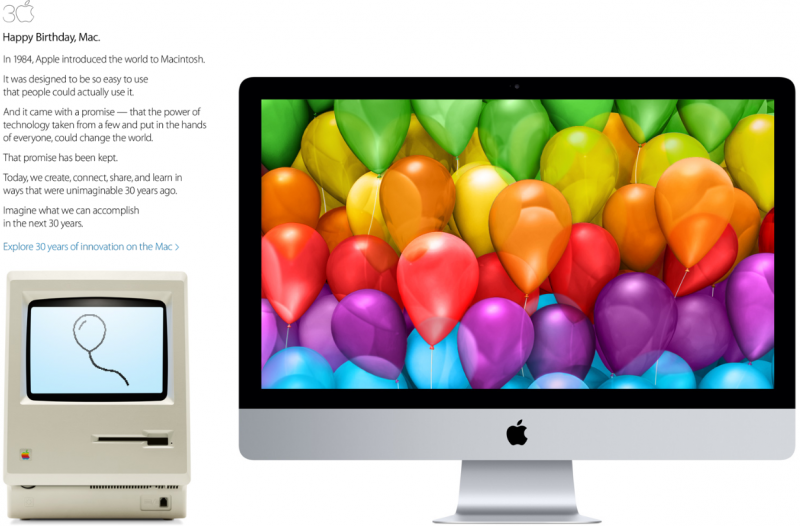
Happy Birthday, Mac.
In 1984, Apple introduced the world to Macintosh.
It was designed to be so easy to use that people could actually use it.
And it came with a promise — that the power of technology taken from a few and put in the hands of everyone, could change the world.
That promise has been kept.
Today, we create, connect, share, and share, and learn in ways that were unimaginable 30 years ago.
Imagine what we can accomplish in the next 30 years.
The special “30 Years” section of Apple’s website allows users to scroll through a visual timeline of the Macintosh’s history, beginning with the first Mac in 1984 all the way to the recently released Mac Pro. Each page in the timeline is introduced by a passage on the Mac’s impact on an individual or entity, such as the Macintosh II’s role in the creation of computational program Mathematica by Theodore Gray or the role the MacBook Pro played in helping create online coding tutorial platform Codecademy.

Pages in the visual timeline also include retrospective information on every Macintosh with photos, and are also followed by research about the most popular uses for a particular Mac. Apple also includes a page for users to input data about their first Mac, which asks questions about location and ownership. The data given by users can be found on another section that gives a visual look at what models were chosen by people as their first Mac, with live updating information.

Meanwhile, the Mac 30 video on the website includes remarks about the Macintosh by notable individuals such as music composer Hans Zimmer and designer Iris van Herpen, and also features a visual look of the computer’s impact in various industries.
In addition to the festivities on Apple’s website, three Apple executives spoke to MacWorld about the Macintosh’s illustrious history, which will be followed by ABC News airing an interview tonight with Apple CEO Tim Cook about the computer’s thirtieth anniversary. Jonathan Zufi, author of the coffee table book “Iconic: A Photographic Tribute to Apple Innovation,” also created a new website that includes photos of macintosh computers and portables from Apple’s early years.
| |
 AIVAnet