



Beats Music Streaming Service Now Available, $9.99 a Month
Beats Music has been in the works for quite sometime. I remember when it was called ‘Daisy’ and Trent Reznor from Nine Inch Nails partnered up to make it all possible. That was back in December of 2012. Last month it was announced that Beats Music would be coming in January and you could register now. It is finally January and Beats Music is here, at least for US residents.


 The Beats Music app is currently sitting in the Play Store for you guys to pick up and test out if you wish. The description boasts access to over 20 million songs from every genre.
- Hand picked albums and playlist curated by their music experts.
- Highlights to help keep your finger on the pulse of current new music and upcoming bands.
- Mix up the ‘Sentence’ to get curated music that fits what your are feeling
- Search for playlists, choose a genre, activity or a curator and Beats Music delivers it to your ears.
- A social aspect to share tracks to Beats Music friends, Facebook and Twitter.
It all sounds pretty good on the outside, heck even the app looks pretty nice. The handpicked and curated aspects seem to have a leg up on some of the competition. The ‘Sentence’ is a pretty interesting way to get tunes delivered that you might not have chosen for yourself for the mood are in or activity you are doing.
There is always something that won’t sit quite right. After being in the works for so long and now finally out, it seems the first big kink is already pushing the rating down quite a bit. Seems a TON of people can[‘t even get out of the sign-up process to start listening. Whoops!! We are sure that will be resolved though. Where Beats Music might struggle the most is the subscription service.
Unlike the competitors, Spotify, Google Music, Pandora and many more, Beats Music is coming out at $9.99 per month. No free ad-supported listening here guys. You do get a 7 day free trial to check it out at least, and if you are with AT&T they have apparently brokered a deal to offer you 3 months of service for free.
Have any of you given it a shot yet? Do you even play to try? Let us know how you really feel in the comments.
Beats Music Play Store Link
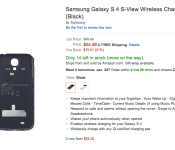
Galaxy S4 S-View Flip Cover with Wireless Charging Available for $55 on Amazon

The Galaxy S4 S-View Flip Cover shined new light on covers with that little flip door, so much that they became a hot commodity in the past year. Now there is a slightly newer version that allows you to wirelessly charge your device using that Qi charging technology. Samsung already made this cover available to users with a Galaxy Note 3, and adding the Qi feature to the backplate was one of the smartest things they could’ve done.
You can snatch up the flip cover for the pretty low price of $55 dollars over on Amazon. If you have been waiting to purchase this cover, now is the time to do so. Hit the link down below to head over to the Amazon page. Let us know if you purchased one.
Source: Droid-Life

Pinterest recipe search makes the joy of cooking easy to pin down

The next time you’re searching for that perfect recipe to please your finicky friends’ ever-evolving dietary needs (you know, the vegan today/paleo tomorrow types), you won’t have to go further than Pinterest. The service is folding in a new search feature that can filter pins down to recipes-only, based on ingredients or even dietary choices. So, say you need to find a gluten-free way to make chocolate chip cookies, you’ll be able to do exactly that and even save that recipe — complete with cooking time, ingredients and servings size data — to your own dedicated board. There’s even an included Indulge Me filter option for those of you that just don’t care how much lard you consume in one sitting. Recipe search is only rolling out to the desktop version for now, but it should be making an appearance on mobile sometime soon.
Filed under: Internet
Source: Pinterest
Phil Schiller Tweets Link to Another Security Report Criticizing Android
Last year, Apple executive Phil Schiller tweeted a link to a research report that noted significant growth in mobile malware, particularly on Android. The report found that Android accounted for 79 percent of mobile threats, with just 0.7 percent attacking iOS.
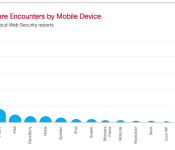
Today, Schiller followed up, tweeting a link to Cisco’s 2014 Annual Security Report. The report, which came out late last week, notes that while overall vulnerabilities are highest since tracking began in 2000, 99 percent of all mobile malware targeted Android devices — leaving iOS devices relatively unscathed thanks to Apple’s controlling mobile ecosystem.
The report does note that many mobile users encounter phishing or other social engineering websites, something that Apple’s security protocols won’t necessarily protect users from.
Not all mobile malware is designed to target specific devices, however. Many encounters involve phishing, likejacking, or other social engineering ruses, or forcible redirects to websites other than expected. An analysis of user agents by Cisco TRAC/SIO reveals that Android users, at 71 percent, have the highest encounter rates with all forms of web-delivered malware, followed by Apple iPhone users with 14 percent of all web malware encounters.

Other than that specific mention of social engineering — and that spam messages mention Apple Gift Cards — the Cisco report does not mention Apple or the Mac or iOS at all. The tweet is likely part of a larger push by Apple to share more favorable third-party reports about the company and its products.
     |

Customize vibration alerts with Mumble! [App Review]
Know more about your incoming messages without looking, regardless of app
Regardless of which app you’re using for your messages on Android devices, one thing generally remains the same across the board. No matter how long your message is or what its contents are, the vibration alert doesn’t change. An app we recently discovered, Mumble!, changes all of that.
 Working in tandem with your standard or third party messaging client, Mumble! lets users configure vibration alerts in a much smarter manner. Play with the settings for a few minutes and you’ll know just by the number of vibrations how long the message before looking. For instance, you can toggle the app to vibrate once for every two words, five words, or ten words.
Hate pulling your phone out just to see a message that says, “kk“? Toggle the box to ignore one word messages. Users can also tell the app just how intense they like their vibrations based on four settings. This way, you can keep things nice and quiet or really active in your pocket.
Additional features in Mumble! include subtle vibrations for syllables, varying degrees of excitement levels, number of overall notifications, and much more. The free version is packed with quite a bit but you can get even more out of the full app. For only $1.49 you can toss in settings for ignoring duplicate messages, recognition of questions, emotions (positive vs negative), NSFW, emergencies, and even SPAM.
While Mumble! isn’t necessarily the best looking app we’ve encountered, it’s one that you only need to see once in a while. The general aesthetics are something out of the early days of Android mixed with a bit of Holo menus but the feature set is deep and intuitive. First-time users will definitely want to walk through the instructions before toggling settings if only to get a sense at what lies ahead.
The post Customize vibration alerts with Mumble! [App Review] appeared first on AndroidGuys.
Max Mobile Security, App review
Max Mobile Security is another security app that claims to protect against viruses, but also boast a collection of other features that make it quite nice, however the $10/year is not appealing, but it might bring peace of mind to some.
Being an Android enthusiast, I am constantly downloading and reviewing new apps from the market or through direct downloads from a developers site. Sometimes they play well and sometimes I just uninstall them, however I have never experienced a “virus” or maybe I just did not know it, but I’ve never had an issue that I couldn’t just uninstall and whisk away.
However, with Max Mobile not only does it “scan” my phone for viruses, which it found none, but also has anti-theft features where I can track my phone if I left it somewhere, God forbid, and even remotely wipe it. Now I know you’re reading this and saying, “Hey, I can already do that with Android Device Manager!” and yes you can.
Max Mobile Security offers:
- Anti-virus: Automatic virus-scanning of apps
- Anti-Theft: Defense tracks your lost mobile
- Safe Web browsing
- Block Call/SMS: Feature filters unwanted calls and SMS text
- System Optimizer: Allows you to manage/kill apps
- Contact Back up: Back up all contacts on SD card or server
- Network stats: Monitors network traffic usage
- Battery optimizer with task killer
You are probably saying, “I have apps that do all of these things!”, and yes there are apps out there that do them all, quite well actually, and do them for free! However, with Max Mobile, you can do all these in one app.
So what do I say to all of this, Go out and spend the money? ($10/year) Move on and download all those free and wonderful apps?, the only real question is if you want something that does them all, conveniently, this might be something to check out.
What would I do? Stay free and donate to those who offer free and awesome apps!
The post Max Mobile Security, App review appeared first on AndroidGuys.

Nexus 5 in the Hands of a Photographer

What is mobile photography? Most people would nod their head with confusion as if you were asking a rhetorical question, but the truth is it’s more than just taking pictures with your phone. Not every phone comes with a high end camera, some mid-range phones come with 5-8 MPs cameras while the other more expensive higher-end ones come with 13 MPs and up.
As many may know the Nexus 5 is the one device that a lot of people were eager to finally have make its debut. Now that it’s been out we have had the time to see the merits and flaws. The Nexus 5 isn’t equipt with a high end camera but it counters that by having 8MP with Optical Image Stabilization. OIS, optical image stabilization can prevent blurred images associated with the motion of a moving camera in this case your phone. Don’t get this mixed up with the handsets alternative feature, HDR+ mode. HDR+ is essentially an upscale to optical image stabilization, which when used properly, it will capture sharper photos containing both bright and dark areas more vibrantly. A good tip to keep on hand is that HDR and Image Stabilization can’t be turned on simultaneously. The Nexus 5 is unexceptional in everyday use of taking photos. It is not the best of the best but performs quite well as compared to other lower end devices with 8MP cameras.
Moving along, thanks to OIS/HDR+ mode and by having the latest update of Android 4.4.2, the Google Nexus 5 allows many enthusiast and regular users to shoot some quite pleasant videos at 1080p and still enjoy taking some more than satisfactory photos on your journey with it. Many thanks go out to XDA member cisoprogressivo, he shared with us one of his friends amazing galleries created using the Nexus 5 camera as the physical hardware vs a traditional DSLR. Below is a video gallery of some awesome photos from a photographers hands!
It is fairly interesting to also note that he shot and edited the whole video above on the Nexus 5. He also gives credit to Google’s Auto Awesome abilities for doing a large chunk of it all on its own without his help. You go Google.
Well, is kind of embarrassing saying that all the base of the video was prepared automatic by Auto Awesome feature. It make me think if there are maybe some people working at #Google to edit the video. I can not belive that automatic algorithm can create sometimes so good with timing and choose in music and mood. About stabilization i haven’t used any special feature, just trying to not shake so much my hand during the shoot, the rest is the optical stabilizer of#Nexus5 that is doing a good job!
Also check out the main gallery at the source down below.
Source: Gallery

Adidas Smart Run users can now export GPS data, while firmware update improves battery life and media player

When we reviewed Adidas’ Smart Run training watch, we were very fond of it. That said, it had three major niggles: the poor battery life, the low volume of the media player and the inability to export your map/run data from either the watch itself, or the companion miCoach website. Today, we can strike all three off our gripe list. Exporting of GPS data from miCoach went live today (you can now import a GPX file to your training log of choice), while the latest firmware update improves the Smart Run’s battery life considerably, activates the previously inaccessible Marathon Mode, and jacks up the volume limit to personal best-inducing levels. What’s more Simon Drabble, Adidas’ Director for miCoach told Engadget there’s even more to come:
Today, we allow for the simple export of a .gpx file where a workout is recorded with GPS. The next step will be to allow platform to platform connectivity for data to be ported from miCoach to other existing communities and vice versa. Ultimately, it is no secret that we are targeting an open API in the not too distant future.
So, if you were stuck to the couch with purchasing indecision, perhaps these tweaks will be enough to get you up on the starting blocks?
Filed under: Wearables

LogMeIn ditches free accounts, asks users to pay up or it’ll LogYouOut

If you’ve been using LogMeIn’s free account, you might, nay will, need to find another option. The remote desktop service is no longer offering its gratis service, forcing existing users to either migrate to one of the paid accounts, or move over to a competitor. Users who bought LogMeIn Ignition for iOS or Android, however, will receive “significant” discounts and the promise of a gentle transition to the subscription offerings. It looks like there isn’t much time to hang around either, with users being given seven days to decide what they want to do. This period starts from the next time you log in, so if you haven’t done so yet, and don’t need the service right away, you might be able to buy yourself some thinking time at least. If you use LogMeIn Central, or the free versions of Cubby and join.me, we’re told those accounts are unaffected at this time. If you are ok with paying up, though, perhaps just focus on the new features you’ll be getting: access multiple machines, mobile apps and remote printing to list a few. Makes it all better, right?
[Thanks to everyone who sent this in]
Filed under: Internet
Source: LogMeIn Forums

Two new Lenovo tablets surface in FCC filings
One of the most popular ways to see up and coming devices is from FCC filings. This time it’s from Lenovo, showing off two new Android tablets.
The A7600 and A5500 made their way through the FCC the other day. With the pictures, came a few details on the A5500. This one sports a 8-inch desplay, with 800×1280 pixels. Also noted are the Dolby Mobile sound, a quad-core 1.3GHz MediaTek processor, and an 8MP rear-facing camera. It’s also rumored to launch with 4.2.2 Jelly Bean.
The tablets have also been approved in China, with 3G connectivity and the ability to make voice calls.
Unfortunately, these are the only details we have on the seemingly mid-range tablets thus far. If you’re interested in keeping up on these devices, check back for more information when it surfaces!

Source: Phone Arena
The post Two new Lenovo tablets surface in FCC filings appeared first on AndroidGuys.
 AIVAnet