


LG reportedly opts for fingerprint scanners in flagship devices
Fingerprint sensors are becoming a new trend in smartphones. Recently, we saw the HTC One Max with a fingerprint sensor on its back, and also the new iPhone was launched with one as well. Now it seems that LG is planning to introduce the new trend in their phones as well. According to ETNews, future LG smartphones i.e. LG G3 and G2 Pro will feature fingerprint recognition technology and it will be located on the back, just like we saw the volume and power button on the G2.
It is said that LG wanted to launch the G2 with such technology, but due to lengthy development process and low yield, they had to let it go. It is expected that LG will release the new G3 in May 2014, and G2 Pro before that. So it seems LG got a lot up their shelves.
What are your thoughts about it? Tell us about it in the comment box below.
The post LG reportedly opts for fingerprint scanners in flagship devices appeared first on AndroidGuys.

Nexus 7 and Nexus 5 Cases on Sale for 25% Off in the Play Store
 Google is pretty notorious for offering up discounts on games and apps, but I think this is the first time that I have seen them discount their cases, sleeves and covers. Currently you can save 25% off three accessories for your Nexus 7 tablet and two for your Nexus 5 smartphone.
- Nexus 7 Sleeve in any color for $22.49
- Nexus 7 Folios are $37.49 (black is out of stock)
- Nexus 7 Cases are $37.49
On the Nexus 5 side of things –
- The Bumper cases are $26.24 in any color
- The QuickCovers are $37.49
 I am sure you could start all kinds of rumors about this discount sale going on. Like that the next Nexus is on the way soon, Google has too many accessories that people aren’t buying and is trying to clear inventory or that they have new stuff coming in and want to clear out some higher-priced stock before announcing lower priced goodies.
No matter the ‘real’ reason for the sale, as they don’t mention it on the Play Store, it does mean you can get something cool directly from Google for your Google device. Hit the individual links above or just head to the Promo Page.

Watch a Firefighter Utilize Google Glass for His Job [Video]

Google Glass might be one of those nerd innovations that a lot of tech enthusiasts can’t get enough of. At CES this year, there were so many Google Glass users, and so many people that haven’t tried Google Glass, getting their first taste of what Glass can do. Now as much as I don’t think I need Google Glass in my life, certain occupations out there could utilize Glass to help them with their jobs. Let’s check out firefighter Patrick Jackson as he uses Google Glass to help him fight fires, and save people.
The video below is another chapter in the Explorer Story playlist on the Google Glass channel. it shows Jackson training for many aspects of his job, all while using Glass’s capabilities. It is pretty fantastic just how Glass could potentially cut precious time from the different obstacles of a firefighter, that could could mean life or death. So check out the video below, and let us know your thoughts about it.

Apple brings iBooks and iTunes U educational tools to more than 50 new countries

It’s no secret that Apple likes its products to be a big part of the educational sector, not just in the US, but all across the world. With that in mind, the Cupertino-based outfit today is broadening the reach of some of its education-focused software, announcing that more than 50 countries are gaining access to iBooks Textbooks and iTunes U Course Manager. With the addition of these new markets, which include ones in Asia, Europe and Latin America, Apple’s now making Textbooks and Course Manager accessible in 51 and 70 countries, respectively. As you might expect, Apple Senior Vice President Eddy Cue is thrilled to bring these tools to more people, stating that he believes things like iBooks Textbooks “represent a monumental shift in learning because they engage multiple capacities of each individual student.”
Filed under: Internet, Software, Apple
Source: Apple

This headset uses sensors and psychology to control gamer rage

Designer Sam Matson has a solution to gamer rage that doesn’t involve throwing things at your screen. Introducing Immersion, a headset that monitors your heart rate and increases a game’s difficulty the more frustrated you become.
It may sound like a heart attack waiting to happen, but the point is to help you control anger rather than let it escalate. Matson designed a shooter-style game on the Unity platform, adding in the ability to interpret a player’s pulse rate. Data from the headset’s optical pulse sensor is sent to the game via Bluetooth, resulting in even more hopeless combat when you’re getting aggravated. The inspiration behind the headset? Matson’s brother, whose Call of Duty skills were sinking as he became increasingly frustrated.
Immersion isn’t commercially available yet — and we’re not sure how many gamers would appreciate this counterintuitive approach to minimizing anger — but we can definitely see the headset integrating with other sensor-laden gaming tech like the Oculus Rift to track mood changes in addition to your body’s movements. Check out the prototype via the source link below.
Filed under: Gaming
Via: Gizmag
Source: Sam Matson

Nokia Lumia 1320 review: an oversized phone that struggles to stand out

It’s not too often we can legitimately say a device is in a league of its own, yet that’s the only way we can describe Nokia’s new low-end smartphone, the Lumia 1320. With a 6-inch screen, it arrives at the same time as more expensive Lumia 1520, which shares the same screen size and battery, but is exponentially better in every other category. There’s nothing else quite like the 1320 on the market at the moment; we’ve seen plenty of large-screened Android phones already, but few of them have price tags as low as the $340 that the 1320 commands. Not only that, this is also the very first low-end Windows Phone with copious amounts of screen space.
The fact that this is the first of its kind doesn’t make the 1320 an instant hit, though. While the cost is lower than most phones its size, it’s still a high asking price for many people in emerging markets. A 6-inch size worked for the Lumia 1520, but does it make sense to come out with a stripped-down version for half the price?
Hardware and display
We’ve seen pebble-shaped smartphones before, but the shape seems even more pronounced on a larger-screened device. The 1320 has a mostly flat back with gently curved slopes near each edge, where it finally droops down sharply and tapers inward to meet the front of the phone. On top of that, the corners are rounded, and the plastic back and sides have a completely smooth, matte finish, which means you won’t have friction in your favor when you hold onto it. And in case you’re already worried about the device slipping out of your hand, we’ll warn you right now that the sides are rounded and quite pointy, which means it’s going to be hard to establish a good grip when you want to use the phone one-handed.
Much like other smartphones this size, the 1320 is quite heavy. In this case, though, it’s heavy even by large-phone standards, weighing in at 7.76 ounces (220g). This is a bit heavier than the 7.37-ounce Lumia 1520, 7.65-ounce HTC One Max and 7.02-ounce Samsung Galaxy Mega, although the difference between them is fairly subtle. It’s also 164.2 x 85.9 x 9.8 mm (6.46 x 3.38 x 0.39 in.), which makes its overall size pretty typical for a 6-inch device. That is to say: It’s big, but not significantly more so than other devices in the category.

In true Nokia tradition, you can get the 1320 in multiple colors. Our review unit was red (which, at first glance, actually looks more like orange), but you’ll also be able to grab one in white, black and yellow. Additionally, it has a removable back cover, which means you can switch things up a bit by swapping backs.
The cover itself is pretty plain. From top to bottom, you’ll see the 3.5mm headphone jack, followed by an LED flash and camera module hump, which has been raised by the slightest of hairs. In fact, you can barely even tell that it’s there unless you’re specifically looking for it. Below the camera is the Nokia logo and speaker grille, which is flanked by two nubs that clear enough space underneath the phone (when laying face-up) to prevent sound from getting muffled. Pry open the cover to reveal a non-removable 3,400mAh battery and slots for micro-SIM and microSD cards.
Eventually, the 1320 will be offered in three different versions: two LTE models for different parts of the globe and one 3G-only option (for emerging markets). Shoppers in the US will be happy to know Nokia has announced a model with AT&T and T-Mobile HSPA+ and LTE bands, but we’re still not sure when it will actually show up or if either carrier will sell it. Our particular unit was the RM-994, which promises quad-band GSM/EDGE, tri-band (850/900/2100) DC-HSPA+ and tri-band (800/1800/2600) LTE Cat 3. As for other connectivity options, you also get WiFi 802.11b/g/n, Bluetooth 4.0+LE and GPS/GLONASS support.

One of the 1320′s biggest shortcomings is its lack of internal storage, which is limited to 8GB. The platform itself takes up around 2GB, which doesn’t leave you with much to use. In fact, we already found ourselves running out of available space after downloading just a few games and apps. If you choose to buy the 1320, do not get one without a microSD card to go along with it — we have a strong feeling you’re going to need it, even if you don’t think you use that much space.
The 720p ClearBlack LCD screen manages to excel in mediocrity, which is actually not as bad as it sounds — considering this is a budget device, it makes sense that the display isn’t exactly a stunner. In fact, given its price point and intended market, we find ourselves with little to complain about. If you want to get really technical, the blacks are more like a really dark gray; the text is a tad fuzzy; and the colors are just slightly inaccurate. On the positive side, the whites are brighter than the 1520′s display when we compare them side by side. Overall, the display is hardly a dealbreaker, and it feels appropriate for a less-expensive device like this.
| Nokia Lumia 1320 | |
|---|---|
| Dimensions | 164.2 x 85.9 x 9.8mm (6.46 x 3.38 x 0.39 in.) |
| Weight | 7.76 ounces (220g) |
| Screen size | 6.0 inches |
| Screen resolution | 1,280 x 720 (245 ppi) |
| Battery | 3,400mAh(non-removable) |
| Internal storage | 8GB |
| External storage | microSD up to 64GB |
| Rear camera | 5MP, f/2.4 |
| Front-facing cam | VGA |
| Video capture | 1080p |
| NFC | Yes |
| Bluetooth | v4.0+LE |
| SoC | Qualcomm Snapdragon 400 |
| CPU | 1.7GHz dual-core |
| GPU | Adreno 305 |
| RAM | 1GB |
| WiFi | 802.11b/g/n |
| Wireless Charging | No |
| Operating system | Windows Phone 8 (Nokia Black) |
Software

There isn’t much to discuss in terms of the Lumia 1320′s software. It offers the latest update to Windows Phone 8, which Nokia bundles in with its own suite of new features and is calling “Black.” This is the same firmware on the Lumia 1520, which we’ve already discussed in detail. In addition to the standard features that come with the platform’s third update — such as screen-rotation lock, custom ringtones for specific types of notifications and the ability to close running apps in the app switcher more easily — it also introduces Bluetooth 4.0 LE support, a new and improved Glance screen with Night Mode and better battery monitoring. Most importantly, it lets the 1320 even exist, since this most recent update adds support for larger screens by throwing in an extra column of Live Tiles.
Other than that, the benefit of using Windows Phone on such a big screen is still up for debate. You’ll have a great experience using the Start menu, now that almost all of your most important content can actually fit above the fold; the keyboard’s also larger and more spacious, which improves your typing experience. Beyond that, however, we’re hard-pressed to find any extra value in a 6-inch screen. The app switcher and application list are two primary examples of areas on the phone that just don’t take advantage of the extra space, and therefore it just makes the screen feel almost too large.
As with any other Nokia device, you’ll want to prepare yourself for a long list of pre-loaded apps. This includes Zinio, Nokia Beamer, Cinemagraph, Creative Studio, Here Maps, Here Drive, App Social, Glam Me and more, but you’ll want to download Storyteller and Nokia Camera since neither one is loaded on the device at first. There are several other Nokia-sponsored options available in the store for you to peruse, and given the lack of internal storage, you’ll want to be picky about which apps you actually download.
As time goes by, it gets more and more difficult to complain about the lack of depth in the Windows Phone Store. Sure, fans of Google’s wide range of services won’t have a very enjoyable experience, but otherwise nearly all of the critical apps are now on Windows Phone in some form. Instagram, every critic’s favorite litmus test for App Store awesomeness, is now available as a beta; beyond that, there are very few major apps still missing, although we’d love to see a wider variety of well-known game titles.
Camera

A 5-megapixel camera is almost obligatory on low-end devices at this point, which just goes to show how far smartphone capabilities have progressed over the last few years; this was actually a top-notch spec not that long ago. But times, they have changed, and most budget phone cameras are now at least tolerable, if not even enjoyable. Indeed, the Lumia 1320′s 5-megapixel shooter is a solid image-taker, and ultimately manages to hold its own — even if it doesn’t come anywhere close to the 1020′s 41MP masterpiece or the 1520′s 20MP shooter.
When you first use the device, you’ll notice that Nokia has chosen to use the stock Windows Phone camera UI as the default option, which means you won’t be able to make many manual adjustments. As soon as you head into the Nokia-sponsored section of the Store, however, the Nokia Camera will be waiting for your download. This app is the same one that the PureView devices use, complete with the ability to tweak manual settings to your heart’s content — shutter speed, ISO, white balance, focus mode and exposure can be changed using this app. Several months after we first played with it, it’s still our favorite camera app on any mobile platform; adding the Smart camera to it was a very wise move that makes the app even more appealing. It’s great that Nokia offers the same app on the 1320, but does it give photographers the same amount of value as it does on the 1020 and 1520? Not really; in many cases, we were able to take better pictures when we let the algorithms do the heavy lifting for us.
Daytime pictures contain about as much detail as you’d expect from a 5-megapixel camera, which is to say that most objects become fuzzy as soon as you start zooming in on them. The white balance, meanwhile, is generally colder than we would’ve liked, and the colors are often slightly off, too. Low-light shots (taken using auto mode, since we got better results this way) are a mixed bag; thanks to the camera’s f/2.4 aperture (same as the Lumia 1520), we were able to see a lot of stuff we normally wouldn’t be able to catch, but we got a lot more noise by doing so.
Video capture is actually the most impressive aspect of the imaging experience on the 1320. By default, it records in 1080p at 30 frames per second by default (the Nokia Camera app lets you choose 24 or 25 fps as well) and records at an average bit rate of 20 Mbps, which is much better than we’d expect from a phone of its caliber. We had no problem capturing smooth motion; its continuous-focus feature worked incredibly well; audio was clear; and mics admirably picked up the voices of our subjects without snagging a lot of wind in the process.
Performance and battery life

There’s certainly nothing wrong with a dual-core 1.7GHz Snapdragon 400 chipset in a device like this. Windows Phone 8 has a reputation for being smooth, efficient and fast on lower-end devices, which, in part, explains why Nokia has been so successful selling products like the Lumia 520 and 620 at extremely low prices. As it stands, a chip like the one in the 1320 is still a solid performer for midrange smartphones, let alone more expensive ones — at least for the majority of tasks, anyway. If you take a look at the benchmark table below, you’ll notice that the performance of the 1320 actually rests right in between that of the 1020 and the 1520. We were perfectly happy with the 1020, so this is definitely a good sign.
In general, the phone ran as well as we’d expect it to, given the Snapdragon 400, but there was one bug that reared its ugly head on occasion. There were a few times in which we unlocked the phone and found that half of the screen was completely black, and the section that did show up was completely fragmented and had distorted coloration. Usually this issue went away once we turned the screen off and turned it back on again, but it also happened a few times when playing games like Temple Run 2.
| Nokia Lumia 1320 | Nokia Lumia 1520 | Nokia Lumia 1020 | |
|---|---|---|---|
| WPBench | 300 | 466 | 223 |
| Battery rundown | 3:28 | 3:30 | 2:12 |
| SunSpider 1.0.2 (ms) | 701 | 546 | 906.2 |
| AnTuTu (*GPU test off) | 14,406 (13,836*) | 25,148 (22,275*) | 11,084 (9,874*) |
| SunSpider: lower scores are better. | |||
The Lumia 1320 features a 3,400mAh battery, which is the same size as what the 1520 offers. You may recall that our experience with the 1520 battery wasn’t as good as we had hoped, but thanks to a lower-res display, two fewer cores to power the device and the use of other low-end components on the 1320, we really weren’t as concerned with its performance. Fortunately, our expectations were met: After 12 hours of solid use (which included conference calls, emails, social networking, navigating a route on Nokia Here for 45 minutes and taking a handful of pictures and video) we discovered that we still had 35 percent battery life remaining. In other words, the 1320 will easily get you through a full workday as well as any social activities you might have in the evening. Interestingly, our standard battery rundown test gives the same results as the 1520, but real-life use was more impressive.
Call quality is passable, but not great. Our calls yielded a lot more static than most devices we’ve reviewed recently, and the other voice often came through slightly muffled. We noticed the same results when using the speakerphone as well. At least we could hear the other caller fairly well, but we still weren’t able to enjoy a crystal-clear conversation.
The competition

Since its only kin is the flagship Lumia 1520, a 6-inch Windows Phone for the budget-minded buyer actually makes the 1320 a one-of-a-kind device. Of course, that doesn’t mean that you only have one option. Let’s take a look at a few other handsets that are similar in price and size.
There’s a handful of large-screened Android phones geared toward those who don’t want to spend a lot of money. BLU Products, a lesser-known name that focuses on producing lower-end Android devices, offers the 5.7-inch Life View for $300; Samsung features the 6.3-inch Galaxy Mega for $480 without a contract (subsidized price varies depending on carrier); and the Huawei Ascend Mate is a 6.1-inch option for just over $450 (its sequel has yet to be priced). There are a few other Android options out there, but we’ve still yet to find any that rival the pricing of the Lumia 1320 and still offer comparable performance. (However, keep an eye out for the ASUS Zenfone 6, which was announced at CES this month and will cost $200 when it launches.)
Wrap-up

More Info
Outside of its 6-inch size, battery life and $340 asking price, nothing about the Nokia Lumia 1320 really stands out. Problem is, even though it’s significantly cheaper than most large-screened phones out there, it’s still in a no man’s land where it’s not quite affordable enough for emerging markets — the Lumia 520 and 620 series are a much better deal, if you can stand the smaller screens. At the same time, it’s not premium enough to compete against flagships, not even Nokia’s own Lumia 1520.
In other words, the Lumia 1320 is very much a niche product. It will have a limited amount of appeal, catering to those who desire a large screen and/or long battery life and are willing to pay more than a normal low-end device to get it. Beyond that, there isn’t anything that tempts us: It’s a bit too heavy for our liking; there are still some wrinkles in performance that need to be ironed out; and you’ll want to get a microSD card to ensure you have enough storage space for everything. Without any standout features, the Lumia 1320 is about as mediocre a smartphone as you can get — and just about as forgettable, too.
Daniel Orren and Edgar Alvarez contributed to this review.
Filed under: Cellphones, Wireless, Mobile, Microsoft, Nokia

Leaked ‘iOS in the Car’ Screenshots Show Possible Design Evolution
App developer Steven Troughton-Smith posted a number of images on Twitter of what appears to be Apple’s upcoming iOS in the Car interface. The files may have been bundled into the recently released iOS 7.1 beta 4, but it is unclear how Troughton-Smith was able to obtain the images, which show a simple iOS 7-style Maps design. When asked for clarification on the origin of the images, Troughton-Smith declined to comment.
First introduced alongside iOS 7, the upcoming iOS in the Car feature is designed to provide enhanced iOS integration in automobiles, offering an iOS-style interface on the car’s touchscreen dash that allows users to make phone calls, access Maps, control music, and more. As shown in the screenshots, the software includes a warning screen like most typical GPS software, and it also has a home screen and an area for bookmarks.

The images of iOS in the Car provided by Troughton-Smith are quite different from those that have been provided by Apple in marketing materials, but that could be due to an evolution of the software’s development. In the image below, Troughton-Smith’s screenshot is compared to Apple’s early example of iOS in the Car.
 iOS in the Car as shown on Apple’s website on the bottom, iOS in the Car screenshot on the top
On Apple’s iOS 7 website, iOS in the Car is listed as “Coming soon” and the company has given few hints as to when it might make an appearance in cars. In mid–2013, Tim Cook said that iOS in the Car was an “important part of the [Apple] ecosystem” and a “key focus.”
Many car makers have expressed interest in including iOS in the Car in their 2014 models, including Audi, BMW, Acura, Chevrolet, Honda, and more. While Honda has included new HondaLink connectivity in its newly released models and several car manufacturers have implemented support for last year’s Siri Eyes Free, cars with full support for iOS in the Car have yet to be released.
Specific iOS in the Car settings were found in the second iOS 7.1 beta, leading some to believe that iOS in the Car support could be a feature bundled into iOS 7.1. Currently on its fourth beta iteration, it is unknown when iOS 7.1 will be released to the public.
     |
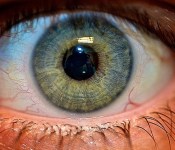
Iris Scanning: The Newest Addition to Apple’s Biometric Roadmap?
Over the course of the last several years, Apple has begun to take an intense interest in biometrics as a way to improve the security and accessibility of its devices. Apple purchased sensor company AuthenTec in 2012 and quickly incorporated its fingerprint-sensing technology into the Touch ID fingerprint scanner that debuted in the iPhone 5s.
Touch ID marked Apple’s first foray into biometrics, confirming user identity via fingerprint, but the company may have much bigger plans in mind for biometric sensors in future devices. Biometrics are said to play a key role in Apple’s iWatch, and Apple may even expand beyond fingerprint technology, as the company has reportedly taken a new interest in iris scanning.

While little is known about Apple’s investigation into iris scanning, it is a promising biometric technology that’s already widely used for identification and authentication purposes.
Read more 
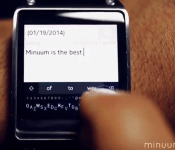
Mini Minuum Keyboard Teased on Samsung Galaxy Gear
Minuum keyboard first made its rounds in the IndieGoGo scene in the early part of last year. They raised $80,000 during their campaign and have had a pretty successful run since. Minuum is an interesting keyboard replacement that takes up less screen space, increases typing efficiency and just plain looks cool. Assuming you are willing to spend the time needed to learn it and use it. With its minimal approach it is pretty much the perfect keyboard replacement software to grace devices with small screens. With smartwatches starting to take a bigger hold in the market, it only makes sense that Minuum is looking to bring their application to a wrist sized screen.
 This morning Minuum sent out an email to its original backers announcing a new update to the app in the Play Store. The update fixed some Android 4.4 issues, memory leaks and a number of other things. It wasn’t the update to the Play Store app that was particularly of interest, it was the sneak peek at the keyboard up and running on a Samsung Galaxy Gear. Take a ‘watch’ of the video to see it in action.
Pretty intense, right? We don’t have any idea if this is just a proof of concept that it will work, and work well, or if the Minuum guys are gearing up to release the keyboard for Gear owners. Digital Trends has reached out to see if they can get the skinny on the situation. Until we find out the plans for Minuum on the Galaxy Gear, let us know if you are even interested in this making its way to the Gear or not.
Source: Digital Trends

AT&T Takes an In-Depth Look into the LG G Flex [Video]

Having trouble trying to decide if you want an LG G Flex or not? Well AT&T wants to help you. AT&T just uploaded a very in-depth look into the LG G Flex on their YouTube channel this morning. Seems fitting, since they just announced the phone yesterday for $300 on a new two-year plan. Many of you probably haven’t sat down and taken a look at what all the Flex has to offer, given the first feature you notice about the phone is the curved design, and beautiful display.
The LG G Flex has a lot to offer besides conturing to your face, and self-healing. There are many features added to the Android experience, such as dual window features, and Slide Aside. They certainly have made it easy to multitask while on your phone, and everything moves as smooth as butter. So check out the video below and let us know know if it drives you into purchasing the curved phone.
 AIVAnet