


iOS 7.1 Beta 4 May Be Released to Developers Tomorrow
Apple may be close to releasing iOS 7.1 beta 4 to developers, according to a report by BGR. The new beta is reportedly in the hands of testing partners and is slated to be released to developers as soon as tomorrow. The beta will be the fourth of a reported six planned developer builds for iOS 7.1.

We are told there are various fixes in this latest version, including fixing keyboard issues, problems with the contacts app, more changes to the phone UI, and other changes. We have heard from sources that with iOS 7.1, Apple is working very hard to address some large memory bugs and other issues in iOS 7 that have caused crashes and restarts for a lot of people. Additionally, iOS 7.1 should help unify iOS 7 better graphically, with various user interface updates across the entire system and in apps for a more cohesive feel.
BGR has a bit of a hit-or-miss track record when it comes to predicting iOS releases, but the timing for a new iOS 7 beta release makes sense. Apple tends to release new beta versions every few weeks, and tomorrow would be two weeks since the release of iOS 7.1 beta 3. It should be noted that the build number mentioned by BGR for the fourth beta, 11D5127c, is actually for the current iOS 7.1 beta 3. A possible typo, however, doesn’t invalidate the entire rumor, and therefore it remains plausible that the beta 4 is still in the pipleline for a developer release tomorrow.
     |

Google starts banning Chrome extensions bought by shady ad firms

A brouhaha over adware-laced Chrome extensions has forced Google to remove two from its store and possibly exposed a wider issue. According to the original developer of “Add to Feedly,” the problems happened after he sold his plug-in — created in a few hours — to a party for a too-good-to-be-true “four-figure” sum. As detailed in a blog, he discovered that new code was injecting ads into every page browsed without approval, angering users and lowering its rating. The same thing happened with “Tweet This Page,” another app that served up unwanted ads after being sold. Since other developers were also approached, there’s speculation that it could be a new type of scam: buying perfectly good extensions, altering them and then letting Google slip them to users via automatic updates. After it was contacted by the WSJ, Google pulled the renegade extensions, saying that recently altered terms of service prohibit them. However, that’s only because they didn’t ask user permission; there’s nothing to prevent apps from inserting such ads — something to keep in mind the next time you tweak Chrome.
Via: The Verge
Source: WSJ, Amit Angarwal

Nest promises not to force any privacy changes on customers after Google’s takeover

Google’s acquisition of Nest prompted more than a few privacy concerns, legitimate and otherwise — will you have to share temperature data with advertisers? You won’t, as long as CEO Tony Fadell has his way. He told those at the DLD Conference that there aren’t any plans to change Nest’s current privacy policy, and any changes will be both transparent and opt-in; your smoke alarm won’t start posting Google+ updates without permission. It will be a while before we see how well the company lives up to its promise, but it’s good to know that Nest’s ideal connected home won’t be too connected. Check out Fadell’s privacy remarks in the video below at about the 12:49 mark.
Filed under: Household, Internet, Google
Via: The Next Web
Source: DLD Conference
Samsung’s new smartphone TouchWiz UI leaks again
Expected to debut with the Galaxy S5, it looks like a combination of Google Now and Metro UI
A new tweet popping up yesterday from evleaks shows us a glimpse of what we might expect out of the Samsung Galaxy S5′s user interface. Looking like a cross between Google Now cards and Microsoft’s Metro UI cards, it’s unlike anything we’ve seen in Samsung’s smartphones. If Google is big on flat and clean, Samsung’s going glossy and full colored.
We can only imagine that these cards give priority to Samsung’s own apps and services, showing items such as weather, flight details, social media activity, events, and more.
Samsung recently introduced a new interface for tablets when they debuted the Pro family of devices; we would expect a smartphone refresh for 2014. Although these are only a few static images, we cannot help but appreciate the change in direction for Samsung. We’d like to see these in action, however, before we can give them a full pass. How intrusive is the experience? How does it work if you aren’t using Samsung’s apps? How user-defined can we set this up?
The post Samsung’s new smartphone TouchWiz UI leaks again appeared first on AndroidGuys.
New week, new rumors for the Samsung Galaxy S5
When it comes to rumors surrounding Samsung’s flagship devices, it’s starting to feel more like rumors surrounding Apple devices — starting months in advance of release.
For example, back in November we started hearing rumors the Samsung Galaxy S5 was expected to launch in Q1 of this year. This isn’t all that surprising as it lines up nicely with previous launches of flagship Galaxy devices.
Then as time has passed us by, the rumor mill is starting to heat up and turn out more and more rumors surrounding the device, seemingly one rumor a week (give or take).
As of right now the Galaxy S5 is supposed to come with new battery tech for faster charging, a QHD screen, an aluminum unibody, revamped TouchWiz UI, and now a 20-megapixel camera, complete with an iris scanner for added security, according to a report from PhoneArena.
It’s hard to sift through all of the rumors and separate fact from fiction, but with the Samsung’s history of pushing the envelope with new features (even features that many may deem unnecessary), many of these rumors may indeed be true.
As usual, only time will tell and you can be sure we will cover the device and it’s specs once its made officially available.
Until then, be sure to tune in next week. Same rumor time, same rumor channel.
The post New week, new rumors for the Samsung Galaxy S5 appeared first on AndroidGuys.
Detecting the Latest Security Trends
As the years pass, technology is becoming more and more advanced and the technology that’s used for surveillance systems is no different. Home and business owners who plan on getting a security system or who plan on upgrading their current security system should look into the newest security innovations to see if there’s anything that they might want to include into their system.
Security on the Go
You can now monitor your home no matter how close or how far you might be from it with mobile security. Smartphones can now be linked up to your security system so that you can activate or deactivate your system without being physically present. You can also monitor the video feed to keep an eye on your kids if you aren’t home when they get back from school.
In addition to monitoring security systems, you can also use your smartphone or tablet to turn lights on and off and adjust your thermostat.
Wireless Security Equipment
Now you don’t have to worry about tripping over the cords from your security system or drilling holes into your walls thanks to wireless security equipment. One of the great things about wireless equipment is that you can place sensors wherever you’d like rather than only where the wires will reach. If you do a lot of moving around, wireless security equipment is a breeze to pack up and move with you to your new home.
Better Video
Now you can enjoy high quality high-definition video with your home surveillance. You don’t have to worry about looking at a blurry image whenever you want to zoom in on an image now that there are more megapixles to enjoy. The advantage of this is that law enforcement will have an easier time of identifying criminals and the details of crime scenes.
There are also video verifications that allow you to receive a video clip via email or text whenever your alarm is tripped so that you can verify whether or not you have an intruder before an alarm is sent to the security company. If you’re charged for every false alarm that your system triggers, you’ll be thankful for the special verification system.
Firefighting
Rather than buying inexpensive smoke detectors for your home, you might prefer to have your home monitored 24 hours a day, seven days a week. You can’t always depend on a smoke detector to work properly, and you might get so tired of it beeping every time there’s a mishap in the kitchen that you remove the batteries and forget to put them back in.
If you live in an area that’s especially prone to wildfires, fire surveillance might be something you want to consider for your home and family. Another great thing about the new fire surveillance system is that the alarm is sent over the Internet instead of through your home’s phone line, which means that you don’t have to worry about paying for a monthly phone line. After about a year or so, the system will pay for itself.
Even if you already have a home surveillance system, you might want to think about upgrading it with the latest security technology. Criminals are getting smarter, so make sure that your surveillance system is up to the task of keeping you safe.

Is this the Samsung Galaxy S5’s new tile-based home screen?

As Samsung’s Galaxy S5 gets ready to launch, the rumor alert scale has already hit “yellow.” The latest from @evleaks shows a possible TouchWiz home screen that would be a sharp U-turn from the current one, if real. It displays information and notifications like Google Now in a tiled format à la Microsoft’s Modern/Metro UI — not unlike the Galaxy Note Pro 12.2‘s Magazine UX. Naturally, there’s no info about how the software would gather up such data, but in any event, the screenshot above could easily be a Samsung test or a fake — we’ll find out in a few short months.
Filed under: Cellphones, Mobile, Samsung
Via: Engadget Spanish (translated)
Source: Evleaks (Twitter)

Korean carrier to launch broadband-shaming 300Mbps LTE-Advanced network this year

Most of us in Europe and North America try not think about how much we’re getting smoked by Asia in terms of internet speeds, but here’s another reminder: residents in South Korea will soon enjoy 300Mbps wireless on the nation’s largest carrier, SK Telecom. That follows on the heels of a similar effort by CSL in Hong Kong, which achieved the same speed by combining two 20MHz LTE bands. However, the Korean carrier is using so-called LTE-Advanced 3-band carrier aggregation tech, which combines one 20MHz and two 10MHz bands. Before residents there can download the proverbial 800MB movie in 22 seconds, though, the new format will have to be standardized globally and adopted by smartphone and chip makers, a process SK said is underway. While you’re mulling that, the carrier will actually be showcasing even better 450Mbps tech in February at Mobile World Congress — so enjoy your 75Mbps max LTE, citizens.
Via: TNW
Source: SK Telecom

Must Have Windows Phone 8 Apps
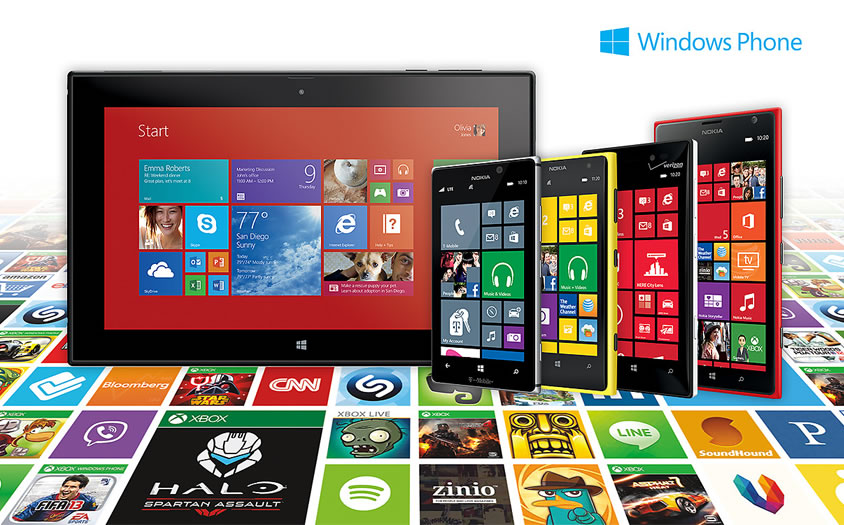
Microsoft has been a little slow coming on to the smartphone scene, but it is starting to make some headway with the introduction of Windows Phone 8. The slick and easy to use UI is very comfortable for both those new to the smartphone experience, and those familiar with the Windows 8 OS.
The partnership with Nokia, as well as still providing the Windows platform to third-party manufacturers like HTC has resulted in some very nice handsets at a very competitive price – some even under £100.
Though they are still playing catch up in the app department, the Windows App store now offers over 100,000 titles. Though that is dwarfed by Android’s and Apple’s 1,000,000 titles, Microsoft follows strict guidelines on what apps can be sold for their platform, much like Apple does. This guarantees that the apps you get will behave properly, and work well, ensuring a smoother overall experience.
Windows Phone 8 comes loaded with many handy Apps like Microsoft Office, Polished Email, Calendar, News, Photo and Music Apps. Here’s a short list of some must-have apps that goes beyond these basics:
1.WhatsApp – If you have any familiarity with smartphones, chances are you’ve already heard of WhatsApp. If not, this is a smartphone messenger that is available for all popular platforms like Android, iOS, and now Windows Phone 8.
The latest iteration has fixed many of the previous version‘s bugs, and runs much smoother. WhatsApp allows you to use your 3G, 4G or Wi-Fi connection to message family and friends who have the same app.
This is a great way to save on texting charges, especially when travelling abroad.
2.Skype – Much like WhatsApp, Skype is the omnipresent video chat software available for connections from phone-to-phone, phone-to-computer (or vice versa), computer-to-computer, and even connections to landlines.
Though the video chat is the nicest feature of the app, it will allow you to make phone calls and texts as well. This is another great way to make free calls using a Wi-Fi connection, which could save you a bundle when you learn to use this procedure correctly.
Be sure that when you are using Skype, you are calling someone who is also running Skype. Though you can call any phone, if it doesn’t go through Skype on the receiving end, you will get connection surcharges, and be charged like a normal phone call.
3.Networking Apps (Facebook, Twitter, etc.) – These have been linked together, because most people understand the idea of social (or business) networks already. Many of the major players like the two mentioned offer apps for Windows Phone 8.
These apps allow you to share thoughts, information, pictures, and your location, even what you’re eating – anytime, anywhere. If you frequent the Social Networks (even if it’s just to play some of their games), and would like the convenience of mobile access, these apps are a must.
4.Indigo – This is a Siri-like voice enabled personal assistant app for Windows Phone. Though the interface is more command based than conversation, you can still accomplish a great deal with this PA, such as: updating Facebook, interacting with Twitter, get recommendations for local restaurants, bars and other venues, get directions, create and store diary entries, create notes and reminders (with alerts), play music stored on your phone and more.
Indigo is a definite must for the ultimate hands-free Windows Phone 8 experience.
5.Yelp – Indigo can tell you how to get somewhere, and Yelp can help you decide where to go. With reviews of near-by hotels, restaurants, and other social gathering places, Yelp is a must have for the user on the go.

MEElectronics Air-Fi AF32 Bluetooth Wireless Headphones Review: connect to your device and Runaway
 I’ve never been a huge advocate of wireless accessories; being an avid gamer, the idea of a wireless peripheral running out of battery while in the midst of battle is basically the most horrifying thought. However, with the torrents of Bluetooth devices now available, ranging from speakers to smartwatches and even lifeloggers, it’s increasingly hard to ignore the benefits of going wireless. What really changed my mind about wireless accessories, in particular Bluetooth headphones, are the MEElectronics Air-Fi AF32 Bluetooth Wireless Headphones. Let’s check them out.
The headphones
I’ve reviewed a MEElectronics product once before, their M9P earphones (which you can read the review for here), and what stood out to me most about that pair of earphones was the bang for buck you got from what is essentially a budget audio product. The MEElectronics Air-Fi AF32 Bluetooth Wireless Headphones, or simply the ‘Runaway’ headphones, appear to be no different as you will discover as soon as you open its box.
 Inside you will find the headphones themselves, a USB charging cable, a physical 3.5mm-to-3.5mm audio cable, a user manual and a felt carry bag to put everything in. As you can see, the Runaway is collapsible into quite a small package, and while this feature is already a nice plus, I like that MEElectronics has also included a bag to store it in, particuarly as the headphones are quite glossy and potentially susceptible to dirty and damage. Naturally, the bag also serves as a nice place to store the included cables so that you can charge them wherever you can find a USB port.
 While the folding of the headphones is a great travel convenience, I did notice, especially after playing around with it for a few minutes, that the join between the two edges coming together are quite close and often emitted a sharp clicking noise when unfurling the headphones. This was actually caused by the plastic inner layer being pulled back and released, snapping back and causing the sound. Whether or not the headphones can put up with this continued abuse remains to be seen, but the fact that it fits so flush when the headphones are in place does make the Runaway one attractive set of audio equipment.
The Runaway is part of MEElectonics’ Air-Fi line of headphones and is available in six different colours schemes: bubblegum pop pink, hot chart topper red, classic black, classic white, vinyl black and vintage red, and the rhythm & blues blue which we are reviewing here.
 The Runaway comes with just 6 buttons, all located on the right side, including a power button, answer call button, skip forward and back, and volume up and down. It’s pretty much all the buttons you’ll ever need from a mobile headset and setting it up is pretty simple; all it takes is to hold the power button for a few seconds and the pairing can begin. Above the buttons are two LEDs which help indicate things such as charging, Bluetooth connection and searching for pairings. A flashing blue LED is pretty standard issue for most Bluetooth devices, but I felt myself loathing the blue light on the Runaway as it routinely illuminated my room while I listened to music before I slept. It’s not a huge issue, but for people who are pedantic about these things, it can be irritating. Otherwise, the lights are a nice, simple way of indicating the few things that the Runaway does.
 As I mentioned earlier, a 3.5mm-to-3.5mm audio cable is included with the Runaway which will enable you to continue listening to music using the headphones even when the batteries have run flat. It’s a very nice touch to allow passive audio listening when the headphones are unpowered, though the cable is only a stereo cable which means you won’t be able to use the Runaway as a mobile headset while using it in this configuration. I did find it unusual though that the audio cable plugs into the right side of the headphones whereas the majority of wired headphones will have only a wire coming out of the left side; again, just a niggling issue. And yes, the Runaway does actually have a hidden microphone located on the right side which can be used to receive calls when connected via Bluetooth.
The comfort
 It might be difficult to tell from these photos, but the Runaway headphones are insanely light. MEElectronics has really boiled the Runaway down to the bare essentials and it’s resulted in a pair of headphones that weigh almost nothing. As you can expect then, the Runaways are a dream to wear. Since they are so light, the head cushion almost feels like its not there and the ear cushions are fantastically soft.
The Runaway isn’t a tight set of headphones either which makes them probably one of the most comfortable headphones I’ve ever worn, right up there with the Steelseries 5Hv3 (which I reviewed here). Unfortunately, this does affect the sound of the headphones, which we’ll get onto next.
The sound
 The audio quality is sharp and precise. The treble and mid ranges are clear and crisp and the bass is good. The bass could probably stand to be a little beefier, but in this day and age or bass-heavy headphones, the Runaway’s balanced sound is a nice change of pace. That said, if you turn it up, the bass can become incredibly intense, and indeed, the sound of the Runaway doesn’t appear to be phased by the increase in volume. If anything, the only weakness the audio of the Runaway has is the Bluetooth connection itself, which from my experience, has a few too many glitches in it to be enjoyable. Of course, you can always connect to it via audio cable which does away with the problem, but then you have to endure the fact that it’s no longer wireless.
 Returning to the fact that the Runaway is a ‘loose’ set of headphones: while the Runaway does fit quite snugly, there is no active or passive noise cancellation meaning that sound can get in and out of the headphones quite easily. This might not be an issue for most, but those commuters among you who will be listening to music in the hustle and bustle may have to turn it up a little during their travels.
The verdict
Rating: 4/5
 As a travel audio accessory, the Runaway is a pretty good one: able to fold up into a tiny footprint and with a carry bag provided, the Runaway looks like a good option if you’re travelling quite a lot. They’re not terrible big or incredibly heavy which makes them a good fit for the bill.
Furthermore, I think they are a really nice looking set of headphones. Particularly in the rhythm & blues blue, I think the looks of the Runaway rivals that of a set of Beats Solo headphones (gasp). Yeah, I said it. Having said that, I don’t exactly like the look of the buttons on the Runaway; somehow I feel like the straight bumper buttons clash with the whole curved, sleek vibe of the headphones, but that might just be me.
 The Runaway sounds damn good too which makes it an exceptional choice for personal headphones. And at $99.99 USD, it’s right in the sweet spot for a pair of Bluetooth headphones, and the fact they sound amazing is a huge bonus. My only gripe of course is that my Bluetooth experience wasn’t as smooth as it could be, but the benefits of having wireless headphones is significant. Using it as a mobile headset is also practical as the mic is clear and call quality is pretty much the same as if you had the phone to your ear.
All in all, the MEElectronics Air-Fi AF32 Bluetooth Wireless Headphones are a fantastic package for a great price. And as of 20/01/2014, MEElectronics are actually having a sale on their store, cutting the price of the Runaway down to $74.99. If you weren’t convinced that they were great value before, they’re now 25% better. Check out the MEElectronics links down below to jump on the offer or check out some of MEElectronics’ other products.
Gallery of photos


 AIVAnet