


Google Now for Desktop Available in Chrome Canary Builds [Mac Blog]
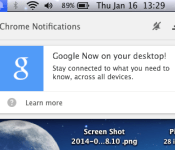
Google Now is a personal assistant service that is considered to be Google’s counterpart to Siri. Available on iOS and Android devices, the service is now making its way onto the desktop via Chrome Canary, the experimental build of Google’s Chrome web browser.

As reported by the Google Operating System blog, the latest build of Chrome Canary allows users to receive Google Now cards directly in the browser’s notification system. Canary users on the Mac can enable the personal assistant by turning on the correct flag in the browser. Users should go to “chrome://flags/#enable-google-now” and then switch the settings from “Default” to “Enabled.” A final click on the “Relaunch Now” button will turn on the feature.
Users who are signed into Chrome will receive a Google Now notification and a list of available cards. According to a Google support page, Google Now on the desktop will support weather, sports scores, commuter traffic and event reminders. Some of these desktop cards will sync with Google Now if it is enabled on a mobile phone. These mobile-synced cards will display relevant information using location data pulled from the mobile device.
Google Now for the desktop is still in the experimental stage, but it will likely land in the consumer version of Chrome for the Mac. 
     |
 AIVAnet