


Amazon Appstore overhauls developer portal
The Amazon Appstore today announced that developers now have a brand new portal for which to work and upload apps. Overhauled with a re-designed look and feel, it also focuses on recently introduced features and resources such as compatibility testing and submission.
To learn more about the redesigned portal, and to get a feel for all that’s changed, be sure to check out Amazon’s blog post.
The post Amazon Appstore overhauls developer portal appeared first on AndroidGuys.

The Engadget Show: Behind the Scenes at CES 2014

Can’t be here with us at CES? Unfortunately we can’t give you the cold morning desert air, throngs of slow-moving showgoers or the creeping convention sickness that will overtake us all by week’s end. We can, however, bring you the next best thing: a tour of the show floor and some behind-the-scenes peeks at our CES operations, including a walk through our backstage area and a look at our doublewide trailer (we roll classy here). Join editors Mat Smith and Michael Gorman for a funny-accented mini Engadget Show just after the break.
Hosts: Michael Gorman, Mat Smith
Producer: Benjamin Ahr Harrison
Executive Producer: Brian Heater
Subscribe to the Show:
[iTunes] Subscribe to the Show directly in iTunes (MP4).
[Zune] Subscribe to the Show directly in the Zune Marketplace (MP4).
[RSS MP4] Add the Engadget Show feed (MP4) to your RSS aggregator and have it delivered automatically.
[HD RSS] Get the Engadget Show delivered automatically in HD.
[iPad RSS] Get the Engadget Show in iPad-friendly adaptive format.

Live from the Engadget CES Stage: Stern Pinball CEO Gary Stern

It wouldn’t be Vegas without some pinball. For the second year in a row, Stern Pinball CEO Gary Stern will be hitting the stage to talk about building machines in the age of the video game.
Filed under: Gaming
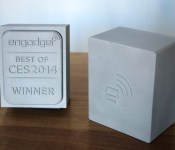
Less than 6 hours left to vote for your favorite gadget of CES 2014!

If you haven’t voted for your personal best of CES yet, get on it now! We have a healthy list of our own top choices, but one of our 15 Best of CES Awards will be decided by you. Head to the poll now, and check in later today when we announce readers’ People’s Choice pick along with the rest of the winners.
What was your favorite gadget from CES?
Filed under: Announcements

Live from the Engadget CES Stage: Formlabs co-founder Maxim Lobovsky

The 3D printing field is a big enough story at this year’s show to justify its own section on the CES floor. And while plenty of companies have thrown their hats in the consumer ring, Formlabs has taken a different tact, looking to bring high-quality, near pro-level printing to the masses.

Live from the Engadget CES Stage: Wacom CEO Masahiko Yamada

Wacom’s been long known for offering up a different sort of tablet than the consumer models that tend to flood the CES show floor. And while the Cintiq marks a bit of an experimental step in that direction, the device is still firmly grounded in what the company does best: offering up high-end pen-based tablets for graphics professionals.
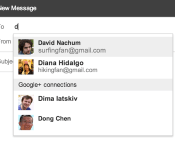
Gmail now lets you email Google+ users directly, still keep your email address private if you choose to

Even though the rest of the tech world is preoccupied with a little trade show in Vegas, the folks in Mountain View are still working hard. Today, Google has rolled out a nifty new feature for Gmail and Google+ users: letting them email each other whether or not they’ve actually exchanged email addresses. That’s right folks, now, when you are typing in email recipients, Gmail will make suggestions to add from your Gmail and G+ contacts, too. Naturally, users can decide which of their circles get access to their inbox, or whether to accept emails from social networkers at all. In practice, should a Google+ contact in one of your circles send you a message, it’ll pop up in the Primary category of your inbox, while all others coming from G+ will wind up under the Social tab. Sound good? The feature will be rolling out worldwide soon, so look for an email from Big G telling you how to set it up in the next few days.
Filed under: Google
Source: Official Gmail blog
Gmail app updated to 4.7.2
Google is pushing out its latest update to Gmail with version 4.7.2. As many users have requested that automatic images show up, they have heard your plea! If you don’t want it, just simply go into settings and disable it!
The download is not pushing out just yet, but courtesy of Android Police, they have provided a link to the official APK here! Let us know if you’ve received it “officially” or any other changes you see as well!
Source: Android Police
The post Gmail app updated to 4.7.2 appeared first on AndroidGuys.
Samsung: “We will go back to the basics” for Galaxy S5
Due by April, the next-gen flagship will debut with a new Galaxy Gear
Samsung, speaking with Bloomberg this week, confirmed that the Galaxy S5 will debut by either March or April. Also due at the same time is a new version of the Galaxy Gear smartwatch.
According to Samsung, the handset maker is taking a “back to basics” approach for the Galaxy S5. Conceding that most customers could not discern the differences between the Galaxy S3 and the Galaxy S4, this year’s model will be more obvious.
Mostly, it’s about the display and the feel of the cover
Additional features that may or may not make the cut for the Galaxy S5 are said to include a fingerprint reader or eye scanner.
As for the wearable tech, Samsung says the Galaxy Gear refresh will feature more advanced functions and will have a less bulky design.
The next-generation Galaxy Note (4) could offer customers a wraparound display when it debuts in the second half of 2014.
“We are targeting consumers who want more professional use and tend to be willing to pay more for handsets”
Brace yourself, we are about to run face-first into the buzzsaw that is the Galaxy S5 rumor mill. As if it weren’t already the subject of much speculation and conjecture, the next two months could crank things up a notch.
The post Samsung: “We will go back to the basics” for Galaxy S5 appeared first on AndroidGuys.

Social calendar app Sunrise finally comes to iPad

Launching on iPhone in February 2013, Sunrise changed our perception of calendar apps with its ability to provide more context to daily events. By connecting to Google, iCloud, Facebook, LinkedIn and Foursquare accounts, Sunrise can intelligently integrate appointments, birthdays and even checkins into its slick calendar UI, giving users a complete picture of what they’ve done in the past and the things they need to do in the future.
Despite its iPhone-only availability, the free app has grown to become one of the most popular third-party iOS calendar apps, consistently ranking in the App Store’s top 100 productivity apps in the final quarter of last year. Almost a year on, Sunrise developers Pierre Valade and Jeremy Le Van have decided it’s finally time to bring the stylish calendar app to iPad, complete with visualization and synchronization improvements.
Like its iPhone counterpart, the Sunrise iPad app will immediately request that you connect your cloud accounts when you open it for the first time, helping to feed it with information it’ll need to remind you about later. Valade says the team has worked hard to bring the best Sunrise experience to the iPad, and so it’s created two new weekly and monthly views that “make it easier to plan from your iPad and navigate in time quickly.”

If you’ve used Google Calendar or Apple’s Mac Calendar.app, you’ll be familiar with Sunrise’s time-based views, although Sunrise will deliver more information at-a-glance. If you see that you have a particularly busy day coming up, the week view will let you dive deeper and see how much free time you have outside of those events. The new week view has also been ported to the iPhone app and can be selected by tapping the week icon next to the new event button.

Tapping on a day will generate a new pop-up tab that displays all of your appointments and reminders. Drawing from the original iPhone UI, Sunrise for iPad not only chronologically lists events, it also categorizes them by assigning them a small icon related to the activity you have planned (or the service they are connected to). As you can see from the screenshot above, if you’ve planned a movie night, the app will assign a little movie ticket icon to the entry. If there’s a location attached to an appointment, Sunrise will provide directions, although Apple Maps, Google Maps or Waze will do the heavy lifting. It’s little things like this that make this that make Sunrise really stand out from other calendar apps.
In the past, if you wanted to ensure Sunrise had an up-to-date list of your upcoming appointments, you’d have to open the app and have it download them, which is especially annoying if you add events from different devices. Sunrise version 2.1 eliminates that frustration by integrating background updates that will synchronize all of your connected cloud accounts every hour by default, or at 30 or 15 minute intervals (if you need tasks to show up a little quicker).
While there’s no shortage of productivity apps on the App Store, Sunrise’s slick user interface and iterative features consistently continue to push the bar for iOS calendar apps. Soon, Apple users won’t be the only ones enjoying the app: desktop and Android versions are expected later this year. Today’s update, however, sees the app go universal while remaining free to download — hit the source link below to try it for your yourself.
Filed under: Tablets, Internet, Software, Mobile, Apple, Google
Via: Sunrise Blog
Source: Sunrise Calendar (App Store)
 AIVAnet