



Netflix is testing multiple new subscription plans, like 3 streams for $9.99

Netflix likes to run small tests of features and packages before it offers them widely (like its new unified UI), and that includes the “1 SD stream for $6.99″ some have started seeing recently. Another offer currently in testing covers the hole between the standard $7.99/month offer that provides up to two simultaneous streams on one account and the $11.99 offer that goes up to 4 at once. Just like the 1 stream offer not everyone will see it and there’s no way to know if it will ever become widely available, but a few will see a $6.99 option that provides 3 simultaneous streams.
Netflix has declined to push cable TV-style tiers and pricing packages, but the multiple tests seem to show how it’s trying to find the sweet spot with what it offers. We also checked on a widely-reported reported list of movies that may leave streaming January 1st, but Netflix could not confirm which titles will actually go away, referring to the constant ebb and flow of titles on Watch Instantly. We’ll be interested in seeing what’s still available after the ball drops and what new options arrive (seasons 5 – 8 of Dexter and Jack Reacher are incoming, and original content like S2 of House of Cards isn’t far off) but if you really need to watch Half Baked this wouldn’t be a bad time to press play.
Filed under: HD
Mac Pro/OS X 4K Display Compatibility ‘Like the Wild West’, Some 4K Monitors Unsupported
In its lengthy review of the new Mac Pro, AnandTech discovered that the Mac Pro’s current support for 4K monitors leaves something to be desired. The reviewer connected the Sharp 32″ 4K display that Apple currently offers on the Apple Online Store, expecting that OS X work the same way on that panel as Apple’s current Retina MacBook Pro models do.
On those machines, Apple renders the screen at full resolution but then renders text, menu and UI elements at 4x their normal resolution so they are the appropriate physical size for the user. It also offers multiple options to scale UI elements up or down as the user prefers. Instead, using the Sharp panel with the Mac Pro makes text and other on-screen elements — aside from photos and video — very small and difficult to read.
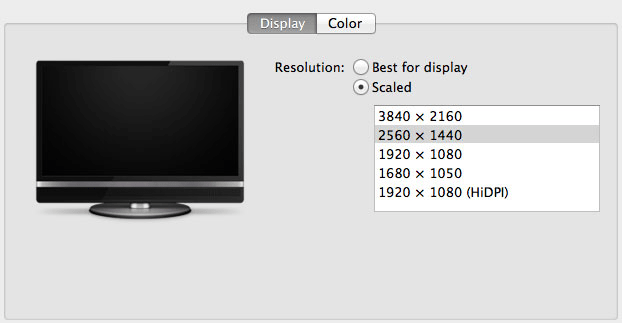
I was fully expecting all of this to be available on the Mac Pro when connected to a 32” 4K display. By default, there’s only a single supported scaled resolution: 2560 x 1440. Unfortunately it doesn’t look like Apple is running the same supersampling routines when you pick this resolution, instead you get a 2560 x 1440 desktop scaled up to 3840 x 2160 (rather than a 5120 x 2880 screen scaled down). The result is a bit of a blurry mess.
You can use tools like SwitchResX (or Quartz Debug or the necessary Terminal command) to enable a 1080p HiDPI mode, but then you end up with insanely low point density of around 68 PPI. Unfortunately it doesn’t appear to be possible to define your own HiDPI modes in OS X, you have to rely on those that Apple officially supports. I tried creating a 5120 x 2880 (2560 x 1440 HiDPI) mode but I couldn’t get it working under Mavericks. I’m not sure if I was limited by the OS or if Sharp’s EDID-specified max resolution of 3840 x 2160 prevented OS X from accepting what I was trying to do.
AnandTech also tried the new Dell UltraSharp 24 Ultra HD display but found that the display is not properly supported by the Mac Pro.
The reviewer calls OS X’s 4K display support “a bit like the wild west at this point”, though he anticipates Apple will fix things with both software updates and its own displays in the future — but urges early adopters to be aware of what they’re getting into.
I am disappointed that Apple didn’t enable any HiDPI modes on the 32” Sharp display. While I found 3840 x 2160 a great resolution for video work, for everything else it made on-screen menus and text a bit too small. I would love to see a 2560 x 1440 HiDPI option (rendering offscreen at 5120 x 2880 and but scaling down to 3840 x 2160 for display) but it looks like I may have to wait for Apple’s own display before I get something like that.
It’s been two years since Apple has updated its standalone display lineup, and the company is expected to come out with new models sooner rather than later. However, there are no concrete rumors suggesting when such an update might happen.
     |

Dell portrays itself as a feisty startup in its first ad after going private (video)

Now that Dell is once again a private company, it’s trying to shake off its reputation as a member of the status quo. Appropriately, the PC builder just unveiled a new TV ad that suggests it has all the energy and vision of a technology startup. The minute-long spot connects Dell’s mindset to that of companies like Dropbox, Gilt and Skype, which started out in modest places but went on to accomplish great things. We’re hopeful that the ad reflects fresh thinking in Round Rock’s offices, but actions will speak louder than words — it’s hard to believe that a tech giant can be as nimble and innovative as a tiny outfit with something to prove.
Filed under: Desktops, Laptops, Dell
Via: CNBC (Twitter)
Source: Dell (YouTube)

Daily Roundup: NSA iPhone malware, Mac Pro teardown, this year in reviews and more!

You might say the day is never really done in consumer technology news. Your workday, however, hopefully draws to a close at some point. This is the Daily Roundup on Engadget, a quick peek back at the top headlines for the past 24 hours — all handpicked by the editors here at the site. Click on through the break, and enjoy.

The year in reviews
We reviewed more than 170 products in 2013, but rather than leave you to sift through them yourself, we’ve compiled our most memorable reviews into one simple package. Click on through for more details.

Leaked NSA iPhone Hack
Leaked documents dating from 2008 reveal an NSA program called DROPOUTJEEP, which developed iPhone malware that can remotely access files on the devices. Follow the link for the video and more information.

Mac Pro teardown
Apple products aren’t exactly known for their serviceability, but according to iFixit’s latest teardown, repairing the new Mac Pro is a surprisingly straightforward affair. Click through for details on the repairability score.

Google Glass available to All Access subscribers
Are you a Google Play Music All Access subscriber? If so, you now have the option to purchase your own Google Glass headset. Click the link for more information.

Galaxy S5 Hands-On Concept Video! Moto G for $100?! – The ManDroid Show

Happy New Year’s Eve my Android friends. Hopefully you guys secured yourself a nice party spot for tonight. First you must get your ManDroid fix. A Galaxy S5 concept video showed up yesterday, giving us a loo at what it will not look like and have. The Moto G might be coming for Verizon soon, but for $100? Most likely not, but that would be awesome. Enjoy the show, and Happy New Year!
Mews Topicn
Galaxy S5 concept video
Moto G spotted for Verizon
Eric Schmidt talks 2014
Galaxy Gear and Galaxy Band may be coming to MWC

Moto G coming soon to Verizon Wireless?
Motorola recently revealed the budget version of the Moto X, known as the Moto G. It’s a decent device and it was made available in November by Motorola it self, as it could be purchased from their official site. Now it seems Moto G will be launched by one of the largest US mobile phone network – Verizon Wireless. A Google+ user known as Josue Joseph, who apparently works at Best Buy, shared a picture of a Moto G in Verizon retail packaging.
 Also the guys says that “it looks like it is going for $100″ , however no words on the release date. So it seems that Best Buy is getting their shelves ready, and we might see the Verizon Moto G – without any contract – with in a matter of days.
Are you looking forward to grab one?
Source: G+
The post Moto G coming soon to Verizon Wireless? appeared first on AndroidGuys.

Ring in the new year from your phone with the Times Square Official Ball App
 2014 is approaching fast, it’s only a few hours a way, and if you can’t be in New York City or near a TV, you can see one of the most famous ball drops right from your Android device.
The app isn’t new, but if you deleted the official app from the Times Square Ball Drop since last year, be sure to download it again so you don’t miss out on ringing in the new year with the rest of the world.
The raising of the ball starts at 6 p.m. EST and then be sure to tune in right before midnight with your 2014 glasses and champagne (if you’re of age, of course) to catch the main event.
Happy New Year from AndroidGuys! We can’t wait to continue bringing you guys coverage of all things Android in 2014!
RING IN THE NEW YEAR WITH THE FREE OFFICIAL 2014 TIMES SQUARE BALL APPS
Watch the Live Webcast and Talk with the Ball on Twitter for a unique live perspective on the Times Square New Year’s Eve Celebration
Revelers across the globe can get up close and personal with the New Year’s Eve celebration in Times Square with the free official 2014 Times Square Ball Apps, from the Times Square Alliance and Countdown Entertainment, organizers of Times Square New Year’s Eve. For the first time, users will enjoy the mobility of watching the Times Square New Year’s Eve celebration at home, work or anywhere in the world while conversing with the Times Square Ball who will share his unique perspective of the performers, revelers and other festivities happening in Times Square via Twitter.
Now available on Android and Apple devices, the new 2014 Times Square Ball App continues to grow in popularity with nearly 500,000 downloads from 162 countries across the globe. Revelers worldwide from Afghanistan, Argentina and Australia to Ukraine, Vietnam and Zimbabwe will use the app to watch the official Times Square New Year’s Eve webcast.
Additionally, the Times Square Crossroads App, brought to you by the Times Square Alliance, will be available for revelers to tune into the New Year’s Eve live webcast and learn more about events at the Crossroads of the World.
The live, six-hour commercial-free webcast will be hosted by returning national television and radio personality Allison Hagendorf (Host on The CW, VH1, Fuse TV, AXS, SiriusXM) and will cover the action and excitement in Times Square, including the Ball Raising at 6 p.m. EST, live musical performances, and hourly countdowns with network television hosts and other celebrities in Times Square as the anticipation builds towards the midnight countdown and the famous Ball Drop. Allison will be joined by three correspondents who will provide backstage access, behind-the-scenes stories, and interviews with revelers, performers and other special guests. This year’s show will also feature an exclusive reveal of AP’s Year-End News Highlights video and an exclusive clip from the upcoming movie The Amazing Spider-Man 2™.
“In response to the tremendous worldwide enthusiasm,” said Jeffrey Straus, president of Countdown Entertainment, “we are again providing the official live viewing experience for users of mobile phones and tablets to interact with the Times Square Ball and the world’s most famous New Year’s Eve Celebration.”
“With the new Times Square Crossroads App, revelers around the world can experience the energy of New Year’s Eve in Times Square and watch the global celebration, including live musical performances, interviews with celebrities and the magical Ball Drop at midnight, all on their mobile devices,” added Tim Tompkins, president of the Times Square Alliance.
“New Year’s Eve 2014 marks the fifth year Livestream brings the celebration in Times Square to millions around the globe in real-time,” said Max Haot, co-founder and CEO of Livestream. “Now, with the reimagined Times Square Ball App, we’re bringing a live, social experience to the fingertips of revelers worldwide.”
The official 2014 Times Square Ball App is now available worldwide for free download through Apple’s App Store and via Google Play for mobile phones and tablets. The Ball App can be found in Entertainment, Travel, and News categories.
The Times Square Ball App was produced by Monday Sessions Media, developed by HAAS/créa, with streaming components developed by Livestream LLC. Device requirements:
- Apple products: iPhone, iPod Touch, iPad. Requires iOS 6 or later. 9.1MB (size of App)
- Android products: Requires Ice Cream Sandwich 4.0 or later. 4.6MB (size of App)
App images, demonstration video, and download available at: http://timessquareball.net/app/
The Times Square Crossroads App is now available worldwide for free download through Apple’s App Store and via Google Play for mobile phones. The Crossroads App can be found in the Travel category. The Times Square Crossroads App was developed by BarkleyREI, with streaming components developed by Livestream LLC. Device requirements:
- Apple products: iPhone, iPod Touch. Requires iOS 6 or later. 6MB (size of App)
- Android products: Requires Gingerbread 2.3 or later. 3.5MB (size of App)
To join the Times Square New Year’s Eve conversation on social media, follow #BallDrop.
Follow the Times Square Ball on Twitter at twitter.com/timessquareball
Like the Times Square Ball on Facebook at facebook.com/timessquareball.
For more information about Times Square New Year’s Eve, visit TimesSquareNYC.org.
The post Ring in the new year from your phone with the Times Square Official Ball App appeared first on AndroidGuys.
Entry-Level Mac Pro Offers Comparable Pricing Versus OEM PCs, DIY Systems More Affordable
Anandtech today published its comprehensive review of the Mac Pro, including a price comparison between the Mac Pro and similar systems from competitors HP and Lenovo.
When comparing the entry-level 3.7GHz quad-core Mac Pro with dual AMD FirePro D300s to both the similarly specced HP Z420 and the Lenovo ThinkStation S30, Anandtech found the Mac Pro to be competitively priced at $3248 (priced with AppleCare) vs. $4490 for the HP and $4373 for the Lenovo.
While there are some important distinctions between the computers, such as the fact that the HP system only offers a single FirePro W7000 and supports more displays, the pricing experiment suggests that Apple’s pricing is in line with other Ivy Bridge EP systems.
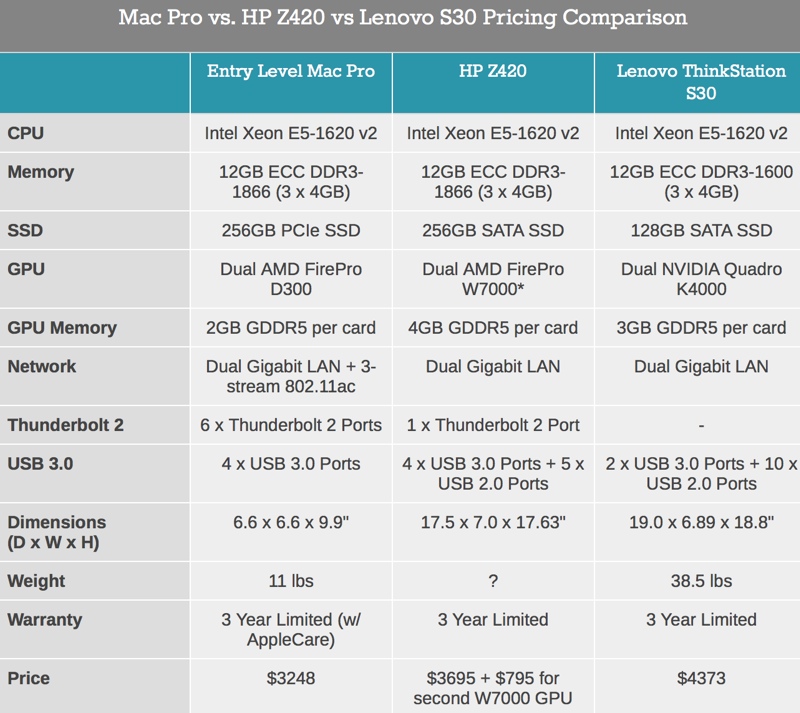
As I learned last time, there are typically some hefty discounts associated with workstation orders so take this pricing with a grain of salt. I also had to fudge the HP numbers a bit as I can only get a single FirePro W7000 in the Z420 configuration – I just doubled the W7000 adder in order to simulate what a theoretical dual GPU version would cost. There are other imbalances between the comparison (HP supports more displays, Apple features more Thunderbolt 2 ports, FirePro W7000 features ECC GDDR5, etc…), but the point here is to see if Apple’s pricing is out of touch with reality. It’s not.
While Apple’s pricing is competitive with similar PCs from HP and Lenovo, AnandTech found that building a comparative PC from individual parts was far less expensive, at least for lower-end systems. Pricing out an option with an Ivy Bridge E Core i7 PC with 12GB of RAM, two FirePro W7000 GPUs, and a fast SATA SSD came to $2730, a good bit less than the approximately $3499 a similar lower-end Mac Pro would cost from Apple.
AnandTech did not price out a higher-end DIY system, but earlier this month, FutureLooks attempted to build a PC equal to the top-of-the-line 12-core Mac Pro with 64GB of RAM, 1TB of flash storage, and Dual AMD FirePro D700 GPUs. Using similar parts (several Mac Pro parts – like the FirePro GPUs – were built exclusively for Apple) a PC equivalent to the high-end Mac Pro was actually priced at $11,530.54, far above Apple’s asking price of $9,599 for its professional workstation.
AnandTech‘s full review, which includes benchmarks comparing the Mac Pro to previous Mac Pros and other offerings from Apple as well as comments on 4K displays, is well worth reading.
| |

PowerUp 3.0 brings Paper Airplanes to a new Level
I have very fond memories of folding countless sheets of paper into airplanes and throwing them across the house and yard. I even used to have a “howto” book to make more insane looking and flying sheets of paper. It was always a quick and inexpensive way to have some good fun. While I still fold some up for my 3 year old son, I have since moved on. Thanks to the innovation of Shai Goitein, we are soon going to be able to mix the fun of paper airplanes with the power of our devices.
 Meet the PowerUp 3.0. A smartphone controlled paper airplane. Yes, we said smartphone controlled paper airplane. Simply grab yourself a sheet of copy paper, fold it up into your plane, attach the PowerUp 3.0, connect it to your phone and throw it into the sky. That is it. Watch –
Cool right? While it will only fly for 10 minutes, it charges via a micro USB port. Take one of your portable battery banks and a few sheets of paper outside with you and you are set for an afternoon of flying and magical discovery.
 The PowerUp 3.0 uses Bluetooth smart technology for ultra low power consumption with a range of about 180 feet/60 yards. That is more than enough distance for some paper airplane flying action. There is a companion app that you will install for the ultimate flight experience. It gives you an onscreen read out of battery life remaining, signal, throttle and a fancy gyroscope.
The PowerUp 3.0 reached its first stretch goal to bring it from an iOS only app and make it Android 4.3 compatible. That goal also allows you to control two PowerUp 3.0′s at the same time. Be it two separate planes flying together or just one supped up dual prop super plane. It is VERY close to making the next stretch goal that will bring in some dogfighting sensor action. That would make for an even more interesting afternoon at the park.
The early bird package has long since been sold out, which was $30. There is still plenty of basic packages space left at $40 or one of the other options. Head over to the PowerUp 3.0 Kickstarter page to take a closer look and jump in on the backing.
The PowerUp 3.0 will be flying around in Las Vegas for CES 2014, we will be sure to get in on that action and let you guys know whats up.

Leak hints Google may shut down its Schemer goal sharing service

We can’t blame you if you haven’t heard of Google’s Schemer; the goal sharing service launched at the end of 2011, but it hasn’t received much publicity (or traffic) since. Accordingly, the crew in Mountain View may be close to shutting Schemer down. Google Operating System has leaked an internal version of Schemer’s website that includes an unfinished closure page inviting users to export their data. It’s not clear how serious Google is about closing Schemer, however. The internal site may reflect real plans, or it could be a just-in-case placeholder; we’ve reached out to the company for a definitive answer. We won’t be surprised if Schemer gets the axe, though, when Google has shut down more beloved services in the past.
Via: VentureBeat
Source: Google Operating System

