


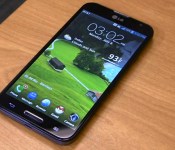
KitKat Rolling Out for AT&T LG Optimus G Pro

There are certainly a slew of happy KitKat users floating around the globe right now. Over the last couple of weeks we have seen a plethora of updates hit devices. Sony was the most recent with a big push on four devices that started rolling ut today. Now AT&T is pushing out a KitKat update for their LG Optimus G Pro.
The update is being pushed out in typical OTA fashion and could take a little time to get to every device that is still out there and in use. The update package size is being listed between 700 – 800 MBs. So you will easily want Wi-Fi and some time to kill for the download.
What’s changing?
- Restyled status and navigation bars
- New full-screen mode
- Stronger security
- Battery performance improvements
- Google Cloud Printer support
- Enhanced processing speed
Anyone still rocking a stock LG Optimus G Pro as their daily driver out there?
Source: AT&T Via AndroidCentral
//<![CDATA[
ord = window.ord || Math.floor(Math.random()*1E16);
document.write('’);
//]]>
Android 4.4 Starts to Roll Out for Sony Xperia Z, ZL, ZR and Tablet Z
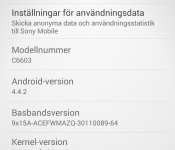
It is always nice to see an OEM stick to their promises. Just over a month ago Sony’s blog announced that the Sony Xperia Z, ZL, ZR and Xperia Tablet Z would all be getting Android 4.4 in May. Well, May is here and 3/4 of the way over and Sony has announced that the update is finally starting to roll out.
 Img via Robert Forslund
On Sony’s blog they outline that the Android 4.4 KitKat update for the devices named above has started today for select markets with more to follow in coming weeks. The update brings in all the usual Android 4.4 goods and fixes that you might have been watching everyone else enjoy. It also offers up a revamped Status Bar and Quick Settings panel.
-
As you might expect, we’re also uplifting Sony’s entire native app portfolio to the latest versions bringing tweaked / improved / current experiences for one and all… some of our favourites look like:
-
Messaging – a few UI adjustments here & there, including a slicker “send” animation, and deeper Emoji support for some expressive fun… also worth noting, you’ll find smileys wherever there’s an app with a keyboard

-
-
Email – you’ll be able to both load and see more mails… but don’t fret, navigation of said load is easier with a more responsive viewing pane – split screen modes divide info for easy digest… especially useful / works a treat on Xperia Tablet Z
-
Smart Social Camera – our social imaging experience makes its debut on our first Z Series devices; a selection of Xperia Camera apps directly accessible from your viewfinder… including personal favourite “Creative Effect”, and more for download to boot!
-
Battery STAMINA Mode – level-upping our unique power management feature, bringing smarter data management & more for prolonging your juice.
The WALKMAN and Album and Movies media apps are also getting an updated UI and are integrated into the Sony Entertainment Network cloud service with better download speeds and more. The update also makes the slightly older devices compatible with the SmartWare Experience SmartBand SWR10 and Lifelog App.
Unfortunately Sony doesn’t lay down the planned locales and regions for us, but we do know the above image is from the update that Robert just installed this morning in Sweden. It is unclear if the T-Mobile variant of the Xperia Z will be picking this update up or not. The current Xperia Z1s on the network is still sitting on Android 4.3, so I would imagine they would want to start there if they do anything at all.
Any devices owners out there seeing the update? Did you pull it from the PC companion app or via OTA, and where are you located?
Via Sony Blog
//<![CDATA[
ord = window.ord || Math.floor(Math.random()*1E16);
document.write('’);
//]]>

Apple’s iWork for iCloud now lets you collaborate on projects with 100 friends

If you’re using Apple’s iWork for iCloud to get stuff done, now you can collaborate on projects with even more people. Before if you wanted to get your co-workers input on your big plans for the company retreat (Laser Tag definitely promotes synergy) you could only have 50 contributors. Now 100 people can work on the same Keynote, Numbers or Pages file at once, and those projects can also be a lot larger. Previously you were limited to 200MB per file, with a 5MB cap for included images. Now there’s 1GB of space to fill with details about your group-cooking class plans, complete with images of up to 10MB each — that’s a lot more fancy dessert photos
More than just additional space and people, today’s update also brought support for 2D and interactive charts. You can now export Numbers projects as CSV files (for easy importing into Excel), and budding authors can transform Pages documents into ePub files. Despite all the updates, Apple is still listing the cloud versions of all three applications as beta, but that might not last long. We’ll likely hear more about all three (and their iOS and OSX counterparts) during Apple’s developer’s conference, WWDC, next month.
Via: 9to5 Mac
Source: iWork for iCloud
Chrome OS gets better organized with latest update

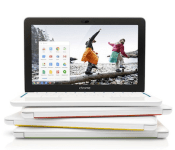
The Chromebook revolution is here and, naturally, Google is doing everything it can so that these devices keep improving even as time goes on. As such, the search giant today revealed some new things rolling out to Chrome OS laptops and desktops, including support for folders within the launcher and the ability to use hands-free voice commands (aka “OK, Google”) in English. What’s more, this new version of the OS, released through the Chrome stable channel, brings back the minimize button, with Google stating that it listened to your feedback and knew you really wanted the feature to be part of the window controls. Unfortunately, not all Chrome OS devices will get this — namely, the ASUS Chromebox and Samsung Series 3 Chromebox. Google didn’t say whether the update will ever come to the omitted Chromeboxes, but we’ll let you know if anything changes.
Filed under: Desktops, Laptops, Software, Google
Via: Android Central
Source: Google

Spyglass beefs up iOS navigation with augmented reality for the great outdoors

Sure, you can use the regular maps available for iOS to get around, but those who trek around the wilderness need a bit more muscle. Well, Spyglass offers just that, employing all of the sensors Apple’s devices house and tossing in a bit of augmented reality for good measure. The app overlays compass, GPS and location info on top of visuals captured by an iPhone camera or the map itself. There’s also a load of more advanced navigation tools for in-depth tracking — options that include a hi-tech viewfinder (HUD), milspec compass, gyrocompass, tactical GPS, speedometer, altimeter, rangefinder, sextant and more. Real-time tracking based on the location of stars, the sun and the moon is possible too, as is the ability to save waypoints for the return trip. You can also save specific spots for later, snap pictures with the data overlaid and employ one of a dozen different coordinate systems ranging from civilian to military. Sound too good to pass up for that next mountain excursion? Spyglass is available now via the iTunes App Store for $3.99.
Via: Uncrate
Source: Spyglass (iTunes)
Box for Android App Updates in a Big a Way with Redesigned UI and More
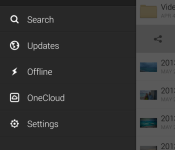
The cloud storage company and app, Box, has just pushed out a pretty major update to the app for Android today. The update moves the app to v3.0 and with a whole number move comes a whole new experience. Finally Box has updated the UI to make cleaner and more polished, not to mention a bit more functional. Going through the old and new app clearly shows a big difference. Lets take a quick look at some of the changes below. All the images on the left are after the Box 3.0 update and the images to the right are the previous app.

 Nothing huge in the left slider, but the removal of the blue bar is pretty nice.

 The overflow menu has a cool new animation for the popup an it certainly looks quite a bit better than it used too.

 The image gallery got an overhaul as well that makes viewing images much faster and when you are scrolling through you images you get a ’3 of 144′ or whatever image you are on in the folder. You can see w quick demo of the new features and look in the New Box 3.0 promo video below.
I dig the ‘swipe’ for action on a particular folder or file. The new update also works seamlessly with OneCloud apps that you might have installed also, which allows you to sign contracts, annotate reports and more. The OneCloud app gallery is native inside Box.
The last little bit of information is that box is extending the MobileIron AppConnect to Box for Android. Now IT admins can deploy Box straight to employees devices with AppConnect policy controls including specific passcode locks and file saving restrictions.
As an added bonus Box has also announced a partnership with LG. Box will come pre-loaded to the new line of G series devices and will be offering new and existing Box customers 50GB of storage for free for one year. This deal also applies to current LG device owners, with the exception of the nexus line.
“Mobility and the cloud are revolutionizing the way businesses and individuals connect, collaborate and stay productive,” said Ramchan Woo, Director of Product Planning at LG Mobile of LG. “We’re incredibly excited to partner with Box and offer our customers a simple, yet powerful solution for sharing and accessing content from LG smartphones and tablets wherever work may take them.”
More detailed info can be found on the Box for Android blog. You can also pick up the Box for Android app through the Play Store.
//<![CDATA[
ord = window.ord || Math.floor(Math.random()*1E16);
document.write('’);
//]]>
Adobe is working on a touch-friendly, full-powered version of Photoshop CC

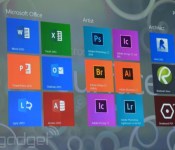
Microsoft is breaking out the big guns for the launch Surface Pro 3. It trotted out creative software powerhouse Adobe to show off a new version of Photoshop CC it’s got in the works. This edition is designed specifically for use with a touchscreen and stylus. Icons and other UI elements have been doubled in size so that they’re easier to tap with a free finger and gestures like pinch-to-zoom work flawlessly. And this isn’t some hobbled, half-featured version like Photoshop Express or Photoshop Touch. What’s more, it should be ready to support high-density displays like the one found on the new Surface. While the focus today may have been on how the Creative Cloud app would work on Microsoft hardware, it should excite avid Adobe users regardless of what brand PC they rely on. The lack of touch and high-density display support has been a bit of a pain point. And don’t worry, there’s “more on the way” according to Michael Goff. Besides, the tiles for other Adobe CC apps that popped up during the demo kinda gave that away.
IFTTT now automates tasks based on your Fitbit activity

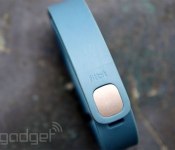
If you’re sporting one of Fitbit’s activity trackers, you can now automate tasks and reminders with the help of IFTTT (If This Then That). The recipe-based software announced a dedicated channel for the sporty gadgets today, handling duties based on goals, activity, sleep, weight and more. For example, you can now log a weigh-in via text message or automatically beam sleep stats to a Google Spreadsheet each morning. Of course, those are just a couple of the possibilities, and users can construct their own formulas as well. Those who prefer Jawbone’s wearables have already been privy to the automated life logging, with other wrist-worn devices like the Pebble smartwatch supported too.
Filed under: Wearables, Software, Mobile
Source: IFTTT

[APK Download] Major Google+ Update, Now at v4.4 and Brings New UI, Auto Awesome Stories and Much More
Google has started to push an update out to Google+ that moves it to version 4.4. Inside we see a ton of changes to the UI, all for the better. The update also has a slew of changes for Auto Awesome and plenty more great additions.


9 new features in Google+ for Android
1. Auto Awesome Stories now combine your photos, videos and the places you visit into beautiful travelogues. You can read more at http://goo.gl/JGgzil.
2. Auto Awesome Movies are now available on Android, iOS and the web, so lots more people will receive highlight reels of their photos and videos. Here’s one example: http://goo.gl/9ljcdj.
3. You can now create animated GIFs and photobooth-style images on demand. Just tap the new plus button in Photos, and select either Motion or Mix.
4. Really big photo libraries are now supported on Android, so you can access your many thousands of photos quickly and easily.
5. You can now browse your entire photo library, as well as your highlights, by date. Just drag the new scroll bar to move forwards or backwards in time.
6. Profiles now display total content views on both Android and the web. (You can choose to show or hide this number via settings.)
7. A new navigation menu makes it easier to switch between your favorite circles and communities, as well as other places in the app.
8. It’s a lot easier to share content from your phone or tablet. To give it a try, just tap the new pencil icon at the bottom right of the stream.
9. The app menu now slides away as you move down the stream, letting posts fill the entire screen.
Look for the new app as it rolls out gradually to Google Play (http://goo.gl/ruuHW), and let us know what you think!
 We have our hands on the apk, but it will only install on Android 4.4+ devices. If you are still running Android 4.3 or later, you will be out of luck. Hit the link to go download that apk if you meet the criteria.
Source: +Dave Bebris / AndroidPolice
//<![CDATA[
ord = window.ord || Math.floor(Math.random()*1E16);
document.write('’);
//]]>

China bans the installation of Windows 8 on government computers

China believes that Windows 8 poses enough of a future security risk that it’s banning government agencies from installing the operating system on any of its new computers. In a statement issued last week and picked up by China’s official news agency today, the Central Government Procurement Center has dealt Microsoft a massive blow by stating that all desktops, laptops and tablets must now run an OS other than Windows 8. Consumers aren’t affected, as it’ll only focus on computers used by government offices. It’s a curious decision, given the fact a reported 70 percent of Chinese computers run Microsoft’s 13-year-old Windows XP platform, but it’s believed officials are trying to stop agencies from being left in the cold should the company pull official Windows 8 support in the future. The government will now focus its efforts on its own Linux-based OS, which is an idea it’s been flirting with for a while already, firstly by promoting its use in an official capacity and then by attempting to persuade consumers in China to switch too.
Filed under: Software, Microsoft
Via: Reuters
Source: Xinhua, Central Government Procurement Center (Chinese)

