


Googles takes step back from default encryption on new Android Lollipop devices

Last fall in the lead up to the release of Android Lollipop, Google let it out that they were planning to enable encryption of storage by default on new devices. This was going to be a change from previous versions of the Android operating system which had the capability of encrypting storage space, but left it up to the user to enable the encryption. As several new devices are starting to finally come to market loaded with Android Lollipop out of the box, Google has apparently decided not to make encryption the default, at least not for their partners manufacturing mobile devices.
When Google first announced plans to make encryption the default, they said it would only apply to new devices. Older devices that were upgraded to Lollipop would not be forced to enable encryption by default as part of the upgrade process. This was apparently done in consideration of potential hardware limitations for devices not designed with encryption in mind.
During the last few months of 2014 and in to 2015, this position appeared to hold. Only the Nexus 6 and Nexus 9 were released to market and they did indeed have encryption turned on by default. Meanwhile, the small number of devices that received the Lollipop update left the decision about encryption up to the user, but it was off by default.
However, the recently released Motorola Moto E (2015) does not have encryption turned on out of the box and sources at MWC 2015 who have gotten their hands on the Samsung Galaxy S6 demo units say encryption is not turned on for those devices either.
Google has not issued any statement about why their position regarding default encryption changed or is at least being delayed. It could be the performance hit is still a concern, even on new hardware, especially after Google’s own Nexus 6 performance was hurt by encryption. It seems hard to imagine a device like the Galaxy S6 would suffer a noticeable performance hit from disk encryption.
For the present time at least, Google’s guidelines for OEMs only indicates that disk encryption should be turned on by default and Google strongly recommends this. However, it is not mandated.
source: Ars Technica
Come comment on this article: Googles takes step back from default encryption on new Android Lollipop devices

Google Play Service 7.0 converts your Android phone into a game controller for Android TV

Google has announced a few great things at Mobile World Congress this year. Ranging from their plans to put unmanned drones above our heads all the way down to a simple update to Google Play Service. Ah, but this is no ordinary update, Google Play Service 7.0 introduces its own set of good things, including the ability to use your Android phone as a video game controller for your Android TV set-top box.
As is usually the case with updates to Google Play Services, it may be a little while before we see these new features go live on our devices. The update does not automatically make these features available, instead, it opens up APIs for developers to work with in order to create apps for these features.

The short list of new items in Google Play Service 7.0 includes an improved Location settings dialog, to better inform the user when and how location services need to be used for an app. A new Places API, that allows developers to pull from Google’s database of places and business, not just GPS coordinates or addresses.
Google Fit sees a big bump, opening half a dozen new APIs, allowing devs to tap into sensors, recording, history and more. Google Mobile Ads have also been updated for optimizations on battery usage and better Analytics tracking. App Indexing sees an updated API, allowing apps to be better searched by Google on your device. And more.
The big one here, which I’ve made you wait to read about, Google Play Games now has a Nearby Connections API. This API serves one amazing purpose, to allow your Android phone or tablet to operate as a video game controller to your Android TV hooked to the big screen. More than just a simple A, B, Up, Down etc. controller, your phone or tablet can operate as a second screen to your TV, adding additional controls, or just cleaning the main display of clutter.
I imagine myself playing a first-person shooter, in which I must look down to the device in my hands to reload my gun. A touch of reality that may or may not appeal to all users.
Head over to the Google Developer blog for all the details on the Google Play Service 7.0 update.
What do you say, are you excited for any of the new features made possible with Google Play Service 7.0?
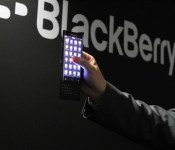
BlackBerry ‘Keian’ is an all new BlackBerry 10 slider

Calling all BlackBerry Torch fans. BlackBerry has just shown off an all new BlackBerry 10 slider at their Mobile World Congress event. The BlackBerry ‘Keian’ as it has been dubbed shares a striking resemblance to the Torch line from not that long ago and while details are still slim at this point, we’d be remiss if we didn’t mention the codename the device has is pretty dear to us.
Google posts new Selfie Slam Android commercial
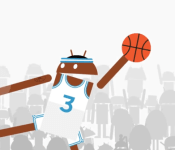
 Google has released their latest Android commercial, titled Selfie Slam. If you’ve ever wanted to see an extremely tall Android dunk a basketball over a team of other Androids while everyone (including the guy with the ball) takes a selfie, this is the commercial you’ve been waiting for.
The video cashes in on the selfie craze and uses the tagline “Be together, not the same.” I guess the point behind the video is to show how varied and versatile Android devices are, and even though they’re made by many manufacturers with all kinds of different hardware and software, everyone can take selfies in the middle of basketball games together.
Click here to view the embedded video.
Come comment on this article: Google posts new Selfie Slam Android commercial
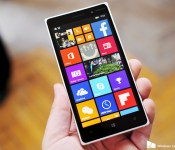
Denim update rolling out to Lumia 830 in India

Microsoft had previously announced that all Lumia devices in India will receive the Lumia Denim update by the end of February, and now it looks like the final few devices are making the switch to the latest firmware. Lumia 830 owners in the country are starting to receive the OTA update, according to a number of tips we’ve gotten.
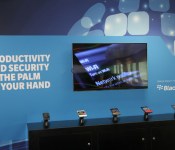
BlackBerry at Mobile World Congress 2015 Live Blog

With all the announcements coming thus far from BlackBerry at Mobile World Congress, one would be excused for possibly thinking they’ve already held their event, but I assure you all those were just the warm up. We’ve got Derek Kessler on the ground in Barcelona, Spain for the actual event which kicks off at 8:00-10:00am CET with the presentation beginning promptly at 8:30AM CET. What will we see? Well, that’s what we’re all here to find out. So, get comfy and let’s see what BlackBerry at Mobile World Congress brings us.
Imagination shows off watch-class PowerVR G6020
Introducing the state-of-the-art of watch graphics.
Imagination Technologies, the maker of the PowerVR graphics processor IP found in Apple’s iPhone and iPad A-series chipsets, has announced the PowerVR G6020, which is aimed at low-end smartphones and… high end smartwatches. According to AnandTech:
From a design perspective, the G6020 is aimed at very simple desktop workloads – the Android UI, wearable interfaces, etc. Imagination has essentially built the bare minimum GPU needed to drive a 720p60 display, taking out any hardware not necessary to that goal such as compute and quite a bit of geometry throughput. What remains is enough of a ROP backend (pixel co-processor) to drive 720p, and the FP16 shading resources to go with it.
And:
The end result of their efforts is designed to be an incredibly small and incredibly low power OpenGL ES 3.0 GPU for devices that fall in the cheap/small range. G6020 is only 2.2mm2 in size on 28nm, making it similar in size to ARM’s Cortex-A7 CPU cores (a likely pairing target). And power consumption is low enough that it should be able to just fit into high-end wearables.
Until the inevitable teardowns, it’ll be hard to know for sure what GPU Apple is using in the Apple Watch‘s S1 computer-on-a-chip. Since the company has such a significant history with the PowerVR, and Imagination has chips like the G6020, it may at least give us a clue as to what sorts of capabilities and power efficiencies are available in cutting edge ultra-ultra-mobile graphics these days.
Google Play Services 7.0 released, brings improvements to locations, Google Fit, and AdMob
 Google has officially updated Play Services to version 7.0 bringing several new features and enhancements for developers to take advantage of. They had previously mentioned some additions to AdMob and Google Play Games, but now the entire service has been updated.
The new Places API seems like the biggest new addition to Play Services, as it will allow apps to get information from Google’s database of locations, venues, and restaurants, and users can quickly get info about the business in particular including addresses and phone numbers.
Google Fit has introduced a handful of new APIs for tracking new measurements and sensors, and it’s supposedly significantly lighter on memory requirements for Fit apps. AdMobs is seeing some Google Analytics integrations, and Google Play Games has adopted a new feature that will let games use a nearby device as a second screen for content. This is especially useful for using your Android device as a controller on Android TV.
Although the developer SDK hasn’t gone live yet, this update should be hitting your devices in the near future. For Google’s full blog post about it, hit the link below.
source: Android Developers
Come comment on this article: Google Play Services 7.0 released, brings improvements to locations, Google Fit, and AdMob
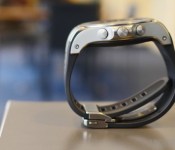
LG Watch Urbane LTE first look
brightcove.createExperiences();
LG has announced two new wearables here at MWC 2015, and they’re some of the most premium-looking smartwatches we’ve ever seen. The first of which is the Android Wear-powered LG Watch Urbane. We went hands-on with the watch a few days ago, and you can check out our first impressions here. The second new wearable from the company is the Watch Urbane LTE, a standalone smartwatch running the LG Wearable Platform OS (based on webOS). We’re taking a look at this LTE-enabled watch today, so let’s dive right in. Here is our hands-on and first impressions of the LG Watch Urbane LTE!

The first thing you’ll notice about the Urbane LTE is the bulkier build to make way for the extra equipment needed for the LTE model. Furthermore, the proprietary band houses all of the antennas in the watch, which will allow you to connect to Wifi, Bluetooth and LTE networks. This also means the band isn’t removable. The overall chassis is similar to the Watch Urbane with its aluminum housing, though the LTE model is, as mentioned, quite a bit bigger. This watch features three buttons on the side which allow you to access your home screen, settings menu and more. While the chassis of the watch is classy and sleek, the band is very similar to what we’d usually see on a sportswatch. This will allow you to exercise with the wearable without worrying about getting a nice leather watch strap dirty. Additionally, the watch has a heart rate monitor, which is always nice to see on a fitness-oriented wearable.

As far as software is concerned, the Watch Urbane LTE is running the “LG Wearable Platform” OS, which is based on webOS. While it’s not actually running webOS as we once knew it, this is basically the same software we’ve seen running on LG’s smart TVs only with modifications for wearables. The interface takes on a circular design, offering up a carousel view of apps to scroll through. With this being an LTE-enhanced model, you can take calls and respond to text messages directly from the watch. You’ll need to respond to messages using an on-screen keyboard, which surprisingly wasn’t too difficult to use.

Due to the LTE functionality of the device, the battery has been upped to 700mAh. We obviously couldn’t test the battery in length with our brief hands-on time, though it will be interesting to see how the battery holds up in our full review.
Gallery


Specs
- 1.3-inch POLED display with resolution of 320×320
- 1.2GHz Qualcomm Snapdragon 400 processor
- 1GB of RAM
- 4GB of internal storage
- 700mAh battery
- Bluetooth 4.0
- Sensors: 9-axis, PPG, barometer, A-GPS/GNSS
- IP67 certification for dust and water resistance
What do you think of the Watch Urbane LTE? Do you think you’ll pick one up?
“Fusion Storage” created by ARCHOS, tablets with 256GB of internal storage and support for 128GB micro SD cards
Device storage can sometimes turn into a rather heated battle between users. Be it the cloud users insisting smaller device storage is all you need, or the dedicated micro SD card guys wanting to pack a 128GB card in their device for various needs. The battle tends to heat up even further when it comes […]
The post “Fusion Storage” created by ARCHOS, tablets with 256GB of internal storage and support for 128GB micro SD cards appeared first on AndroidSPIN.

