


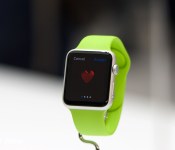
Apple Watch: Should you get one?

If you have an iPhone 5, iPhone 5c, iPhone 5s, iPhone 6, or iPhone 6 Plus, you can use the Apple Watch. But should you get one?
As we come closer to the Apple Watch’s sale date, it’s the big-ticket question. Most people need a phone. Many people need a computer. Like an iPad, however, the Watch feels like an extra accessory, and that can make it harder to figure out if you need it or not. So, let’s break down the decision process and make it a little bit easier.
Whether you should get an Apple Watch or not comes down to how compelling any of the main features are for your lifestyle, either by themselves or when combined together. Those features include not only timekeeping, but health and fitness tracking, notifications and informational widgets, Apple Pay, remote control, and communications.
Put simply: The Apple Watch is the shuttlecraft to the iPhone’s starship. Most of these activities can already be done on your iPhone, but can be done more conveniently with an Apple Watch. And a select few can only be done with the Apple Watch.
Timekeeping
It’s not an uncommon story: You stopped wearing a watch because your iPhone had a big clock right on the Lock screen, only a pocket- or purse-pull away. It’s the old single- vs. multi-tasker debate, and why convergent devices like the iPhone proved so popular to begin with.
The Apple Watch is also a convergent device, and that convergence can be seen in every aspect, including how it takes time. When you want to see the time on your Apple Watch, you don’t have to dig into your pocket or purse, or reach for your bag or table, you just turn your wrist. The screen lights up, and you can view the time and date. It can be just that simple or, in the grand tradition of timekeeping, you can add “complications”.
The Watch’s faces range from minimal to chronometer to utilitarian to motion graphics to astronomy to, well, Mickey Mouse. Each face also includes a number of complications which offer even more data, if you want to enable it.
Complications can include features as subtle as a monogram for personalization, but also world clocks, alarms, a stopwatch, the weather, sunrise and sunset, activity levels, phases of the moon, upcoming appointments, and stock quotes.
If that level of efficiency is intriguing to you, the Apple Watch might be just intriguing enough.
Notifications and information

Any iPhone running iOS 8 has interactive notifications. With the Apple Watch, however, those notifications can appear on your wrist, sending you a subtle tap that doesn’t even light up the display unless you turn the Watch to signal your interest. Even then, you only get a short summary of the information, providing the app name along with a brief bit of context. From there, you get to decide if you want to stop what you’re doing and view more.
When you’re interacting with the Watch, you can pull up Glances, which act much like widgets in the Today view of the iPhone’s Notification Center. Rather than appearing and disappearing like notifications do, a Glance’s information persists, just a swipe or few taps away.
Watch apps take it a step further, providing an even greater level of interaction; they also allow you to hand off activities to your iPhone if and when they’d benefit from a bigger screen.
Facebook messages, turn-by-turn directions, airplane boarding passes, coffee cards, and other app interactions can benefit from being more easily accessible. If that appeals to you? The Apple Watch might appeal to you.
Health and Fitness
If you have an iPhone 5s, the Apple Watch can add vertical movement (staircase) tracking to your step-counting in the Health app. If you have an iPhone 5 or iPhone 5c — both of which lack the M7 movement co-processor — the Apple Watch adds both step-counting and staircase-tracking. If you have an iPhone 6 and iPhone 6 Plus, you already have step and staircase-tracking built in; with the Apple Watch, however, you can leave your iPhone behind and go walking or jogging without it weighing you down.
What’s more, the Apple Watch offers unique personal training options. There’s a heart rate monitor, which isn’t available on any iPhone. There’s also an Activity app that will show you how much you’ve moved, exercised, and even stood up during the day.
There’s also a Workout app for when you’re doing cardio, and a Fitness app that keeps track of your goals and rewards your accomplishments.
If any of those features could help you live a healthier, fitter life, the Apple Watch might be all the help you need.
Apple Pay
Apple Pay — wherein you use Touch ID to authorize a transaction at a NFC-enabled checkout counter — is currently only available on the iPhone 6 and the iPhone 6 Plus. That’s because only the iPhone 6 and iPhone 6 Plus include a near-field communications (NFC) chip with built-in secure element, which handles the storage and transmission of credit and debit card information.
The Apple Watch, however, has its own NFC chip built in, and it can pair with an iPhone 5 or later. That means that even though you may not be ready to upgrade your iPhone, you can still enjoy the convenience of Apple Pay with the Apple Watch.
Moreover, if you want to got out for a walk or run but don’t want your iPhone weighing you down, you can just take your Apple Watch. As long as you’ve authorized it before leaving and it doesn’t breaks skin contact, you can use your Apple Watch to buy a drink (or anything else) while you’re out.
If adding or extending Apple Pay sounds enticing to you, you might well be enticed by the Apple Watch.
Connecting

Like the iPhone, the Apple Watch has Siri built in. Just raise your arm, say “Hey Siri,” and tell Apple’s personal digital assistant exactly what you want done or what you want to find out.
If someone calls, you can answer and converse right on your wrist, and hand the call off to your iPhone if you think it’s going to take awhile. You can also dictate or select a quick response to any Messages that might come in, all without ever reaching for your phone.
The Apple Watch additionally has three forms of communication all its own: Sketches, Taps, and Heartbeats. With Sketches, you can quickly send doodles to convey an idea, express an emotion, tease, troll, or simply earn a smile. Taps does pretty much what it says on the tin: It lets you send a pattern of taps that plays out on the other person’s wrist. And with Heartbeat, well, you can let that special someone know you’re thinking of them in the most personal way possible.
If keeping in touch matters to you, the Apple Watch just might be the right touch for your wrist.
Remote control
The Apple Watch will let you control your Apple TV. It’ll also let you remotely access your iPhone’s camera, and thanks to Siri and HomeKit integration, it may even let you program any compatible home-automation gear you have in your house.
The possibilities for the Apple Watch are boundless here: It could lock or unlock your doors, switch on or off your lights, put your living room into home theater or gaming mode, turn on a fan or adjust a thermometer, right on your wrist.
If easy access to all your connected accessories sounds good to you, the Apple Watch might be the easy choice.
Who shouldn’t get an Apple Watch
If you have an iPhone 4 or iPhone 4s; if you’re content with the functionality of your iPhone 5, iPhone 5c, iPhone 5s, iPhone 6, or iPhone 6 Plus and don’t find the Watch’s extra features compelling; if you can’t stand things on your wrist or you simply prefer to wait and see — then you probably don’t want or need an Apple Watch.
Who should get an Apple watch
If you like the features your iPhone has to offer but need gaps filled — like Apple Pay on older iPhone models — or you want new options, like the Watch’s heart-rate monitor, or you simply want everything made easier and more convenient, then you should definitely check out the Apple Watch.
If health and fitness is important to you, if you’re into home automation, or you simply want a better way to stay notified and informed, you should also absolutely check out the Apple Watch.
<!–*/
<!–*/
<!–*/
.devicebox
background-color: #5CB8DB;
border: 1px solid #E2E9EB;
float: right;
display: block;
margin: 0 0px 10px 10px;
max-width: 350px;
overflow: hidden;
width: 50%;
.devicebox h3
background: #8D98BD;
color: #fff;
font-family: “camptonmedium”,sans-serif;
font-size: 20px;
margin-bottom: 0;
margin-top: 0;
padding: 0;
text-align: center;
.devicebox h3 a
display: block;
line-height: 30px;
padding: 0 10px;
.devicebox h3 a:hover
background: #7e88aa;
text-decoration: none;
.devicebox .video
margin: auto;
border: 0px;
.devicebox p,
.entry-content .devicebox p > img,
.devicebox img
margin: 0px;
padding: 0px;
.devicebox,
.devicebox a,
.devicebox a:active,
.devicebox a:hover,
.devicebox a:link,
.devicebox a:visited,
.devicebox p,
.devicebox ul,
.devicebox ul li,
.devicebox li
color: #fff;
.devicebox a:hover
text-decoration: underline;
.devicebox p,
.devicebox ul,
.devicebox ul li,
.devicebox li
border-width: 0px;
font-family: “camptonlight”,sans-serif;
font-size: 16px;
padding: initial;
.devicebox ul
margin: 0;
padding: 0.5em 1em 1em 30px;
.devicebox ul li
display: list-item;
.devicebox ul,
.devicebox ul li,
.devicebox li
line-height: 24px;
list-style: disc outside none;
.devicebox ul li:before
display: none;
.devicebox ul + p
padding: 0px 15px 15px;
line-height: 1.25;
.field-items p:last-of-type + .devicebox,
.slide p:last-of-type + .devicebox,
.article-body-wrap p:last-of-type + .devicebox
float: none;
margin: 0 auto 30px;
max-width: 700px;
min-height: 225px;
position: relative;
width: 100%;
.field-items p:last-of-type + .devicebox .video,
.slide p:last-of-type + .devicebox .video,
.article-body-wrap p:last-of-type + .devicebox .video
bottom: 0px;
left: 50%;
position: absolute;
right: 0px;
top: 30px;
.field-items p:last-of-type + .devicebox .video_iframe,
.slide p:last-of-type + .devicebox .video_iframe,
.article-body-wrap p:last-of-type + .devicebox .video_iframe
height: 100%;
padding: 0px;
.field-items p:last-of-type + .devicebox ul,
.slide p:last-of-type + .devicebox ul,
.article-body-wrap p:last-of-type + .devicebox ul
width: 43%;
.field-items p:last-of-type + .devicebox h3 + p,
.slide p:last-of-type + .devicebox h3 + p,
.article-body-wrap p:last-of-type + .devicebox h3 + p
bottom: 0;
left: 50%;
position: absolute;
right: 0;
top: 30px;
.field-items p:last-of-type + .devicebox h3 + p img,
.slide p:last-of-type + .devicebox h3 + p img,
.article-body-wrap p:last-of-type + .devicebox h3 + p img
height: auto;
min-height: 100%;
min-width: 100%;
@media all and (max-width: 500px)
.devicebox
float: none;
margin: 0;
max-width: 100%;
width: 100%;
.field-items p:last-of-type + .devicebox .video,
.slide p:last-of-type + .devicebox .video,
.article-body-wrap p:last-of-type + .devicebox .video
left: 0;
position: relative;
top: 0;
.field-items p:last-of-type + .devicebox .video_iframe,
.slide p:last-of-type + .devicebox .video_iframe,
.article-body-wrap p:last-of-type + .devicebox .video_iframe
padding-bottom: 56.25%;
.field-items p:last-of-type + .devicebox h3 + p,
.slide p:last-of-type + .devicebox h3 + p,
.article-body-wrap p:last-of-type + .devicebox h3 + p
left: 0;
position: relative;
top: 0;
.field-items p:last-of-type + .devicebox ul,
.slide p:last-of-type + .devicebox ul,
.article-body-wrap p:last-of-type + .devicebox ul
width: auto;
/*–>*/
/*–>*/
/*–>*/
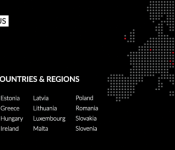
OnePlus One will soon make its way to all European countries

While the OnePlus One has already been available in multiple European countries for some time now, the company is finally expanding its reach to the rest of Europe. OnePlus has just announced that the One will soon be available in 16 additional countries, including:
- Bulgaria
- Croatia
- Cyprus
- Czech Republic
- Estonia
- Greece
- Hungary
- Ireland
- Latvia
- Lithuania
- Luxembourg
- Malta
- Poland
- Romania
- Slovakia
- Slovenia
Alongside the launch of the handset in these countries, OnePlus is holding special promotional events to make more users aware that they can now buy the device. Events will be held in Warsaw on March 9th, Prague on March 10th and in Budapest on March 12th. Specific launch dates and prices have yet to be announced, but OnePlus assures us that they’ll provide that information shortly.
Even a year after the device has been available, the One still offers up some great specifications for the price (that is, if you can buy one). The device has a 5.5-inch 1080p display, a 2.5GHz Snapdragon 801 processor, 3GB of RAM, either 16 or 64GB of on-board storage, and a big 3100mAh battery. If you’d like some more information on the OnePlus One, take a look at our full review here.

Facebook’s Slingshot app update makes it easier to find people to follow
The new 2.1 update for Facebook’s Snapchat rival allows users to explore and follow other people that are using the app.

Verizon HTC One M8 Android 5.0 Lollipop rolling out
In a perfect world when a manufacturer had a software update ready for a specific device, it would just become available. Unfortunately we don’t live in a perfect world. Simply put, that means highly anticipated updates can sometimes be staggered between carriers by weeks and even months. For those of you on Verizon with a […]
The post Verizon HTC One M8 Android 5.0 Lollipop rolling out appeared first on AndroidSPIN.
BBM for Android passes 100 million downloads
BlackBerry has announced that BBM for Android has been downloaded over 100 million times from the Google Play Store. This milestone comes just 17 months after the launch of the app.

Facebook’s Slingshot app update makes it easier to find people to follow
The new 2.1 update for Facebook’s Snapchat rival allows users to explore and follow other people that are using the app.

Facebook clearly would love for Android devices users who are addicted to Snapchat to try out Slingshot, which got its worldwide launch in June. Here’s what the company had to say about Slingshot’s new feature:
Explore is a place to discover funny, inspiring and creative people from across the globe. It features popular people who are active on Slingshot. You can view their shots and then decide who you want to follow. If you don’t want to be featured in Explore, you can turn on Approve Followers in Settings.
- Free – Download now
BBM for Android passes 100 million downloads on Google Play

BlackBerry has announced that BBM for Android has been downloaded over 100 million times from the Google Play Store. The app has hit this milestone in 17 months following its October 2013 launch.

Stories of App Store success…and failure

GDC is giving developers on both sides of the App Store success story a chance to share their tales of triumph and woe.
Success in life isn’t guaranteed, and that’s especially true on the App Store, where fortunes can be made by developers that hit it big. But most developers aren’t that lucky. This week’s Game Developer Conference (GDC) is giving devs a chance to tell both sides of the App Store story: Unimaginable riches, and unimaginable heartache.
Matt Hall is one of two guys behind the Crossy Road phenomenon (the other being Andy Sum): Hipster Whale, an Australian game developer. Between in-app purchases and advertising, the team has earned $10 million so far from 50 million downloads, according to a new Polygon article:
Crossy Road is the rare story of success at the intersection of art, commerce, design and marketing. It’s about lessons learned in hard times and a games maker who thought he might never go back to GDC after one terrible year. It’s about a pair of developers who, in fact, did set out to create a video gaming phenomenon — and succeeded.
It’s a remarkable tale, but it’s still pretty rare. Much more typical is the sort of stories shared at a panel session on Tuesday by developers who haven’t seen that sort of success, according to this Gamesindustry.biz article:
One of the big lessons Seto wanted to impart to developers was not to fall in love with your ideas. If something’s not working, cut it quickly and move on. There were other issues, but in the end, Seto said it was on his shoulders to make sure it doesn’t happen again. You can’t learn from your failures if you’re not willing to take responsibility, Seto said.
It’s an interesting study in comparisons. Hopefully aspiring app developers can learn a bit from both.


Kantar’s latest data reveals sales spike in France, Australia, but shortfalls in stronghold Italy

Kantar WorldPanel has released its latest numbers for smartphone sales for the last three months ending back in January. The numbers contrast nicely with the last report that showed near universal declines in sales of Windows Phone.
The numbers, as usual, are a mixed bag of good news and not so good news for Windows Phones. Sales, in general, are up slightly as a whole across of big five European markets including Great Britain, Germany, France, Italy, and Spain. However, in individual countries, the story varies.

